




How to Sign Up for Meta Muse and Use a Referral Code
Muse has recently become one of the most talked-about AI Agent products in the AI tools space. As a new AI Agent from …
This guide covers 2026 YouTube automation methods for auto-liking and auto-commenting. Compare automation scripts, RPA templates, and AI Agent technology, and learn how DuoPlus AI Agent helps manage multiple YouTube accounts at scale for affiliate marketing and content promotion.

Get an AI-Powered Summary of This Article
As YouTube content operations continue to scale, more creators, brands, and marketing teams are looking for ways to improve channel management efficiency. For a single account, repetitive tasks like content browsing, liking, commenting, and data organization can be handled manually. However, when managing multiple channels or performing regular tasks over time, frequently logging in and switching between accounts adds significant operational overhead.
In 2026, more users are turning to automation tools to streamline YouTube workflows. From traditional automation scripts and RPA tools to the more recent AI Agent technology, different automation approaches are helping users handle repetitive tasks and improve daily management efficiency.
Auto-liking and auto-commenting on YouTube are common practices for teams and individuals managing multiple YouTube accounts. These activities help maintain account activity, support content distribution, and simplify daily workflows.
When scaling operations across multiple YouTube accounts, automating basic tasks like liking and commenting offers several practical advantages:
To achieve efficient YouTube management, teams typically encounter three different types of automation technologies:
Script automation involves pre-written code that executes a fixed sequence of operations. It offers clear logic and is suitable for basic tasks where the execution path does not change.
How it works: Developers analyze the YouTube app interface and write code using automation frameworks such as Auto.js, Tasker, UiAutomator, or Python-based frameworks (combined with Selenium or Appium). Scripts typically rely on absolute screen coordinates (e.g., clicking at position X:500, Y:600) or fixed UI element IDs to locate like buttons or comment boxes, then execute clicks, swipes, and text input in a predetermined sequence with fixed time intervals.

RPA is a low-code/no-code software solution that simulates user interactions on device interfaces through predefined rules. In multi-account management and virtual device operations, RPA is often used for standardized workflows involving multiple steps and cross-app interactions.
How it works: RPA introduces visual workflow orchestration, moving away from pure text-based coding. In platforms like DuoPlus Cloud Phone, users can intuitively drag and drop pre-built function modules (such as click, swipe, input text, wait, condition checks) through the workflow management interface to build complete automation sequences. Alternatively, users can access built-in template libraries, apply pre-set YouTube interaction templates, adjust parameters, and distribute tasks to multiple virtual devices for batch execution.
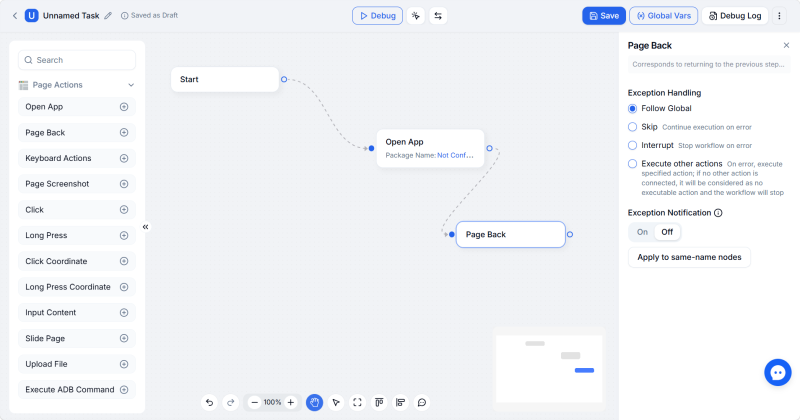
AI Agent represents an emerging direction in multi-account management. Unlike traditional scripts or RPA, it no longer relies on fixed code or predefined workflows. Instead, it understands task goals through natural language and autonomously plans operation steps to complete a series of mobile interaction tasks.
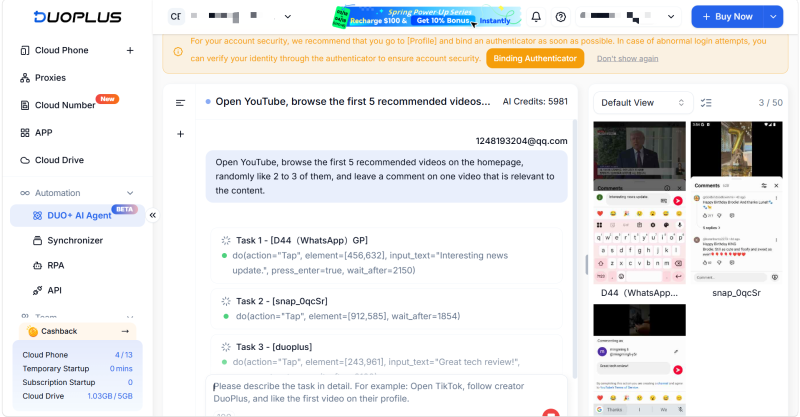
How it works: AI Agent is a no-code automation approach. Users do not need to write scripts or build flowcharts — they simply describe tasks in natural language, such as "Open YouTube, search for a specific keyword, watch the first video, and like and comment." The AI automatically interprets the task intent, uses visual recognition to analyze the current screen in real time, identifies buttons, input fields, and other elements, and autonomously performs clicks, swipes, text input, and app switching — simulating the full interaction process of a real person.
| Comparison Dimension | Traditional Automation Scripts | RPA Templates | DUO+ AI Agent |
|---|---|---|---|
| Technical Barrier | High — requires programming knowledge | Low — drag-and-drop workflow configuration | Very low — natural language commands only |
| Maintenance Cost | High — code needs rewriting when UI changes | Medium — templates require manual adjustment | Low — AI adapts to UI changes automatically |
| Risk Control Performance | Mechanical fixed patterns easily detected | Still shows rule-based operation patterns | Optimal — human-like random delays |
| Batch Capability | Requires custom integration | Supports batch template distribution | Supports distributing one command to 50 devices in parallel |
| Best For | High-precision, fixed low-level tasks | Standardized, routine daily operations | Flexible, multi-scenario daily engagement operations |
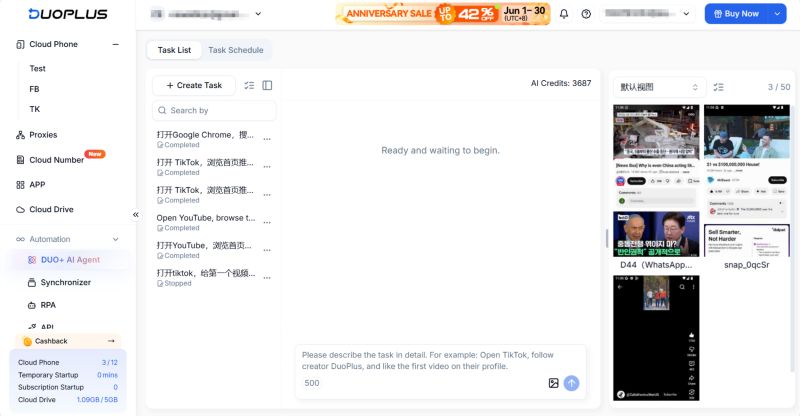
The core advantage of DUO+ AI Agent lies in turning complex technical processes into simple daily conversations. Below is the complete setup process.
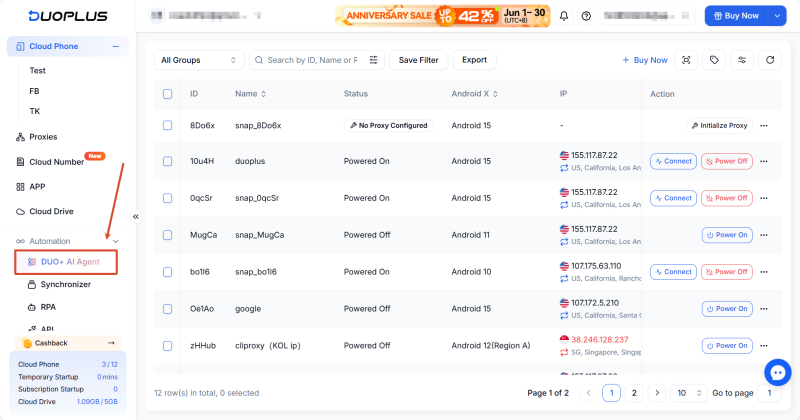
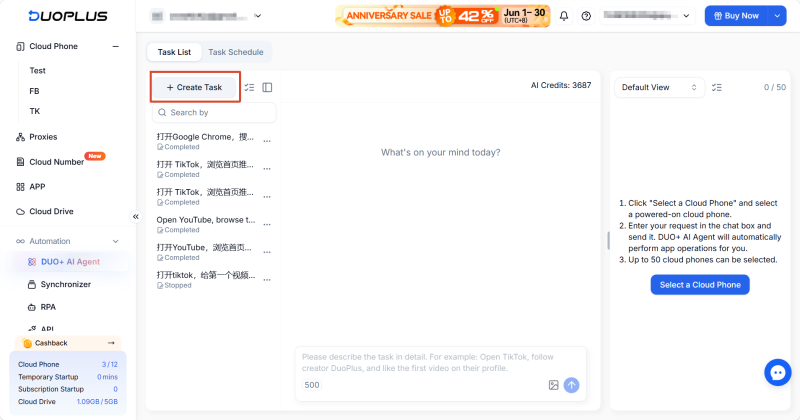
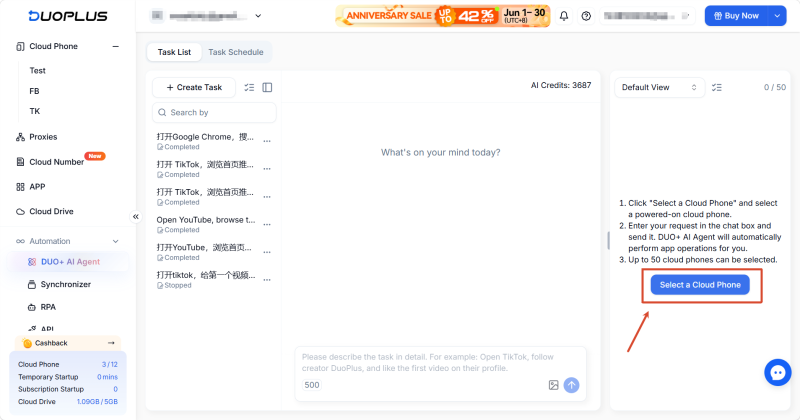
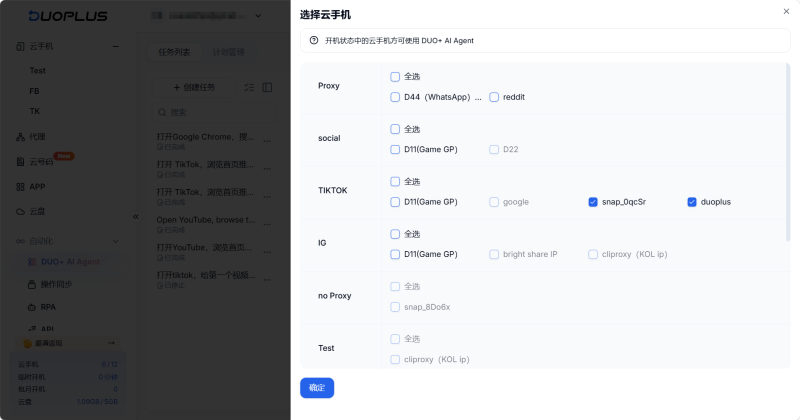
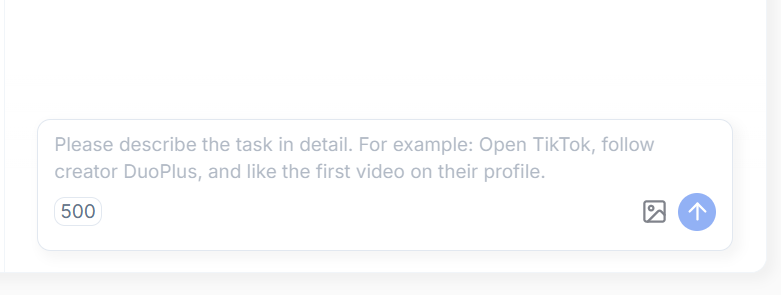
In the task description dialog, directly describe your task in plain language. No flowcharts or code are required — just clearly outline the steps as you would when assigning work to a team assistant.
Example YouTube auto-like and comment command: "Open the YouTube app, type '[e.g., Tech Review 2026]' in the search bar at the top and search. In the search results, click and watch the first video. After watching for at least 1 minute, click the 'Like' button. Then scroll down to the comments section and leave a comment: '[This sounds very useful].'"
Common use case examples:
YouTube has advanced risk control systems and behavioral algorithms. Traditional automation tools may be flagged due to highly consistent operation patterns, potentially leading to account restrictions. The combination of DuoPlus Cloud Phone's hardware-level isolation and AI Agent's human-like interaction patterns provides a safer way to apply automation to YouTube operations.
Automation requires a secure device environment. DuoPlus Cloud Phone runs on native Android systems with ARM architecture and has passed Google Integrity Level 3 certification. It provides completely independent, isolated physical device parameters for each YouTube account, creating a multi-layer security foundation through environment isolation combined with AI-powered human-like operations.
YouTube's mobile app updates frequently — button positions shift, and personalized recommendation pop-ups appear. Traditional tools may break when they cannot find preset UI nodes. DUO+ AI Agent uses visual models to analyze the screen in real time. Even if the "Like" or "Comment" button positions shift slightly, it can still perform actions like a real person, significantly reducing maintenance costs.
YouTube's security mechanisms can detect automated bot characteristics. During the full "search, watch, like, comment" workflow, AI Agent introduces reasonable random delays in swipe speed, click positions, and interval times, creating natural human-like behavioral patterns that more effectively avoid detection.
Newly registered accounts need to build interaction data early on, helping the platform establish accurate classification. Operators can schedule multiple DuoPlus Cloud Phones in batches, using AI Agent to search for keywords in specific niches, automatically browse videos from established creators in the same field, and perform regular interactions. This consistent basic activity helps the platform recommend content from these accounts to the right audiences more accurately.
For affiliate marketers, gaining exposure in the comments section of relevant popular videos is a common traffic strategy. With AI Agent, operators can efficiently manage multiple accounts in bulk. Commands can be configured to automatically monitor industry-relevant keywords, leave objective and valuable comments on newly published popular videos, or engage with specific comment threads — driving consistent traffic to external links or landing pages while maintaining platform compliance.
When a brand or independent site's YouTube channel releases new product videos, engagement data in the first few hours is critical for algorithmic promotion. Teams can use AI Agent to coordinate multiple accounts immediately — automatically searching keywords, watching videos fully, liking, and leaving comments with different perspectives. This rapid engagement building not only improves the official video's performance metrics but also attracts real viewers to join the conversation.
For teams managing multiple YouTube accounts long-term, the value of automation goes beyond time savings — it's about establishing stable, repeatable workflows for daily interactions, account maintenance, and content operations. DUO+ AI Agent uses intuitive natural language interaction to enable every team member to build standardized automation workflows without technical barriers, improving management efficiency at scale. For teams planning YouTube multi-account operations, start with a single-account AI Agent automation test, validate the results, and gradually expand to parallel multi-account management.
The risk is very low. DuoPlus Cloud Phone provides completely isolated native Android hardware parameters and independent IPs for each account. DUO+ AI Agent uses visual models to dynamically identify interfaces, with swipe patterns, click positions, and wait times that include human-like random delays — making it much safer than traditional scripts.
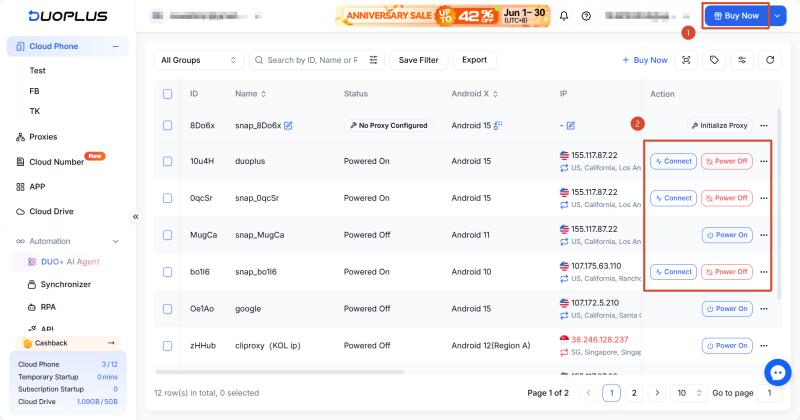
DUO+ AI Agent supports distributing a single task to up to 50 cloud phones simultaneously, making it suitable for batch completion of repetitive tasks like browsing, liking, and commenting.
Absolutely. This is a completely no-code automation tool. Simply describe your task in natural language in the dialog box — for example, "Open YouTube, search for a specific keyword, watch the first two videos, and like and comment on each." The system autonomously parses and executes the task.
The two are complementary. For fixed, repetitive, high-frequency tasks where execution speed is critical, traditional RPA templates remain more efficient. However, for scenarios involving YouTube UI updates, layout changes, or complex cross-app interactions, AI Agent's adaptive recognition capabilities can significantly reduce template maintenance costs.
Muse has recently become one of the most talked-about AI Agent products in the AI tools space. As a new AI Agent from …
OpenAI Codex is an AI coding agent designed to help developers write, modify, review, and deliver code. It is available …
VK (VKontakte) is one of the major social media platforms in Russia. In addition to account management, content …
No need to purchase multiple real phones.
With DuoPlus, one person can operate numerous cloud phones and social media accounts from a single computer, driving traffic and boosting sales for you.
