Still Doing Procurement by Yourself? Accio Is Already Making Money for You
If you work in e‑commerce, manufacturing, branding, or creative production, Accio may be one of the most important …


Table of Contents
On YouTube, many creators face the same challenge: they consistently publish videos, but views, likes, and comments grow slowly.
On one hand, YouTube is becoming increasingly competitive, with more content dividing audience attention. On the other hand, user engagement is unpredictable, making it difficult to scale results with a single account.
For teams managing multiple accounts, manually handling likes, comments, and subscriptions is not only inefficient but also hard to sustain over time.
As a result, more users are looking for smarter and more natural ways to automate YouTube interactions—while continuously improving exposure and engagement.
To grow on YouTube, it's essential to understand one core principle that YouTube recommendations are driven by user behavior data.
YouTube doesn't rely solely on view counts. Instead, it evaluates multiple engagement signals:
These signals work together to determine whether a video gets recommended to a wider audience.
YouTube uses a multi-dimensional system to evaluate content quality:
Watch Time is one of the most important signals. A fully watched 3-minute video often performs better than a 30-minute video watched for only 5 minutes.
Likes, comments, shares, and saves directly influence recommendation weight.
Subscribes are high-quality signals indicating long-term user interest.
User interaction patterns differ across different video types on YouTube. For example, entertainment content tends to have more likes than comments, while tutorial content shows a trend of more comments and saves.
The value of interaction data needs to be considered in conjunction with its relevance to the content type. Therefore, YouTube creators need to optimize their content by following basic interaction logic to increase engagement.
When people hear "automation", they often think of simple batch actions. But effective automation is not about repetition—it's about simulating real user behavior.
When YouTube videos are automatically playing, random or continuous playback is easily flagged as abnormal behavior by the platform. Real users typically:
This is especially important when using an auto views youtube bot, where realistic behavior determines effectiveness.
More likes and comments are not necessarily better; rather, they should be tailored to the time distribution and usage habits of real users. A real user won’t like 10 videos in one minute or post multiple comments instantly.
Automated operations without a target can easily become ineffective. For YouTube accounts, it's possible to automate operations for specific content. Precise interaction can enhance the relevance of content recommendations and drive traffic growth.
This is where tools like a youtube comment bot or youtube like bot become more effective when used strategically.
for example, multiple YouTube accounts performing identical actions, having the same watch duration, or posting repetitive comments. In contrast, real user behavior is naturally varied and unpredictable.
Therefore, during automation, it is important to maintain behavioral randomness and diversity (timing, paths, and frequency), as well as operational differentiation.
Early tools like youtube like bot or youtube automatic comment bot rely on scripts.
Pros: Easy to use and low cost
Cons:
Tools like vidIQ and other youtube comment bot plugins run in browsers.
Pros:
Cons:
RPA can simulate the operation process of real users (clicking, activity, input, waiting) by pre-creating operation processes, and realize the repetitive and automatic execution of tasks.
Pros:
Cons:
In real-world automation, YouTube creators should focus on ensuring that automated tasks can run consistently over the long term while closely mimicking real user behavior.
Traditional automation tools often rely on local devices or browser environments. Once there are changes in devices, IP addresses, or unexpected operational anomalies, account stability can be affected.
In contrast, cloud phone–based automation solutions provide each account with an independent and consistent environment. This makes actions such as auto YouTube likes and comments more stable and reliable.
DuoPlus Cloud Phone offers a dependable cloud-based automation solution designed for users at different stages, helping you grow your YouTube accounts with greater stability and efficiency.
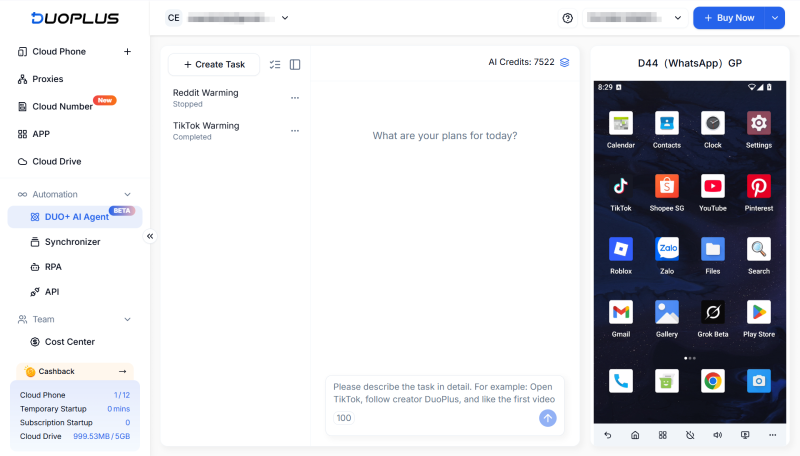
For most users, the challenge of automation lies not in using the tools themselves, but in the complexity of setup and the high learning curve.
DUO+ AI Agent simplifies everything. You can simply input instructions like:
The system automatically breaks down tasks and executes them, enabling it to quickly auto like and comment on YouTube.
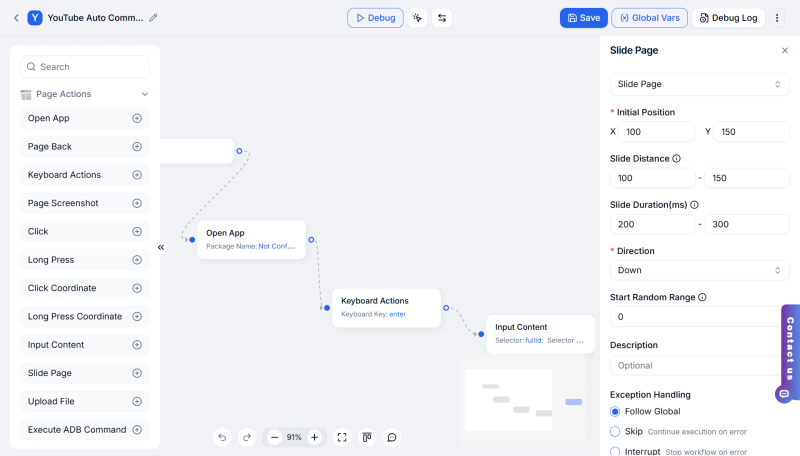
For advanced users, RPA provides deeper customization. It helps you automate more complex tasks.
DuoPlus RPA supports visual workflow building and full mobile actions (tap, swipe, input, upload). Combined with cloud phones, it enables batch execution across multiple devices, allowing users to transform complex mobile operations into automated processes.
Compared to basic YouTube auto-like tools or comment plugins, DuoPlus's RPA function allow for random delays and conditional logic, more closely mimicking real user behavior paths.
YouTube not only focuses on content quality but also continuously assesses account behavior and device environment, such as:
Once an account's environment becomes abnormal, YouTube typically lowers its content recommendation and may even restrict account functionality.
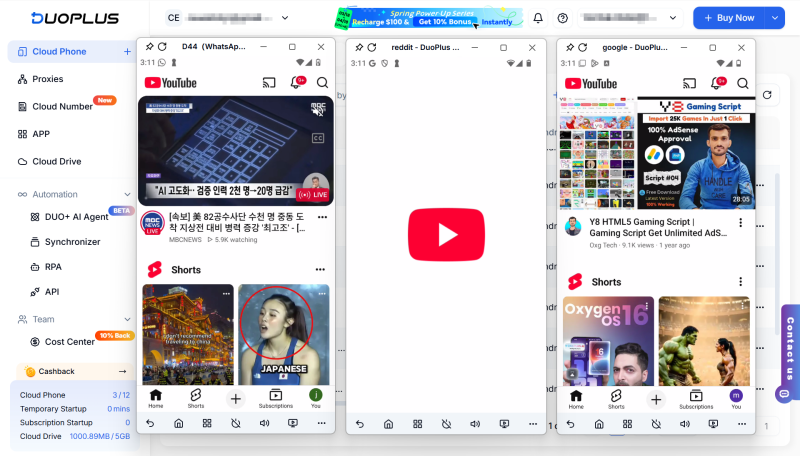
DuoPlus Cloud Phone operate all automation on a stable, independent device environment. Each account runs on a fixed cloud device with consistent device parameters and network conditions, essentially simulating the behavior of a real user consistently using the same device.
With DuoPlus, you can register and login multiple YouTube accounts, automatically play YouTube videos, and execute interactive actions such as liking and commenting.
YouTube impressions are the result of a combination of interaction behavior, content quality, and user behavior. When simple automation tools are prone to failure due to unstable account environments and repetitive behaviors.
A more effective approach is to combine stable environments with realistic automation.This is how you can truly scale your YouTube performance.
DuoPlus Cloud Phone
Protect your multiple accounts from being
If you work in e‑commerce, manufacturing, branding, or creative production, Accio may be one of the most important …
After Meta launched Threads, the app quickly became a global sensation. It is not only regarded as the main competitor …
No need to purchase multiple real phones.
With DuoPlus, one person can operate numerous cloud phones and social media accounts from a single computer, driving traffic and boosting sales for you.
