
How to Assign DuoPlus Cloud Phone and Account Management Permissions to Your Social Media Team
Social media operations often involve content publishing, account maintenance, project collaboration, and staff …
Learn all about X Chat, the new standalone encrypted messaging app from X (formerly Twitter). Discover its key features, how to download it, Grok AI integration, and how it compares to Telegram.

Get an AI-Powered Summary of This Article
Recently, X (formerly Twitter) officially launched its standalone messaging app, X Chat, now available on the Apple App Store.
X Chat separates the direct messaging feature from the main platform and focuses on end-to-end encryption and an ad-free experience. This move is more than just a product launch—it represents X’s effort to strengthen its private communication layer.
Traditionally, X has been a content-driven platform where interactions mainly happen through comments or DMs. With X Chat, the platform is evolving from a content hub into a more complete social + communication ecosystem.
X Chat is an encrypted messaging app rebuilt on top of X’s original DM system. Users can log in directly with their existing X accounts—no additional registration or phone number required.
Once logged in, your existing contacts and connections from X are automatically synced into X Chat.
Messaging & Group Chats
Voice & Video Calls
File Sharing
Privacy & Security
According to X, all messages are protected with end-to-end encryption:
Additional features include disappearing messages, message recall, delete for everyone, and screenshot notification alerts.
No Ads, No Tracking
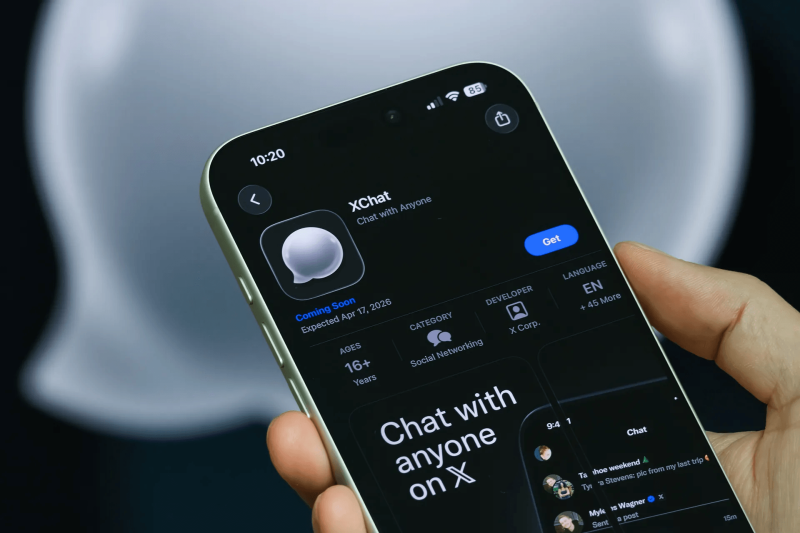
Currently, X Chat is only available on iOS via the Apple App Store.
XChat is available on iOS 26 or later. Depending on your region, you may need to update your Apple ID region settings before downloading.
The Android version has not yet been released.
1.Open X Chat and log in with your X account
2.Set up your encryption key and PIN
3.Enter the chat interface and start messaging
X Chat includes integration with Grok.
XChat's built-in Grok AI lets you long-press any message and select "Ask Grok" to instantly analyze content, expand on ideas, or translate messages — making it particularly useful for multilingual conversations or when you need to quickly process complex information.
One important privacy consideration: when Grok analyzes a message, a non-encrypted copy is temporarily transmitted for processing, which means end-to-end encryption is bypassed for that specific interaction. This doesn't affect the encryption of your other messages, but it's worth keeping in mind if the conversation involves sensitive information.
Since its release, X Chat is often compared to Telegram. While they share some similarities, their positioning and use cases differ significantly.
XChat's core advantage lies in its deep integration with the X platform. Once logged in, users can message their existing X followers and contacts directly — no phone number exchange required.
Telegram, by contrast, operates as a standalone messaging ecosystem where users need to build their contact list independently.
XChat currently supports group chats of up to 350 members, while Telegram's supergroups can accommodate up to 200,000. For teams managing large-scale communities, Telegram remains the more practical option at this stage.
X states that XChat uses end-to-end encryption by default, though several security researchers have noted that its implementation does not yet match the standards set by dedicated encrypted messaging apps like Signal. Telegram does not enable end-to-end encryption by default — users need to manually activate "Secret Chat" mode to enable it.
XChat is best suited for users already active on X who want to move public interactions into private conversations without leaving the platform. Telegram functions more as a standalone content distribution and community management tool, with a significantly more mature ecosystem of channels, bots, and automation features.
| Feature | X Chat | Telegram |
|---|---|---|
| Platform | Part of X (Twitter) | Independent platform |
| Signup | X account (no phone number) | Requires phone number |
| Social Graph | Synced from X | Built separately |
| Encryption | Default (claimed) | Optional (Secret Chat) |
| Ads | No | Some channels include ads |
| Group Limit | 350 users | Up to 200,000 |
| File Sharing | Multiple formats | Up to 2GB per file |
| Disappearing Messages | Yes | Yes |
| Screenshot Alerts | Yes | In Secret Chats |
| AI Integration | Built-in Grok | Third-party bots |
| Web Access | chat.x.com | web.telegram.org |
| Android App | Not yet available | Available |
| Best Use Case | X users extending private chats | Large communities & content distribution |
Yes. X Chat shares the same messaging backend as X. Messages sent or received on either platform are automatically synced in real time.
Yes. You can access it via chat.x.com. All messages will sync across devices.
No. It does not block screenshots. Instead, it sends a notification alert to participants when someone takes a screenshot.
Social media operations often involve content publishing, account maintenance, project collaboration, and staff …

As TikTok, Instagram, and Facebook become important channels for brand marketing, content creation, and affiliate …

TikTok Shop gives sellers multiple ways to reach potential customers, from shoppable videos and livestreams to creator …
No need to purchase multiple real phones.
With DuoPlus, one person can operate numerous cloud phones and social media accounts from a single computer, driving traffic and boosting sales for you.