




How to Assign DuoPlus Cloud Phone and Account Management Permissions to Your Social Media Team
Social media operations often involve content publishing, account maintenance, project collaboration, and staff …
Learn how to identify possible X (Twitter) search visibility issues, check account status, understand common causes, and take practical steps to address search restrictions. This guide also explains how DuoPlus Cloud Phone can help teams manage multiple X accounts and streamline device operations.

Get an AI-Powered Summary of This Article
If engagement suddenly drops after you post on X (formerly Twitter), your account cannot be found in search, or a new post does not appear in search results, you may suspect a Shadowban. However, these signs do not necessarily mean that your X account has been penalized. Search ranking, content filtering, account privacy settings, and platform issues can all affect post visibility.
This guide covers how to check search results and account status, identify common causes, and follow practical troubleshooting steps. It also outlines management practices for teams that operate multiple accounts.
“Shadowban” is commonly used to describe a situation in which an X account can still publish posts, but its content has limited visibility in search results, replies, or recommendation surfaces. Because users may not receive a clear suspension notice, this is sometimes called a “shadow ban.”
However, on its “Debunking X myths ” Help Center page, X denies that a traditional Shadowban exists and explains that posts are ranked to show users more relevant content. Some posts may have their reach limited because of platform rule violations, quality and safety filtering, user filtering settings, or other factors. A post may not appear in search results or recommendation notifications, or it may be visible only on the author’s profile.
When investigating a possible Shadowban, distinguish among the following situations:
| Situation | Typical Signs | What to Check First |
|---|---|---|
| Search result filtering | A post or account cannot be found with certain search queries | Search category, account settings, and content filters |
| Limited reply visibility | Replies are collapsed or difficult to find in a conversation | Reply content and quality or safety notices |
| Reduced recommendation reach | Posts remain viewable, but organic exposure declines | Content relevance, engagement, and distribution |
| Locked or suspended account | Posting, engagement, or login features are explicitly restricted | Account notifications, verification requirements, and appeal options |
| Search system issue | Results differ inconsistently across search queries or access methods | Platform status, search conditions, and technical issues |
These situations may overlap, but they are not interchangeable. A post missing from Top search results does not prove that the entire account is restricted. Likewise, being able to publish posts does not mean every post will appear in public search. Start by identifying where the visibility issue occurs, then choose the next steps based on the symptoms.
If your post impressions appear unusual, start by checking search results, your account profile, and what other users can see. One check alone is only a clue; comparing multiple checks can help narrow down the cause.
Search X for a recent public post of your own. To avoid overly common terms, use a distinctive phrase or a unique keyword from the post. Review the different result categories:
X provides different search categories, and results may also be affected by Safe Search settings. Muted or blocked accounts and filtered sensitive content can affect what a user sees.
Search for the exact username and try visiting the public profile directly. Check whether the profile loads normally. If the profile is accessible but a particular post cannot be found by keyword, investigate that post’s search visibility separately. If both the profile and multiple public posts are difficult to find, rule out account settings, search filters, and other possible restrictions.
To rule out differences caused by personal settings or account relationships, ask someone who does not follow the account and has not blocked it to search for the same public post or reply using the same keywords and search category. Keep the keywords and search conditions as consistent as possible. If results differ, check search settings, content visibility, and account relationships first. If the content cannot be found across several independent environments, investigate search filtering or reach restrictions further.
Look for notices from X indicating that account features are restricted, verification is required, or content may violate platform rules. Eligible accounts may also be able to view X’s “Under the Hood” report. Public information describes this report as showing labels related to account or post visibility over a specific period. It is not a real-time Shadowban detector for every account or time range. Confirm that your account has access and check the period covered by the report.
Once you have confirmed that a post or account has a search visibility issue, investigate the possible cause.
When post protection is enabled, the audience that can see the content is restricted, so its search performance should not be compared directly with that of a public account.Account names, usernames, and profile completeness may also affect how easily other users can find an account.
Search results can also be affected by Safe Search settings , sensitive-content filtering, and blocking relationships. One user’s inability to find a post does not necessarily mean the platform has penalized it.
This is particularly important for people managing multiple accounts. X’s search rules state that repeatedly publishing duplicate or near-identical content, abusing trending topics and hashtags, using automation to publish similar content, or posting similar messages across multiple accounts may prevent content from appearing normally in search results. Aggressive following and unfollowing may also lead to search filtering or other account restrictions.
For example, if a team operates several X accounts and mechanically publishes the same promotional copy and links on every account, it may increase the risk of triggering search filtering.
A post being published successfully does not guarantee that it will appear in every user’s search results or recommendation feed. Content relevance, interactions between users, and the platform’s quality and safety systems can affect how X content is displayed.
If public posts remain searchable but replies are difficult to find in conversations, focus on reply visibility rather than assuming the entire account is restricted.
If the search page fails to load, results change unexpectedly, or several accounts experience similar issues at the same time, the cause may be a network connection, browser cache, browser extension, or platform technical issue. Check the access environment before concluding that the account itself is restricted.
If you find signs of a search visibility issue, choose corrective steps based on your findings instead of deleting large numbers of posts or repeatedly switching accounts.
If the issue is related to account settings, check post protection, email verification, and relevant profile settings. If you have recently published large amounts of duplicate content, posted similar replies, or engaged in unusual following activity, stop those behaviors. Teams managing multiple X accounts can adapt content topics, wording, and posting times to each account’s positioning. Avoid mechanically publishing the same copy and links across accounts.
These steps can help make daily operations more consistent, but they do not guarantee that search visibility will return immediately. X does not promise that every type of search filtering will be lifted within a fixed period, so be cautious of blanket claims such as “wait 24 hours and the ban will be removed.”
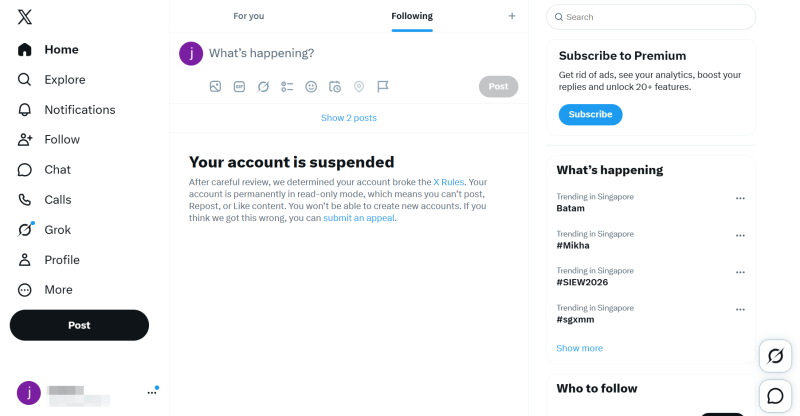
If X explicitly notifies you that an account is restricted, or you believe a post has been incorrectly limited, review the account notifications, relevant policy information, and any available appeal options. When submitting an appeal, explain when the issue started, identify the relevant posts or account, describe the checks you have already performed, and keep any related links and notices. If search rankings have changed but there is no clear restriction notice, continue checking search settings, content filters, and possible technical issues first.
After changing settings or posting behavior, periodically check the relevant posts using the same keywords and search categories. Record whether the account profile remains accessible, whether public posts can be found, and whether any restriction notices remain. If the issue continues, review account status again and follow the information provided by X.
For individual users, investigating a possible Shadowban mainly involves account settings and posting behavior. Teams operating multiple X accounts also need to consider publishing coordination, device management, and day-to-day workflows, in addition to content quality.
Managing multiple accounts does not mean that every account needs completely independent content, but repeatedly publishing the same material should not be the main way to improve efficiency. A brand team can adapt topics, wording, and engagement content to the audience and positioning of each account instead of having every account publish exactly the same promotional message at the same time. Changing a few words does not guarantee that highly similar content will avoid search filtering.
When a team manages multiple X accounts, account logins, device assignments, publishing, and routine maintenance may be handled by different team members. Without a consistent management process, accounts and devices may be mixed up, content may be posted repeatedly, and operational records may be incomplete.
Maintain clear records for each account, including its owner, primary purpose, content plan, and publishing status. Define who is responsible for content creation and who handles publishing and review.
These workflows cannot directly remove search filtering, but they can help reduce repetitive actions and human error.
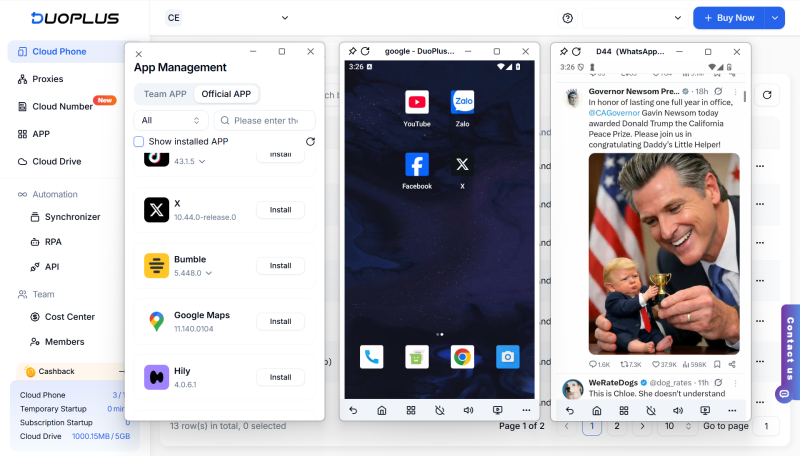
For teams operating multiple X accounts, DuoPlus Cloud Phone can help improve management efficiency through device environment configuration, account organization, and bulk device management. Each DuoPlus Cloud Phone provides an independent Android environment. Based on business needs, users can configure a suitable proxy IP for each cloud phone and set parameters such as device brand and model, language, and time zone. This helps distinguish the operating environments used for different accounts and reduces management issues caused by sharing device environments.
DuoPlus also supports bulk cloud phone management , such as installing, uninstalling, or launching apps in batches and adjusting device groups in bulk. Combined with clear account records and a content publishing plan, these features can help reduce operational mistakes and duplicate posting.
DuoPlus Cloud Phone cannot directly detect or remove an X Shadowban, nor can it guarantee that an account will avoid search filtering. Its role is to support multi-account device management and team workflows. Account visibility still depends on X’s platform rules, content quality, and the actual status of the account.
DuoPlus Cloud Phone Free Trial
An X account that cannot be found in search, a post that does not appear, or a decline in reply visibility does not necessarily indicate a Shadowban. Search results are filtered and ranked, while account settings, content quality, repeated posting behavior, and technical issues can all cause similar symptoms.
First check search results for the post and account, then review post protection, email verification, content filtering, and account notifications. If you have recently posted duplicate content across accounts, automated similar messages, or engaged in unusual following activity, adjust your workflow. If X provides a clear restriction notice, follow its official guidance and appeal when appropriate.
For teams managing multiple X accounts, clear content plans, defined account responsibilities, and organized mobile device management can reduce repetitive actions and operational errors. DuoPlus Cloud Phone can help manage multiple cloud-based Android devices, but account visibility ultimately depends on X’s rules and the platform’s handling of the account.
X has not published one standard recovery time for all search filtering or visibility restrictions. Respond based on the specific issue and any platform notices, and do not rely on promises that restrictions will be lifted after a fixed period.
Third-party tools usually infer account visibility from public search results and cannot fully access the platform’s internal restriction records. Their results are not a substitute for information provided by X.
No. A subscription does not exempt an account from search filtering, content rules, or other platform restrictions.
Not necessarily. Deleting content does not guarantee that a restriction will be lifted immediately, and it may not resolve issues caused by account settings, search filtering, or technical problems.
No. A proxy IP cannot replace account verification, content changes, or an official appeal. There is no reliable basis for assuming that changing an IP address will remove search filtering.
Social media operations often involve content publishing, account maintenance, project collaboration, and staff …
As TikTok, Instagram, and Facebook become important channels for brand marketing, content creation, and affiliate …

TikTok Shop gives sellers multiple ways to reach potential customers, from shoppable videos and livestreams to creator …
No need to purchase multiple real phones.
With DuoPlus, one person can operate numerous cloud phones and social media accounts from a single computer, driving traffic and boosting sales for you.

