





How to Sign Up for Meta Muse and Use a Referral Code
Muse has recently become one of the most talked-about AI Agent products in the AI tools space. As a new AI Agent from …
A complete guide to X account settings, covering how to access X Settings, turn off sensitive content filters, adjust Safe Search, and manage Privacy Settings, including account visibility, direct messages, and discoverability.

Get an AI-Powered Summary of This Article
X (formerly Twitter) provides a range of content and privacy settings that allow users to control media visibility, search results, and account visibility based on their needs. When using X, some users may find that certain images or videos cannot be viewed, search results seem incomplete, or they want to prevent strangers from finding their account through their email address or phone number.
Most of these options can be found in X Settings. This guide covers where to access X Settings, how to adjust sensitive content and Safe Search, how to manage Privacy Settings, and how to check whether your changes have taken effect.
Images, videos, and posts on X may not be displayed in the same way for every account. Certain content may be unavailable because of sensitive content settings, search filters, the status of the post, or account restrictions.
X may label certain images and videos as potentially sensitive. If your account settings restrict this type of content, the media may not display when you open the post.
Search results can also be affected by Safe Search. When related filtering is enabled, some posts containing sensitive content may not appear in search results even though the posts themselves still exist.
Other factors can also affect content visibility. For example, a post may have been deleted, an account may be restricted, or the content may have specific access requirements. When content cannot be viewed, it is therefore useful to check the relevant settings instead of changing just one option.
X Settings is the main place for managing account features and preferences, including privacy, security, content visibility, and notifications.
On the web
On the app
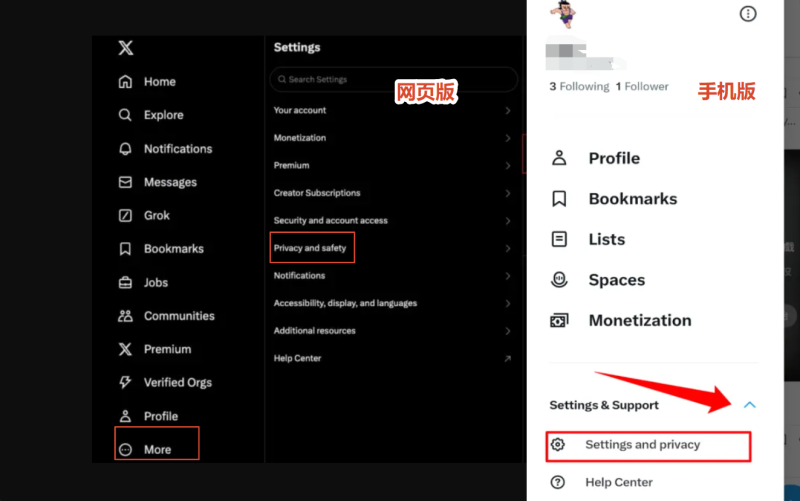
Once inside Settings, you will see several categories. The options covered in this guide are mainly located under Privacy and safety, as well as the content and search settings.
To adjust content visibility, open Privacy and safety and look for options such as Content you see. To change account visibility, direct messages, or discoverability, open the corresponding privacy settings.
The exact menu names and locations may change slightly as X updates its web and mobile interfaces, but the main options can generally be accessed through Settings and privacy.
X labels certain media as potentially sensitive. The relevant setting controls whether your account can display this type of content.
Go to:
Settings and privacy → Privacy and safety → Content you see
Find the option related to displaying sensitive content and adjust it according to your preferences.
After changing the setting, return to your timeline or reopen a post that previously could not display its media to check whether the image or video is now visible.
If some content is still unavailable, check whether the account or post has other access restrictions. Enabling sensitive content does not guarantee that every piece of potentially sensitive content will be displayed, as X may still restrict certain content based on its type, account status, or platform rules.
Safe Search is used to filter certain types of sensitive content from X search results.
For example, if some relevant posts do not appear when searching for a particular keyword, you can check the search filtering settings.
On the X website, open the search page and access the search settings. Look for the option related to filtering sensitive content and adjust it as needed.
The general path is:
Search → Search settings → Adjust sensitive content filtering
After changing the setting, search for the same keyword again and check whether the results have changed.
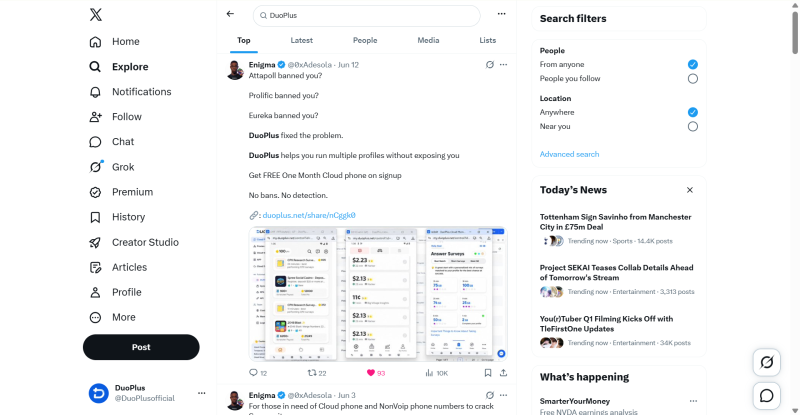
The location of this option in the X app may vary between versions. You can open the search page and look for Search Settings or related search options.
If certain content still does not appear after adjusting Safe Search, the post may have been deleted, the account may be restricted, or other search filters may be affecting the results.
X Privacy Settings control your account's visibility and how other users can interact with you. If you want to reduce the chances of being found or contacted by strangers, you can adjust the relevant settings based on your needs.
| Privacy Setting | Main Function | Suitable For |
|---|---|---|
| Protected Posts | Limits posts to approved followers | Reducing public visibility |
| Direct Messages | Controls who can send you direct messages | Reducing unwanted messages |
| Photo Tagging | Controls whether other users can tag your account in photos | Reducing unwanted photo tags |
| Discoverability | Controls whether people can find your account through your email or phone number | Reducing account discoverability |
| Contacts | Manages contact syncing and contact discovery | Preventing contact-based discovery |
For example, enabling Protected Posts prevents your posts from being publicly visible to everyone and limits access to approved followers.
If your main concern is unwanted messages, adjust the Direct Messages settings. If you do not want other users to tag you in photos, change the Photo Tagging settings.
Users who are particularly concerned about account discoverability can also review Discoverability settings. These options determine whether other people can find your X account using your linked email address or phone number.
The Contacts settings relate to contact syncing. If you do not want X to use your contacts to help people discover your account, review and adjust the relevant options.
You do not necessarily need to disable all of these settings. Public-facing accounts may benefit from remaining discoverable, while personal accounts may prefer to limit post visibility and interactions with unknown users.
After changing your X Settings, you can verify the changes through actual use.
After changing sensitive content settings, reopen an image or video that was previously unavailable and check whether the media now displays correctly.
After adjusting Safe Search, search for a keyword that previously returned filtered results and see whether the results have changed.
After changing privacy settings, you can use another account to view your profile and check whether your posts are public, whether your account can be found through your email address or phone number, and whether other users can still interact with you as expected.
If the changes do not appear to have taken effect, return to the relevant settings page and confirm the current status. It is also worth checking whether the X app is running the latest version.
X account Settings cover a range of content, search, and privacy controls. Sensitive content settings affect the display of certain images and videos, Safe Search filters certain content from search results, while Privacy Settings control account visibility and how other users can interact with you.
When you cannot view certain content on X, search results seem incomplete, or your account privacy does not match your preferences, check the relevant settings and make the necessary adjustments. You can then verify the changes by viewing content, performing searches, and checking your account from another perspective.
X search results can be affected by account settings, search terms, when content was posted, and personalized factors. As a result, two accounts searching for the same keyword may see different results.
X has introduced stricter privacy controls around likes for some accounts. Your following list can also be affected by account privacy settings, although its visibility may vary depending on your account type and current platform features.
Go to Settings and privacy → Privacy and safety and review the options related to advertising preferences, personalized content, and data usage. You can adjust these settings according to your preferences.
When publishing a post, you can choose who is allowed to reply, such as everyone, accounts you follow, or only accounts you mention. This can help reduce unwanted interactions under public posts.
Yes. The same X account can be logged in on multiple devices, including phones and computers. If you need to manage multiple independent accounts over the long term, an isolated mobile environment such as DuoPlus Cloud Phone can be used for each account to help reduce device or network overlap.
Muse has recently become one of the most talked-about AI Agent products in the AI tools space. As a new AI Agent from …

OpenAI Codex is an AI coding agent designed to help developers write, modify, review, and deliver code. It is available …

VK (VKontakte) is one of the major social media platforms in Russia. In addition to account management, content …
No need to purchase multiple real phones.
With DuoPlus, one person can operate numerous cloud phones and social media accounts from a single computer, driving traffic and boosting sales for you.

