





How to Sign Up for Meta Muse and Use a Referral Code
Muse has recently become one of the most talked-about AI Agent products in the AI tools space. As a new AI Agent from …
This guide explains how to use DuoPlus Cloud Phone's batch file push feature to distribute images and documents across multiple WhatsApp accounts with one click. Solve common issues like repeated transfers and version inconsistency, and improve team collaboration efficiency.

Get an AI-Powered Summary of This Article
For teams using WhatsApp for customer communication, materials like product catalogs, price lists, campaign posters, and user manuals need regular updates and timely syncing to customer service accounts, so agents can quickly send the right content during client inquiries. As the number of customer service accounts and devices grows, repeatedly transferring images, videos, and PDF files becomes increasingly time-consuming, and issues like inconsistent document versions, missed updates, and incorrect file transfers become more common.
This guide explains how to efficiently sync the latest materials across multiple WhatsApp accounts using cloud phone batch file push, helping customer service teams improve collaboration efficiency.
For many businesses, WhatsApp is more than just a messaging tool—it's a key channel for customer inquiries, pre-sales communication, and after-sales support. As businesses grow, teams typically manage multiple WhatsApp accounts, each responsible for different countries or regions, product lines, or time zones.
In daily work, customer service agents frequently send product catalogs, price lists, promotional posters, product images, user guides, and after-sales documents. These files are constantly updated as new products launch, prices change, or marketing campaigns roll out. If different customer service accounts use inconsistent material versions, it can negatively impact customer experience and increase internal communication and maintenance costs.
Centralizing the management and distribution of product materials has become a key task for multi-account customer service teams. When all customer service accounts can access the latest images, videos, and PDF files in a timely manner, teams can reduce repetitive work and maintain consistent external communication.

As the number of customer service accounts and devices increases, manual file transfer workload grows accordingly, gradually becoming a repetitive bottleneck in team collaboration.
In daily operations, after new product launches, price adjustments, or marketing campaigns, operators need to sync the latest product catalogs, price lists, and campaign posters to all customer service accounts. Using manual methods, each device needs to receive, save, and confirm file updates individually. When maintaining dozens of WhatsApp accounts, the same material often needs to be transferred multiple times—not only time-consuming but also prone to missed devices.
WhatsApp customer service teams continuously update product images, pricing information, and promotional materials. If some devices haven't synced the latest files, agents may continue sending outdated quotes or posters, leading to inconsistent external communication and additional time spent on corrections. For teams with multiple collaborators, keeping all accounts on the same material version is essential for maintaining communication efficiency.
As the number of customer service accounts grows, operators need to track which account corresponds to each device, confirm whether files have been successfully transferred and saved to the correct location, and verify they can be sent to customers. When new product images or documents need updating daily, these repetitive management tasks accumulate and impact overall team efficiency.
If you can sync the latest images, PDFs, and documents to all operational devices through a unified platform, you can reduce repetitive work and ensure all WhatsApp customer service agents use the most current product materials.
As more teams use cloud phones to manage multiple WhatsApp accounts, unified management of images, videos, and documents has become a key operational requirement. Unlike traditional phones, which require receiving and saving files on each device individually, cloud phones not only provide independent WhatsApp environments but also support file batch push through a management dashboard, enabling asset syncing and account operations on the same platform.
Using DuoPlus Cloud Phone as an example, cloud phones offer the following advantages for file syncing:
Operators upload files once on their computer and select multiple target cloud phones for syncing—no need to import images or documents to each device individually.
For teams maintaining multiple WhatsApp customer service accounts, this approach reduces repeated transfer steps and makes it easier to keep product catalogs, price lists, and promotional materials up to date across all accounts.
Beyond unified file distribution, DuoPlus also supports Batch Push, allowing different images, PDFs, or documents to be pushed to specific cloud phones based on different customer service account needs.
For example, customer service accounts in different countries or regions can receive language-specific versions of product catalogs, while different product lines can have their own pricing and promotional materials.
Through the desktop management dashboard, operators can centrally manage the images, documents, and other materials that need syncing, and distribute them to target cloud phones in a unified way. Compared to agents saving files individually, this centralized approach makes it easier to maintain consistent material versions and simplifies future updates.
For example, after launching a new product, an electronics company's operator can upload the latest product catalog, price list, and campaign posters to the DuoPlus dashboard and sync them to all customer service cloud phones with one click. Agents can then directly send the materials through WhatsApp without updating files on each device individually—ideal for teams that frequently update product materials and manage multiple customer service accounts.
Organize the images, product catalogs, price lists, campaign posters, or PDF documents you need to sync on your computer. For easier management, name files consistently based on product category, region, or customer service group—for example, US_Catalog.pdf, EU_Price_List.pdf, or Promotion_July.jpg.
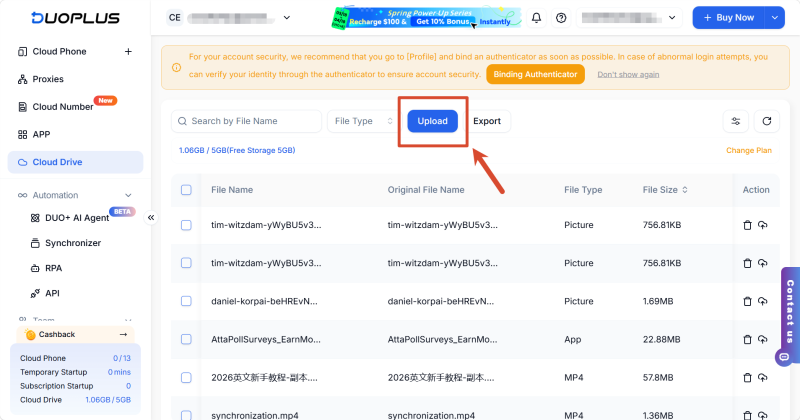
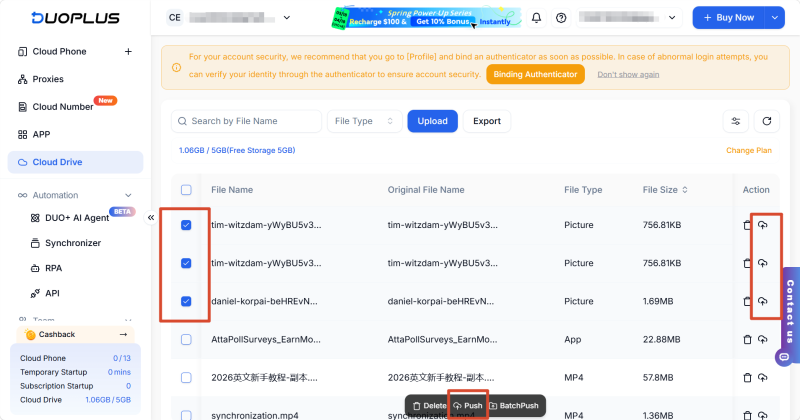
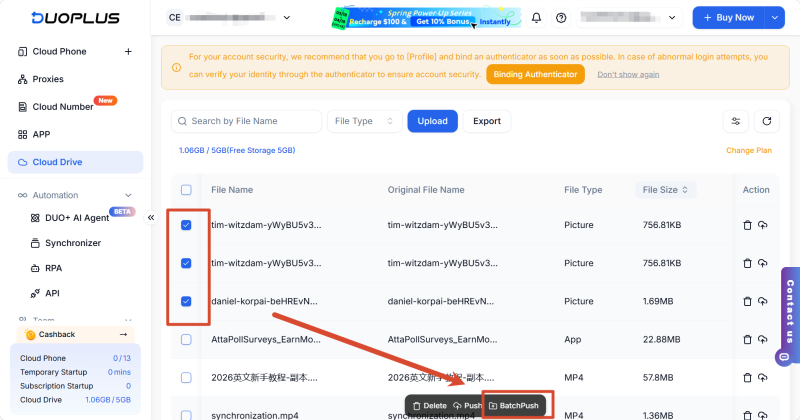
After confirming the files and target devices are correct, click Push. The system will automatically sync the images, PDFs, or other documents to the corresponding cloud phones.
Once the push completes, agents can access the materials directly through the cloud phone's File Manager or specified directory, and send them to customers via WhatsApp without additional downloads or transfers.
DuoPlus supports unlimited multi-device management and can push images, videos, PDFs, and other files to multiple cloud phones simultaneously. The actual number of devices depends on your account configuration and usage scale.
Yes. With Batch Push, you can push different images, PDFs, or documents to specific cloud phones. For example, customer service accounts in different countries can receive language-specific product catalogs, while different product lines can have their own pricing and promotional materials.
Files can be saved to custom directories during the push process. After syncing completes, agents can access images, PDFs, and other documents directly in the cloud phone and send them to customers via WhatsApp.
File push failures are usually related to network connection issues, target cloud phones being offline, insufficient storage, or incorrect directory settings. Ensure the cloud phones are running properly and check the relevant settings before retrying.
As customer service teams grow, the frequency and complexity of product material updates increase accordingly. Establishing a unified material distribution system reduces repetitive work and helps teams maintain consistency across product catalogs, price lists, and promotional assets.
With DuoPlus Cloud Phone's batch file push feature, operators can more efficiently sync images, PDFs, and documents. Combined with DuoPlus AI Agent, teams can further connect repetitive tasks like material distribution into a complete automated workflow. For teams managing multiple WhatsApp customer service accounts long-term, this approach improves daily collaboration and brings greater structure to product material management.
Muse has recently become one of the most talked-about AI Agent products in the AI tools space. As a new AI Agent from …

OpenAI Codex is an AI coding agent designed to help developers write, modify, review, and deliver code. It is available …

VK (VKontakte) is one of the major social media platforms in Russia. In addition to account management, content …
No need to purchase multiple real phones.
With DuoPlus, one person can operate numerous cloud phones and social media accounts from a single computer, driving traffic and boosting sales for you.

