





How to Sign Up for Meta Muse and Use a Referral Code
Muse has recently become one of the most talked-about AI Agent products in the AI tools space. As a new AI Agent from …
A practical WhatsApp FAQ covering account registration and verification, PINs and Security Codes, linked devices, account security, group creation and joining, member invitations, expired invite links, and account bans.

Get an AI-Powered Summary of This Article
WhatsApp is relatively simple to use, but some settings and features can still be confusing when registering an account, securing the account, or using group chats. Account verification involves different types of security credentials, while multi-device access and group invitations also have their own rules and limitations.
This guide covers WhatsApp registration, account verification and security features, followed by group chat functions and several common issues related to multi-device access, verification codes, group invitations, and account bans.
WhatsApp is an instant messaging app that supports text messages, images, videos, files, voice calls, and video calls. In addition to one-on-one conversations, users can communicate with multiple people through Group Chats.
To register for WhatsApp , you need to verify your phone number. The basic process is:
During registration, WhatsApp sends a six-digit verification code to the phone number you provided. This is a one-time verification code and should never be shared with anyone else.
WhatsApp provides several security features, including end-to-end encryption, two-step verification, and linked-device management. These features provide a certain level of protection for both chats and accounts during normal use. However, they cannot completely replace good security practices. Leaked verification codes, phishing links, and unfamiliar device logins can still put an account at risk.
For this reason, protecting a WhatsApp account involves paying attention to account verification, PINs, chat security, and linked devices.
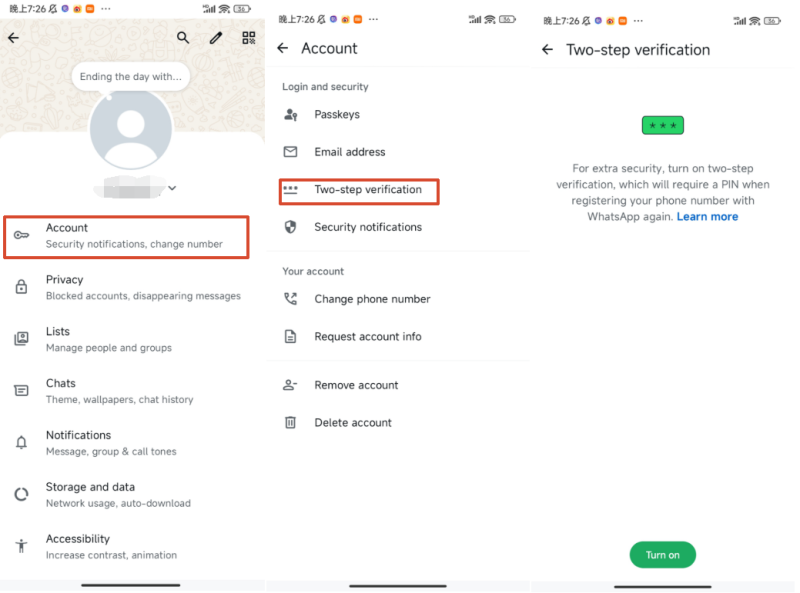
WhatsApp provides Two-step verification. Once enabled, you need to enter a PIN you created yourself in addition to phone number verification, adding another layer of protection to the account.
The PIN is different from the SMS verification code received during registration. It is a security credential created by the user. Even if someone obtains your phone number and one-time verification code, two-step verification adds another barrier to account access.
For long-term WhatsApp use, it is recommended to enable two-step verification, choose a PIN that is difficult to guess, and never share the PIN with others.
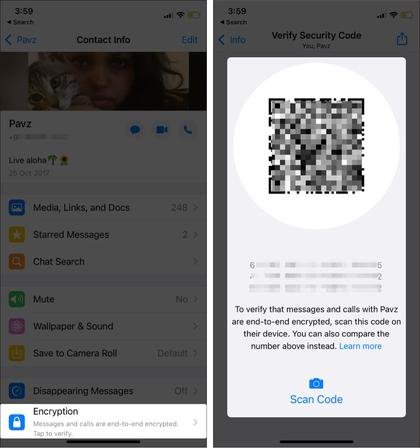
WhatsApp uses end-to-end encryption for personal chats. For important conversations, you can check the Security Code associated with a contact to verify whether the encrypted connection between the two accounts has changed.
Open the chat with the contact, go to their contact information, and find the relevant encryption settings to view the Security Code. WhatsApp provides both a QR code and a numerical security code, which can be compared through a trusted method or in person.
If the security codes match, the encrypted connection is consistent with the other person's device. If the Security Code changes, however, it does not necessarily mean that the account has been hacked. For example, changing phones, reinstalling WhatsApp, or changing linked devices can cause the Security Code to update.
Therefore, the Security Code is mainly used to verify the status of chat encryption. If you also notice unfamiliar device logins or messages being sent without your knowledge, you should check Linked Devices and the account's verification status as well.
WhatsApp account security also depends on everyday usage habits. Never share a verification code with anyone, and do not disclose verification codes or PINs because someone claims to be customer support, a friend, or an event organizer.
You should also be cautious about links, files, or account verification requests sent by unfamiliar people.
Common security risks include:
Linked Devices lets you see computers, browsers, and other devices currently connected to your WhatsApp account.
If you find an unfamiliar device, log it out immediately. It is especially important to check Linked Devices after using WhatsApp on a public computer or someone else's device to make sure unnecessary sessions do not remain active.
Several signs may indicate that your account has a security problem, including:
If you notice these signs, first check Linked Devices, log out unfamiliar devices, and verify your account again. If you believe someone has taken control of your account, use WhatsApp's available account recovery and appeal options as soon as possible.
WhatsApp Groups allow multiple users to communicate in the same conversation. Members can send text messages, images, videos, and files, as well as make group voice and video calls.
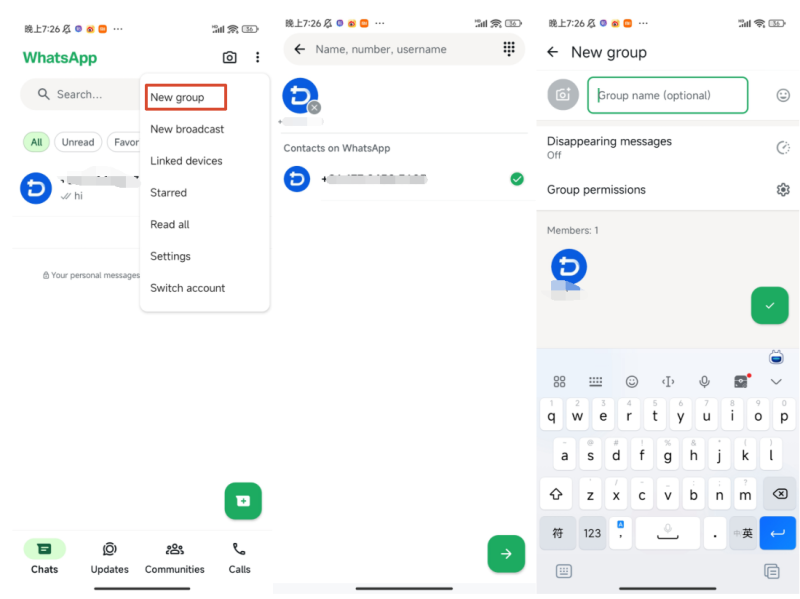
Creating a WhatsApp group is straightforward. You can start a new group directly from WhatsApp:
WhatsApp groups are usually joined through an invitation from an administrator. Common methods include:
After receiving an invite link, open it to view the group information and follow the instructions to join.
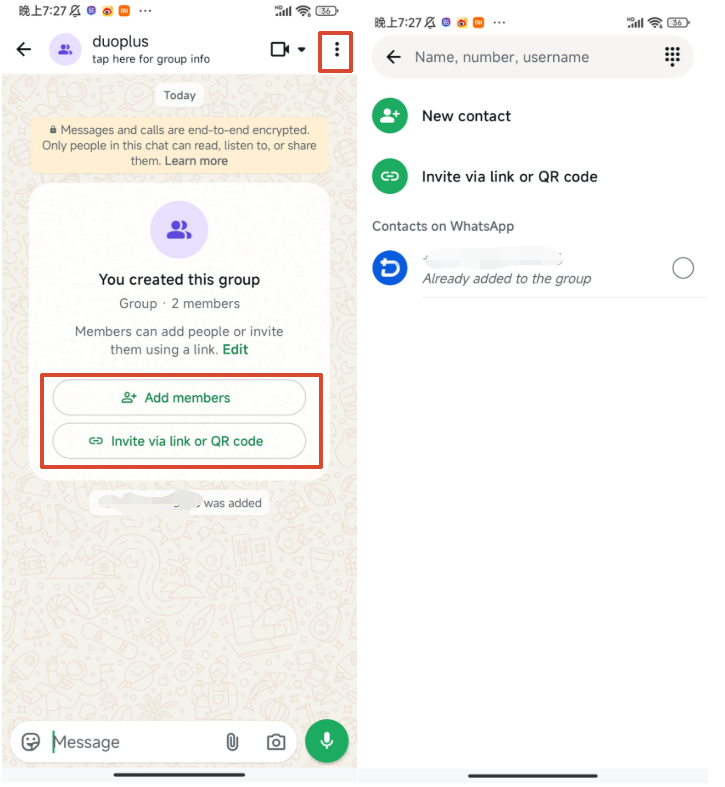
If you have the required group permissions, you can add contacts directly from the group information page or generate a group invite link and share it with others.
Invite links are particularly convenient when you need to invite multiple people. However, anyone who receives a forwarded link may be able to access it, so group admins should pay attention to where the link is shared.
A group invite link may stop working if an administrator resets or revokes the previous link.
The simplest solution is to contact the group admin and ask them to generate a new invite link. If the admin has restricted new members from joining, they will also need to check the group's current joining permissions.
Using WhatsApp mainly involves account registration, verification, account security, and group communication. Registration requires phone number verification, while the six-digit verification code and two-step verification PIN serve different security purposes. Users should never share either type of verification information with others.
For everyday use, you can manage connected devices through Linked Devices and enable two-step verification for additional account protection. WhatsApp groups can generally be joined through direct administrator invitations or invite links.
For more complex scenarios involving multiple accounts or devices, the key is to maintain a clear relationship between each account and its corresponding device, and choose an appropriate management method based on your actual needs.
Yes. WhatsApp supports linking the same account to other devices through Linked Devices, such as computers and web browsers.
For using one account on both a phone and computer, WhatsApp's built-in multi-device feature is generally sufficient.
If you need to manage multiple WhatsApp accounts simultaneously, however, you need to consider the device environment associated with each account. DuoPlus Cloud Phone can provide separate Android environments for different accounts, allowing WhatsApp to run independently on different cloud phones. You can also configure the corresponding network environment as needed, making it easier to manage multiple accounts simultaneously.
First, confirm that the phone number and country code are correct, and check whether your phone can receive SMS messages or calls normally. If the SMS does not arrive immediately, wait for a while before trying again and follow any alternative verification options provided by WhatsApp.
Avoid requesting verification codes repeatedly in a short period, as this may trigger a temporary restriction.
A WhatsApp account may be restricted or banned for reasons such as violating the Terms of Service, sending large amounts of unsolicited messages, or engaging in unusual account activity. If your account has been banned, follow the instructions shown by WhatsApp and submit an appeal or review request when available.
Open WhatsApp and go to Settings → Linked Devices to see the computers, browsers, and other devices currently connected to your account.
If you find a device you do not recognize, select it and log out. It is a good idea to check your linked devices regularly, especially after using WhatsApp on a public computer or another person's device.
Muse has recently become one of the most talked-about AI Agent products in the AI tools space. As a new AI Agent from …

OpenAI Codex is an AI coding agent designed to help developers write, modify, review, and deliver code. It is available …

VK (VKontakte) is one of the major social media platforms in Russia. In addition to account management, content …
No need to purchase multiple real phones.
With DuoPlus, one person can operate numerous cloud phones and social media accounts from a single computer, driving traffic and boosting sales for you.

