





How to Use ADB with Cloud Phones: Common Android App Testing Scenarios and Methods
Android app testing often involves repeatedly installing apps, testing different versions, performing fixed operations, …
Learn how to safely change your WhatsApp phone number without losing chat history or groups. Discover the differences between changing numbers vs. registering new accounts and how to manage multiple accounts using cloud phones.

Get an AI-Powered Summary of This Article
Changing your phone number on WhatsApp isn't as straightforward as it sounds. Beyond swapping digits, WhatsApp actively monitors your device environment, network consistency, and account behavior during the process — and if anything looks off, you can run into restrictions before you even finish.
This guide walks you through exactly how WhatsApp's number change works, the correct steps to do it, answers to the most common questions, and what to do if you're managing multiple accounts.
For long-time WhatsApp users, switching to a new phone number is usually a better option than creating a completely new account — especially if the old number can no longer receive a verification code or if you want separate numbers for work and personal use.
WhatsApp’s official Change Number feature transfers your existing account data to a new phone number. In most cases, the following information stays intact:
WhatsApp also builds trust around accounts based on long-term usage patterns, such as:
If your account has been used normally over a long period of time, changing the phone number usually carries lower risk and is less likely to trigger restrictions.
Registering a brand-new WhatsApp account with a new number is different. New accounts typically go through stricter verification and risk checks, especially if there are unusual login attempts or abnormal activity.
You’ll also need to rebuild:
For users who rely on WhatsApp for ongoing communication or customer management, starting over can be inconvenient.
In most cases, it’s recommended to use the Change Number feature first, and only register a new account if the old account is no longer accessible.
Before changing your WhatsApp number, make sure these three conditions are met:
WhatsApp requires you to verify your existing account before changing the number. If the account is logged out, restricted, or inaccessible, the number change may fail.
Your new number must be able to receive SMS messages or phone calls from WhatsApp.
For best results:
If the number cannot receive the verification code, the transfer process cannot be completed.
During verification, WhatsApp doesn’t just verify your phone number — it also evaluates factors like your IP address, device information, login behavior, and network stability to determine whether the activity looks normal and secure.
Frequent device switching or unstable network environments may cause verification problems or temporary restrictions.
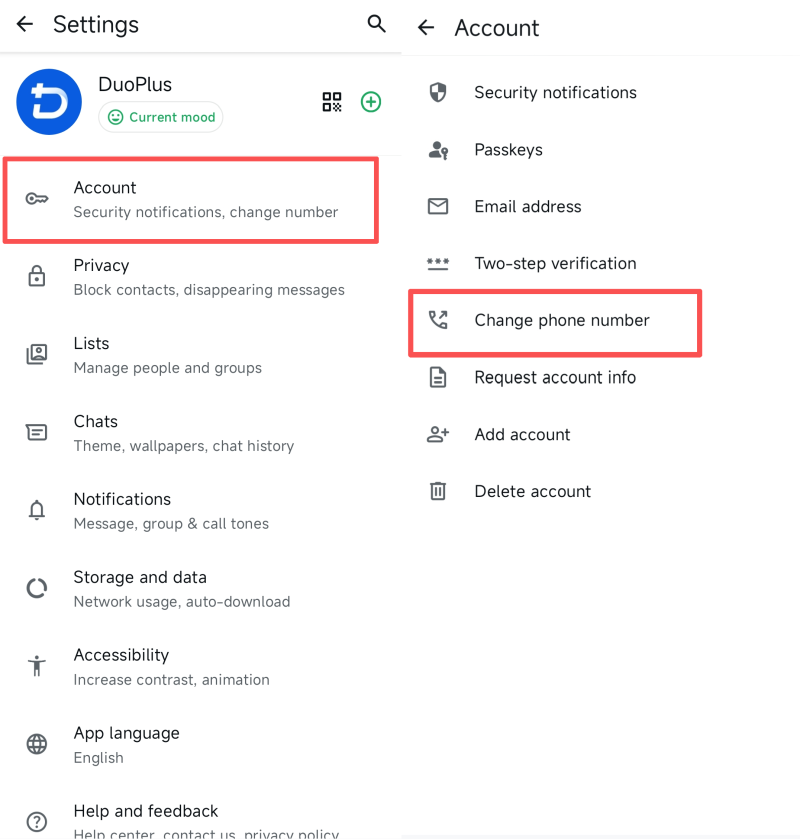
1.Open WhatsApp, Go to Settings → Account → Change Phone Number
2.Enter your current WhatsApp number and your new phone number, making sure to select the correct country code for both
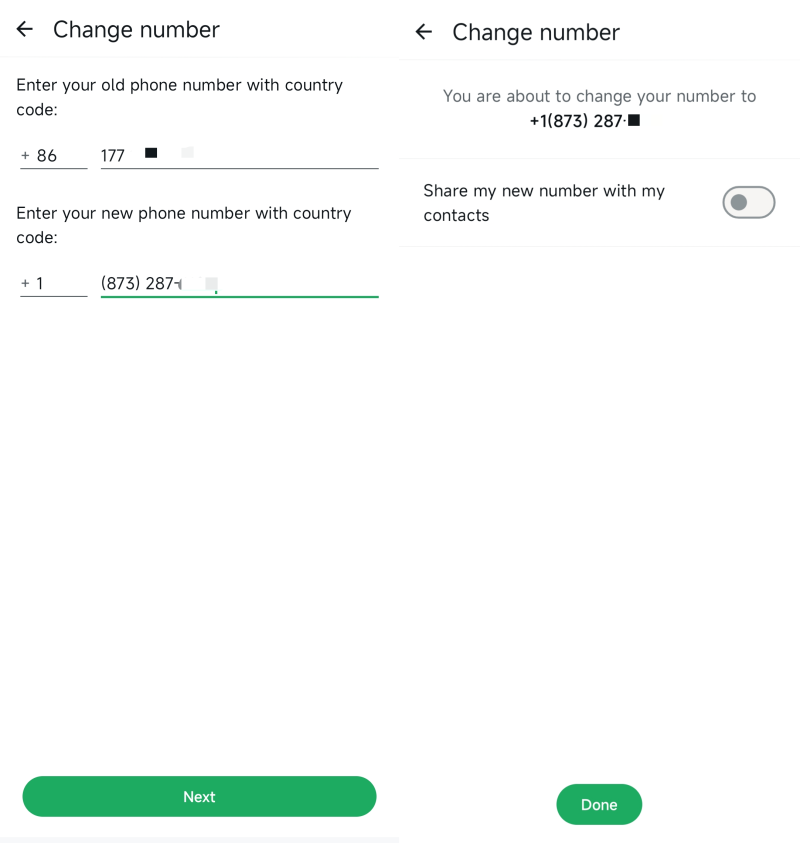
3.Receive and enter the verification code 4.Complete verification and allow WhatsApp to migrate the account automatically
If the verification code doesn’t arrive immediately, wait a few minutes before trying again. Repeated requests within a short time may trigger temporary limits.
For many users, especially those managing different projects, teams, or communication channels, a single WhatsApp account is often not enough anymore.
Common setups include:
While WhatsApp supports multiple accounts to some extent, constantly switching between accounts on the same local device can become unstable over time. WhatsApp generally favors consistent long-term login environments.
Because of this, more users now rely on cloud phone solutions to manage Multiple WhatsApp Accounts more safely and efficiently.
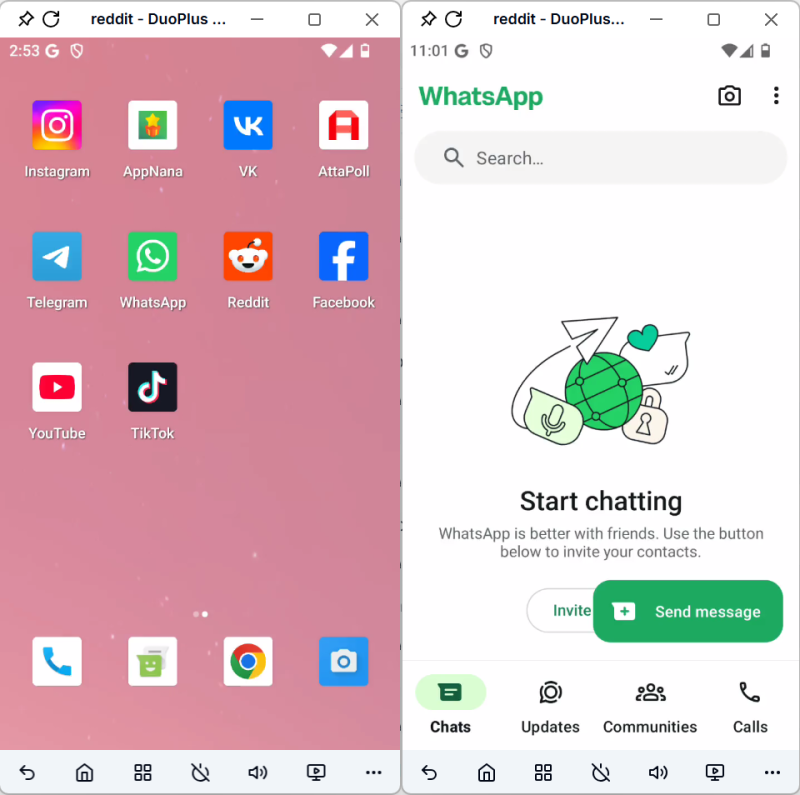
DuoPlus Cloud Phone provides separate Android cloud devices with Google framework support. Each WhatsApp account runs in its own isolated environment, including device information, App data and login sessions.
Compared to repeatedly switching accounts on one physical device, this setup is more stable for long-term account management and helps reduce verification risks.
For teams managing customer communication through WhatsApp, DuoPlus Cloud Phone also supports remote access, flexible permission management, and shared account operations for smoother collaboration.
WhatsApp allows you to choose whether to notify your contacts when changing numbers.
During the process, you’ll see a Notify Contacts option where you can decide who gets informed.
However, group chats work differently. Group members may still see a system message indicating that your account changed phone numbers. This behavior is automatic and cannot be disabled.
As long as you continue using the same device without uninstalling WhatsApp or clearing local app data, your groups and chat history should remain available after changing your phone number.
Once the number change is completed, the old number becomes unlinked from the original account and can be used to register a new WhatsApp account.
However, registration success still depends on the number’s history and usage status.
If someone already saved your contact information, WhatsApp may automatically sync the updated number relationship. However, inactive or older contacts may still see the previous number until they manually update it.
Compared to registering a brand-new WhatsApp account, using WhatsApp’s official Change Number feature is usually the safer and more stable option. It helps preserve your chat history, group connections, and existing relationships while reducing the need to rebuild account activity from scratch.
Android app testing often involves repeatedly installing apps, testing different versions, performing fixed operations, …

Instagram management is about more than likes and follower counts. For individual creators, brand accounts, and …

When creating YouTube videos, the script determines the video’s structure, pacing, and completeness. For creators who …
No need to purchase multiple real phones.
With DuoPlus, one person can operate numerous cloud phones and social media accounts from a single computer, driving traffic and boosting sales for you.
