





How to Log In to Codex: What to Do If You Don't Receive the Phone Verification Code
OpenAI Codex is an AI coding agent designed to help developers write, modify, review, and deliver code. It is available …
Learn how to manage a VK account with practical strategies for content planning, Community management, user engagement, advertising, and multiple-account operations.

Get an AI-Powered Summary of This Article
VK (VKontakte) is one of the major social media platforms in Russia. In addition to account management, content publishing, and social interaction, VK also offers Communities, video, short-form video, and messaging features.
For brands and content teams, managing a VK account involves more than creating an account and publishing posts regularly. You need to define your target audience, decide what content to publish, increase engagement, and expand content reach based on your target market and business goals.
This guide covers the main features of VK and common management strategies, including account positioning, content planning, Community management, short-form video, user engagement, advertising, and multiple-account management.
VK (VKontakte) is one of the major social platforms in Russia, covering content publishing, Communities, video, short-form video, and messaging. For brands and teams targeting Russia and Russian-speaking markets, VK can be used for brand content, Community management, user engagement, and advertising.
From an operational perspective, VK covers several areas of content publishing and user interaction:
| Feature | Common Use |
|---|---|
| Account | Publish posts and establish an account identity |
| Communities | Build a brand or topic-based community and grow an audience |
| VK Video | Publish long-form videos and live streams |
| VK Clips | Publish short-form videos and expand content reach |
| Messenger | Handle user questions and day-to-day communication |
These features serve different purposes, but they can be combined as part of an overall VK strategy.
For example, a brand can use its account and Community as its main content hub, use Clips and Video to expand reach, communicate with users through comments and messages, and use VK's advertising tools when additional reach is needed.
The first step in managing a VK account is to determine who the account is for and what you want to achieve with it.
For example:
Once the positioning is clear, create a content plan.
Not every post needs to focus on product promotion. You can combine different content types based on your goals, such as product introductions, tutorials, industry news, customer stories, campaigns, and discussion topics.
If you want to build an audience over time, you can create a VK Community as a dedicated space for ongoing content and interaction.
A Community should not simply be a page for promotional posts. Instead, it should consistently provide useful content around a clear topic.
For example, a brand can publish:
Community management also involves responding to comments and user questions in a timely manner.
This allows a Community to serve as a space for content publishing, user engagement, and brand information, rather than simply functioning as a content reposting channel.
If you plan to build a long-term brand, interest-based, or industry-focused presence, you can create a VK Community by following these general steps:
There is no need to promote the Community aggressively right after creating it. First, make sure the name, description, visual assets, and initial content are complete. You can then adjust the content strategy based on audience feedback.
VK content does not have to rely on a single format.
Text and image posts are useful for more detailed information, such as product tutorials, tips, industry knowledge, and comparisons. Short-form videos are better suited to quickly demonstrating product features, showing how something works, presenting customer use cases, or creating more engaging content.
VK Clips can be an important format for short-form video content.
For example, one product can be turned into several short videos:
This allows one piece of long-form content to be repurposed into multiple content assets and makes better use of existing content.
For tutorials, reviews, interviews, and other information-heavy content, you can use VK Video to present the full version.
VK management should not focus only on how often you publish. You also need to pay attention to whether users are willing to engage with your content.
You can introduce simple interaction mechanisms, such as:
For Communities, you can also adjust your engagement strategy based on user activity.
For example, welcome posts can help new members quickly understand the Community, while active users can be encouraged to stay involved through campaigns, exclusive content, and other forms of interaction.
The goal is to gradually move users from simply seeing your content to participating in it.
According to VK, the number of advertising campaigns increased by 45% year over year in the first half of 2026, while the number of sales, leads, app installs, subscriptions, and other target actions generated by advertising increased by 82%.
If you rely only on organic content, it can take time to build an audience.
For brands with specific promotional goals, VK's advertising tools can be combined with organic content. For example, you can promote products, Communities, or specific posts to selected audiences and adjust campaigns based on clicks, engagement, and conversion data.
Product launches, limited-time promotions, giveaways, and live streams can all serve as key campaign moments. After a campaign ends, user engagement and advertising can be used to reach interested users again.
A complete VK strategy can therefore follow this process:
Account positioning → Content publishing → Community building → User engagement → Advertising and campaigns
The specific combination will depend on your business goals and available resources.
When a brand targets different markets, product lines, or content topics, it can create separate VK accounts for different objectives. This allows each account to maintain a clear content focus and target a specific audience.
However, as the number of accounts grows, management involves more than the accounts themselves. You also need to manage login devices, app data, network environments, and daily operational tasks.
Switching between multiple VK accounts on the same phone can require repeated management of login sessions and app data. Preparing a physical device for every account, meanwhile, increases hardware, setup, and maintenance costs.
For this reason, multiple-account management is not simply about creating more accounts. It also requires a corresponding device and operating environment for each account, making it easier to manage accounts separately and reduce repetitive device operations.
For teams managing multiple VK accounts, DuoPlus Cloud Phone can provide separate Android cloud phone environments for different accounts. You can also configure the network environment for individual devices, making it easier to manage each account and its corresponding device separately.
When you need to manage more cloud phones, you can batch start, shut down, restart, and reset devices, as well as install apps in batches. This reduces the workload of operating each device individually.
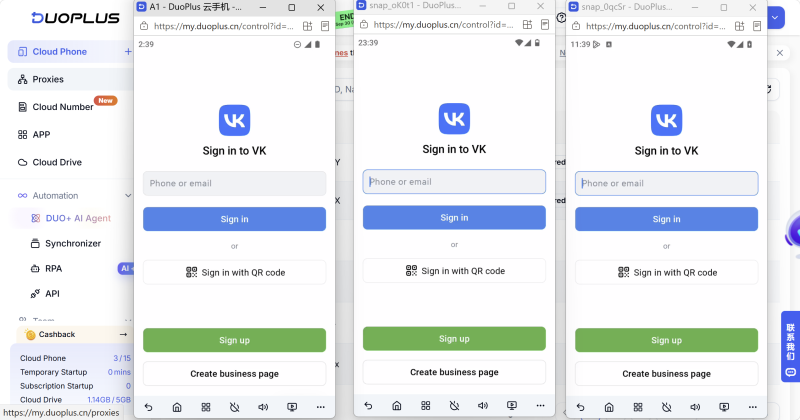
For more advanced workflows, RPA and AI Agent can also be used to handle certain repetitive tasks.
This allows accounts, devices, and operational tasks to be managed separately while reducing the workload involved in running multiple devices.
Managing a VK account involves more than publishing posts regularly. A sustainable strategy starts with clear account positioning and a consistent content system, then uses Communities, short-form video, user engagement, advertising, and campaigns to expand reach and build an audience.
As a business expands across different markets, brands, or content topics, multiple-account management can help separate different operational goals, but it also creates additional device and account management requirements.
If you need to manage multiple VK accounts, DuoPlus Cloud Phone can provide separate Android environments for different accounts and help you manage multiple devices from one place.
There is no fixed posting frequency that works for every account. Start with a consistent publishing schedule based on your content production capacity, then monitor reach and engagement at different posting times and frequencies and adjust accordingly.
You can evaluate an account based on content reach, engagement, follower growth, and conversions. In addition to looking at individual posts, compare different topics, content formats, and posting times to identify which types of content perform better for your account.
Yes. Live streaming can be used for product demonstrations, campaigns, product launches, interviews, and real-time interaction with users. For brand accounts, pre-stream promotional content and post-stream content can also be included in the overall content strategy.
Start by considering your account positioning, target audience, Community topic, and content engagement. For paid campaigns, you can then use the audience targeting options provided by VK's advertising platform to narrow down the target audience.
Yes. DuoPlus Cloud Phone can provide separate Android environments for different VK accounts and centrally manage multiple devices, making it suitable for teams that need to maintain multiple VK accounts.
OpenAI Codex is an AI coding agent designed to help developers write, modify, review, and deliver code. It is available …
ChatGPT is available through both the web version and desktop/mobile apps. The web version requires no installation and …

Different ChatGPT models vary in response speed, reasoning ability, performance on complex tasks, and usage cost. The …
No need to purchase multiple real phones.
With DuoPlus, one person can operate numerous cloud phones and social media accounts from a single computer, driving traffic and boosting sales for you.
