How to Manage Multiple Social Media Accounts with DuoPlus Cloud Phone: A Guide to Device Names, Tags, and Groups
As TikTok, Instagram, and Facebook become important channels for brand marketing, content creation, and affiliate …
A comprehensive guide on the essential foundational steps for new TikTok Shop sellers after registration, including business verification, warehouse and shipping setup, account security, and team permission management.

Get an AI-Powered Summary of This Article
Many new sellers focus on product listings and traffic generation as soon as they finish registering for TikTok Shop Seller. But completing registration does not mean the store is ready to run smoothly.
Store verification, warehouse configuration, shipping setup, account security, and user permission management are all foundational steps that directly affect later product review, order fulfillment, and team collaboration. If these settings are missing or completed incorrectly at the start, sellers often run into repeated adjustments, inconsistent information, and inefficient collaboration later on.
TikTok Shop’s official store setup guidance also places these tasks among the key post-registration steps, including business verification , warehouse setup, shipping options, and user management .
For that reason, the first week after registration should not be spent rushing to upload products or chase traffic. The priority should be building a complete, compliant, and workable store foundation.
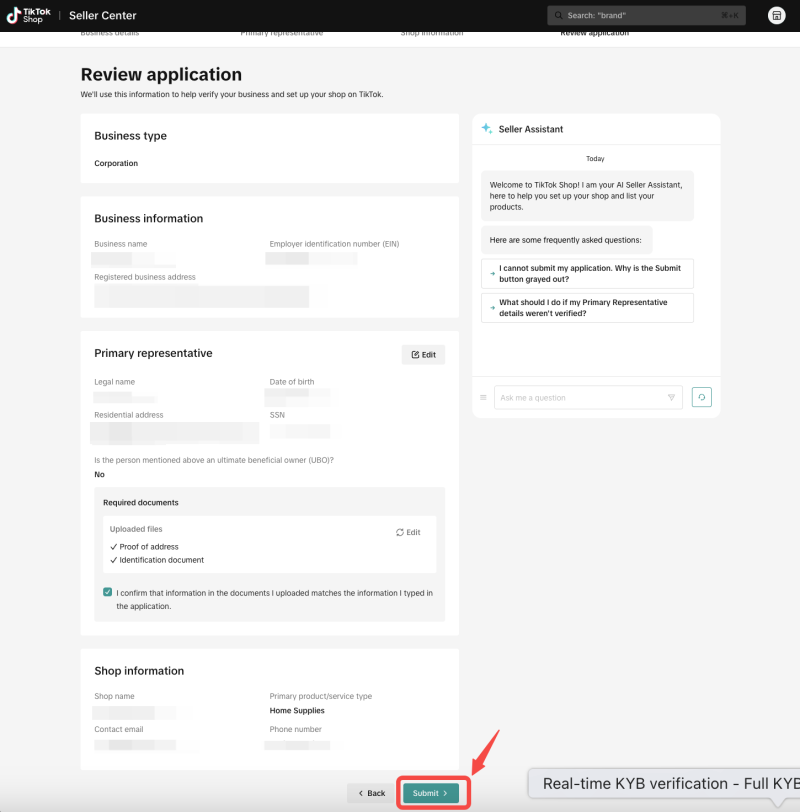
Under TikTok Shop’s official store requirements, business verification, company information, tax details, and bank payout details are all basic prerequisites for operating the store. For sellers, one of the most important tasks in the first week is to make sure the information submitted matches the store information exactly.
This part should focus on checking the following:
The goal of TikTok Shop verification is not just to complete the online submission. It is to make sure the core business information can continue to support the store over the long term. If the information is incomplete at the start, it can easily lead to later verification rejection, payout delays, or repeated requests for additional review.
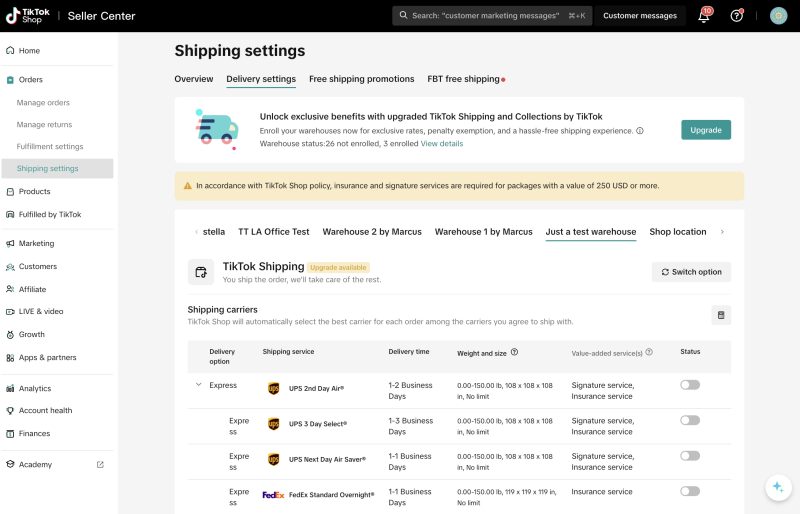
Warehouse and shipping setup is one of the most commonly overlooked tasks after registering for TikTok Shop, but it directly affects fulfillment and delivery efficiency later on. In Seller Center, sellers need to complete the basic setup for warehouse or pickup address, return address, shipping options, and shipping templates.
For example, for new sellers in the US market, the default shipping method is usually TikTok Shipping. If the seller switches to Seller Shipping instead, a shipping fee template must be configured first.
During the first week, it is best to complete the following three tasks first.
The address information should be accurate, usable, and aligned with the actual business operation. This includes both the pickup warehouse and the return warehouse.
If the warehouse setup is incomplete, it can later affect:
Shipping models may vary depending on the marketplace and seller type. New TikTok Shop sellers should confirm early whether they are using platform shipping or seller shipping, because this directly affects:
If the store currently has only a small number of SKUs and serves a limited selling region, there is usually no need to create multiple complex shipping templates right away. A safer approach is to first build one stable and general shipping setup that can support normal fulfillment, then optimize it later based on product category, order volume, and selling regions.
The core goal of TikTok Shop warehouse and shipping setup is not complexity. It is usability and stability.
Many sellers delay account security setup, but in practice, it should be completed at the same time as registration and store setup. Login email, phone number, password, two-factor authentication, and trusted devices are all part of TikTok Shop’s basic account management.
The following settings should be completed in the first week.
If the store will later involve team collaboration across operations, customer support, advertising, or content roles, shared backend access becomes more common. Enabling two-factor authentication early helps prevent login confusion, account theft, and permission leakage from the start.
Frequently switching devices, browsers, or network environments when logging into TikTok Shop Seller Center can trigger platform risk controls. It is better to organize a stable set of office devices early and keep the access environment as consistent as possible.
The shop owner account should only be used by the core manager or a very small number of people. Reducing shared use of a high-permission account lowers the risk of mistakes and also makes later problem tracing and responsibility assignment easier.

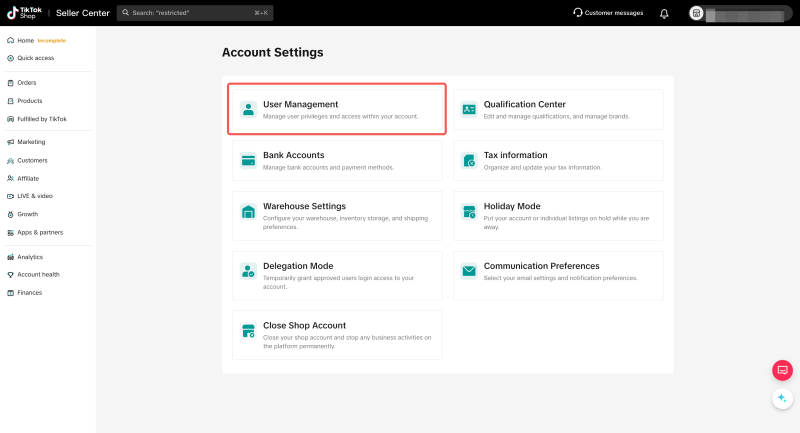
TikTok provides User Management and preset roles for different team members. Only the shop owner can invite new users in Seller Center and assign roles, and invited users need to activate their account through email or SMS within 120 hours. The platform currently provides preset roles with different levels of page access and management permissions, while some sensitive settings remain restricted to the owner account.
This means that for seller teams, the first week after registration is the right time to complete the initial permission setup.
A practical way to start is to separate roles into 3 groups.
This role is responsible for high-sensitivity settings such as business verification, store verification, warehouse and logistics settings, tax and bank details, and permission management. Access should stay limited to one person or a very small group, so core permissions do not become too widely distributed.
This role handles product maintenance, content coordination, routine data checks, and everyday backend tasks. These users should only be given the functions they actually need, rather than full administrative access.
This role should only have access to buyer messages, order handling, and after-sales tasks. Core settings such as warehouse, funds, and permissions should remain hidden from this role to keep the risk scope smaller.
A clear permission structure helps the TikTok Shop team divide work more effectively and makes troubleshooting more efficient. It is also a necessary condition for stable long-term collaboration.
The first week after registration is mainly about completing the basic setup. After the first month, the focus should shift to checking whether these settings are actually supporting store operations in practice.
It is a good idea to regularly review the following 4 areas.
This includes product categories, brand information, store details, and business information. If the initial setup was handled too loosely, it often creates repeated rework later in compliance review, verification, or documentation updates.
Warehouse addresses, shipping templates, and order fulfillment should not stop at being “set up.” The full process, including test orders, shipping, and returns, should be checked to confirm that the workflow actually works.
If the team is still frequently relying on the main owner account after the first month, or if owner, operations, and support permissions are still mixed up, efficiency will continue to suffer later on.
For an individual seller, completing the basic setup may be enough to keep the store running. But for teams managing multiple accounts, more issues often begin to appear during the second and third weeks, such as:
At that stage, relying only on a single device and standard browser setup makes it difficult to balance efficiency and account safety. For teams managing multiple accounts, tools such as DuoPlus Cloud Phone can help reduce repeated logins, permission confusion, and constant device switching.
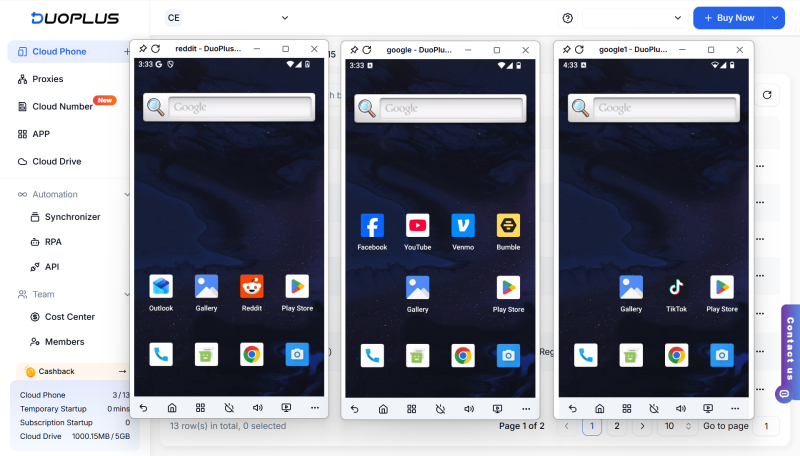
With DuoPlus Cloud Phone, teams can separate each account into its own independent operating environment and use isolated cloud spaces to reduce platform association risk. At the same time, its batch operations and centralized management features can simplify day-to-day maintenance across multiple accounts, making it more suitable for long-term multi-account operations.
Completing TikTok Shop Seller registration is only the beginning of store operations. What affects efficiency later is not the registration itself, but whether the store has completed the foundational setup during the first week, including verification, warehouse setup, account security, and permission allocation.
For new sellers, getting these basics in place early makes later product management, team collaboration, and fulfillment much easier to stabilize. For teams, building a clear permission structure and execution framework early also helps operations stay more organized, more transparent, and more sustainable over time.
As TikTok, Instagram, and Facebook become important channels for brand marketing, content creation, and affiliate …

TikTok Shop gives sellers multiple ways to reach potential customers, from shoppable videos and livestreams to creator …

When managing multiple social media accounts, you often need to handle large amounts of text, including post captions, …
No need to purchase multiple real phones.
With DuoPlus, one person can operate numerous cloud phones and social media accounts from a single computer, driving traffic and boosting sales for you.