





How to Sign Up for Meta Muse and Use a Referral Code
Muse has recently become one of the most talked-about AI Agent products in the AI tools space. As a new AI Agent from …
Learn how to choose and assign proxy IPs for multiple TikTok accounts. This guide covers proxy types, target markets, IP quality, stability, and how to manage TikTok accounts and proxies with DuoPlus Cloud Phone.

Get an AI-Powered Summary of This Article
When managing multiple TikTok accounts, network configuration is just as important as content, account, and data management. This becomes particularly relevant when accounts target different countries or regions. If multiple accounts continuously use the same network environment, it can be difficult to manage their IP addresses and access locations separately.
A proxy IP can provide a specific network environment for a TikTok account, allowing different accounts to use IP addresses associated with their target markets. However, choosing a proxy is not simply about finding one that works. You also need to consider the account's target market, proxy type, IP quality, stability, and the number of accounts you manage.
This guide explains why proxy IPs matter for managing multiple TikTok accounts, how to choose the right proxy type, and how to assign proxies to the corresponding accounts and devices.
A proxy IP can change the public IP and network access location used when a TikTok account connects to the internet. This allows accounts targeting different markets to use network environments that correspond more closely to their operational needs.
When multiple accounts perform actions such as publishing content, checking analytics, or browsing TikTok through the same IP, a large amount of traffic can become concentrated on a single network exit.
Assigning appropriate proxy IPs to different accounts can distribute network traffic and make each account's network environment easier to manage separately.
When multiple TikTok accounts consistently use the same network environment, their network access patterns can overlap. Using separate proxy configurations can reduce the extent to which different accounts share the same network environment.
However, proxy IPs are only one part of an account's operating environment. TikTok may also consider device information, login activity, account behavior, and other signals. Using different IPs therefore does not guarantee that accounts will never be associated or restricted.
TikTok accounts targeting different markets may need to access content, pages, or market information from corresponding regions. A proxy IP allows the account's internet traffic to use a public IP associated with the target market.
For example, a U.S.-focused account can use a U.S. proxy, while an account targeting Japan can use a Japanese proxy. When choosing a proxy, you should also verify that the IP's actual location matches the advertised region.
When choosing proxy IPs for multiple TikTok accounts, consider the target market, proxy type, IP quality, and account volume rather than simply comparing IP quantity or price.
First, determine which type of proxy fits the account's operating requirements. If an account needs a relatively stable network environment for long-term login, content publishing, and daily management, a static proxy IP may be more suitable. A static proxy generally keeps the same IP for an extended period and is therefore better suited to accounts that require IP continuity.
If your workflow requires IP rotation or access through a larger pool of IPs, a dynamic proxy IP may be more appropriate. Before choosing one, check how the provider rotates IPs, such as by time, request count, or connection, to make sure the rotation mechanism matches your requirements.
You should also consider the source of the IP. Residential proxy IPs come from residential networks and generally have network characteristics closer to those of ordinary users, while datacenter proxy IPs come from data centers and are typically valued for their stable connections, speed, and lower cost.
The proxy location should generally match the target market of the TikTok account.
For example, if you manage accounts targeting the United States, United Kingdom, and Japan, you can assign U.S., U.K., and Japanese proxy IPs to the corresponding accounts.
In addition to the country, check the actual IP geolocation to avoid situations where the advertised location does not match the IP's actual location.
For long-term TikTok account management, proxy quality can affect everyday activities such as login, content publishing, and account management.
When evaluating a proxy, consider factors such as IP availability, connection speed, latency, and network stability. A reliable proxy can make long-term account management more consistent and easier to maintain.
After selecting the proxies, you need to assign them to the appropriate TikTok accounts. If you only manage a few accounts, configuring proxies individually on phones or computers is relatively straightforward. As the number of accounts increases, however, repeatedly logging into different devices, changing network settings, and checking proxy status can become increasingly time-consuming.
For teams managing multiple TikTok accounts over the long term, a cloud phone can provide a more centralized way to manage accounts and proxy IPs. Different accounts can be assigned to different cloud phones and configured with their corresponding proxies, making the relationship between accounts, devices, and network environments easier to manage.
With DuoPlus Cloud Phone , you can:
1. Add proxy information
Prepare the proxy protocol, IP address, port, username, and password provided by your proxy provider, then add the information in the DuoPlus proxy settings.
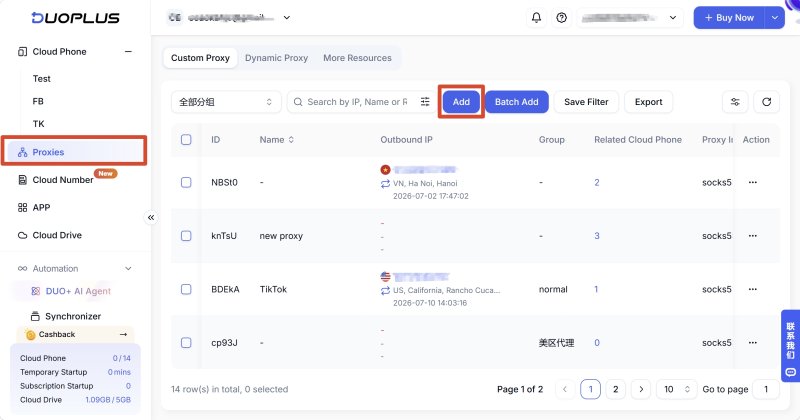
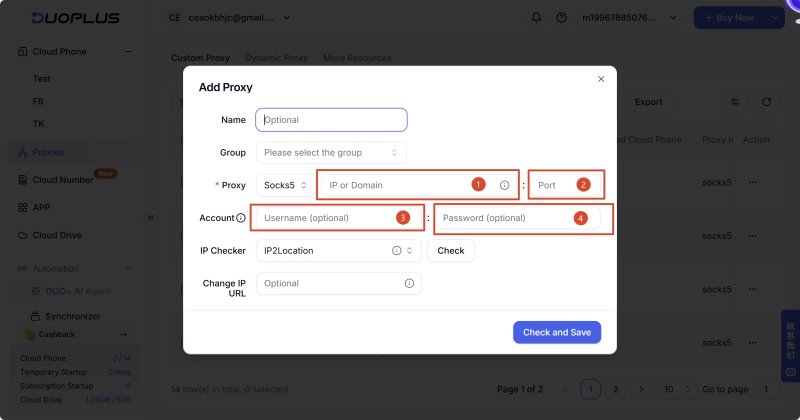
2. Assign the proxy to a cloud phone
After adding the proxy, assign the corresponding proxy to the selected cloud phone.
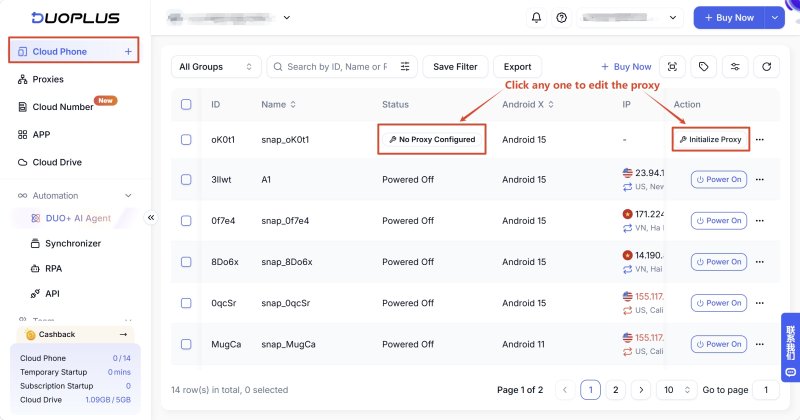
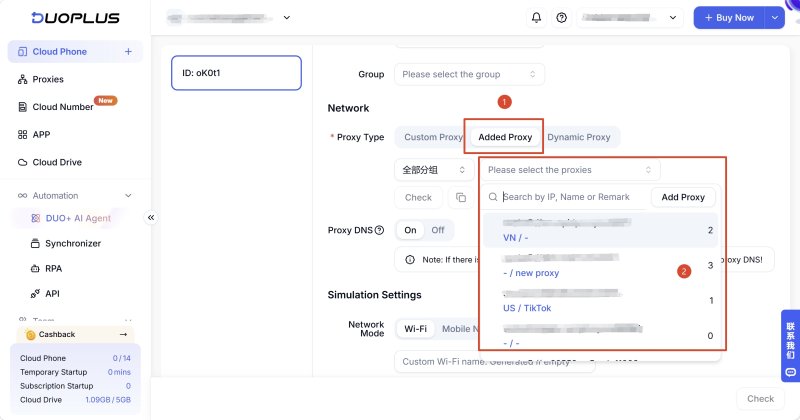
3. Start the cloud phone
Once the configuration is complete, start the cloud phone and check whether the current IP address and location match your expectations. After confirming that the proxy is working, log in to the corresponding TikTok account.
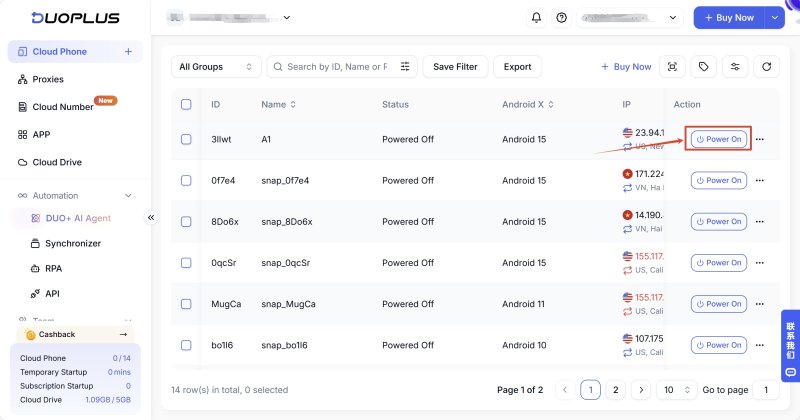
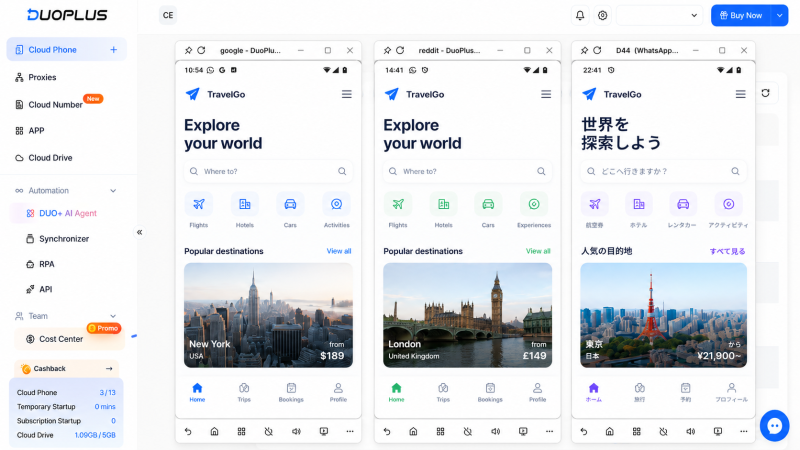
This approach allows teams to maintain a clearer relationship between TikTok account → cloud phone → proxy IP, making multiple-account management easier to organize.
When choosing proxy IPs for multiple TikTok accounts, start with the account's target market and operating requirements, then consider the proxy type, IP quality, stability, and account volume. Different accounts do not necessarily need identical proxy configurations, so the setup should reflect the actual business requirements.
For a small number of accounts, proxies can be configured directly on phones or computers. As the number of accounts grows, cloud phones can provide a more centralized way to manage different TikTok accounts, devices, and proxy environments. DuoPlus Cloud Phone supports adding and assigning proxies to individual cloud phones, making it suitable for teams managing multiple TikTok accounts and their network configurations.
Not necessarily. The right setup depends on the number of accounts, target markets, and operating requirements. If you need to separate the network environments of different accounts, assigning separate proxies can make management easier.
It depends on how the account is operated. Static proxies are more suitable when you need a relatively consistent IP, while dynamic proxies are more suitable when your workflow requires regular IP rotation or access to multiple IPs.
Choose a proxy location that matches the account's target market whenever possible. For example, a U.S.-focused account can use a U.S. proxy, while an account targeting the U.K. or Japan can use a proxy from the corresponding region.
Yes. You can configure different proxies for different cloud phones and place the corresponding TikTok accounts in those environments, making it easier to manage accounts, devices, and proxy configurations separately.
Muse has recently become one of the most talked-about AI Agent products in the AI tools space. As a new AI Agent from …

OpenAI Codex is an AI coding agent designed to help developers write, modify, review, and deliver code. It is available …

VK (VKontakte) is one of the major social media platforms in Russia. In addition to account management, content …
No need to purchase multiple real phones.
With DuoPlus, one person can operate numerous cloud phones and social media accounts from a single computer, driving traffic and boosting sales for you.

