





How to Log In to Codex: What to Do If You Don't Receive the Phone Verification Code
OpenAI Codex is an AI coding agent designed to help developers write, modify, review, and deliver code. It is available …
Facing the 'Maximum number of attempts reached' error on TikTok? Learn why TikTok restricts logins, how their security system detects unusual activity, and effective ways to fix login limits and manage multiple accounts safely.

Get an AI-Powered Summary of This Article
Many TikTok users have seen messages like “Maximum number of attempts reached” or “Too many login attempts, try again later” — especially after switching devices, changing networks, or managing multiple accounts.
When this happens, most people keep requesting verification codes, repeatedly try to log in, or even uninstall and reinstall TikTok multiple times. Unfortunately, those actions often make the restriction last even longer.
This guide breaks down why TikTok triggers login restrictions, how TikTok detects unusual login activity, and what actually works when you hit a login limit.
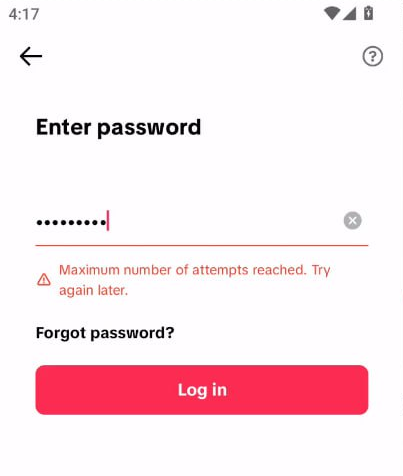
A lot of users assume their account has been banned the first time they see a login restriction. In reality, most “maximum attempts reached” warnings are temporary security measures triggered by TikTok’s risk detection system.
Here are the most common reasons TikTok limits login attempts.
This is one of the most common causes.
If you enter the wrong password multiple times or keep requesting verification codes within a short period, TikTok may temporarily lock login attempts to prevent unauthorized access.
TikTok tracks the usual login environment associated with your account, including:
If your account suddenly logs in from different devices or rapidly changing networks, TikTok may flag the activity as suspicious and temporarily restrict access.
Many users switch between multiple TikTok accounts on the same phone for convenience, but from TikTok’s perspective, several accounts sharing the same login environment can look risky.
Repeatedly logging into different accounts on one device — especially within a short period — increases the chances of triggering login verification or temporary restrictions.
Older TikTok accounts that haven’t been used for a long time are more likely to trigger security checks when logging in again.
Actions such as logging in from a new device, frequently changing account information, or repeatedly resetting passwords can make TikTok view the account as higher risk and trigger additional security checks.
Many users think a correct username and password are enough to log in safely, but TikTok analyzes much more than account credentials.
TikTok’s security system also evaluates the overall login environment, including device fingerprints, IP consistency, and account behavior patterns.
TikTok stores information about devices previously used to access the account, including:
If the current device looks very different from historical login records, the account may face additional verification checks.
TikTok also monitors:
Rapid IP changes or logging in from multiple regions within a short time can easily trigger abnormal login detection.
TikTok analyzes behavioral data such as:
If the activity pattern differs too much from normal user behavior, the account may temporarily lose access.
Why Some TikTok Accounts Get Restricted More Easily Than Others?
TikTok builds a trust profile for every account based on historical usage data, including account age, daily activity, device consistency and login stability.
Older accounts with stable long-term usage usually have a higher trust level and are less likely to trigger restrictions during normal login attempts.
New or inactive accounts, on the other hand, are far more sensitive to device or network changes.
If you see a login limit warning, avoid repeatedly trying to log in. Constant retries usually make the restriction last longer. Here are the methods that work best.
Best for: Temporary login restrictions caused by accidental failed password attempts
Some TikTok login limits automatically reset after a waiting period, which can range from 30 minutes to 24 hours depending on the risk level.
During this time, avoid repeated login attempts and constant verification code requests.
Best for: Accounts still blocked after waiting
Many users have found that resetting the password helps bypass the current login restriction. Even if normal login attempts are temporarily blocked, TikTok may still allow password recovery.
Steps:
After successfully logging in, avoid changing account settings or switching devices immediately. Let the account return to normal activity gradually.
Best for: IP-related login restrictions
Sometimes the issue is tied to the current network rather than the account itself.
You can try:
If the restriction is network-related, logging in from a cleaner and more stable connection often helps.
Best for: Accounts that continue getting blocked despite normal activity
If your account appears to be restricted by mistake, you can contact TikTok support through the login page or TikTok’s feedback page .
When submitting an appeal, make sure to include your username, a clear explanation of the issue, and the approximate time the restriction started.
In many cases, login problems are caused by unstable account environments rather than actual account violations. Here are a few ways to keep your TikTok account more stable long term.
TikTok generally trusts accounts that maintain the same device, stable IP locations and consistent usage behavior. Frequent changes in devices or networks increase the likelihood of triggering verification checks.
Turning on two-factor authentication (2FA) adds another layer of security and reduces the chances of repeated password-related login issues.
TikTok allows login verification through:
For users managing multiple TikTok accounts, constantly switching accounts on the same physical phone can easily trigger login restrictions. Using several physical devices is possible, but it quickly becomes expensive and difficult to manage.
That’s why many experienced TikTok users choose DuoPlus Cloud Phone to maintain a more stable login environment for each account.
DuoPlus Cloud Phone provides separate Android cloud devices for different TikTok accounts. Each account runs in its own isolated environment with independent device information, separate app data and stable long-term login sessions.
Compared to constantly logging in and out on a local device, this setup keeps account activity more consistent and reduces the risk of triggering TikTok security checks.
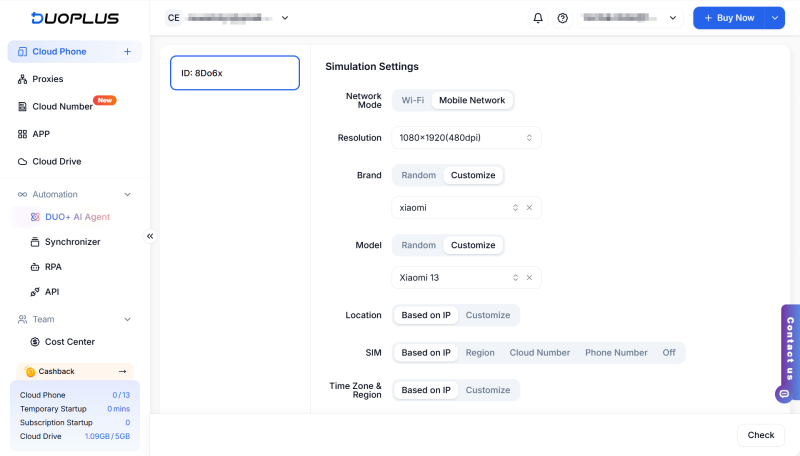
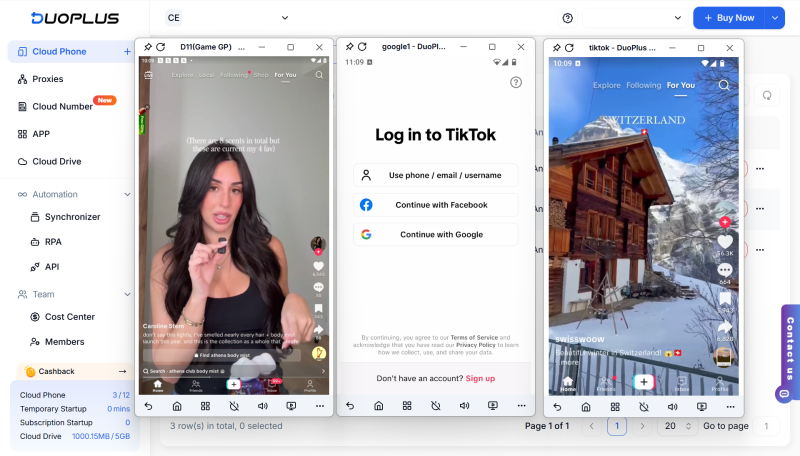
DuoPlus Cloud Phone also supports batch operations for users managing multiple TikTok accounts, including bulk account login, content uploads, scheduled publishing. This makes it much easier to handle repetitive daily tasks while keeping accounts separated.
1. How long does the “Maximum Number of Attempts Reached” error last on TikTok?
There is no fixed recovery time. The TikTok login limit may clear within a few hours, but some users may need to wait 24 hours or longer. Avoid repeated login attempts while waiting.
2. Does reinstalling TikTok fix the issue?
Reinstalling TikTok may fix app-related issues, but it usually cannot remove a temporary login restriction. Try clearing the cache first, then wait before logging in again.
3. Can changing the IP address remove the TikTok maximum attempts limit?
Changing the IP address does not guarantee that the limit will be removed. Frequently switching networks, IP addresses, or devices may trigger additional verification, so it is better to use a stable connection.
4. Why does TikTok still show the error after 24 hours?
The restriction may last longer if TikTok continues to detect repeated attempts or unusual login activity. Stop trying temporarily, reset your password if necessary, and contact TikTok Support if the error continues.
As TikTok continues strengthening its security and login detection systems, maintaining a stable account environment has become more important than ever.
Simple habits like keeping a consistent device, enabling 2FA, and avoiding excessive login attempts can already reduce many common restriction issues.
For users managing multiple TikTok accounts, using a solution like DuoPlus Cloud Phone to provide separate and stable device environments is often a much more reliable approach for reducing login risks and keeping accounts running smoothly.
OpenAI Codex is an AI coding agent designed to help developers write, modify, review, and deliver code. It is available …

VK (VKontakte) is one of the major social media platforms in Russia. In addition to account management, content …

ChatGPT is available through both the web version and desktop/mobile apps. The web version requires no installation and …
No need to purchase multiple real phones.
With DuoPlus, one person can operate numerous cloud phones and social media accounts from a single computer, driving traffic and boosting sales for you.
