




Instagram Creator Account vs. Business Account: Which Is Right for You?
Instagram offers two types of Professional Accounts: Creator accounts and Business accounts. For content creators, …
Learn why Threads accounts get suspended in 2026 and how to recover them through Meta's official appeal process. This guide covers common suspension reasons, Instagram account checks, login environment best practices, and practical tips to reduce the risk of future account restrictions.

Get an AI-Powered Summary of This Article
Threads has quickly become an important social platform for brands, creators, and cross-border businesses looking to expand their online presence. However, as Meta continues to strengthen its security and moderation systems, more users are encountering issues such as account suspensions, temporary restrictions, or being unable to log in.
Some accounts are flagged immediately after registration, while others are restricted after months of normal activity. In some cases, users even discover that when their Threads account is suspended, their Instagram account is affected as well.
If your Threads account has been suspended, avoid creating a new account immediately or repeatedly submitting appeals. Instead, first identify the reason for the restriction and follow Meta's official recovery process. This guide explains the most common causes of Threads account suspensions, how to recover your account, and practical ways to reduce the risk of future restrictions.
Threads uses Meta's account security and content moderation systems to evaluate account risk. Rather than judging a single action, Meta considers multiple factors, including account behavior, login environment, previous violations, and the status of connected accounts.
If the system detects suspicious activity, it may request identity verification, temporarily restrict certain features, or suspend the account altogether.
The following are some of the most common reasons why Threads accounts become restricted.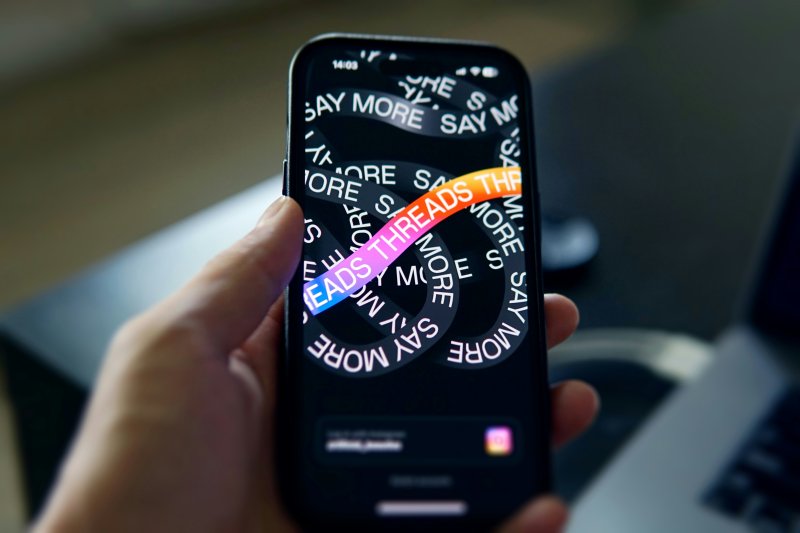
Threads continuously monitors user behavior and interaction patterns. Performing large numbers of similar actions within a short period may cause the system to flag your account as suspicious.
Examples include:
New accounts are particularly vulnerable because they haven't yet established trust with the platform. Rapid engagement immediately after registration can significantly increase the likelihood of triggering security checks.
It's generally safer to build account activity gradually by browsing, interacting, and posting at a natural pace.
Besides account behavior, Meta also evaluates where and how you log into your account.
Your account may be considered risky if you regularly:
These patterns may trigger additional identity verification or even temporary account restrictions.
For personal users, logging in from the same device and a stable network is usually sufficient. Businesses or users managing multiple accounts should minimize unnecessary changes to their login environment whenever possible.
Threads and Instagram are linked through the same Meta account system, so restrictions on one platform can affect the other.
For example, if your Instagram account is suspended or violates Meta's policies, your Threads account may also become unavailable, lose posting privileges, or display account restriction notices.
If your Threads account is suddenly suspended despite normal usage, it's worth checking whether your Instagram account has received any security warnings or policy violation notices. Many users focus only on Threads and overlook issues affecting the linked Instagram account, which can delay troubleshooting.
Threads also evaluates whether account activity resembles normal human behavior.
Aggressive automation often performs repetitive actions at unusually high speeds, such as:
These patterns differ significantly from typical user behavior and can trigger Meta's automated detection systems.
That doesn't necessarily mean automation should never be used. Responsible automation—such as scheduled publishing or limited repetitive tasks performed at realistic intervals—is generally much safer than aggressive bulk actions.
If you can no longer log in, post content, or receive a restriction notice, don't rush to register another account or repeatedly submit appeals.
Instead, work through the following steps to identify the cause and choose the appropriate recovery method.
Since Threads and Instagram share the same Meta account system, restrictions can originate from either platform.
When your Threads account is suspended, first log into Instagram and check whether your linked account is also experiencing issues.
If Instagram is also restricted, the problem may involve your overall Meta account rather than Threads alone. In that case, review notifications from both platforms and complete any requested identity verification or appeal process.
If Instagram works normally but only Threads is restricted, continue by checking Meta's emails or using the appeal option available within Threads.
When Meta restricts an account, it often sends an email explaining the account's current status and the next steps.
These emails may include:
Always verify that the email comes from an official Meta domain before clicking any links or entering account information to avoid phishing scams.
If no email has arrived, check the notifications inside Threads or Instagram, as some account warnings only appear within the apps.
If Meta provides an appeal option, follow the official review process.
When a Threads account is suspended or partially restricted, you'll typically see an Appeal or Request Review button after signing in. If you don't see one, refer to the instructions included in Meta's email.
The typical process is:
If you're asked to explain your situation, describe your account usage honestly and clearly.
Mention how you use the account, whether you've recently performed any unusual actions, and why you believe the restriction may have been a mistake.
Avoid emotional language or copied appeal templates. Clear and factual explanations generally help reviewers understand your case more effectively.
Some users may be asked to submit identification documents, selfies, or other verification materials.
If this happens, provide genuine, high-quality documents that match your account information to avoid unnecessary delays.
Many users repeatedly submit appeals because they're worried about waiting.
However, sending multiple requests rarely speeds up the review process and may even complicate the case. After submitting your appeal, simply monitor your email and in-app notifications for updates.
Meta doesn't publish a fixed review timeline. Minor restrictions may be resolved within hours or several days, while cases involving manual review or policy violations can take considerably longer.
While waiting, avoid changing your account information frequently or creating new linked accounts.
The final decision always depends on Meta's official review process.
Even after your account has been restored, Meta continues monitoring account activity and security signals. Developing healthy account management habits is far more effective than repeatedly appealing account restrictions.
Meta evaluates factors such as your device, network connection, IP address, and login location when determining whether an account appears trustworthy.
Frequently changing devices, switching IP addresses, or repeatedly logging multiple accounts in and out from the same device can trigger additional security checks.
For individual users, consistently logging in from the same device and network is usually sufficient for everyday use.
However, the situation is different for businesses, cross-border sellers, and social media teams managing multiple Threads accounts. As the number of accounts grows, constantly switching devices, networks, and login sessions not only increases management complexity but also makes it difficult to maintain a consistent login environment for each account.
In these situations, many teams choose to use cloud phones to manage multiple accounts.
A cloud phone is essentially a cloud-hosted Android device that functions just like a physical smartphone. Each instance runs independently, allowing you to install and use Threads, Instagram, and other Android applications while keeping accounts separated.
Using DuoPlus Cloud Phone as an example, each cloud phone can be configured with its own independent proxy and managed from a centralized dashboard. The platform also supports team collaboration and multi-device management, making it easier to assign each Threads account to its own dedicated environment rather than constantly switching between devices.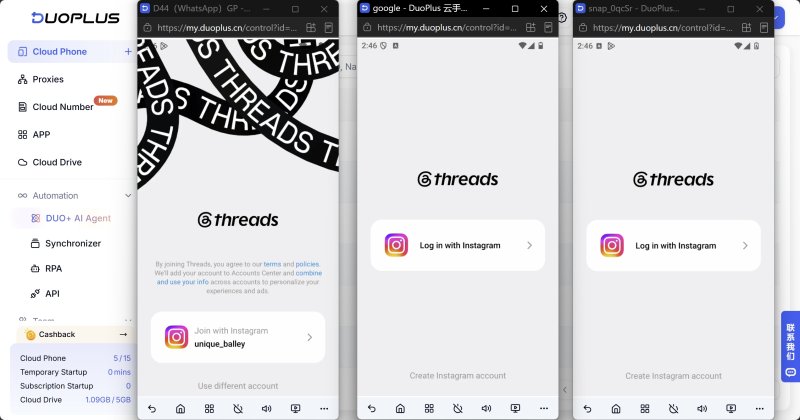
| DuoPlus Feature | Best For | Benefits for Threads Multi-Account Management |
|---|---|---|
| Independent cloud phone environment | Multi-account management | Keeps each Threads account in its own isolated Android environment |
| Independent proxy configuration | Overseas account operations | Helps maintain a consistent network environment for each account |
| Team collaboration | Business teams | Simplifies account management and collaboration across multiple operators |
It's important to understand that using a cloud phone does not guarantee account safety. Whether an account remains active ultimately depends on complying with Meta's policies and Community Standards.
Threads enforces Meta Community Standards and related platform policies when reviewing both content and account behavior.
Even with a stable login environment, repeatedly violating these policies may still result in account restrictions.
To reduce the risk of future suspensions, consider the following best practices:
Maintaining authentic account activity while consistently following Meta's policies helps support long-term account stability.
If your Threads account has been suspended, don't rush to create a new account.
Instead, first determine whether your linked Instagram account has also been affected, review any emails or notifications from Meta, and follow the official appeal or identity verification process.
Once your account is restored, focus on maintaining a consistent login environment, avoiding excessive repetitive activity, and using automation responsibly.
For teams managing multiple Threads accounts over the long term, creating independent and stable operating environments can simplify account management while reducing unnecessary operational complexity.
There is no fixed recovery time.
If your account only requires a security verification or has a minor restriction, it may be restored within several hours or a few days after completing Meta's requested steps. Cases requiring manual review or content moderation may take considerably longer.
The final timeline depends entirely on Meta's review process.
Yes—if Meta still provides an official appeal option.
Follow the instructions provided by Meta and submit your appeal through the official review process. Whether the account can be restored depends on the severity of the violation and Meta's final decision.
Be cautious of third-party services claiming they can "unlock" permanently suspended accounts for a fee, as these services are generally unreliable.
Not necessarily.
Because Threads and Instagram share the same Meta account system, restrictions may be tied to your overall account status rather than the Threads profile itself.
Before creating a new account, determine why the restriction occurred and complete the official recovery process whenever possible.
The best approach is to develop consistent, natural account behavior.
This includes maintaining a stable login environment, avoiding unusually high-frequency interactions, following Meta's Community Standards, and using automation responsibly.
For users managing multiple accounts, separating each account into its own stable operating environment can also simplify account management and reduce unnecessary device and network switching over time.
Instagram offers two types of Professional Accounts: Creator accounts and Business accounts. For content creators, …
You moved your accounts to DuoPlus cloud phones to stop them getting linked. Each one runs on its own Android device, …
When managing X (Twitter) accounts, some daily tasks need to be repeated, such as publishing posts, checking task …
No need to purchase multiple real phones.
With DuoPlus, one person can operate numerous cloud phones and social media accounts from a single computer, driving traffic and boosting sales for you.

