





How to Sign Up for Meta Muse and Use a Referral Code
Muse has recently become one of the most talked-about AI Agent products in the AI tools space. As a new AI Agent from …
Telegram's t.me short domain is experiencing DNS resolution issues with a serverHold status. Learn how to fix broken links, avoid phishing risks, and secure your team's Telegram accounts.

Get an AI-Powered Summary of This Article
http://t.me is experiencing DNS resolution issues. According to WHOIS records, the domain is registered with GoDaddy and currently shows the serverHold status, which means DNS resolution has been suspended. As a result, related website and email services may not work properly.delete Prohibited, transfer Prohibited, and renew Prohibited, which indicate that deletion, transfer, renewal, or related domain operations are restricted.https://t.me/username cannot be accessed, teams can test alternative formats such as https://telegram.me/username. Always verify that the link points to the official destination before publishing it.Recently, Telegram’s widely used short domain http://t.me has been experiencing access issues. According to WHOIS records, the domain is registered with GoDaddy and currently shows the following statuses:
serverHold: DNS resolution is suspended, so related website and email services may not be availabledelete Prohibited: Domain deletion is prohibitedtransfer Prohibited: Domain transfer is prohibitedrenew Prohibited: Domain renewal or related operations are restrictedt.me is one of Telegram’s most common short-link formats. It is widely used for groups, channels, bots, personal profiles, and community entry points.
When t.me cannot resolve properly, users may fail to reach the intended Telegram destination through the original link. More importantly, they may start searching for alternative entry points and end up in fake groups, phishing bots, or impersonator accounts.
This is not just a broken-link issue. It can also affect account security, user trust, and operational stability.
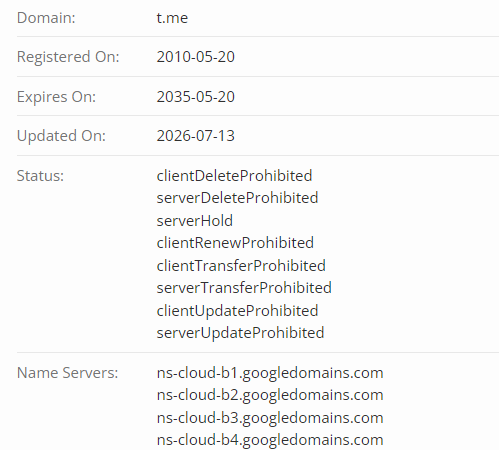
t.me links depend on normal domain resolution. If the domain is under serverHold, DNS resolution may be suspended, causing related links to fail or stop redirecting correctly.
However, this does not necessarily mean the Telegram app itself is unavailable. Many Telegram groups, channels, and bots may still exist, but users may have trouble accessing them through the t.me short link.
If your team uses Telegram groups or channels to manage a user community, broken t.me links may prevent new users from joining the official community. It may also make users more likely to be misled by fake third-party links.
Web3, wallet, trading, NFT, and DeFi projects rely heavily on Telegram communities. When links become unstable, fake airdrop bots, impersonated official groups, and phishing accounts may spread more easily.
Many Telegram bots use t.me/botname as their main entry point. If the link cannot be accessed, users may be unable to start the bot, affecting tool usage, notification delivery, and business workflows.
Many international teams use Telegram for user communication, announcements, and community management. If official entry links fail, user reach may be affected, and the risk of brand impersonation may increase.
If your team manages multiple Telegram, WhatsApp, TikTok, Facebook, Instagram, or other social accounts, link issues can make troubleshooting, link updates, and account permission management more difficult.
Start by checking Telegram links across:
Make sure each link opens correctly and points to the right Telegram group, channel, bot, or account.
If the original link does not work:
texthttps://t.me/username
You can test:
texthttps://telegram.me/username
Before publishing any replacement link, test it across different devices and network environments to confirm that it works and points to the official destination.
You can publish a short security notice such as:
Please only use the official Telegram links listed on our website to join our community or access our bot. We will never ask for your password, verification code, private key, seed phrase, or payment via Telegram.
This is especially important for Web3, finance, cross-border business, and community-driven products.
Teams should also review:
If the account environment is messy, a link issue can further amplify account security risks.
For teams that rely on Telegram, global social platforms, and mobile apps, t.me link issues are only the surface-level problem. What matters more is having a stable, isolated, and remotely manageable account environment so teams can quickly troubleshoot issues, update entry points, and reduce security risks.
DuoPlus Cloud Phone allows teams to assign separate cloud-based Android environments to different Telegram accounts, community accounts, bot accounts, or overseas social media accounts. Compared with logging multiple accounts into the same physical phone, isolated environments help maintain account stability and reduce operational errors, device mixing, and account association risks.
DuoPlus supports AI Agent and cloud number capabilities, making it suitable for mobile account registration, verification, message handling, and user communication scenarios. Teams can reduce reliance on personal phone numbers and repetitive manual work, making Telegram, social media, and app account operations more automated and process-driven.
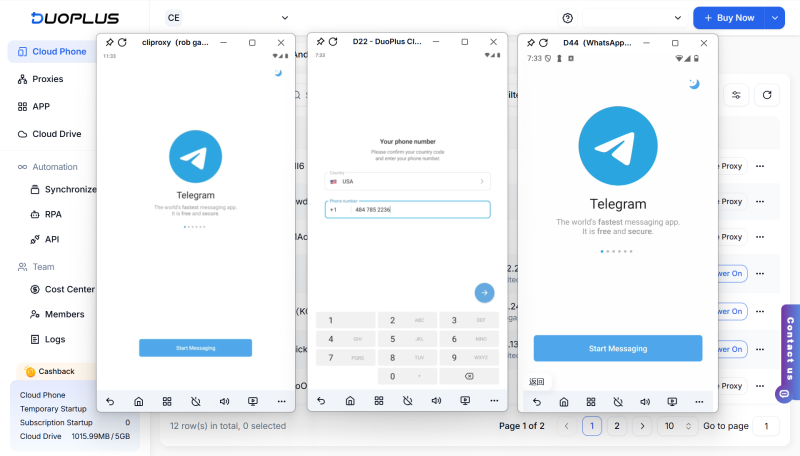
DuoPlus provides RPA and API capabilities, allowing teams to remotely control cloud phones and perform batch operations, status checks, message handling, and workflow tasks. When Telegram links, account login status, or app runtime status become abnormal, teams can monitor and respond through automation, reducing manual troubleshooting costs.
Team members do not need to carry multiple phones or frequently hand over physical devices. They can remotely operate Telegram, WhatsApp, TikTok, Instagram, and other mobile apps in the cloud. This can significantly improve collaboration efficiency for distributed teams, remote teams, and multi-project operations teams.

When a team needs to manage multiple Telegram groups , channels, bots, support accounts, or overseas social media accounts, DuoPlus Cloud Phone helps keep account environments centralized in the cloud. Account ownership becomes clearer, making it easier to troubleshoot links, update entry points, check login status, and hand over accounts when needed.
If company accounts stay logged in on employees’ personal phones or shared devices, personnel changes, device loss, or account leaks can create serious risks. By centralizing mobile account environments with DuoPlus Cloud Phone, teams can better standardize account usage, reduce password sharing, and limit unauthorized operations.
The DNS resolution issue affecting Telegram’s t.me short domain may impact access to groups, channels, bots, and community entry points. Teams should audit all public links as soon as possible, test alternative formats, create an official entry page, and warn users about fake groups and phishing links.
For teams that manage Telegram and global social media accounts over the long term, DuoPlus Cloud Phone provides isolated, stable, and remotely manageable cloud phone environments to improve multi-account security and operational efficiency.
Muse has recently become one of the most talked-about AI Agent products in the AI tools space. As a new AI Agent from …

OpenAI Codex is an AI coding agent designed to help developers write, modify, review, and deliver code. It is available …

VK (VKontakte) is one of the major social media platforms in Russia. In addition to account management, content …
No need to purchase multiple real phones.
With DuoPlus, one person can operate numerous cloud phones and social media accounts from a single computer, driving traffic and boosting sales for you.

