




What Is an X (Twitter) Shadowban? How to Check Search Restrictions and Restore Visibility
If engagement suddenly drops after you post on X (formerly Twitter), your account cannot be found in search, or a new …
Learn how to recover access through existing logged-in devices, Login Email, or Passkeys, and explore long-term number options, phone number privacy settings, and key considerations when using DuoPlus Cloud Numbers.

Get an AI-Powered Summary of This Article
Telegram is a messaging app many people use for everyday conversations, joining communities, and communicating with customers. However, account access is closely tied to the phone number associated with the account. If your original number is deactivated, a temporary SMS number is no longer available, or you cannot receive a verification code after switching devices, you may have trouble logging back in. Some users are still logged in on an old device but do not know how to change the number linked to the account. Others have been logged out of every device and face a more complicated account recovery process.
If you can no longer use the phone number linked to your Telegram account, do not immediately abandon the account or rush to create a new one. First, check whether you still have an available way to log in, then choose an approach based on your account status. This guide covers account recovery, choosing a number for long-term use, phone number privacy settings, and managing multiple accounts. It also explains which problems cloud numbers may help address.
If your original Telegram phone number no longer works but you are still logged in on another device, you may be able to change it to a new number you can control long term. If you are logged out on every device, account recovery may be more limited.
Login Email, the recovery email used for Two-Step Verification, and Passkeys serve different purposes. Availability depends on your account settings and the current login flow.
When choosing a number for long-term Telegram use, prioritize continued control of the number, the ability to receive verification codes, and ongoing maintenance costs—not just whether it can receive a code during sign-up.
DuoPlus Cloud Numbers support centralized management of phone numbers and verification messages. They may be useful when managing multiple app accounts, but whether a specific number works with Telegram depends on the number source and Telegram's verification process.
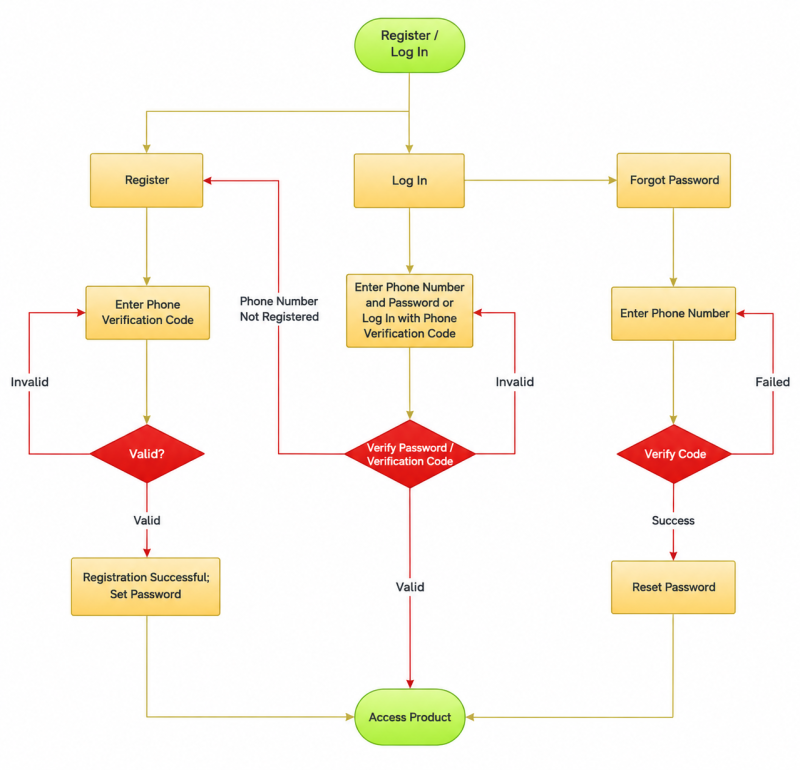
Telegram uses phone numbers to identify and associate user accounts, so a phone number is generally required when creating an account. Your number is not only used during sign-up; it can also be important when logging in again or recovering access. If you registered with a temporary SMS number or the number linked to your account has been deactivated, you may run into verification problems the next time you try to log in.
When you log in to Telegram on a new device, the app may ask for a verification code sent to the phone number linked to your account, or it may offer another available way to confirm the login request. The exact process can vary depending on your account status, login environment, and enabled security settings, so the steps are not necessarily identical every time.
Phone number verification helps confirm that the person attempting to log in can access a verification channel associated with the account, reducing the risk of unauthorized access. However, receiving a verification code does not always complete the login process. If Two-Step Verification is enabled, you may also need to enter your password. If the current login flow offers another method, such as Login Email, follow the instructions shown in the app.
This is why a Telegram account does not necessarily become invalid as soon as its original phone number is deactivated, but logging in again or recovering access may become difficult. The next step is to check whether the account is still logged in on another device, whether the original number can be recovered, and which verification options are currently available.
If your original number is no longer available, first check whether you still have access to your Telegram account. Different situations call for different solutions.
If Telegram is still logged in on your old phone, computer, or tablet, keep those sessions active. Avoid logging out or uninstalling the app before checking your options.
Follow these steps:
Open the Telegram client that is still logged in.
Go to Settings and check the phone number currently linked to your account.
If you want to change the number, find the Change Number option.
Follow the in-app instructions to verify your new number and move the existing account to a number you can control long term.
Telegram provides an official option to change the phone number linked to an account. Changing the number through account settings is different from registering a new account with another number. If the original number was deactivated recently, you can also contact your mobile carrier to ask whether it can be restored or replaced. This depends on the carrier's policies and the number's current status.
Telegram supports a Login Email mechanism. In certain login flows, it can send a verification code to the Login Email address associated with your account. This does not mean every Telegram account can log in directly with an email address, or that email can generally replace the phone number used to register the account.
If the login screen offers email verification, check the linked inbox for the code and follow the instructions. If the option does not appear, do not assume that entering an email address alone will restore access.
It is also important to distinguish between Login Email and a recovery email:
Telegram also supports Passkeys. If you set up a Passkey in advance, you may be able to use your device PIN or biometric authentication on a supported device and in a supported login flow. This feature must be configured beforehand and is not guaranteed to be available for every account that has lost access to its phone number.
If Two-Step Verification is enabled on your Telegram account, logging in may require both a verification code and your Two-Step Verification password. If you forget the password but previously set a recovery email, you can try the recovery process offered by Telegram. Whether the recovery email can be used depends on your account settings and the current recovery flow. If you can still access a logged-in device, check your account security settings first and confirm whether you still control the linked phone number.
Recovering your account becomes significantly more difficult if the original number has been deactivated, you cannot receive verification codes, and you are logged out of every Telegram client.
First, contact your carrier to check whether the original number can be restored. Then review any other verification or recovery options Telegram currently offers. If no usable method is available, you may not be able to regain access to the original account.
You can consider creating a new account, but first determine whether the original account can still be recovered and whether you need to retain its contacts, groups, and chat history. A newly registered account does not automatically inherit the identity or chat history of the original account.
If you plan to use Telegram over the long term, choose a number based on whether you can continue to control it—not simply whether it can receive one verification code during registration.
① Check Whether You Can Keep Using the Number
Temporary SMS numbers are generally intended for short-term verification. If you lose access to the number when the service ends, you may be unable to complete a future login, device change, or security check. For personal accounts and important business accounts, prioritize a number you can control continuously, and update any linked number that is no longer available.
②Check Whether the Number Can Receive Telegram Verification Codes
Different number types and providers offer different capabilities. A number that receives SMS messages from other platforms may not work for Telegram registration or login.
Before purchasing a virtual number or cloud number, check its country or region, number type, service duration, and intended use. Also confirm whether Telegram currently accepts that number type. Do not assume verification will succeed based only on a provider's marketing claims.
③ Compare the Ongoing Costs of Maintaining a Number
Physical SIM cards may involve purchase, top-up, roaming, or number-retention costs. Virtual numbers and cloud numbers may be subject to provider policies, plan durations, number recycling rules, and platform acceptance. Choose based on your expected usage period, continued control of the number, and future verification needs.
| Number Type | Key Characteristics | Use Cases and Considerations |
|---|---|---|
| Physical phone number | A number provided by a mobile carrier. | Suitable for personal accounts where long-term control is important. Consider number-retention and roaming costs. |
| Virtual number (e.g., Google Voice) | A phone number provided through an online service; a physical SIM card may not be required. | Check service eligibility, regional restrictions, and whether Telegram accepts the number. |
| Temporary SMS number | Usually intended for receiving verification codes over a short period. | Future control is limited, so it is not suitable for accounts that require reliable long-term access. |
| Cloud Number | Can be purchased and managed through a cloud service, with received verification messages viewed in a dashboard. | Useful for workflows that require centralized number management. Check the validity period and compatibility with the target platform. |
Whether a virtual number can be used to register for Telegram depends on the number type, the provider's rules, and Telegram's current verification requirements.
Google Voice, for example, is a virtual phone number service, but not every user is eligible to use it, and its numbers may not always pass Telegram verification. Before using it, check regional availability, service eligibility, and whether the target platform accepts the number.
Even if the number works for initial registration, make sure you can continue to control it. This helps prevent access problems if you need to verify your account again later.
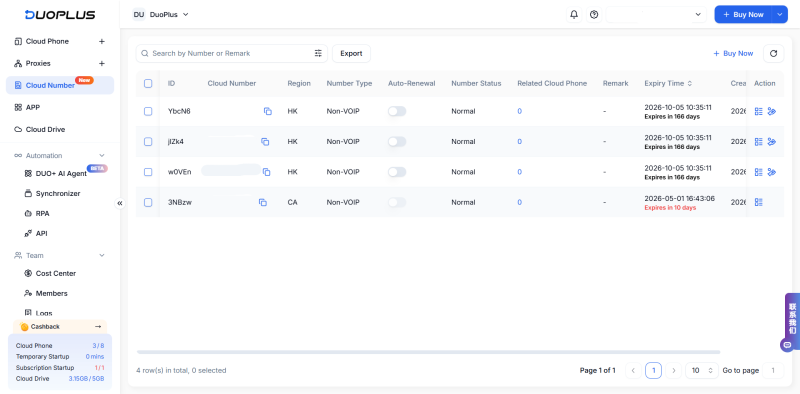
DuoPlus Cloud Numbers are cloud-based phone numbers for verification workflows across apps. Depending on actual inventory, users can purchase physical or virtual numbers and view and manage received verification codes in one dashboard. Some supported versions of DuoPlus Cloud Phone can also be linked to cloud numbers, allowing users to receive verification codes and complete supported verification steps within the device.
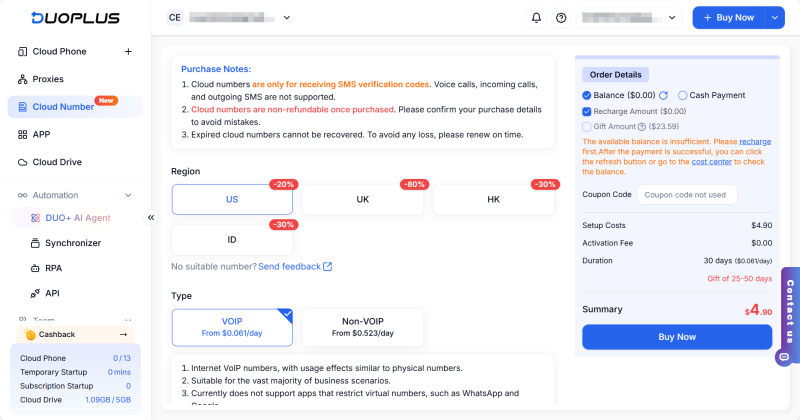
For users managing multiple app accounts, DuoPlus Cloud Numbers can reduce the need to switch between different numbers and SMS records. For example, operators can review message records for each number in the dashboard and manage the association between numbers and cloud phones according to their workflow.
However, a cloud number is not necessarily a permanent number. Available countries or regions, number types, purchase durations, and renewal methods depend on the plan shown at checkout. A number that receives verification codes from other platforms is not guaranteed to work with Telegram.
If you plan to use Telegram long term, confirm the number's validity period, renewal rules, and compatibility with the target platform before purchasing. Make sure you can continue to control the number.
If you want to communicate with people on Telegram without making your phone number visible to everyone, you can adjust your phone number privacy settings.
The general steps are:
①Open Telegram and go to Settings.
②Select Privacy and Security.
③Find the Phone Number setting.
④Choose who can see your number
and who can find you by your number, according to your preferences.
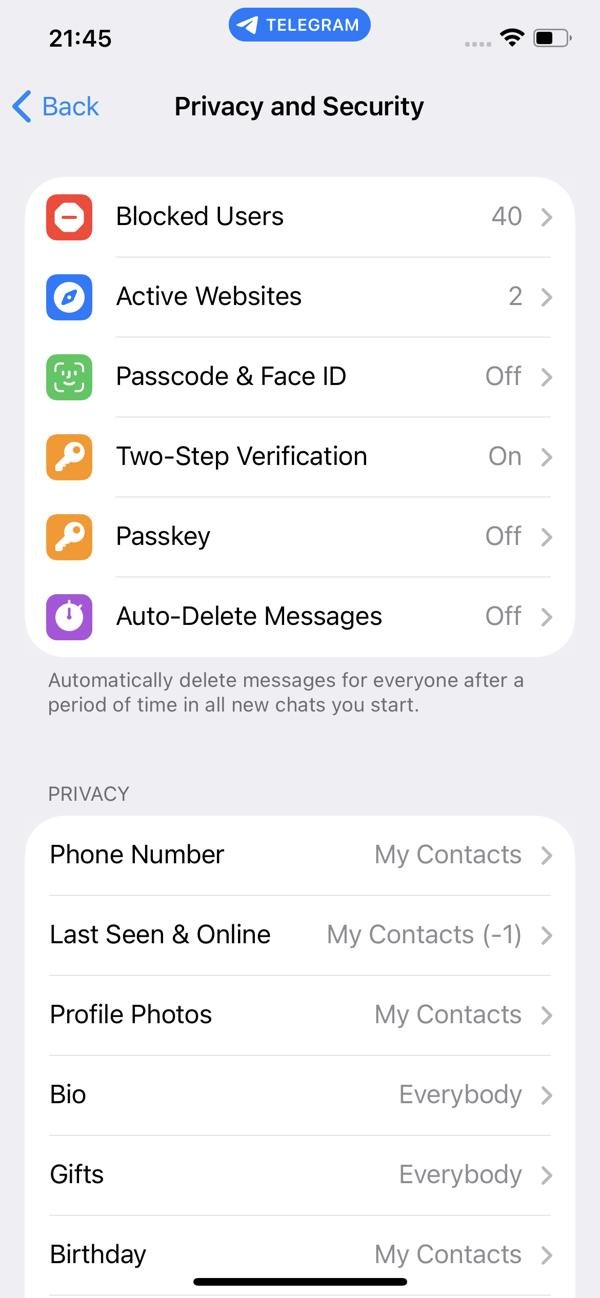
The exact option names may vary by client version and language. Refer to Telegram's official FAQ for guidance on phone number visibility.
Hiding your phone number only controls how visible it is to other users. It does not unlink the number from your Telegram account or replace login verification. If the linked number has been deactivated, you still need to address the number-change issue.
If you use only one Telegram account, you generally need to focus on keeping its phone number available and maintaining the account's security settings. For marketing, community management, or team workflows, multiple Telegram accounts may serve different purposes, such as customer communication, community management, and market research.
Managing them becomes more complex as the number of accounts grows.
You can improve your multi-account workflow in three ways:
①Track which number belongs to each account. Record the linked number, account status, and renewal date for every account so you do not discover a verification problem after a number expires.
②Define how devices and accounts are used. Assign login devices according to your workflow and make sure team members understand the intended use of each account.
③Standardize access and security practices. Set clear access permissions for shared accounts, protect verification codes and Two-Step Verification passwords, and avoid forwarding codes to people who do not need them.
Each DuoPlus Cloud Phone can be configured with a suitable proxy IP based on your workflow. You can also set device parameters such as brand, model, language, and time zone to distinguish different account environments.
Keep in mind that using different cloud phones or proxy IPs does not guarantee that accounts will never be linked or restricted. Results depend on the platform's detection systems, account behavior, and other factors.
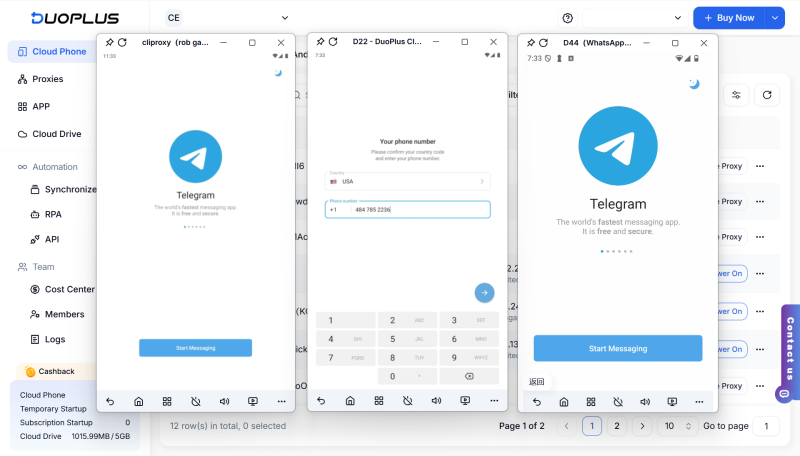
Cloud phone tools are better suited to workflows that involve multiple devices or accounts. If you only use one personal Telegram account, keeping the linked number under your control and updating security settings promptly are usually more important than adding another management tool.
If the phone number linked to your Telegram account has been deactivated, first check whether you are still logged in on another device and whether your carrier can restore the number. If you can still access the account, consider changing the linked number to one you can control long term. If you are logged out on every device, check whether the current login flow supports Login Email, a previously configured Passkey, or another available verification method.
For personal and business accounts that need to remain accessible over time, do not focus only on whether a number works for initial registration. Consider future verification, renewal costs, and account recovery as well. DuoPlus Cloud Numbers can support number management for some app-account workflows, but check the number's validity period, terms of use, and compatibility with Telegram before purchasing.
Whichever option you choose, prioritize continued control of the phone number linked to your account and keep your login credentials secure to reduce the risk of losing access later.
Telegram's Login Email is used for verification in certain login flows. It does not mean you can generally register a new account using only an email address. Follow the verification process currently shown in the Telegram client.
First, check that the phone number is entered in the correct international format. Then check whether the code has been delivered to another device where Telegram is still logged in, and whether the current screen offers another verification method. If the number has been deactivated, check whether your carrier can restore it and follow the available official process.
Telegram accounts are associated with phone numbers, and the client supports using multiple accounts. The exact number of accounts you can add may depend on the client version and current product rules. Check the official client's current limits and instructions.
The main risk is losing control of the number later, which can make it difficult to log in again or complete verification. For important accounts, use a number you can control long term and enable appropriate account security settings.
Using the official Change Number flow in Telegram settings generally moves your existing account rather than creating a new one. Before proceeding, confirm that you can still access the account and follow the in-app instructions.
If engagement suddenly drops after you post on X (formerly Twitter), your account cannot be found in search, or a new …
Social media operations often involve content publishing, account maintenance, project collaboration, and staff …
As TikTok, Instagram, and Facebook become important channels for brand marketing, content creation, and affiliate …
No need to purchase multiple real phones.
With DuoPlus, one person can operate numerous cloud phones and social media accounts from a single computer, driving traffic and boosting sales for you.

