




How to Manage Multiple TikTok and Instagram Accounts with Cloud Phones and Mobile Proxies in 2026
Managing social media for one business is relatively straightforward. Managing TikTok, Instagram, and Facebook accounts …
This article explains the reasons for Telegram's mutual restrictions and how to resolve them, ensuring smooth communication and improving cross-border service efficiency.

Get an AI-Powered Summary of This Article
Telegram is one of the most popular communication means for cross-border people. Maybe they don't get it if you're trying to message someone you want to connect with. This is because there are mutual restrictions on your Telegram account.
However, Telegram's mutual restrictions are not the same as a banned account. You just can’t message non-mutuals, which may restrict the productivity of cross-border services.
Today we’ll help everyone learn about the mutual restrictions of Telegram and tell you how to get out of them effectively, so you could use Telegram for cross-border communication more effectively.
If you're messaging a non-mutual user on Telegram, you may get a message like: "Sorry, you can only send messages to mutual contacts at the moment." This means that your account is limited to sending messages to mutual contacts.
Thus, the mutual restrictions of Telegram are not an official ban, but a general restriction that is determined by the settings of the user’s account. Your account can log in, receive messages and send messages in groups with mutual restrictions, but cannot actively send messages to non-mutual contacts.
Each other can limit your Telegram account for the following two reasons: 1. The user's privacy settings; 2. The system's security settings.
1. User Privacy Preferences
If the other party has privacy settings to allow messages only from "My Contacts" you will not be able to send them messages. The only way to remove this restriction is to add them as a contact.
2. System Security Configuration
If Telegram’s system flags your account as suspicious, mutual restrictions can also occur. This is the most common reason for users to get restricted and it includes mostly:
The main difference between mutual restrictions and bans is that you can still log into your account as usual. A ban basically means the account is flagged for repeated violations and can’t log in Mutual restrictions means the account can log in and receive messages, but can’t actively send private messages to “non-mutual contacts.” It is kind of a social media monitoring mechanism that is intended to guaranty the safety of users.
Based on the common experience of all users, the following two methods can be used to solve the problem that Telegram does not allow active messaging with non-mutual users.
Telegram has an official support bot, @SpamBot, find it, press on “Start” and follow the bot’s operational instructions.
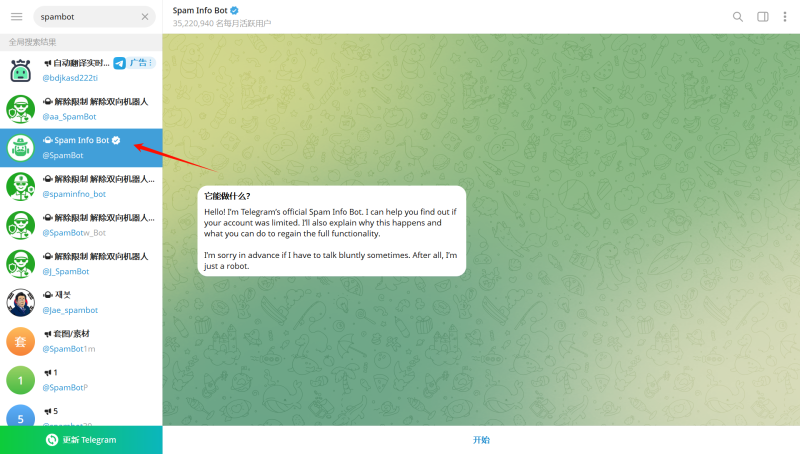
The first step is to choose the “Submit a complaint” option.
Then choose the option “No, I will never do any of this!“. This means that the account has not violated any rules.
The third step is to edit the dialog box that says “I am unable to send any message to anyone” and click send.
(Note that the language may be different, for example, there have been no violations in my account, but I can't send messages to other users.)
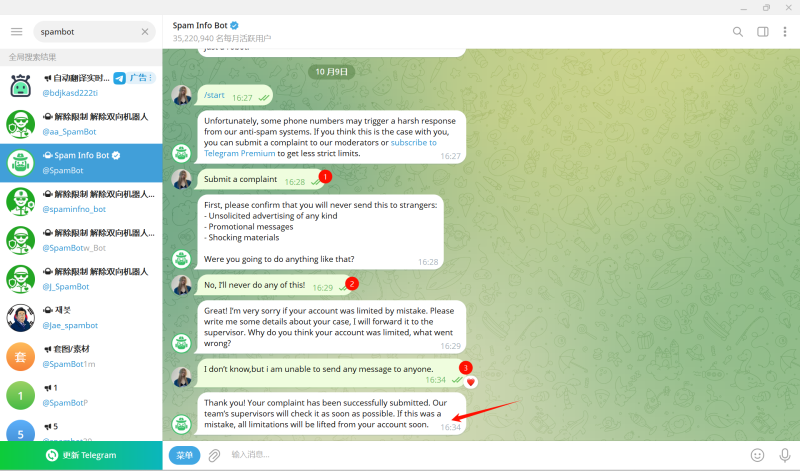
Effectively this will submit a request to resolve mutual restrictions. Usually, it takes around 30 minutes for resolution. However, if the request is not resolved for more than 1-2 days, you can resubmit it.
There will be no official notification to you when mutual restrictions are resolved. In the meantime, you can try sending private messages to other users.
Telegram is a foreign app and a lot of +86 numbers are restricted from calling each other. You can change the phone number associated with your account directly.
If you’ve been on a +86 number for a while and are suddenly restricted on sending private messages, you might want to switch to a Google Voice number or an overseas phone number. Mutual restrictions may be automatically lifted. However, one should be aware that virtual numbers can be subject to service provider distribution warnings, which may carry certain risks.
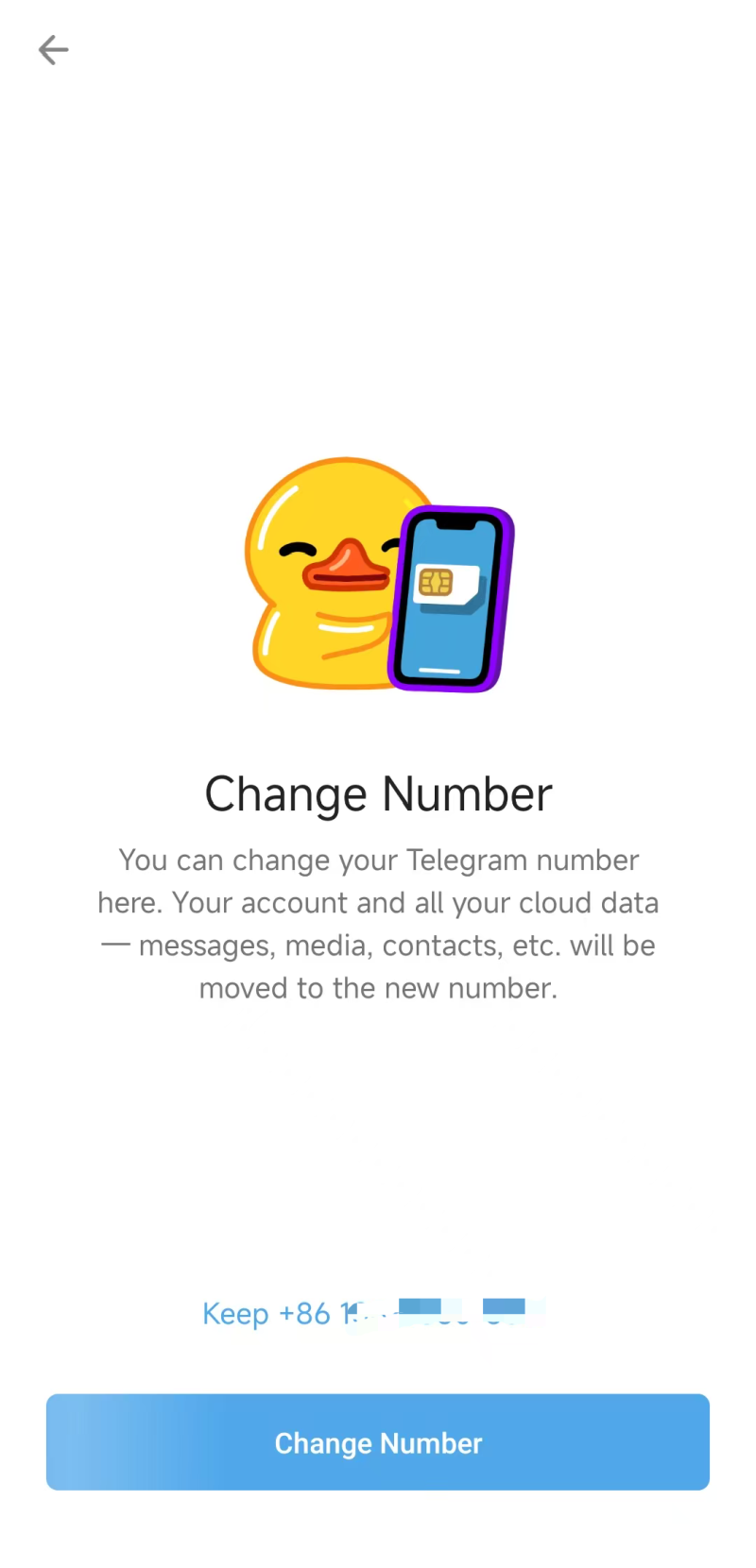
The new +86 number cannot send a private message temporarily, it does not need to be solved specifically, and it will gradually recover normally during this period. It is recommended to use Telegram regularly to avoid violations.
Based on the above reasons for mutual restrictions, Telegram users can decrease the possibility of being restricted by following their daily usage habits.
Guidelines for Keeping a New Telegram Account:
Daily work with the Telegram account:
There must be a range of problems arising during the usage of Telegram. We aim to find and adopt efficient solutions that would guaranty smooth communication and thus minimize the impact on productivity of cross-border services.
Just type the link directly to register and get a one-month cloudphone service. If you have any inquiries, Join the Telegram channel athttps://telegram.me/duoplusen
Managing social media for one business is relatively straightforward. Managing TikTok, Instagram, and Facebook accounts …

Instagram Reels are an important way for creators to showcase video content and reach new audiences. However, trying a …

WhatsApp is a widely used messaging app for everyday communication and business conversations. For users who need to …
No need to purchase multiple real phones.
With DuoPlus, one person can operate numerous cloud phones and social media accounts from a single computer, driving traffic and boosting sales for you.