





How to Use the DuoPlus Clipboard to Manage Multiple Social Media Accounts More Efficiently
When managing multiple social media accounts, you often need to handle large amounts of text, including post captions, …
Is TamilMV safe to use? Learn about common security risks, fake mirror sites, malicious downloads, and safer ways to browse TamilMV using proxies and DuoPlus Cloud Phone.

Get an AI-Powered Summary of This Article
TamilMV offers a wide range of content, including the latest Tamil, Telugu, Malayalam, Kannada, and Hindi movies, as well as dubbed films, regional releases, web series, TV shows, and selected English-language titles. As one of the most well-known third-party streaming and download websites, it attracts millions of users looking for the latest entertainment.
At the same time, many users have the same questions: Is TamilMV safe? Can it infect your device with malware? Could it expose your personal information?
In reality, the biggest risks don't necessarily come from the website itself. Instead, they often arise from pop-up advertisements, malicious downloads, third-party redirects, and browser tracking that users may encounter while browsing. Without basic security precautions, these risks could affect both your device and your personal privacy.
This guide explains the most common security risks associated with TamilMV and introduces several practical ways to browse more safely, helping you better protect your devices and personal data when visiting third-party websites.
TamilMV is a third-party movie website that hosts copyrighted content, which means browsing the site carries certain risks. In addition, because its domain frequently changes, many fake websites and mirror sites have appeared online, making it more difficult for users to distinguish legitimate pages from malicious ones.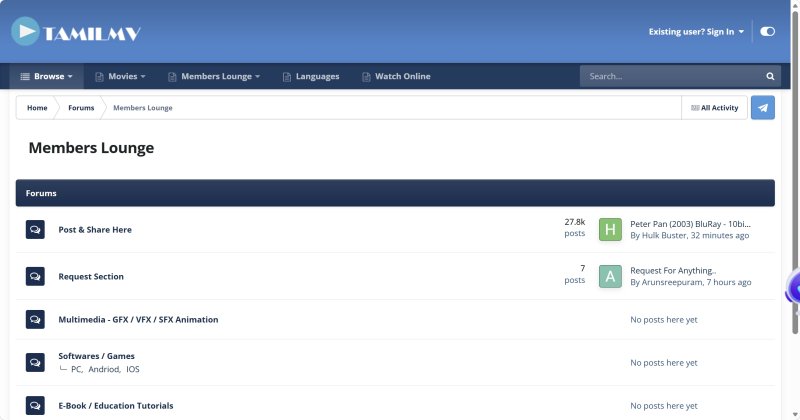
The most common risks include the following.
Movie pages often display multiple download buttons, but not all of them lead to the actual content. Some are simply advertisements designed to redirect users to software downloads, membership offers, or unrelated third-party websites.
Before downloading anything, always verify that you're clicking the correct link rather than an advertisement.
Every additional redirect creates another connection between your browser and an unknown website, increasing the chances of encountering advertising scripts, tracking technologies, or malicious pages. If you're redirected to an unfamiliar website, avoid entering passwords, payment details, or other personal information.
Some pages may prompt you to install a media player, video codec, browser update, or download manager before allowing you to access content. In some cases, unrelated software may even be bundled with the movie download.
In most situations, watching or downloading content from a website does not require installing additional software. If a website repeatedly asks you to download unknown applications, they're often third-party promotions or potentially unwanted software—and in some cases, they may contain malware. It's best to avoid installing them.
Some third-party websites collect browser information, including your device type, browser version, cookies, local storage, and browser fingerprint.
Although browser fingerprinting isn't always malicious, it allows websites and advertising platforms to identify your device and track your browsing behavior across multiple sessions.
If you frequently visit third-party websites, using an isolated browsing environment can help reduce unnecessary exposure of your device information.
Because TamilMV frequently changes its domain, many websites with similar names have appeared online, such as:
Some are legitimate mirror sites, while others are completely fake.
These fake websites often imitate the appearance of TamilMV but include significantly more advertisements, malicious scripts, misleading download buttons, and redirects to unrelated third-party websites.
For this reason, simply seeing the name "TamilMV" in search results doesn't guarantee that you're visiting a trustworthy website. Always verify the domain carefully before browsing or downloading any content.
Visiting TamilMV doesn't automatically put your device at risk. However, because the site may contain third-party advertisements, mirror sites, and unknown download links, many users take additional precautions to reduce potential security risks while browsing.
Different security measures address different risks, so the right approach depends on your browsing habits and security requirements.
Using a proxy or VPN is one of the most common ways to access websites that may be unavailable in certain regions.
A proxy or VPN routes your traffic through a remote server, helping to hide your real IP address and bypass regional restrictions.
If TamilMV isn't accessible from your location, or you want to reduce the amount of network information exposed to the website, using a proxy or VPN can be an effective solution.
Keep in mind that free proxy and VPN services often suffer from slower speeds, unstable connections, or questionable privacy practices. For long-term use, it's generally safer to choose a reputable provider.
In addition to protecting your network connection, it's also a good idea to separate TamilMV browsing from your everyday browser.
High-risk websites are more likely to display malicious advertisements, fake download pages, browser extension prompts, or phishing login screens. If these activities occur in the browser you use for work or personal accounts, they could potentially affect your normal browsing environment.
Common options include:
This allows you to isolate high-risk browsing activities from your primary browser. Even if you accidentally install an unwanted extension or need to reset the browsing environment, your everyday browser and accounts remain unaffected.
An isolated browser environment helps reduce many browsing-related risks, but if you accidentally download malicious software or encounter malware, your local device could still be affected.
For users who want an additional layer of isolation, a cloud phone provides a separate device environment for browsing.
A cloud phone is essentially an Android device running in the cloud. Browser cache, cookies, downloaded files, and browsing history are stored inside the cloud environment rather than on your local computer.
For example, DuoPlus Cloud Phone allows each cloud phone to use its own independent network environment and includes a one-click device reset feature. If you encounter a suspicious website or accidentally download an unwanted file, you can simply reset the cloud phone without affecting your local computer.
By isolating browsing activities within a separate cloud device, potential risks remain contained inside that environment instead of impacting your primary device.
For occasional browsing, a proxy or VPN is often enough to access TamilMV. However, if you're more concerned about browsing security, DuoPlus Cloud Phone provides an additional layer of isolation beyond what a local device can offer.
It doesn't make TamilMV itself safer. Instead, it isolates potential risks within a cloud-based device, reducing their impact on your local computer.
A cloud phone is an Android device running entirely in the cloud.
When browsing TamilMV, your browsing history, cache, downloaded files, and other temporary data remain inside the cloud phone rather than being stored on your local computer.
Even if you accidentally visit a suspicious page or download an unknown file, the impact is limited to the cloud phone instead of your everyday device.
Many users combine cloud phones with dedicated proxy services when accessing third-party websites.
Each DuoPlus Cloud Phone can be configured with its own Proxy IP, allowing every device to operate in an independent network environment. You can switch proxy IPs without modifying your local network settings or repeatedly changing proxy software on your computer.
Cleaning a local computer after installing unknown software or accumulating large amounts of browsing data can be time-consuming—and in some cases may even require reinstalling the operating system.
With DuoPlus Cloud Phone, you can simply reset the cloud phone to restore a clean device environment.
Instead of manually clearing browser cache, cookies, and downloaded files, a single reset returns the device to its initial state, making it easy to start with a fresh environment whenever needed.
If you want to keep TamilMV browsing separate from your local device, you can access the website through DuoPlus Cloud Phone. The following example demonstrates the basic setup process.
Log in to the DuoPlus Dashboard, create a new cloud phone, and select the Android version you want to use.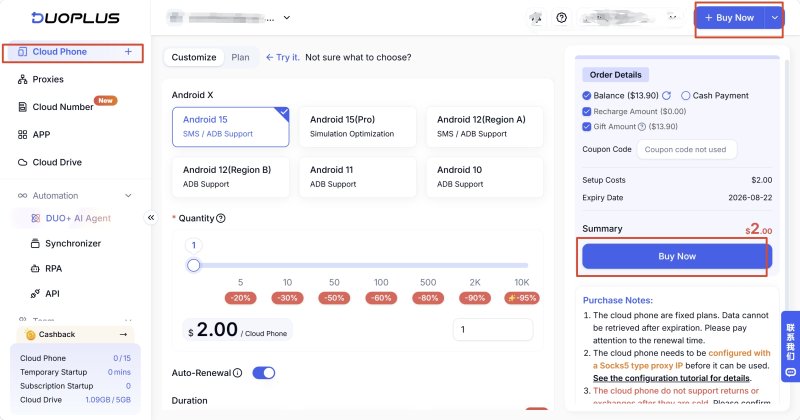
Go to the Cloud Phone Management page and click Initialize Proxy to assign a Proxy IP to the cloud phone.
Once the configuration is complete, use the built-in Check Proxy feature to verify that the network connection is working properly.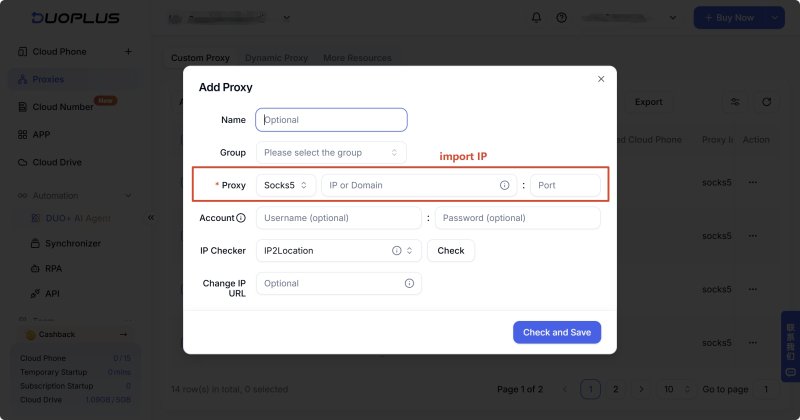
After the proxy is connected, power on the cloud phone and launch Chrome or another web browser.
Enter the latest available TamilMV domain to start browsing.
All browsing data—including cache, cookies, browsing history, and downloaded files—remains inside the cloud phone instead of being stored on your local computer.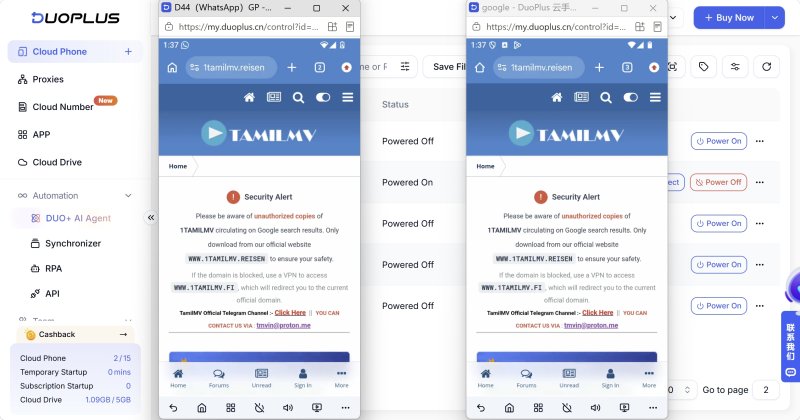
When you've finished browsing, you can simply power off the cloud phone.
If you plan to continue using the same environment later, you can leave it as it is. If you prefer to start with a clean device next time, simply reset the cloud phone. This restores a fresh environment without manually clearing browser cache, cookies, or downloaded files.
The biggest security risks associated with TamilMV typically come from third-party advertisements, fake mirror sites, malicious downloads, and unknown redirect links encountered while browsing.
Avoiding suspicious advertisements, downloading files only from trusted sources, and using a reliable proxy or an isolated browsing environment can significantly reduce these risks.
If you'd like to further isolate high-risk browsing activities from your local computer, DuoPlus Cloud Phone provides an independent device and network environment where browsing history, cache, and downloaded files remain in the cloud rather than on your primary device.
Ultimately, no tool can make a high-risk website completely safe. However, choosing the right browsing environment and following good security practices can greatly reduce potential risks while browsing.
TamilMV may become unavailable for several reasons, including domain changes, regional restrictions, DNS resolution issues, or temporary server maintenance.
If you can't access the site, first check whether the domain is still active, then try changing your DNS settings or using a proxy or VPN.
TamilMV frequently changes its domain, so there is no permanently fixed official website.
If the address you previously used no longer works, make sure you obtain the latest available domain from a reliable source and be cautious of TamilMV Fake Sites that imitate the original website.
Not necessarily.
A VPN can help bypass regional restrictions, but availability depends on the VPN provider, server location, and whether the TamilMV domain is currently accessible.
If the website still doesn't load after connecting to a VPN, try switching to another server, changing your DNS settings, or checking whether the site is temporarily unavailable.
DuoPlus Cloud Phone doesn't make TamilMV itself safer, but it helps isolate potential risks from your local device.
Browsing history, cache, cookies, and downloaded files remain inside the cloud phone. If you need to reset the environment after visiting a high-risk website, you can simply restore the cloud phone without affecting your local computer.
For users who want to separate high-risk browsing from their everyday work environment, DuoPlus Cloud Phone provides a practical and isolated solution.
There is no verified official TamilMV APK. APK files found on third-party websites may contain malware or other security risks. If you choose to install one, only download it from a trusted source and consider using DuoPlus Cloud Phone to isolate potential risks from your primary device.
When managing multiple social media accounts, you often need to handle large amounts of text, including post captions, …
E-commerce operations and social media content management often require saving product specifications, descriptions, …

Muse has recently become one of the most talked-about AI Agent products in the AI tools space. As a new AI Agent from …
No need to purchase multiple real phones.
With DuoPlus, one person can operate numerous cloud phones and social media accounts from a single computer, driving traffic and boosting sales for you.

