Script, RPA & AI Agent Automation: Which Is Best for Managing Multiple Mobile Accounts?
Discover the differences, advantages, and limitations of Script, RPA, and AI Agent automation. Learn how DUO+ AI Agent combines with cloud phones to help you manage multiple social media accounts efficiently.
Author
Sophie Laurent
25 Jun 2026
12 mins read
In 2026, with the massive scale of social media management, e-commerce operations, and digital marketing, managing multiple mobile accounts has become a daily routine for many teams. Because manual operation across various accounts and devices incurs significant time costs and operational risks, finding the right automation technology to boost efficiency has become a primary focus for the industry.
Currently, automation solutions for managing multiple accounts generally fall into three categories: traditional script automation, RPA (Robotic Process Automation), and the new generation of AI Agent automation. Due to their distinct technical logic and algorithmic architectures, these three technologies differ in their learning curves, execution stability, and adaptability to various scenarios.
This article provides a comprehensive analysis of the working principles, advantages, and limitations of each method to help operations managers quickly select the optimal automation solution for their business.
Key Takeaways
- Script Automation relies on code and fixed rules to execute tasks. It is ideal for stable workflows requiring precise control but comes with ongoing maintenance costs.
- RPA Automation manages repetitive tasks through visual workflows and templates, making it best suited for standardized, rule-based business processes.
- AI Agent Automation understands task objectives through natural language, significantly lowering the barrier to entry. It is perfect for multi-app, multi-account, and mobile operation scenarios.
- Users can mix and match these three automation methods based on task complexity, team technical capabilities, and business requirements.
1. What Is Script Automation?
Script automation refers to using pre-written program scripts to let a system automatically execute a sequence of operations following a fixed workflow. Characterized by clear logic and predefined steps, it is ideal for highly repetitive tasks with stable execution paths. For scenarios requiring the long-term execution of identical actions, script automation significantly reduces manual labor to boost efficiency.
1.1 How Script Automation Works
The core logic of script automation centers on predefined rules and rigid execution. Its typical workflow is as follows:
- Code Writing & Deployment: Technical personnel analyze the interface of the target application (App), write code containing specific logic, and install the script onto the device.
- Coordinate & Element Capture: While running, the script relies primarily on absolute screen coordinates (e.g., clicking screen location X:500, Y:600) or fixed control IDs (e.g., identifying specific submission button code) to locate where to operate.
- Sequential Fixed Execution: The script executes actions like clicking, scrolling, and text input in the exact sequence and time intervals defined by the code. The system cannot independently judge interface changes; it merely executes established program commands.
In practical applications, common script automation tools include Auto.js
, Tasker
, UiAutomator
, and various Python-based automation frameworks. For instance, Auto.js and Tasker are frequently used for automation on Android devices to complete tasks like clicking, swiping, and opening apps; UiAutomator is an official Android testing framework used to simulate user interactions on an interface; Python can be combined with tools like Selenium
and Appium
for web or mobile automation control.

1.2 Advantages & Limitations of Script Automation
Advantages
- Fast Single-Task Execution: On fixed interfaces with ideal network conditions, script automation can complete various standardized operations (such as scheduled check-ins or batch data imports) at exceptionally high speeds.
- Ideal for High-Precision, Fixed Workflows: For closed-loop, low-level tasks that are free from external interference and feature fixed layouts, scripts deliver precise results.
Limitations
- Technical Barrier to Entry: Developing and debugging scripts requires team members with a programming foundation. Standard operations personnel cannot write or modify code independently, which incurs additional hiring or resource costs for the team.
- Lack of Environmental Adaptability: The stability of a script depends heavily on the target app's user interface. Once an app updates its version, tweaks its layout, or triggers unexpected pop-ups like CAPTCHAs or direct messages, the configured coordinates or control IDs may fail, causing script interruptions or erroneous actions.
- High Long-Term Maintenance Costs: As major social media and e-commerce platforms step up their risk management mechanisms and interface update frequencies, scripts often require frequent re-debugging and rewriting. This makes it difficult to support long-term, stable operations across multiple accounts and platforms.
Consequently, script automation is best suited for rigid, unchanging tasks rather than scenarios requiring flexible judgment or frequent context switching.
2. What Is RPA Automation?
RPA (Robotic Process Automation) is a technology that uses software robots to emulate human interactions on computer or mobile device interfaces, executing business processes according to predefined rules. In multi-account management and cloud phone operation scenarios, RPA is commonly deployed to handle standardized, multi-step workflows that span across different applications.
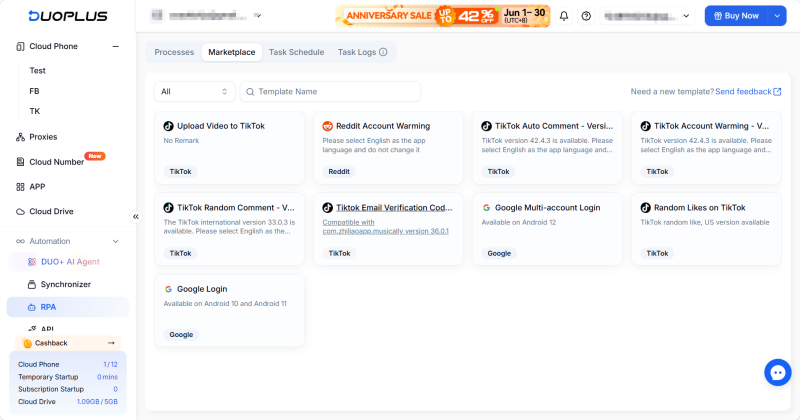
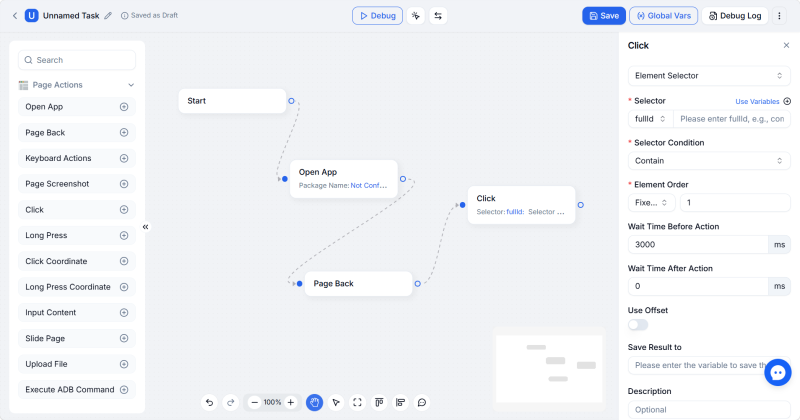
Within the DuoPlus RPA feature set, users can create and edit tasks via Workflow Management, call predefined configurations directly from the Template Store, view and execute recurring tasks via Schedule Management, and review execution outcomes in the Task Logs.
2.1 How RPA Automation Works
The core logic of RPA is built upon UI node recognition and workflow orchestration. Compared to traditional scripts, its operational approach offers several upgrades:
- Visual Workflow Orchestration: RPA generally provides a graphical user interface, moving away from pure code development. Users can drag and drop preset functional modules (such as click, scroll, text input, and conditional wait) to piece together a complete workflow like building blocks.
- UI Element Structure Recognition: When targeting operational goals, RPA relies less on absolute screen coordinates. Instead, it parses the application's UI structure tree (such as a node's text attributes, class name, and hierarchical relationships) to lock onto the target object.
- Template-Driven & Branching Logic Execution: Once choreographed, a workflow can be saved as a standard template. RPA allows conditional branches within the flow (e.g., "If Interface A appears, execute Action B; otherwise, execute Action C").In the DuoPlus Cloud Phone platform, the system comes with built-in RPA templates tailored for various business scenarios. Users do not need to configure everything from scratch; they can simply deploy relevant templates and tweak parameters to run batch executions across multiple accounts or devices.
2.2 Advantages & Limitations of RPA Automation
Advantages
- Lower Learning Curve: RPA utilizes a graphical interface with low-code/no-code characteristics. This allows operations personnel without deep programming backgrounds to independently configure automation flows by dragging and dropping functional modules.
- Improved Stability and Fault Tolerance: Thanks to UI structured node recognition, RPA adapts better than traditional scripts when interface elements undergo minor adjustments, leading to more stable operations.
- Facilitates Standard Operating Procedures : Its template-driven nature allows business workflows to scale quickly across a team. This helps multi-account management teams rapidly establish standard operating guidelines and shorten setup cycles.
Limitations
- Focus on Structured Tasks: RPA operations are bound by predefined rules. It is best suited for tasks with explicit steps and clear logic, facing boundary limitations when dealing with complex scenarios that require real-time, fuzzy judgments.
- Requires Periodic Manual Upkeep: When an application interface undergoes a major redesign or encounters unconfigured exceptions, human intervention is still required to adjust and maintain the rule templates.
3. What Is DUO+ AI Agent Automation?
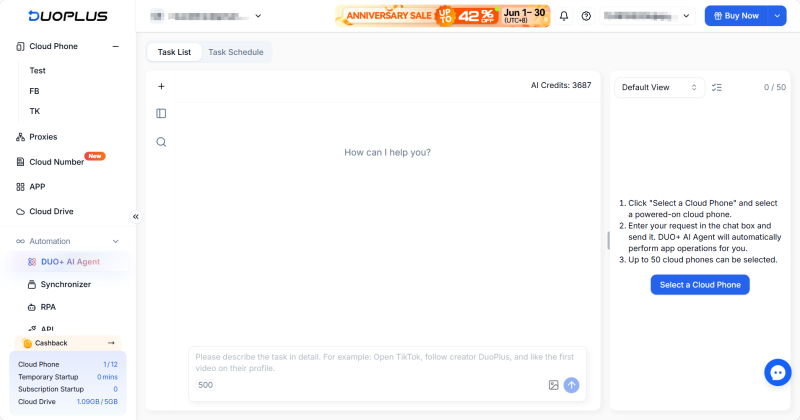
AI Agent automation represents an emerging technological trend in the mobile multi-account management space. DUO+ AI Agent is a next-generation AI automation feature designed specifically by DuoPlus for cloud phone environments. Its defining trait is the reduction of code and rigid rule constraints, allowing users to drive device tasks directly using natural language.
3.1 How DUO+ AI Agent Automation Works
Compared to a script's "coordinate execution" and RPA's "node orchestration," an AI Agent's operational logic aligns closely with intent understanding and autonomous execution:
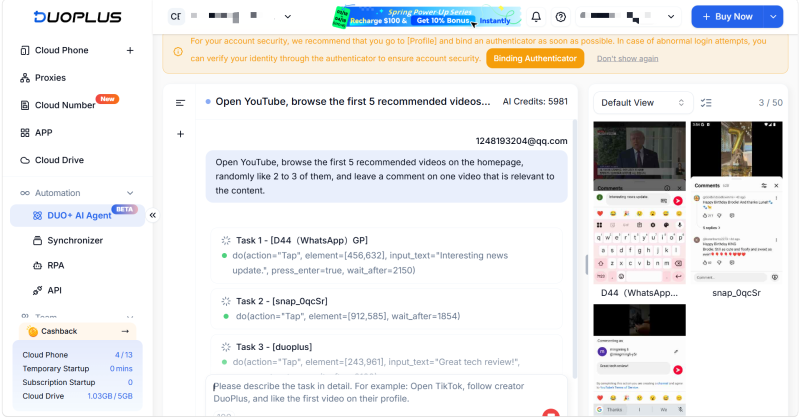
- Natural Language Command Parsing: DUO+ AI Agent is a completely no-code automation solution. Users do not need to write code or drag workflow blocks; they simply describe the task goal in plain language in the chat box (e.g., "Open TikTok, browse the recommended feed, and like the first 3 videos"). The system's built-in intelligent engine automatically parses the text and translates it into operational logic that the cloud phone understands.
- Dynamic Interface Recognition & Operation Simulation: Instead of relying on static coordinates or UI structure trees, the system utilizes AI vision and logical models to automatically identify various elements (such as buttons and input boxes) on the current interface. It then autonomously completes the entire operational process—including clicking, scrolling, and page switching—by simulating a real user.
- Cross-App & Multi-Device Scheduling: The system possesses the ability to switch and collaborate autonomously across different applications. Combined with the batch management framework at the cloud phone's foundation, a single natural language command given by a user can be synchronized and distributed to up to 50 cloud phones for parallel execution, achieving scale in multi-account management.
Start Now
3.2 Advantages & Limitations of DUO+ AI Agent
Advantages
- Significantly Lowered Barrier to Entry: Operating entirely on natural language interactions, non-technical marketing and operations personnel can directly configure automation tasks like TikTok account warming or Instagram interactions without relying on technical support.
- Dynamic Adaptation to App Interfaces: When facing application interface updates, layout adjustments, or routine pop-ups, the AI Agent adapts to changes autonomously through dynamic recognition. This reduces the failures caused by page redesigns.
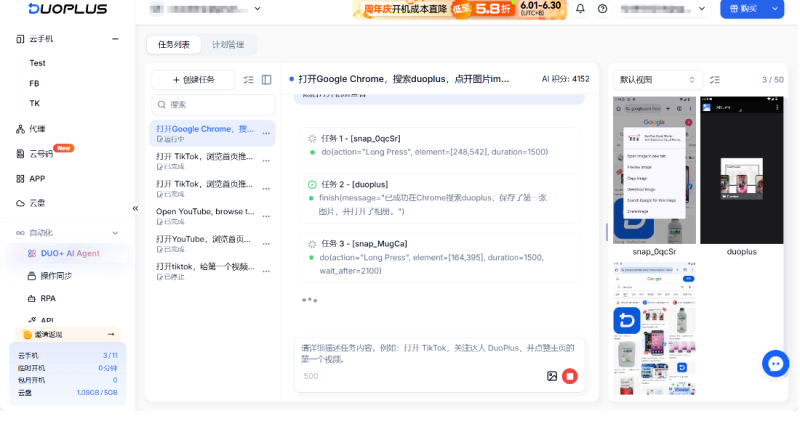
- Supports Cross-App Operations: It seamlessly handles sequential actions across different apps (such as searching and saving an image from a browser, then opening the gallery to verify it), offering a distinct advantage when managing fluid, everyday mobile tasks.
Limitations
- DUO+ AI Agent focuses primarily on repetitive daily tasks that have clear objectives but require a degree of procedural flexibility. If your business scenario demands exact precision over every minor operational detail, or if the underlying logic is extremely intricate, traditional scripts or RPA remain the more appropriate choices.
4. Script vs. RPA vs. AI Agent: How to Choose for Multi-Account Operations?
In practical business scenarios, these three automation technologies do not replace one another. Many mature teams managing multiple mobile accounts employ a hybrid setup based on the complexity of the tasks and the technical background of their team members.
1. Script Automation: Best for High-Frequency, Customized Low-Level Development
- Applicable Scenarios: When the operations team has dedicated technical staff or members familiar with scripting languages, and certain core operations demand high customization for execution logic and operational precision, scripts remain an efficient low-level tool.
- Team Division Suggestion: Technical members handle the writing and routine maintenance of scripts to process high-frequency tasks on long-static interfaces with singular operational paths—such as batch pulling traffic data from account backends daily or scraping product info—thereby achieving optimal operational speed.
- Applicable Scenarios: When a team wants to standardize mature business processes (such as syncing data reports across multiple stores or batch-processing files) and enable non-technical operations staff to execute them efficiently, RPA is a dependable choice.
- Team Division Suggestion: The team can choreograph standard operating procedures into RPA templates for operations staff to call directly. This approach maintains execution rigor while lowering communication overhead during collaboration, making it ideal for step-explicit, logic-dependent operations.
3. DUO+ AI Agent: Best for Low-Barrier, Multi-Scenario Daily Interactions
- Applicable Scenarios: For a vast array of daily, flexible business scenarios involving interface clicks, content interactions, and multi-app switching—especially when the task goal is clear but the steps require some adaptability—an AI Agent delivers a notable boost in efficiency.
- Team Division Suggestion: Both managers and novice operations staff can rapidly handle daily account interactions, content browsing, or information lookups via simple natural language commands. This applies to automated social media management on platforms like TikTok, e-commerce operations, and ad campaign optimization. It delegates repetitive, mechanical interaction tasks to the system, freeing team members from trivial work so they can focus on core strategies like content planning.
Core Comparison Matrix
| Dimension | Traditional Script Automation | RPA Automation | DUO+ AI Agent Automation |
|---|
| Core Drive Method | Code commands and coordinates | Visual modules and workflow orchestration | Natural language commands |
| Technical Learning Curve | High; typically maintained by technical staff | Medium; suitable for establishing standard operating specs | Low; accessible for ordinary operations staff |
| Environmental Adaptability | Low; must match interface layout precisely | Medium; relies on node structure recognition | High; possesses dynamic recognition and adaptation capabilities |
| Workflow Logic | Rigid, preset program logic | Standardized conditional branches and rule flows | Autonomous simulation after understanding task goals |
| Cross-App Collaboration | Requires complex code integration | Supports cross-app, but requires advance orchestration | Supports fluid, continuous collaboration across multiple apps |
| Team Division Suggestion | Technical staff handle low-level logic | Business staff maintain standard workflows | Full team efficiently handles daily interaction tasks |
FAQ
A1: Compared to traditional automation tools, it offers higher security against account risk. DuoPlus provides isolated, genuine device environments and independent IPs to keep account environments stable. On a behavioral level, traditional scripts and RPA rely on fixed coordinates and mechanical intervals, making them easy for platforms to detect. In contrast, DUO+ AI Agent utilizes large models for dynamic interface recognition, rendering operational trajectories and time intervals more random and consistent with genuine human behavior.
Q2: Is it necessary to introduce an AI Agent if our team already has technical programmers?
A2: Yes. Social media platform interfaces update frequently. Traditional scripts easily break due to minor interface tweaks, causing long-term maintenance and patch costs to climb continuously. Introducing an adaptable AI Agent to handle daily interaction tasks frees up your technical resources, allowing programmers to focus on core business logic and system development.
Q3: What is the learning curve for DUO+ AI Agent? Do users need a technical background?
A3: This feature is a completely No-Code application. Operations personnel do not need any programming foundation. By simply inputting business instructions using clear, natural language (e.g., "Open TikTok, search for a specific hashtag, and like the first 5 videos"), the system autonomously parses the steps and executes them. It is designed for quick adoption across the entire team.
Q4: How do AI Agent, RPA, and scripts differ in terms of execution efficiency?
A4: In terms of pure execution speed, scripts and RPA outperform the AI Agent because they rely on immediate, hardcoded responses. An AI Agent involves UI element recognition and path planning phases during execution, introducing millisecond-level pauses between steps. However, in social media management scenarios, this moderate, human-like pacing is actually advantageous for evading automated detection systems.
Conclusion
Maximizing efficiency when managing multiple accounts comes down to allocating technical tools intelligently based on your team structure and task characteristics to achieve the optimal combination:
- Script Automation: Suited for teams with development capabilities to execute core, high-frequency tasks with fixed low-level logic.
- RPA Automation: Suited for scenarios with standardized business processes, enabling cross-platform collaboration through structured workflow orchestration.
- DUO+ AI Agent: Suited for all operations team members, drastically lowering the technical barrier via natural language interaction to flexibly handle fluid, evolving interaction scenarios.
By aligning your tools with your team's current strengths—having technical staff maintain low-level systems, business leaders secure workflows, and operations staff leverage AI—you can achieve a streamlined, highly productive account management ecosystem.
Start Now