
How to Sign Up for Meta Muse and Use a Referral Code
Muse has recently become one of the most talked-about AI Agent products in the AI tools space. As a new AI Agent from …
Learn how to effectively repurpose TikTok videos for Instagram Reels with a 5-step workflow. Avoid common pitfalls like watermarks and mismatched CTAs while optimizing for Instagram's algorithm and managing multiple accounts efficiently.

Get an AI-Powered Summary of This Article
In social media marketing, many teams post TikTok videos to Instagram Reels as a shortcut. On paper, it sounds efficient. In practice, the results are often uneven: the content feels reposted, engagement is unstable, and the workflow does not actually save much time.
The issue is not whether TikTok videos can be posted to Reels. The issue is that TikTok videos are usually built around TikTok’s own structure, editing style, captions, and calls to action. Instagram has said it aims to recommend original content and gives priority to the original version when it detects reposted or repeatedly repurposed material. TikTok help center also treats features such as editing tools, Duet, Stitch, accessibility tools, and TikTok Studio as part of the video creation workflow.
Therefore, both TikTok and Instagram require a rethink of the video publishing process based on each platform’s unique characteristics.
TikTok and Instagram Reels are both short-form video formats, but they do not reward exactly the same content patterns.
If a video includes a visible TikTok watermark, TikTok-specific on-screen language, or a style that clearly depends on TikTok context, it will feel like reposted content on Reels rather than native Instagram content. Instagram explicitly says materially edited original content is prioritized over reposted versions, and simply stitching clips together or adding a watermark does not count as original.
A video rhythm that performs on TikTok may not work on Reels, especially when it relies heavily on trend context, comments, challenge mechanics, Duet, or Stitch. TikTok’s own help center groups tools like Duets, Stitch, editing.
TikTok videos often end by encouraging comments, replies, Duet participation, Stitch responses, or more profile browsing. On Instagram, Reels more often support next steps such as profile visits, saves, DMs, Story follow-ups, or clicking the bio link.
So when you move a TikTok video to Instagram Reels, the goal should not be to recreate everything from scratch, but it should also not be a direct repost. The better approach is to reuse the right source material, adapt it to Reels, and then publish it in a stable workflow.
Not every TikTok video should be republished on Instagram Reels. The best candidates usually share two characteristics: they do not depend heavily on TikTok-native features, and their information structure is already clear.
Tool demos, product walkthroughs, feature explainers, and process videos often travel well because the value comes from the information itself, not from platform-specific interaction.
Examples include before-and-after clips, workflows, product usage scenes, and behind-the-scenes execution. These videos depend more on visual clarity, so they are easier to rebuild.
This includes lessons learned, framework breakdowns, and industry takeaways. But this type usually needs heavier rewriting in the title, caption rhythm, and CTA.
By contrast, videos built too heavily around TikTok trends, comment context, challenge mechanics, or visible TikTok branding are usually weak candidates for Reels adaptation.
A common shortcut is to download the finished TikTok video and upload it to Instagram. It looks efficient, but it often preserves platform signals and leaves little room for clean editing.
A better method is to keep reusable source assets, such as:
This gives you more control over the rebuild. Instead of being locked into the final TikTok export, you can edit around the core idea and create a cleaner Reels version.
If the video has already been fully edited inside TikTok, then before using it on Reels, at minimum you should remove obvious TikTok branding, replace platform-specific prompts, and rewrite any CTA that only makes sense inside TikTok’s own interaction flow. Instagram’s guidance around originality makes this especially important.
Cross-posting only works when the structure is rebuilt, not when the visuals are copied over unchanged.
If the TikTok version opens with too much inside-context, dense subtitles, or a weak value signal, it often needs to be rewritten for Reels. Stronger Reels openings usually do one of three things quickly: show the result, show the key visual, or state the value in one sentence.
TikTok often tolerates faster, denser subtitle pacing. Reels generally works better when the text is cleaner, easier to scan, and more selective. It helps to reduce the amount of text per frame and highlight only the key phrase.
A TikTok ending may push viewers to comment, Duet, or Stitch. A Reels ending is usually stronger when it directs users to visit the profile, save the video, send a DM, or click the bio link.
Repurposing short-form video is not just about re-editing the video. The text layer matters too.
On TikTok, the cover often serves only the individual post. On Instagram, the Reels cover also affects how your profile grid looks as a whole. A better Reels cover is usually clearer, more outcome-driven, and visually consistent with the rest of the account.
If the TikTok title is trend-heavy or emotion-led, it often works better on Reels when rewritten into a question-led, result-led, or tutorial-led angle.
TikTok captions are often shorter and more dependent on in-platform context. Instagram captions are more useful for adding context, reinforcing keywords, and guiding the next action. In practice, it helps to keep the core theme, then add just enough explanation and an Instagram-appropriate CTA.
If your team repurposes TikTok videos for Reels regularly, this should not rely on memory or one-off judgment. It should become a fixed checklist.
A practical checklist usually covers three areas:
Content selection
Editing
Publishing

In a single-account setup, repurposing is mostly an editing problem. But once the workflow of selecting, adapting, and publishing starts running across multiple accounts, the biggest time drain is usually no longer the video itself. It becomes account switching, scheduling, and repetitive posting.
Different accounts often need different video versions. Publishing times may need to be staggered across TikTok and Reels. Accounts in different regions may need different languages, offers, or landing pages. And once multiple people are involved, assets, accounts, and publishing tasks can quickly become fragmented.
These issues do not always hurt the quality of one post, but they do affect how stable the overall content system becomes. That is why efficient multi-account publishing matters just as much as the creative work itself.
This is where DuoPlus Cloud Phone can help. Using DuoPlus Cloud Phone effectively solves multi-account collaboration issues and helps you better publish TikTok videos to Instagram Reels.
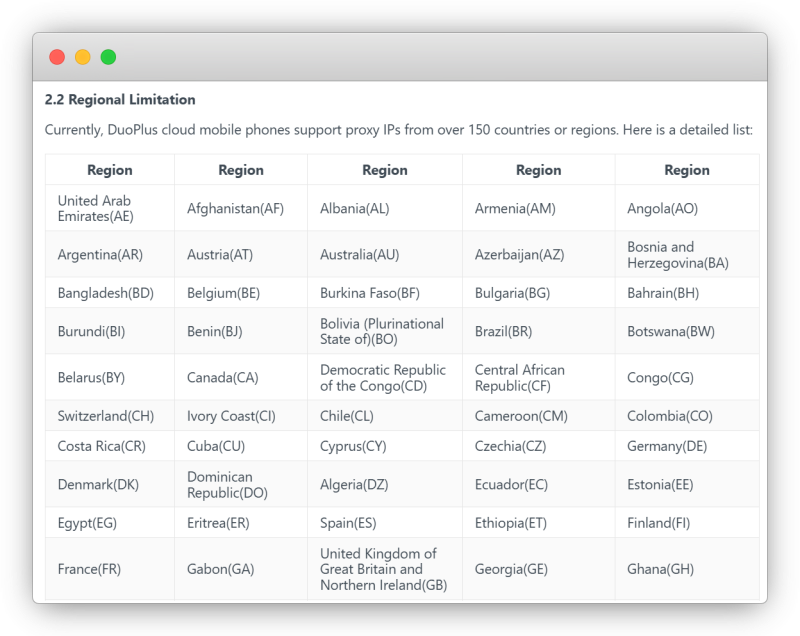
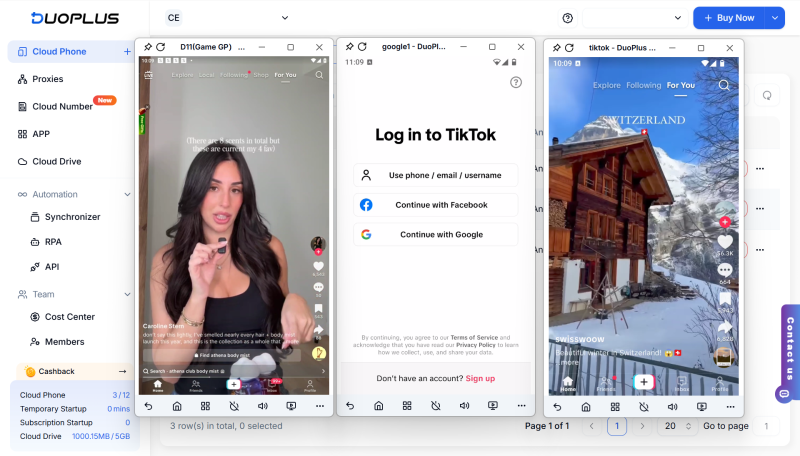
In cross-platform publishing scenarios, DuoPlus Cloud Phone does not change your content creation methods; instead, it makes the multi-account publishing process more stable and reduces repetitive operations.
When repurposing TikTok videos for Instagram Reels, the key is not simultaneous posting, but reorganization.
First, select content worth reusing; then restructure the edit, cover, and caption according to Reels’ logic; finally, standardize the multi-account publishing process.
Only in this way can secondary creation truly deliver long-term value.
Muse has recently become one of the most talked-about AI Agent products in the AI tools space. As a new AI Agent from …

OpenAI Codex is an AI coding agent designed to help developers write, modify, review, and deliver code. It is available …

VK (VKontakte) is one of the major social media platforms in Russia. In addition to account management, content …
No need to purchase multiple real phones.
With DuoPlus, one person can operate numerous cloud phones and social media accounts from a single computer, driving traffic and boosting sales for you.