
Buvei Launches Virtual Card Platform for Global Business Crypto Payments
Amid the sustained rapid growth of digital advertising, SaaS services, and cross-border operations, global businesses …
Table of Contents
PayPal is one of the most commonly used digital wallets worldwide, with its risk control system being quite strict. Regardless of whether you are a cross-border merchant or an individual user, you may encounter situations where your account is restricted due to risk control. This article will detail the reasons for PayPal account restrictions, the handling methods, and strategies for lowering the risk of being restricted again, assisting you in quickly restoring your account functionality while also minimizing the chance of encountering risk.
PayPal has strict monitoring for transactional behaviors and account security factors, with the following actions being common triggers for account restrictions:
PayPal prioritizes protecting the interests of merchants, and a high rate of refunds can indicate service or transaction problems. If your account receives an unusual number of refund requests or disputes, PayPal may consider this a heightened risk, leading to account limitations. This is particularly true if the refund rate exceeds the industry benchmarks or occurs frequently over a short period, which makes it easier for risk control to be triggered.
Selling items that lack legitimate licensing, counterfeits, or engaging in illegitimate sales practices is a major risk factor for restrictions. PayPal monitors seller descriptions, price discrepancies, and historical transaction records closely for these risk factors. For example, if a product listing contains multiple trademarked names and its pricing is significantly lower than expected, the system may suspect counterfeit products. Additionally, items that are not actually stocked, yet claimed as available or information suggesting fraudulent material flows can also lead to account restrictions.
PayPal monitors the devices, IP addresses, and geolocation used to access accounts. If a user frequently switches their login IP address, uses VPNs, or accesses their accounts from different regions, the system may determine that the account is involved in suspicious or unusual activities, resulting in restrictions.
Unverified accounts cannot provide PayPal with complete personal and financial information, making them more likely prone to restrictions. Also, newly created accounts with limited personal information, unusual transaction histories, or those that have been flagged previously for suspicious activities are at a higher risk of being restricted.
PayPal actively monitors transactions for unusual behaviors. New accounts or accounts that have not been active for a while may suddenly show large capital inflows or account-linked unusual product information and price fluctuations, which can lead the system to flag these activities as suspicious. For instance, if a newly opened account receives a large number of payments in a short time, or if previously low-volume accounts suddenly increase their transaction levels, it could trigger a risk notification.
When a PayPal account receives restrictions, the system typically requires certain verification documentation to properly process the request, thereby confirming the true nature and compliance of the account.
The common steps to resolve restrictions are: Prepare documentation → Enter the Resolution Center → Click on the prompt to submit → Wait for review feedback.
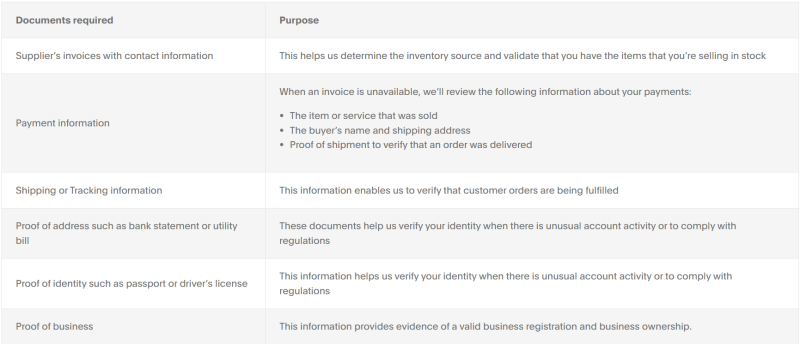
The documents PayPal requires from you may vary depending on the reasons for the restrictions, but generally can include the following:
Identification documents are primarily used to verify the identity of the person owning the PayPal account. This is a necessary and crucial step when resolving restrictions. Regardless of the specific reasons for the account restrictions, if they involve account security, compliance, or risk review, PayPal will typically require users to first complete identity verification.
PayPal generally accepts effective identification documents issued by government authorities, including but not limited to:
The submitted identification documents must be within their validity period and the name on the document must match the PayPal account registration information.
If the account uses an English name for registration, while the identification document is in the local language, the system may usually recognize it, but in some review scenarios, PayPal may still require users to provide explanations or resubmit documents.
Address verification documents are used for confirming the real characteristics of the account holder, usually required during cash flow transactions, account upgrades, or risk reviews. This type of document must be issued by a credible organization and clearly show the account holder's name and address.
PayPal typically accepts documents like:
To pass verification, the address verification document needs to be complete, showing details such as street and door numbers, and the document should be at least 3 months old.
For merchant accounts or accounts involved in high-value transactions, documents related to transaction authenticity or verification of business practices are also necessary. These may include but are not limited to:
Regardless of the type of document, when submitting to PayPal’s Resolution Center, the following general requirements must be met, or otherwise, it could lead to system rejections or requests for resubmission:
Log into your PayPal account, select "Help" at the top navigation bar → "Resolution Center." If your account has been restricted, you can also see the "Account Limited" notification directly on the homepage, clicking in to proceed.
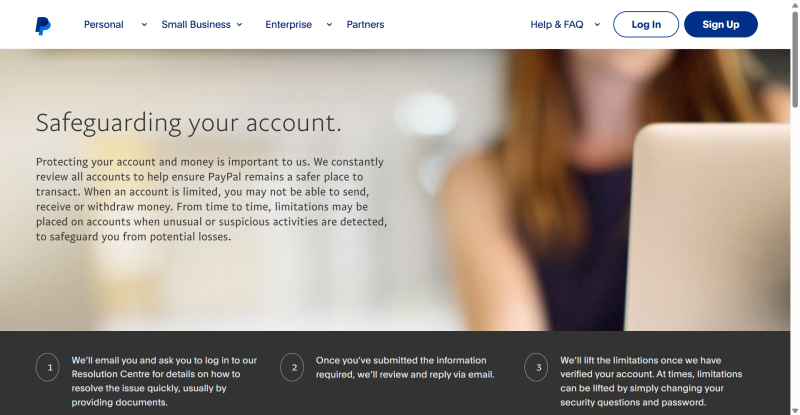
After entering the Resolution Center, click on "View Account Limitation Details" or similar links to display the limitations currently imposed (like restrictions on withdrawals/deposits) and the document list required by PayPal for submission.
Based on the system’s prompted task checklist, complete each step as required, such as: uploading identification documents, uploading address verification, filling out business-related descriptions, submitting transaction confirmation documents, issuing flow statements, etc.
During the submission process, PayPal may provide a "Prompt Description" text box to describe your deposit situation, such as "What unusual transactions have emerged from your account?" etc. It is advisable to be clear, accurate, and concise.
After completing all required steps, the PayPal system will initiate an online review. Under normal circumstances, the review will typically be conducted via an email or Resolution Center message within 3-5 working days:
After resolving PayPal account restrictions, maintaining account security is still highly important. By implementing proactive measures and being cautious regularly, you can effectively reduce the likelihood of encountering future restrictions. Key suggestions include:
PayPal will judge account risks based on the stability of the account login environment and transaction activities. For example, frequently changing login devices or IP addresses may lead to system risk assessments. To minimize risk notifications, ensure consistent devices and networks to access your PayPal account, avoiding activities that may seem abrupt.
Additionally, avoid operating accounts on public or unsecured Wi-Fi networks, which makes the account vulnerable to restrictions or unusual access notifications.
PayPal's risk control primarily focuses on monitoring unusual transaction activities and account behaviors. By routinely checking transaction records, for instance, sudden payment requests or cash flow anomalies can manifest early on, allowing for timely interventions.
Beyond managing activities, account security is critical:
For users managing multiple accounts or conducting cross-regional operations, each account should have distinct operating protocols, and transactions and asset volumes should be separated, and there should also be a stable device and network setting to avoid unusual access or restrictions.
To minimize system-triggered risk, consider using dedicated tools like a dedicated Android environment when accessing PayPal accounts. It is not necessary to purchase multiple workstations; the Android environment can effectively isolate each PayPal account and operate distinctly.
Each environment should retain a distinctive system configuration and network access point, which can effectively isolate device indicators and IP addresses, preventing connections back to the PayPal account.
On the control panel interface, select "Purchase Cloud Device," choose the setup you require, and assign your proxy IP settings to the cloud device.
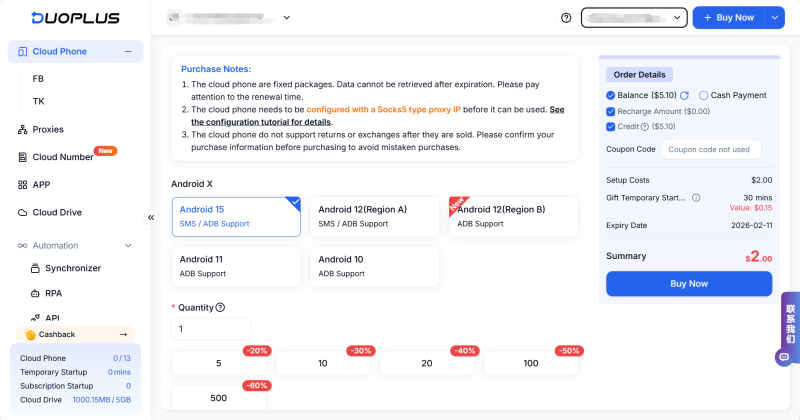
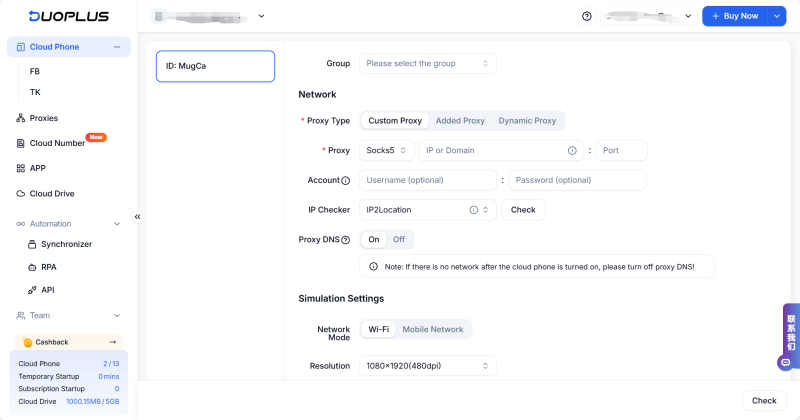
Once you access the created cloud device, you will see an interface similar to a real device. In the cloud device, search and install PayPal (The DuoPlus cloud device provides a standard app).
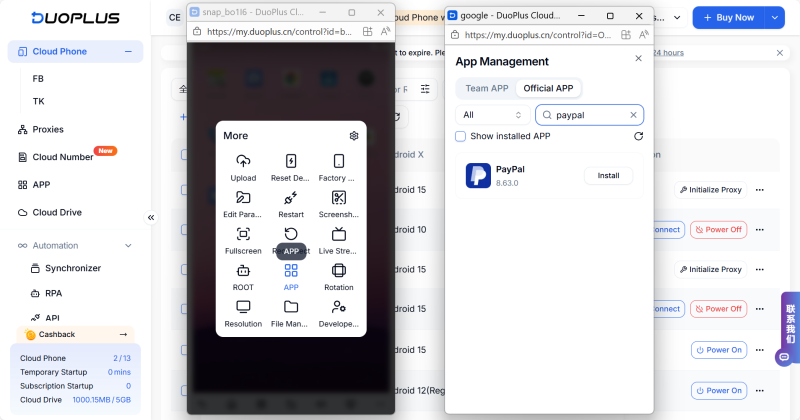
Once downloaded well, you can simply use PayPal; if you need to register multiple accounts, repeat Steps Two and Three to create a new cloud device, select different IP addresses, and then register new PayPal accounts within the new cloud device.
While PayPal's risk control is strict, most restrictions can be efficiently resolved by submitting relevant documentation, maintaining account security and compliance activities. If multiple accounts need to be managed, leveraging a cloud device can effectively lower the risk of restrictions while ensuring the accounts remain operational and secure.
DuoPlus Cloud Phone
Protect your multiple accounts from being
Amid the sustained rapid growth of digital advertising, SaaS services, and cross-border operations, global businesses …

Following the official launch of Gemini Pro 3.1, Google is accelerating its dominance in the AI sector. From development …
No need to purchase multiple real phones.
With DuoPlus, one person can operate numerous cloud phones and social media accounts from a single computer, driving traffic and boosting sales for you.
