How to Sign Up for Meta Muse and Use a Referral Code
Muse has recently become one of the most talked-about AI Agent products in the AI tools space. As a new AI Agent from …
Pinterest AI Assistant is transforming the platform into a discovery shopping destination. How can sellers create contextual content? How to make Pins AI-recognizable? This guide covers content formulas, trend tools, and multi-account management methods.

Get an AI-Powered Summary of This Article
In 2026, the key to Pinterest growth is not just publishing more Pins—it's making your content easier for both users and the platform to understand. Officially described as an AI-powered, visual-first collaborative tool, Pinterest Assistant aims to redefine how users shop online and discover content. This represents Pinterest's evolution from a visual search platform to an AI-driven discovery shopping platform.
For sellers and affiliate marketers, this means Pinterest content can no longer just showcase products. Instead of simple product displays, you need to present clear contextual solutions that meet user needs in specific usage scenarios.
In the past, Pinterest functioned more like a visual search platform. Users entered keywords, browsed image results, and saved content they liked to Boards. This model still works today, as many purchasing decisions begin with inspiration.
The change brought by Pinterest Assistant is that it allows users to express their needs in more natural language. Instead of just searching for "modern bedroom furniture," a user might describe: "I want a light-colored, minimalist small living room design idea." AI combines text, visual content, and the user's own saved preferences to recommend content and products that closely match their needs.
Pinterest Assistant leverages natural language processing, visual analysis, behavioral recommendation AI technologies, and its proprietary Taste Graph database to accurately capture user preferences based on platform behavior data, breaking the limitations of traditional keyword-based recommendations. This has a direct impact on sellers: Pinterest content no longer just needs to be "searchable"—it needs to be "understandable by AI".
If a Pin only has a product image and a simple title, the Pinterest platform can only understand limited information. If the image, title, description, product attributes, and landing page all revolve around the same scenario, your content is much more likely to enter users' discovery and shopping paths.
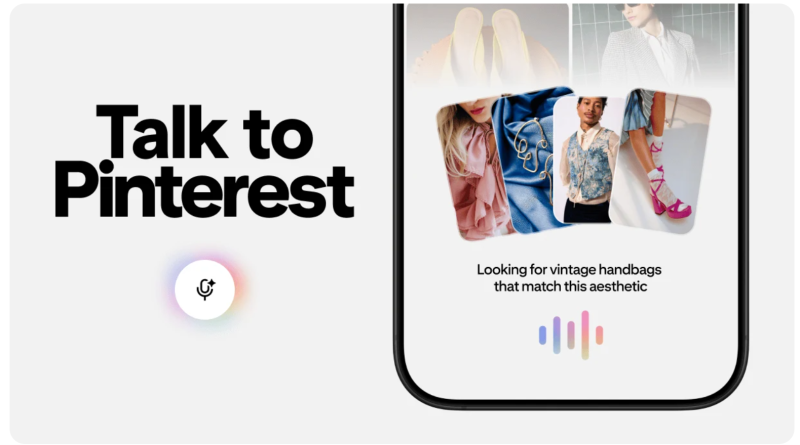
The emergence of Pinterest Assistant confirms that Pinterest is moving further from traditional visual search toward AI-driven discovery shopping. At this stage, the core of Pinterest content is not the product itself, but how the product is useful in a specific context. The better your Pinterest content matches these contextual needs, the more likely it is to be saved and clicked by users, and the better it will support subsequent product recommendations.
For example, the same table lamp can be presented in completely different ways that convey vastly different information:
| Generic Product Content | AI-Optimized Pinterest Content |
|---|---|
| Table lamp | Small bedroom lighting ideas |
| Wooden table lamp | Cozy minimalist bedroom bedside lamp |
| Desk lamp | Comfortable home office setup ideas |
| New lighting collection | Small room furniture arrangement tips |
The second approach is clearer because it simultaneously includes the product, the scenario, and the user's need.
Sellers and affiliate marketers can use a simple formula to design Pins: Product + Scenario + Audience/Need
Examples:
| Product Category | Ideal Content Angle |
|---|---|
| Home storage | Small apartment storage ideas |
| Beauty tools | Easy everyday makeup tutorials for beginners |
| Fashion accessories | Summer wedding guest outfit ideas |
| Travel essentials | 7-day Europe travel packing list |
| Gift products | New mom gift recommendations |
The value of contextual content is that it places Pinterest products within users' real search contexts. For Pinterest sellers, this creates more effective content entry points than simply uploading product images. For Pinterest affiliate marketers, it also makes it easier to naturally integrate into shopping lists, review articles, and product roundup pages.
Contextualization addresses what your content should be about, but to help Pinterest Assistant better understand your content, you need to ensure consistency across images, text, product information, and landing pages. AI doesn't just look at titles—it combines visual elements, user behavior, and product information to determine which scenarios your content is suitable for.
Pinterest Assistant learns through natural language processing, visual image analysis, behavioral recommendations, and user pattern recognition. Therefore, when creating Pinterest content, sellers should focus on four key areas:
| Element | What to Include |
|---|---|
| Images | Product in its natural usage scenario, including background, colors, and styling |
| Title/Description | Keywords, usage scenarios, and user needs |
| Product Information | Complete attributes including category, style, material, color, and applicable scenarios |
| Landing Page | Consistency with the Pin's scenario, and ability to continue meeting user needs |
For example, if a Pin for a table lamp has the title "Small bedroom lighting ideas," the accompanying image should show a real small bedroom or bedside lamp scene. Product information can include keywords like warm light, wooden base, and minimalist bedroom. The landing page should link to a small bedroom lighting product collection or related专题 content, not just your store homepage.
For sellers with independent websites or product pages, it's not just the Pin image that needs to be clear—the titles, descriptions, categories, colors, materials, and usage scenarios on your product pages should also be detailed. When Pinterest Assistant reads your product information, these attributes will help the platform understand which recommendation scenarios your product fits. This same approach applies to affiliate marketers.
In simple terms:
The more consistent these four elements are, the easier your content will be understood by both users and the Pinterest platform.
Pinterest Assistant makes content more dependent on contextual descriptions, but before creating content, sellers still need to answer two questions: Which scenarios are worth planning for in 2026? And when should specific keywords be published? Pinterest Predicts and Pinterest Trends provide the answers.
Pinterest Predicts is the platform's annual trend report, which uses platform big data and user behavior to predict annual trends in lifestyle categories including home, fashion, beauty, and travel. The 2026 report identifies 21 trend categories.
Pinterest Trends is a professional trend tool for business accounts that allows you to query search, save, and shopping data from different countries and regions over the past two years. It helps sellers understand keyword popularity, content trends, consumer preferences, and user interests.
For sellers:
In short: Pinterest Assistant changes how users discover content and products, while Predicts and Trends help sellers identify which scenarios are worth creating content for.
Follow this practical workflow:
As Pinterest teams use AI tools like Pinterest Assistant to generate content ideas, they need to start testing multiple categories, regions, and content directions simultaneously. This creates new challenges in Pinterest account management and material distribution. While individual creators can manage two or three Pinterest accounts, once a team needs to test multiple categories (home, beauty, fashion) or regional content (US, UK, Australia), account environment isolation, material distribution, and publishing workflows become significant pain points.
DuoPlus Cloud Phone is perfectly suited to address these multi-account management challenges. It provides a stable and secure cloud-based environment for team collaboration, allowing businesses to manage multiple operational projects simultaneously and instantly upload and distribute Pinterest content materials.
Pinterest content operations are rarely a one-person job. Ideation, design, publishing, link checking, and data analysis are typically handled by different team members.
DuoPlus Cloud Phone supports creating teams with independent resources, and inviting members with different permission levels. For Pinterest operations, you can assign roles as follows:
| Team Role | Responsibilities |
|---|---|
| Content Strategist | Use Predicts/Trends to identify trends and keywords |
| Designer | Create Pin images and covers |
| Account Manager | Manage assigned accounts and publishing workflows |
| Affiliate Manager | Verify product links and landing pages |
| Data Analyst | Track performance across accounts, materials, and links |
It's not recommended to publish all types of content from a single Pinterest account. A more effective approach is to group accounts by category, region, or conversion path.
Examples:
| Grouping Method | Use Cases |
|---|---|
| By Category | Home, beauty, fashion, travel, gifts |
| By Region | United States, United Kingdom, Canada, Australia |
| By Task | Trend testing accounts, main accounts, accounts pending review |
| By Conversion Path | Store accounts, affiliate accounts, blog traffic accounts |
This allows teams to quickly locate the right Pinterest accounts and more clearly analyze which content directions are performing well.
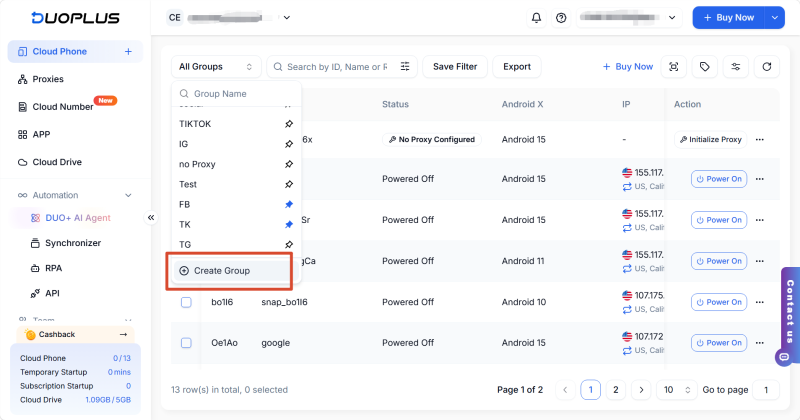
As a visual content platform, Pinterest operations generate numerous material versions. Different covers, titles, regional copy, and affiliate links can quickly become disorganized if stored on personal computers or in chat logs.
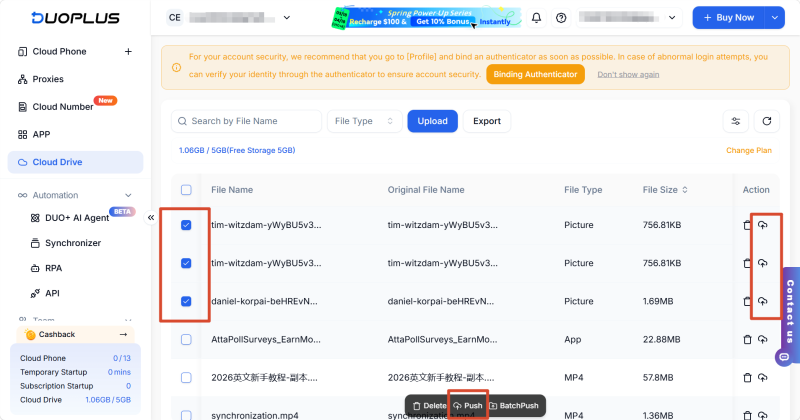
DuoPlus Cloud Phone's file pushing feature is ideal for this scenario: Pinterest teams can upload images, short videos, covers, and copy files to cloud storage first, then push them to the corresponding cloud phones. For teams conducting detailed testing, batch pushing enables "one account, one material" management.
Examples:
| Testing Goal | Implementation |
|---|---|
| Test different covers | Send Cover A to Account 1, Cover B to Account 2 |
| Test regional content | Use US keywords for US accounts, UK keywords for UK accounts |
| Test different categories | Send home materials to home accounts, beauty materials to beauty accounts |
| Test different links | Assign different product collections or review pages to different accounts |
The goal is not just to publish more content, but to ensure every Pinterest account, every set of materials, and every link path is trackable.
It makes Pinterest product discovery more contextual and personalized. Sellers need to place products within specific usage scenarios rather than just uploading isolated product images. Titles, images, descriptions, and landing pages should all revolve around the same scenario.
Yes. Pinterest still has strong search functionality. Pinterest Trends allows you to view search, save, and shopping trends from the past two years, and sellers should continue to optimize Pin titles, descriptions, and Board names with relevant keywords.
Absolutely. It's particularly well-suited for shopping lists, product comparisons, contextual recommendations, and seasonal content. Gift guides, home decor ideas, travel packing lists, beauty tool reviews, and outfit inspiration all work great with affiliate links or product roundup pages.
Pinterest AI favors real-life scenario images, atmospheric lifestyle photos, and completed styling shots. It does not perform well with plain white background hard-sell product images. Prioritize creating Pinterest materials that show products in natural living environments, with human elements, and complete home/fashion/travel setups for better AI recommendation distribution.
No. AI amplifies exposure for high-quality contextual content while reducing visibility for pure hard-sell ads or keyword-stuffed Pins with no real context. By consistently creating vertical, contextual Pinterest content, you will actually see more stable traffic.
The emergence of Pinterest Assistant confirms that Pinterest is evolving from a visual search platform to an AI-driven discovery shopping destination. For sellers and affiliate marketers, the key to growth is not publishing more images, but transforming product content into clear contextual solutions. You can use Predicts to identify trend directions, validate keywords and regions with Trends, and ensure your images, titles, product attributes, and landing pages all revolve around the same scenario—this is how you will thrive in the AI era of Pinterest.
Muse has recently become one of the most talked-about AI Agent products in the AI tools space. As a new AI Agent from …

OpenAI Codex is an AI coding agent designed to help developers write, modify, review, and deliver code. It is available …

VK (VKontakte) is one of the major social media platforms in Russia. In addition to account management, content …
No need to purchase multiple real phones.
With DuoPlus, one person can operate numerous cloud phones and social media accounts from a single computer, driving traffic and boosting sales for you.