
How to Log In to Telegram Without Your Phone Number
Telegram is a messaging app many people use for everyday conversations, joining communities, and communicating with …
Learn how to test mobile apps across devices and regions, organize cloud phone environments, check regional availability, and use residential proxies for reliable testing.

Get an AI-Powered Summary of This Article
An app may work perfectly on a developer's smartphone but suddenly crash on another device, display the wrong currency, or fail to load certain features for users in a particular country. These situations are familiar to teams launching mobile products on international markets. And the more devices, Android versions, and regions their audience covers, the more complicated testing becomes.
Testing on a single smartphone is no longer enough. You need to understand how your app behaves across different device configurations, system settings, and connections from different countries. The goal is not simply to collect as many test devices as possible, but to build a process that makes results comparable and issues reproducible.
Let's look at how to organize this testing process, which scenarios to prioritize, and how cloud phones and residential proxies can help.
A mobile app depends on more than just its own code. Its performance is affected by the operating system, device specifications, screen resolution, language, time zone, location settings, and internet connection quality.
As a result, the same feature may behave differently on two smartphones. For example:
The last case is particularly important for international products. An app may take the connection country, service availability, regional app store settings, localization, and other factors into account. If you only test it from one region, some issues may go unnoticed until the product reaches real users.
That is why a test environment should account for several independent factors: the device, operating system, system settings, and network location.
One of the first mistakes teams make when organizing mobile testing is trying to check everything at once. They launch the app on several devices, go through the main screens, and consider the task complete. But without predefined scenarios, it is difficult to know which combinations of parameters have already been tested and which have been overlooked.
A better approach is to start with a testing matrix. It helps distribute testing tasks and avoid duplicated work.
Your matrix should cover four main groups of parameters.
Choose several configurations that represent your target audience:
You do not need to test your app on dozens of devices right from the start. It is more important to cover common configurations and those with a higher likelihood of errors.
For an international app, check:
Consider not only internet speed but also the network's exit location. Testing may require connections from different countries, as well as scenarios involving high latency or unstable connections.
Make a list of the actions users are expected to perform: registration, login, password recovery, payments, file uploads, receiving notifications, and using the app's main sections.
Then check how these actions work on the selected devices and in the required regions.
For example, an app that supports international payments could have a dedicated test scenario with an English-language device, the regional settings of a particular country, the corresponding time zone, and a network connection from that region. This approach tests an entire user configuration rather than just one parameter.
When a project is developing quickly, constantly buying new smartphones and switching between them manually becomes inconvenient. In addition to hardware costs, there are other tasks to deal with: charging devices, updating the system, installing builds, storing equipment, and keeping configurations under control.
One way to simplify the process is to use cloud phones.
For example, DuoPlus provides remote Android devices that can be managed through a browser. This makes it possible to run several mobile environments in parallel, install apps, and execute test scenarios without having all the smartphones physically on hand.
This is particularly useful when you need to:
However, it is important to understand that cloud phones do not completely eliminate the need for physical device testing. If an app uses Bluetooth, a camera, NFC, sensors, or specific hardware capabilities, those features should also be tested on real devices. Cloud devices are convenient for many standard scenarios, but they cannot replace every type of hardware testing.
Imagine that you are testing an app for users in Germany, France, and the United States. You have changed the system language, selected the appropriate time zone, and configured the location settings. However, the internet connection is still identified as coming from the same country.
As a result, your test may not reflect how the app actually behaves for users in the target region.
An IP address is a separate source of location information. Services may use it to determine the connection country, select available content, apply regional restrictions, or configure certain features.
That is why testing international apps requires you to consider not only the device settings but also the geographic location of the network connection.
This is where residential proxies can be useful. They allow you to route traffic through IP addresses associated with real users' internet connections and select the location required for a particular test scenario.
For example, with Node Proxy residential proxies , you can select an IP address from a specific country and check how an app or its individual network features behave when accessed from that region.
This can be useful in several situations:
Keep in mind that a proxy changes the network route and external IP address, but it does not automatically change the device's GPS coordinates, SIM card, language, or time zone. These parameters must be configured separately and kept consistent for accurate regional testing.
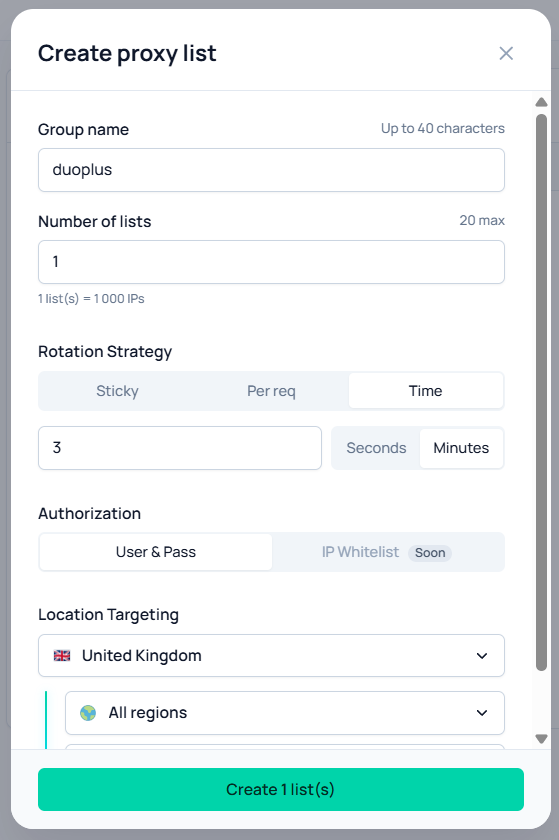
Selecting an IP address from the right country does not automatically guarantee an accurate test. To make results reproducible, you need to record the configuration used for every test run.
One convenient way to do this is to create separate test profiles or scenario records. Each one should include:
For example, if an error occurs only when opening a catalog from France, the team will be able to repeat the test using the same build, device, and network settings. Without these records, it can be difficult to understand why everything worked yesterday but the problem appeared today.
For certain scenarios, it is useful to compare results using two types of connections: a regular connection and one routed through a proxy. If a feature works in one case but not the other, this provides additional information for troubleshooting. However, this comparison alone is not enough to blame the IP address immediately. You should also check server responses, app settings, and possible regional restrictions.
Imagine that the app fails to load data even though its other features are working. The cause could be a bug in the app, a server-side issue, an unstable connection, or an incorrectly configured proxy.
If you immediately start changing app settings, you may waste time looking for a code issue that does not exist. That is why it is worth checking the network connection separately before running the main test scenario.
First, make sure that:
For quick diagnostics, you can use the Node Proxy proxy checker . It helps test the connection and determine whether the proxy is working before you start investigating the cause of an issue inside the app.
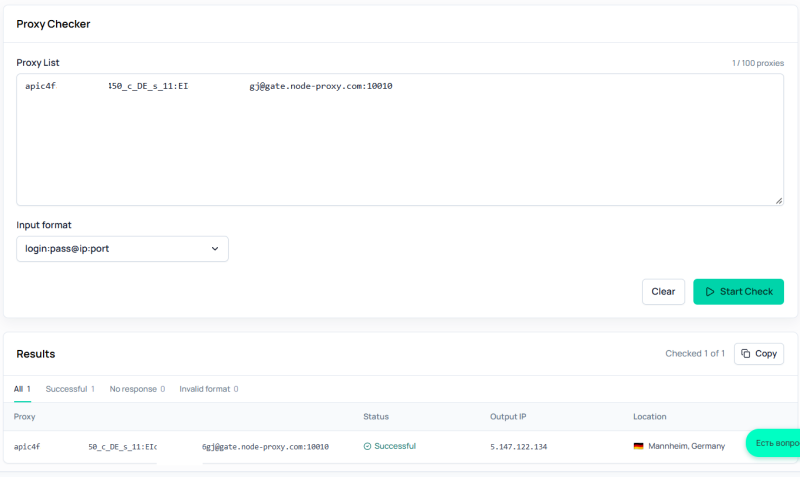
If the check fails, fix the network configuration first. If the connection works but the app still reports an error, move on to checking requests, server responses, and the application's own logic.
During regional testing, it is important to choose the right IP address management mode. Frequent connection changes are not useful in every situation.
If you are testing authentication, checkout, or a long user journey, it is better to keep the same IP address throughout the session. This makes it easier to reproduce the sequence of actions and avoids situations where the app receives different network parameters in the middle of a test.
For short, independent checks, on the other hand, IP rotation can be useful. For example, if you need to send a series of requests or check the availability of public data from different connection points, changing IP addresses can distribute requests across multiple addresses.
In these cases, decide in advance how the IP address should change: by time interval, on request, or between separate test sessions. Avoid changing it unnecessarily in the middle of a single user scenario. This complicates troubleshooting and may trigger additional checks from the service being tested.
If your test requires a long-lasting connection with the same address, consider Node Proxy static proxies . They are suitable for scenarios where the IP address needs to remain unchanged for a specified period.
When testing covers multiple devices and regions, it is important not only to run the checks but also to make them repeatable. You can organize the process using a simple workflow:
Step 1. Identify priority configurations. Do not try to cover every smartphone on the market. Start with the most common devices, Android versions, and countries your app targets.
Step 2. Prepare test environments. Create the required cloud phones or prepare physical devices. Install the test build and configure the system settings.
Step 3. Configure network connections. For regional tests, select an IP address from the required country. Check the proxy separately and make sure its detected location matches the scenario.
Step 4. Run identical scenarios. Use the same sequence of actions across different configurations. This will let you compare results instead of trying to match unrelated tests.
Step 5. Record errors and the conditions in which they occur. Document not only the issue itself but also the device configuration, region, IP address, time, and step at which the problem appeared.
Step 6. Repeat the test after fixing the issue. Check not only the scenario in which the error was found but also related features. This helps ensure that the fix has not affected other parts of the app.
Mobile testing across different devices and regions is about much more than launching an app on several smartphones. It involves working with a whole range of conditions, from Android versions and screen resolutions to IP addresses and regional settings.
Cloud phones make it easier to organize multiple independent mobile environments and run tests in parallel. Residential proxies complement this setup when you need to check an app's network behavior from different countries. And checking the connection beforehand helps distinguish network problems from issues within the app itself.
The most effective approach is to define test scenarios in advance, record configurations, and change one parameter at a time. This turns regional testing from a chaotic series of experiments into a structured process that helps identify issues before real users encounter them.
Telegram is a messaging app many people use for everyday conversations, joining communities, and communicating with …
If engagement suddenly drops after you post on X (formerly Twitter), your account cannot be found in search, or a new …
Social media operations often involve content publishing, account maintenance, project collaboration, and staff …
No need to purchase multiple real phones.
With DuoPlus, one person can operate numerous cloud phones and social media accounts from a single computer, driving traffic and boosting sales for you.