How to Automate Social Media Accounts: A Simpler Alternative to OpenClaw
Recently, regardless of whether it's on social media platforms or tech communities, one name stands out: the AI tool …
Table of Contents
Recently, the AI community has begun to discuss a new term — OpenClaw.
Unlike the discussions around the capabilities of large language models in the past, this time the focus is not on whether "AI is getting smarter," but rather on whether AI can truly start working.
As more and more developers emerge, the capabilities of large models have already reached a sufficient level, but there still exists one apparent limitation: they can answer questions effectively, yet struggle to continuously execute tasks. The emergence of OpenClaw aims to address this problem.
OpenClaw is not just another large model; it is an AI action framework. Its role is to connect language models with real operational capabilities, including:
In simpler terms, large models generally determine strategies while OpenClaw turns those strategies into executable actions. This allows AI to develop content from a functional perspective and move toward executing tasks.
However, once the AI has the operational capability, a new question arises: How does AI know "what specific task to do"?
The answer lies in Skills.
In OpenClaw, Skills are a type of reusable task capability module designed to specify a standard way for AI to accomplish certain types of work. They typically include: workflow execution, tool invocation scripts, rules and constraints, and output format specifications.
Unlike one-off prompts, Skills can be maintained long-term and automatically invoked during similar task occurrences.
This addresses standard issues encountered in AI usage:
Through Skills, tasks are stabilized, and AI is no longer dependent on situational reasoning, but operates according to preset rules.
When users input commands, OpenClaw will automatically sketch and integrate the applicable Skills, accelerating task execution based on the relevant tools and generating corresponding outputs. The entire process requires no external operation, only a simple natural language prompt.
Thus, in the OpenClaw ecosystem, Skills are not merely auxiliary functions; they comprise the essential components of the operational system.
DuoPlus Cloud Mobile has also integrated the OpenClaw ecosystem and launched duoplus-agent skills , making everyone’s use of Cloud Mobile quicker and more convenient.
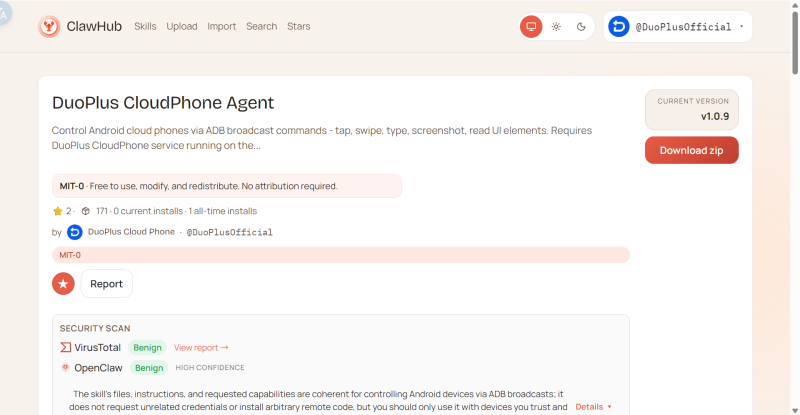
In OpenClaw, the application of Skills is simpler than you might imagine. The system will automatically identify the installed capabilities package based on the command content and select the appropriate Skill to execute the task. To manage Skills, follow the steps below:
OpenClaw utilizes Clawhub to manage Skills:
<BASH>npm install -g clawhub
After installation, you can check if it was successful by entering the following command:
<BASH>clawhub --version
You can visit the Clawhub Official Website to browse the full range of capabilities, and you can also directly use the terminal search command:
<BASH>clawhub search "keyword"
For example, if you want to find Skills related to weather inquiries:
<BASH>clawhub search "weather"
Once you have identified the target, execute the install command:
<BASH>clawhub install <Skill Name>
For example:
<BASH>clawhub install weather
If you want to specify a version:
<BASH>clawhub install weather --version 1.2.3
Some Skills may require you to set an API Key or environmental variables. For instance, for tavily-search, you need to add it to your system first:
<BASH>export TAVILY_API_KEY="your_key_here"
Only then can Claude access the external interface to execute tasks.
Once everything is configured, run the following command to start the OpenClaw service:
<BASH>openclaw start
After that, you can enter natural language directly in the chat window, such as:
"Check the weather for today."
OpenClaw will automatically invoke the weather Skill you just installed and return the result immediately.
Note:
skill-vetter to sketch and check the Skills’ security.After the AI begins executing, new issues may arise, and many tasks may not occur within the text environment but rather in real devices, such as:
Logging into mobile applications, managing multiple accounts, conduct long-term automated operations, using different regional network environments.
OpenClaw is responsible for the degree of capability but does not provide device-based guidance; indeed, AI has already maintained operational protocols, albeit lacking stable operational environments.
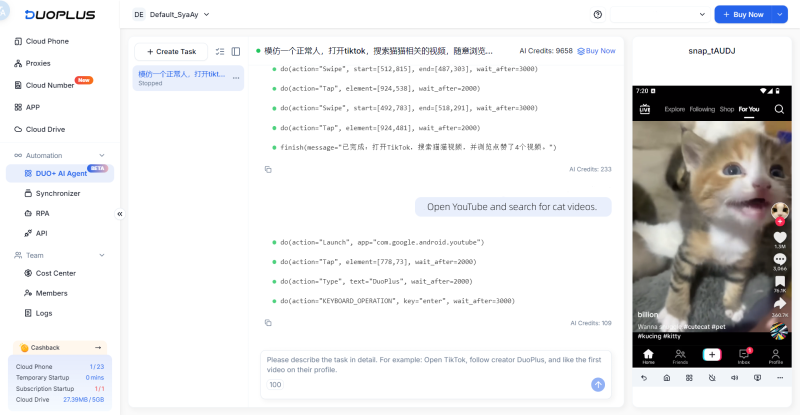
To address the issue of limited operational environments for AI execution, DuoPlus integrates the Cloud Mobile functionality into the OpenClaw ecosystem, allowing for real-time sharing of related Skills to openclaw.ai. This way, OpenClaw can easily invoke Cloud Mobile, allowing AI to independently operate within its own secure device.
At the same time, DuoPlus has also launched the brand-new upgraded Duo+ AI assistant, the first mobile version named "Little Dragonfly," featuring the following characteristics:
In the past, our relationship with AI was conversational. Now, it is entering the operational phase.
Skills provide AI with a stable work methodology, while OpenClaw supplies the operational framework, and DuoPlus integrates a true operational environment.
AI no longer merely offers suggestions but actively participates in practical workflows, suggesting that AI is gradually evolving from a tool into a real digital executor.
DuoPlus Cloud Phone
Protect your multiple accounts from being
Recently, regardless of whether it's on social media platforms or tech communities, one name stands out: the AI tool …
A few months ago, a popular open-source AI tool called OpenClaw emerged, targeting a wide range of technical areas. It …
No need to purchase multiple real phones.
With DuoPlus, one person can operate numerous cloud phones and social media accounts from a single computer, driving traffic and boosting sales for you.
