Instagram Two-Factor Authentication (2FA): How It Works, 3 Methods, and Security Setup
Instagram accounts may face security risks due to password leaks, suspicious login attempts, or device changes. Enabling …
Learn how a small agency manages social media accounts at scale using DuoPlus cloud phones and PSB Hosting VPS. Discover a 24/7 automated setup for TikTok, Instagram, and Facebook.

Get an AI-Powered Summary of This Article
Mobile-first platforms like TikTok, Instagram and Facebook treat the phone as the main device. That’s why teams that run many accounts increasingly move from browsers to cloud phones. But a cloud phone is only part of the setup. Around it you need tools that schedule content, collect statistics, run scripts and keep everything going when nobody is at the computer.
This article walks through a real-world scenario: a small agency managing accounts for several clients with DuoPlus cloud phones and a VPS from PSB Hosting.
An agency runs social media for six clients in different countries. Each client has two to five accounts across TikTok, Instagram and Facebook. The team is four people: two content managers, a media buyer and a team lead.
Their problems before the switch:
DuoPlus provides Android cloud phones running on real ARM devices in the cloud. For the agency this replaces the drawer of phones:
Cloud phones handle the accounts. But an agency also runs tools that don’t belong on a phone:
These need to run 24/7, which is exactly what a VPS is for. The agency rents a server from PSB Hosting : VPS in the Netherlands, Germany, Finland or the USA, with DDR5 memory, NVMe storage, unmetered traffic and ports up to 10 Gbit/s, starting from $8 per month with 24/7 support.
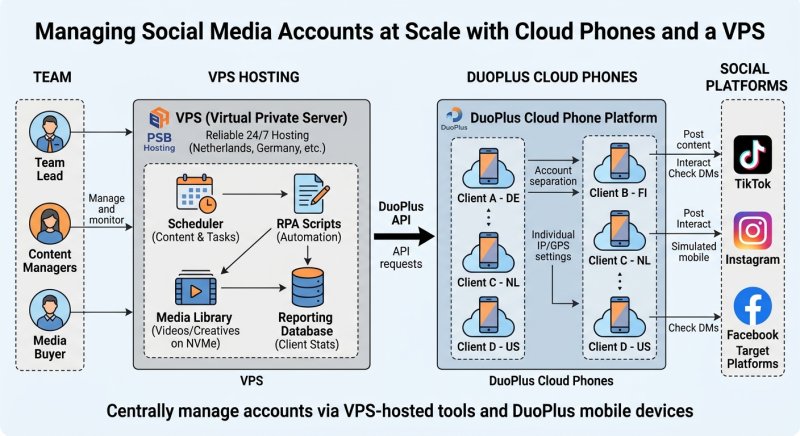
1.Morning. The scheduler on the VPS prepares the day’s posts for each client. Scripts call the DuoPlus API to open the right cloud phones and queue the tasks.
2.During the day. Content managers open cloud phones in their browsers to reply to comments, record stories and check messages. The media buyer works with ad accounts on separate devices.
3.Evening and night. Scheduled posting and statistics collection keep running on the VPS. Nobody needs to leave a laptop on.
4.Reporting. Results go into the database on the VPS. The team lead builds weekly client reports from there.
Keep accounts separated. One account, one cloud phone. Don’t log several clients’ accounts into the same device.
Match the location. The cloud phone’s GPS and SIM settings should match the account’s country and audience.
Protect access. Use team permissions in DuoPlus and SSH keys or strong passwords on the VPS. Store API keys only on the server, not in shared chats.
Follow platform rules. Automation should support normal account management — scheduling, replies, analytics — and stay within each platform’s terms.
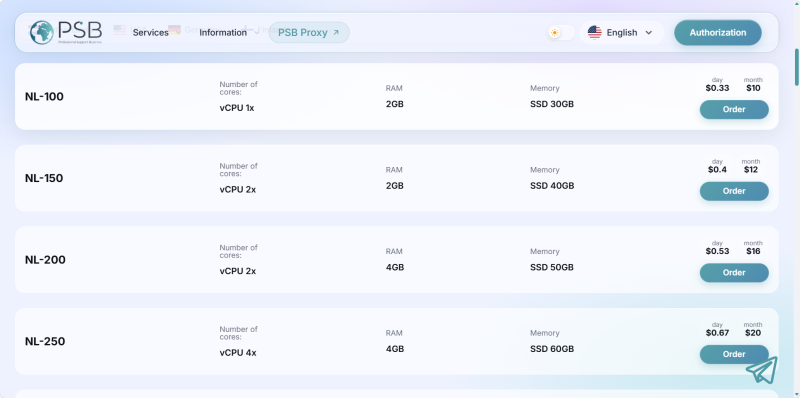
After the switch, the agency has no physical phones to maintain, devices are easy to hand over between shifts, and all scripts and reports run on one always-on server. Adding a new client is a matter of minutes: create cloud phones, add them to the scheduler, and start working.
DuoPlus cloud phones give every account its own mobile device in the right country. A VPS from PSB Hosting runs the schedulers, scripts and reports around them 24/7. Together they form a simple, scalable setup for managing social media accounts at scale.
Instagram accounts may face security risks due to password leaks, suspicious login attempts, or device changes. Enabling …
Instagram offers two types of Professional Accounts: Creator accounts and Business accounts. For content creators, …
You moved your accounts to DuoPlus cloud phones to stop them getting linked. Each one runs on its own Android device, …
No need to purchase multiple real phones.
With DuoPlus, one person can operate numerous cloud phones and social media accounts from a single computer, driving traffic and boosting sales for you.