Google Account Stuck on QR Code Verification? How to Fix It (2026)
Following the official launch of Gemini Pro 3.1, Google is accelerating its dominance in the AI sector. From development …
Table of Contents
In cross-border operations, B2B sales, or social media marketing, many professionals and businesses choose to manage multiple LinkedIn accounts to reach a wider audience or expand into different business lines. However, LinkedIn has strict regulations regarding the management of multiple accounts, and improper actions can easily lead to account restrictions. This article will analyze the value, risks, and practical tools for managing multiple accounts on LinkedIn effectively.
A single LinkedIn account has certain limitations when it comes to connecting, messaging, and publishing content, especially if you plan to operate in different regional markets, manage different personal brands or corporate brands, or test different content strategies. One account may not meet all your needs. Here are some common scenarios that require multiple accounts:
For the need to target different audiences with distinct profiles, managing multiple LinkedIn accounts can help clearly segment personal brands and industry brands. By setting up different accounts, they can target each individual audience based on specific criteria, such as:
For agencies or B2B teams, having multiple LinkedIn accounts is often essential during client acquisition activities. Each client has unique goals, audiences, and brand directions, and operating multiple accounts can help avoid the mixing of information or content. By using multiple dedicated accounts, you can maintain each client's unique properties, streamline management processes, enhance content publishing and message engagement.
For professionals and businesses involved in cross-regional or multi-industry operations, using different accounts can differentiate services targeted at various locations or industry-related networks. Accounts can be linked to specific cities, countries, or industry groups for more accurate development and market penetration. Through this approach:
For businesses or recruitment networks managing multiple accounts, segmentation can be applied to different offices or business departments. Each account can independently operate:
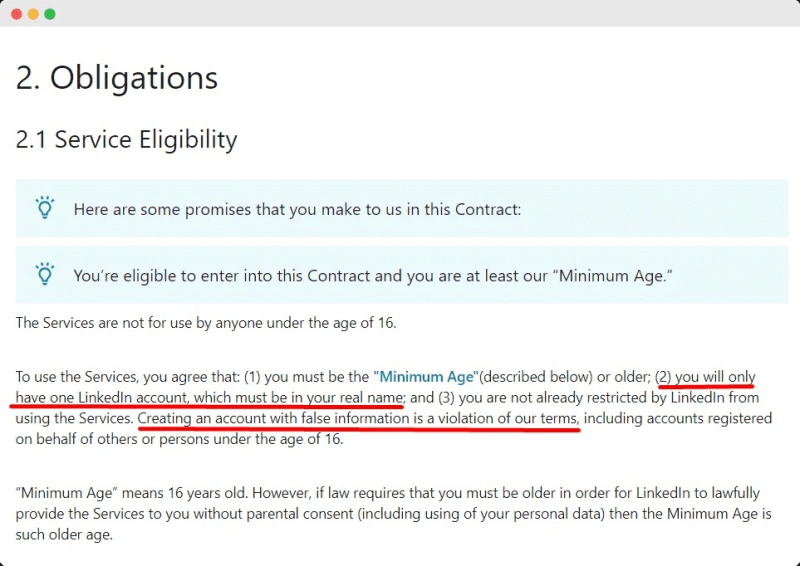
Indeed, managing multiple LinkedIn accounts in cross-border expansion, team collaboration, and account management comes with apparent advantages. However, LinkedIn's official guidelines allow each person to hold only one account, and any violation of this can lead to severe consequences, including account suspension or limited functionalities. Most importantly, accumulating a large number of connected accounts, historical data, and content may become irrecoverable, directly impacting business and private operations.
Managing multiple accounts centers around security, efficiency, and control. Depending on different industries and team requirements, the selection of strategies can vary:
The most straightforward method is to set up each account on different devices, such as separate phones or computers. This method minimizes the chance of lockouts; however, management costs can be high, which may not be effective for large team operations or managing many accounts.
For limited account numbers or teams with restrictions, using Chrome multi-profile files is a sustainable and secure strategy. Each account has its distinct browser cache, cookies, and login conditions that can log in simultaneously without interfering. Combined with VPN / Proxy, different IP addresses can be displayed, closely aligning to real user operations. However, this method has the limitation that profiles can only separate cache but not device settings or system environments; if multiple accounts still share a single device, they can easily be flagged by the platform.
For businesses needing to manage large volumes of accounts, anti-detection browsers are more effective solutions. Tools like AdsPower , GoLogin, and Multilogin specialize in managing multiple accounts to enhance security and operational efficiency.
Core features include:
Utilizing these tools, teams can securely and efficiently manage multiple LinkedIn accounts, while also ensuring collaborative effort among members without sacrificing effectiveness.
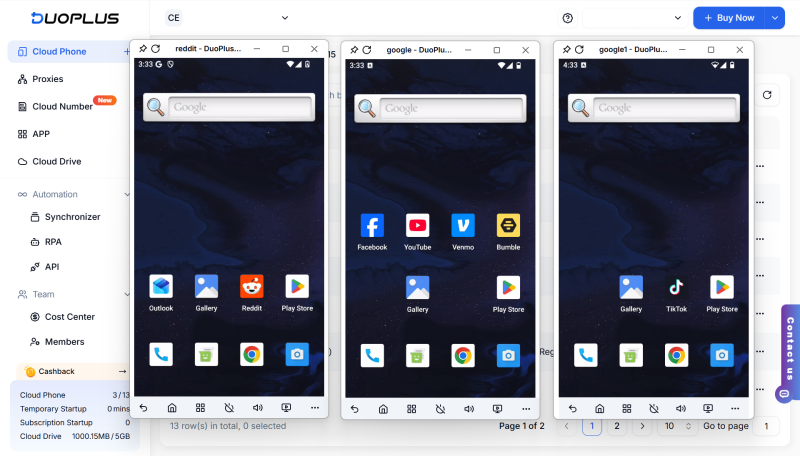
Cloud phones simulate mobile devices through real operation ARM chips, each virtual phone environment interconnectivity is divided, mimicking physical devices. Furthermore, cloud phones do not rely on local hardware resources, enabling unlimited device environments. This is crucial for managing multiple LinkedIn accounts while enhancing operational effectiveness and management controllability.
DuoPlus, based on the cloud phone Android system environment, supports over 150 global locations and SIM card data models, providing unique operational spaces for each LinkedIn account while supporting multiple account management, batch operations, and automated workflows. Regardless of cross-regional expansion, or multi-client management, DuoPlus can assist you:
In today's globalized and digitized era, LinkedIn is no longer just a platform for job seeking and building professional relationships, but gradually transforming into a critical tool for businesses to gain clients, establish brand presence, and expand B2B growth. Leverage DuoPlus cloud phones for safer and more efficient management of multiple LinkedIn accounts, facilitating steady growth capabilities in cross-regional expansion and private sector operations.
DuoPlus Cloud Phone
Protect your multiple accounts from being
Following the official launch of Gemini Pro 3.1, Google is accelerating its dominance in the AI sector. From development …

TIRED OF THESE BOTTLENECKS? ❌ Running account farms only to be halted by relentless Captcha triggers? ❌ Grinding on …
No need to purchase multiple real phones.
With DuoPlus, one person can operate numerous cloud phones and social media accounts from a single computer, driving traffic and boosting sales for you.
