





How to Sign Up for Meta Muse and Use a Referral Code
Muse has recently become one of the most talked-about AI Agent products in the AI tools space. As a new AI Agent from …
This guide explains why live streaming operations need centralized device and content management, compares physical phones and cloud phones, and shows how DuoPlus Cloud Phone can be used to manage devices, networks, content, and streaming tasks from one place.

Get an AI-Powered Summary of This Article
As the number of live streaming accounts and rooms grows, managing devices, network environments, and streaming content becomes increasingly complex. This guide explains why live streaming operations need centralized device and content management, compares physical phones and cloud phones, and shows how DuoPlus Cloud Phone can be used to manage devices, networks, content, and streaming tasks from one place.
Managing a few devices and a small amount of content is relatively straightforward. As the number of accounts and live streaming rooms increases, however, there are more devices, content assets, and streaming tasks to coordinate at the same time.
At that point, the challenge is no longer simply getting a live stream running. It becomes important to keep multiple streaming tasks organized while maintaining clear connections between devices, content, and scheduled tasks.
Different accounts and live streaming rooms may require dedicated devices. As more streaming tasks are added, the number of devices that need to be configured and monitored increases as well.
Device configuration, app installation, device status checks, and task assignment all need to be handled on an ongoing basis. As the number of devices grows, managing these operations in an organized way becomes increasingly important.
Live streaming operations continuously generate videos, covers, clips, and backup content.
When there are only a few files, storing them locally on a computer or device is usually enough. As the content library grows, however, a clearer way to organize, store, and distribute files makes it easier to find the right content and assign it to the appropriate streaming task.
When multiple live streams run at the same time, tasks such as starting streams, loading content, switching tasks, and checking device status also increase.
Handling each streaming room separately means repeating many of the same operations. Organizing devices, content, and tasks together makes it easier to manage multiple streams as a group rather than handling every task individually.
Physical phones and cloud phones are the two common approaches to managing live streaming devices and content. Both can support basic streaming requirements, but the differences become more noticeable as the number of devices increases.
Physical phones are the more traditional option. Each live streaming account can run on a designated device, while streaming content is stored on or transferred to the phone in advance.
This approach is straightforward and works well when only a small number of devices are involved. As the number of devices grows, however, account setup, device configuration, content transfers, and status checks all need to be handled separately.
Advantages: Straightforward to use and easy to understand, making it suitable for a small number of devices.
Limitations: Devices need to be managed individually, while content transfers and device maintenance become more time-consuming as operations scale.
Cloud phones provide Android device environments in the cloud and allow multiple devices to be managed remotely through a centralized dashboard.
Device management can also be combined with proxy configuration, cloud storage, and automation, allowing network settings, content distribution, and streaming tasks to be managed within the same workflow.
Advantages: Centralized management, remote access, and bulk operations make it easier to manage and expand a larger number of devices.
Limitations: Users need to adapt to managing devices remotely, and a stable network connection is required.
| Comparison | Physical Phones | Cloud Phones |
|---|---|---|
| Device Management | Managed individually | Centralized management and bulk operations |
| Remote Access | Limited | Supported |
| Network Configuration | Usually configured individually | Can be configured centrally |
| Content Management | Content needs to be transferred to devices | Can be managed through cloud storage |
| Scalability | Requires additional physical devices | Cloud devices can be added as needed |
| Best For | Small numbers of accounts and devices | Multiple accounts, devices, and large-scale operations |
Overall, physical phones are a practical choice for smaller live streaming operations and can meet basic requirements without adding unnecessary complexity. As the number of devices, accounts, and streaming tasks increases, centralized management and remote access become more important.
For large-scale operations that require multiple live streaming devices and content assets to be managed in bulk, cloud phones are generally better suited to serving as the foundation for device management.
Cloud phones can take device and content management from individual operations to centralized management. Through a cloud-based dashboard, multiple live streaming devices can be managed from one place. With DuoPlus Cloud Phone, for example, teams can manage devices in bulk, upload content in batches, and automate repetitive operations, bringing devices, networks, content, and streaming tasks into one workflow.
After logging in to DuoPlus, you can create the required number of cloud phones based on the number of live streaming accounts and rooms.
Devices can be organized according to accounts or streaming rooms, allowing each cloud phone to handle a specific streaming task and making ongoing management easier.
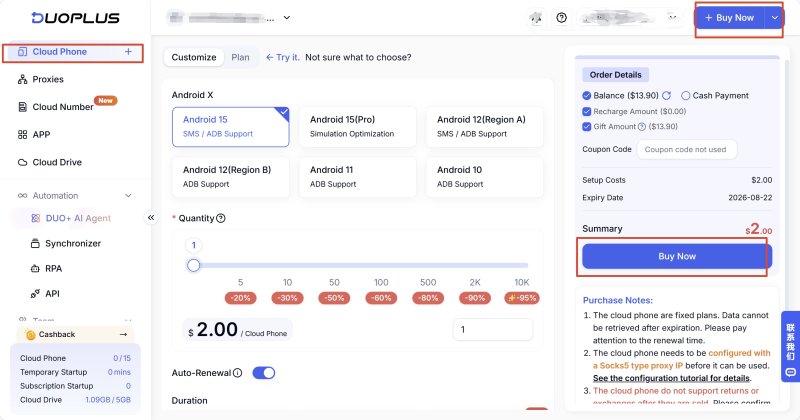
After creating the cloud phones, you can configure settings such as proxies, region, language, and time zone according to your streaming requirements.
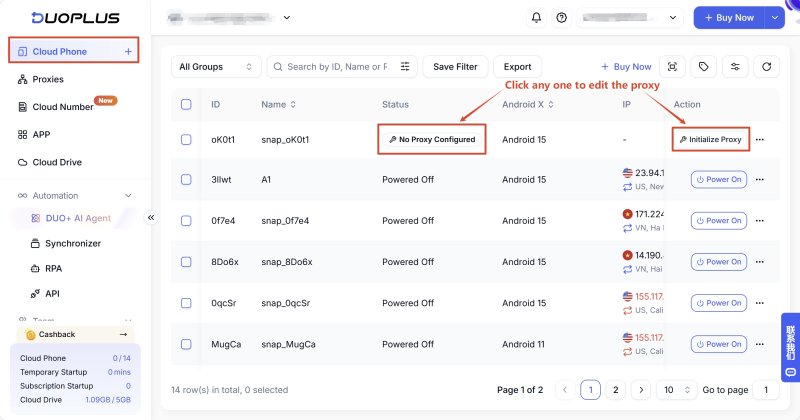
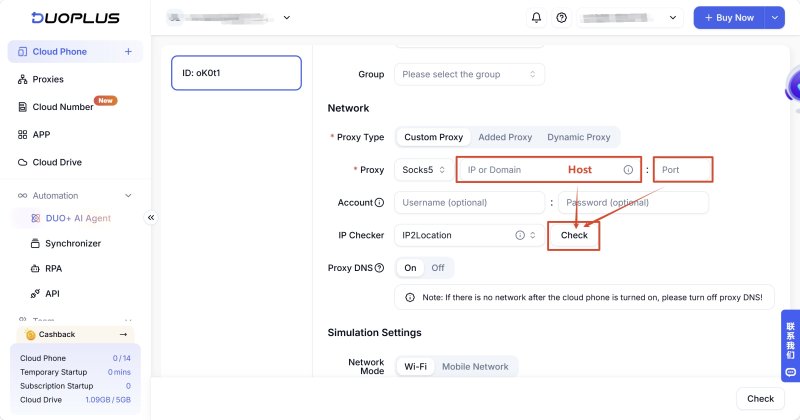
DuoPlus supports bulk proxy imports, device-level IP binding, and proxy pool management, making it possible to maintain network configurations for multiple devices from one place.
After the proxy settings are configured, devices can be viewed centrally from the dashboard. You can also perform bulk actions such as starting, shutting down, restarting, modifying parameters, and resetting devices.
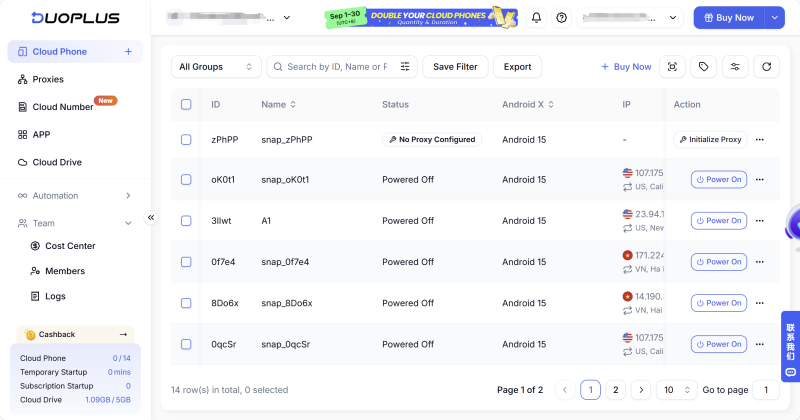
For live streaming accounts that run over longer periods, keeping device and network settings relatively consistent can reduce unnecessary configuration changes.
Live streaming videos, cover images, clips, and backup content can be uploaded to cloud storage and organized by account, streaming room, or content type.
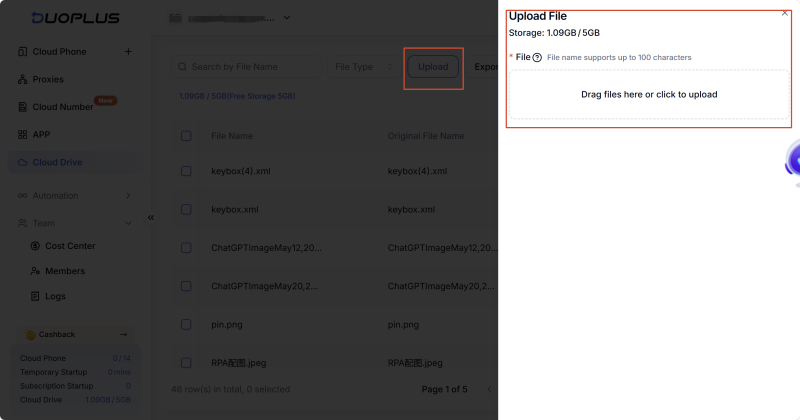
DuoPlus provides cloud storage capabilities that allow live streaming content to be organized in one place and then distributed to cloud phones according to specific streaming tasks.
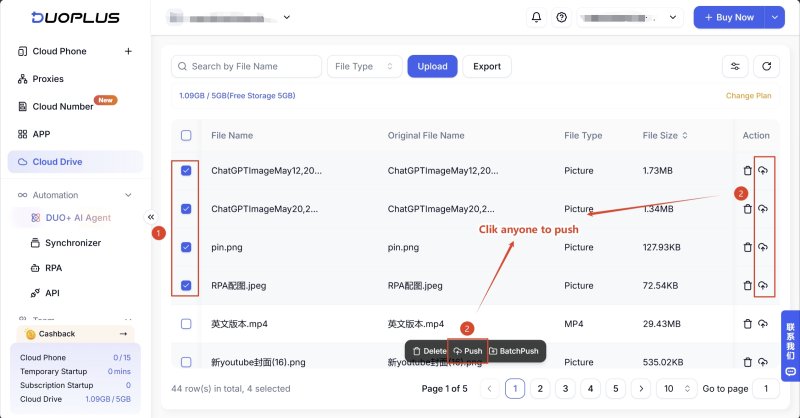
This reduces the need to keep separate copies of content across different devices and makes it easier to update and maintain the content library.
Once the content has been organized, the appropriate videos can be imported into the designated cloud phones according to the streaming schedule.
DuoPlus supports uploading live streaming videos to cloud storage or directly importing them into cloud phones. Content can then be used for live streaming through video playback or OBS .
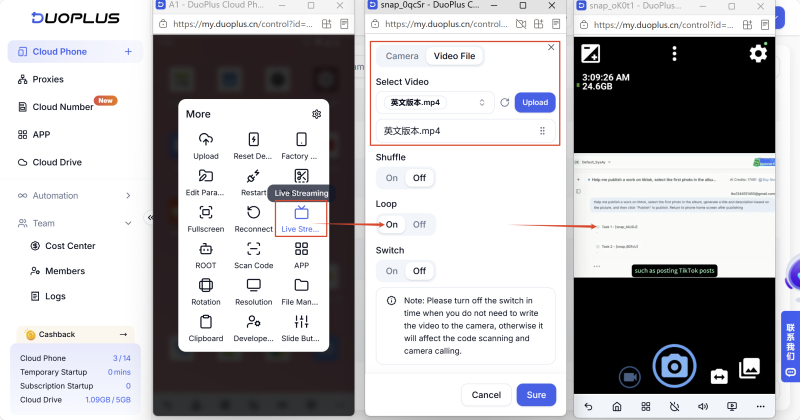
This creates a complete workflow:
Upload content → Organize content → Assign devices → Start streaming
For streaming tasks that need to run for extended periods, you can set up functions such as loop playback, scheduled starts, automatic termination, and exception handling. DuoPlus supports RPA , scripts/API, and bulk task execution to automate some repetitive streaming operations.
This reduces the amount of time spent repeatedly operating individual devices and makes day-to-day management more centralized.
As the number of devices and tasks grows, it is also important to know whether each device is running normally.
DuoPlus provides device lists, task logs, bulk management, and team collaboration features to help monitor devices and live streaming tasks.
When a device or streaming task encounters an issue, the relevant information can be checked from the dashboard for troubleshooting.
Get Started
As live streaming operations grow from a few accounts to multiple accounts and rooms, the management requirements extend beyond the streaming devices themselves to include network environments, content assets, and task status.
Both physical phones and cloud phones can support live streaming. Physical phones are straightforward for smaller operations, while cloud phones are better suited to growing operations that require centralized management, remote access, and easier scaling.
DuoPlus Cloud Phone builds on this approach by bringing device management, network configuration, content storage, content distribution, and streaming tasks into a more centralized workflow. This allows live streaming operations to spend less time managing individual devices and content assets and more time managing the overall streaming process.
Yes. Both can run live streaming applications and support unattended streaming workflows. Cloud phones are more convenient when multiple devices need to be managed remotely or when automated tasks are involved.
Yes. DuoPlus supports bulk cloud phone creation and management, including actions such as starting, shutting down, restarting, modifying parameters, and resetting multiple devices.
Yes. DuoPlus provides cloud storage for organizing live streaming videos, cover images, clips, and other content, which can then be distributed to the appropriate cloud phones.
You can assign cloud phones to different accounts or streaming rooms and configure the corresponding network environment, content, and streaming tasks for each device. This makes it easier to manage multiple accounts without handling every device separately.
It can, depending on the specific streaming application, account requirements, and device workload. For operations that need to manage multiple accounts, assigning accounts to appropriate cloud phones can make device, network, and content management easier.
Muse has recently become one of the most talked-about AI Agent products in the AI tools space. As a new AI Agent from …

OpenAI Codex is an AI coding agent designed to help developers write, modify, review, and deliver code. It is available …

VK (VKontakte) is one of the major social media platforms in Russia. In addition to account management, content …
No need to purchase multiple real phones.
With DuoPlus, one person can operate numerous cloud phones and social media accounts from a single computer, driving traffic and boosting sales for you.

