
Managing Social Media Accounts at Scale with Cloud Phones and a VPS
Mobile-first platforms like TikTok, Instagram and Facebook treat the phone as the main device. That’s why teams that run …
Learn how Instagram two-factor authentication works, how authenticator apps compare with SMS codes, how to turn 2FA on, and how to keep your verification number reliable.

Get an AI-Powered Summary of This Article
Instagram accounts may face security risks due to password leaks, suspicious login attempts, or device changes. Enabling two-factor authentication (2FA) adds an extra layer of identity verification in certain login situations, requiring users to confirm their identity through an additional verification method beyond their password. This makes it more difficult for unauthorized users to access an account. This article explains how Instagram two-factor authentication works, how to enable or disable it, and how to troubleshoot common issues such as not receiving verification codes or failing the verification process, helping users better protect their accounts.
An Instagram account can be tied to personal content, a community of followers, a brand page, and business partnerships. If someone else logs in, they may change your profile details and posts, and your day-to-day operations can be disrupted. A password alone isn't always enough, so it helps to add another layer of protection.
Your password is the first line of defense, but it can't fully prevent a takeover. Common risks include:
Password leaks. If a password you used on another site or app gets leaked, attackers may try the same one on Instagram.
Phishing. You might click a link that looks like an official Instagram notification and enter your login details on a fake page.
Weak passwords. Birthdays, names, and common number patterns are easy to guess and make your account easier to break into.
This matters even more if you manage several social media accounts. When multiple accounts share the same or similar passwords, one leak can put the others at risk too.
Two-factor authentication (2FA) adds an identity check on top of your password.
Once it's on, logging in from a new device or an environment Instagram doesn't recognize may require an extra verification code or another form of confirmation, in addition to your password. Even if someone has your password, they may not be able to get through login without the second factor.
For example, if you enable an authenticator app, you'll need to enter the one-time code it generates every time you're asked to verify. An attacker who knows your password but can't get that code will likely be stopped at login.
For most people, 2FA is a simple extra layer for a personal account. It matters even more for these groups:
Content creators. Accounts that have built up followers and content are costly to lose.
Brand and business account managers. These accounts can involve brand image, customer messages, ad campaigns, and partnerships, so unauthorized access does more damage.
People managing multiple accounts. You need to keep track of the login credentials and security settings of each account, so a problem with one doesn't spill over to the rest.
2FA shouldn't be something you set up only after something goes wrong. It works best as part of your regular account security routine.
Instagram's 2FA options usually include authenticator apps and SMS codes. Depending on your region or account, a WhatsApp option may also appear. The methods differ in how you receive codes, how convenient they are, and how secure they are.
An authenticator app generates time-based codes to confirm your identity. Common choices include Google Authenticator and Microsoft Authenticator.
After you link it, the app creates a new code at regular intervals. When you log in to Instagram, you open the app and enter the code that's currently valid.
This method doesn't rely on your mobile carrier or on waiting for a text to arrive. Because the code is generated locally on your device, it's generally less exposed to SIM swap attacks and SMS interception than text-message codes.
It does have a few requirements. You need to keep your authenticator's transfer or recovery information safe, and make sure you've backed it up before switching phones or deleting the app. Otherwise, you may lose access if your original device becomes unusable. Also, this method can only be turned on through the Instagram mobile app.
With SMS verification, Instagram sends a one-time code to your linked phone number when you log in, and you enter it to complete verification.
It's simple, and you don't need to install a separate authenticator app. The tradeoff is that it depends on your phone number and your ability to receive texts. If the number is deactivated, expires, can't receive SMS, or you lose control of it, logging in and recovering your account can become difficult.
SMS also comes with risks such as SIM swapping and text-based phishing. An attacker may use social engineering to convince a carrier to transfer your number, or trick you into handing over a code through a phishing message. So while SMS is better than a password alone, it is generally less secure than an authenticator app.
In some regions or for some accounts, Instagram may offer WhatsApp as a way to receive verification codes. When it's enabled, codes are sent through your linked WhatsApp account, so you need to be able to use that account and receive messages on it.
This is convenient if you already use WhatsApp every day, but it isn't available everywhere. If you don't see the option on your settings page, you can't use this method.
| Method | How You Get the Code | Main Advantage | Things to Keep in Mind |
|---|---|---|---|
| Authenticator app | Generated by the app | Doesn't rely on SMS; relatively higher security | You need to manage the app and its transfer info; can only be turned on through the Instagram mobile app |
| SMS verification | Sent to your linked phone number | Simple to set up and low barrier to entry | Depends on the number staying available; exposed to SMS interception and SIM swap risk |
| WhatsApp verification | Sent through WhatsApp | Convenient if you use WhatsApp daily | Availability depends on your region and account |
From a security standpoint, an authenticator app is usually the better choice among the options Instagram provides. If you use SMS verification, make sure the linked number stays usable, and keep track of renewals and any changes to that number.
Turning on 2FA doesn't take much effort. You can find the security settings in your Accounts Center.
Open Instagram and go to Settings, then go to Accounts Center, then Password and security, then Two-factor authentication, and select the Instagram account you want to set up.
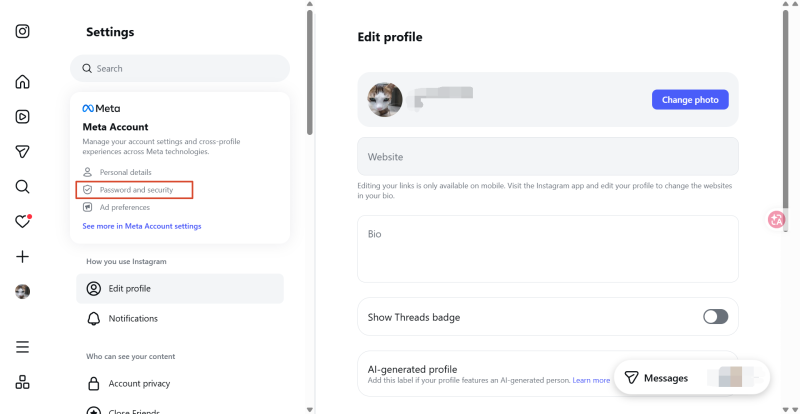
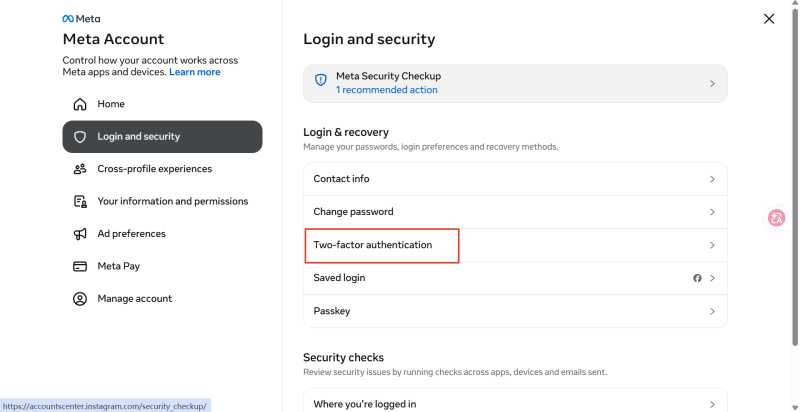
Once you're on the two-factor authentication page, Instagram shows the methods available for your account. Choose an authenticator app, SMS, or any other option that appears, depending on your situation.
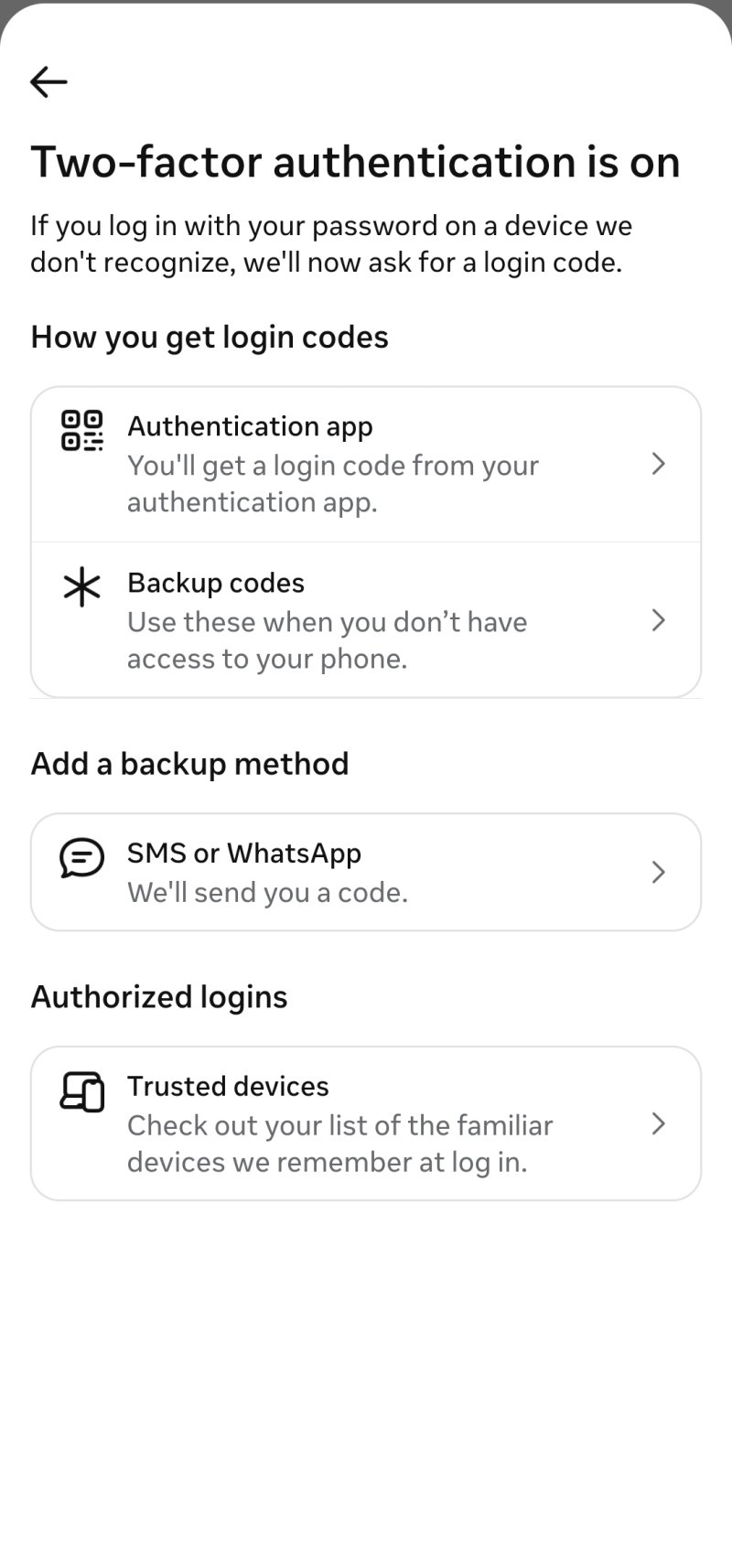
Turning on 2FA is only one part of account security. Beyond protecting your login credentials, you also need to keep an eye on your login activity and your recovery options. If you chose SMS verification, whether your linked phone number stays usable directly affects whether you can keep receiving codes.
Login activity shows which devices and locations your account has recently been accessed from. If you see an unfamiliar device, an unusual location, or a login you didn't make, look into it right away.
When you spot something suspicious, log out of that device, then check whether your password, linked email, and phone number were changed without your permission.
If several people manage an Instagram business account , decide clearly who has access, and avoid sharing passwords and verification codes more widely than necessary.
2FA doesn't replace good password habits. Give your Instagram account its own password rather than reusing one from your email, other social platforms, or shopping accounts.
Avoid birthdays, names, and sequential numbers. If you manage multiple accounts, a reliable password manager can store separate credentials for each one and cut down on password reuse.
Your phone number and email can be used to receive verification codes, and they also matter when you need to confirm your identity and recover an account after a problem. If you change your phone number or email, update the contact info in your Accounts Center promptly and complete any verification Instagram asks for.
If you use an authenticator app, also keep its transfer information and your backup codes safe. Before you change phones, reset a device, or uninstall the app, make sure you have another working verification method, so you don't get locked out if the original device is no longer available.
If you pick SMS as your 2FA method, your phone number becomes the main channel for receiving Instagram login codes.
When you log in from a new device, or when Instagram asks for extra confirmation, a code may be sent to your linked number. If that number has been deactivated, has expired, or is no longer under your control, you may not be able to receive codes, and logging in can become difficult.
This is especially relevant if you signed up for Instagram with a temporary SMS number. Some temporary numbers can be recycled or reassigned after a single code is received, which means texts sent to that number may no longer reach you.
So if you plan to use an Instagram account long term, don't only check whether you can receive a code once. Also consider how long the number is valid, whether it can receive messages repeatedly, and whether you can keep managing it over time.
| Number Type | Key Features | Best For and Things to Note |
|---|---|---|
| Physical mobile number | Provided by a mobile carrier | Good for personal accounts where you want long-term control of the number; keep an eye on keep-alive requirements and roaming costs |
| Virtual number, such as Google Voice | An online phone number that doesn't necessarily need a physical SIM card | Check eligibility, regional restrictions, and whether Instagram accepts it |
| Temporary SMS number | Usually meant for receiving a short-term verification code | Limited control afterward; not suited to important accounts you'll need to access long term |
| Cloud number | Can be purchased and managed through a cloud service, with SMS codes viewable online | Works well when you need to manage numbers in one place; check the validity period and whether it's compatible with the platform you're using it for |
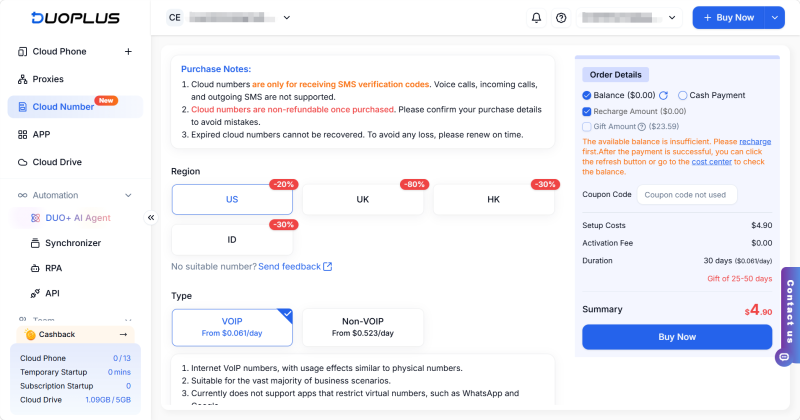
If you manage multiple social media accounts, buying and maintaining a separate physical number for each one can add up. DuoPlus Cloud Numbers offers physical and virtual number options, and supports renewals and receiving SMS repeatedly during the rental period. For Instagram accounts that use SMS verification, you can keep using the same number to receive codes throughout the rental period, rather than switching to a new number each time because the old one only worked briefly.
In practice, you can view the SMS messages received by your Cloud Numbers from the DuoPlus dashboard, so you don't need to log in to different devices or switch between number services to find a code. If you manage several Instagram accounts, this helps you handle the SMS verification messages for each account in one place and keeps your numbers and codes easier to follow.
On some versions of DuoPlus Cloud Phone, you can also bind a Cloud Number to the device and receive verification codes directly inside the Cloud Phone.
Keeping an Instagram account secure takes a strong password, 2FA, and regular upkeep working together. Turning on 2FA adds an extra identity check and lowers the chance of someone logging in with just your password. Checking login activity, keeping your recovery info current, and saving your backup codes help prevent problems later.
If you use Instagram SMS verification, the long-term availability of your phone number is just as important. When choosing a number, weigh the number type, validity period, whether it can receive SMS repeatedly, and how you'll manage it over time. DuoPlus Cloud Numbers can help you manage numbers and receive verification codes in one place, but it doesn't replace Instagram's own security settings. Choose the verification method that fits your account, and keep up with maintenance.
Not necessarily. Whether you're asked for an extra code usually depends on your device, your login environment, and Instagram's security checks. You're more likely to be prompted when logging in from a new device or an environment Instagram doesn't recognize.
Check that the phone number is correct, that it's still active, and that your phone can receive text messages. You can also wait a moment and try again, or use another verification method you've already enabled.
Back up or transfer your authenticator data and save your Instagram backup codes before you switch phones. If you can no longer use your old device, try logging in with a backup code or another verification method.
Backup codes let you verify your identity when you can't use your authenticator app or receive a text. Save them ahead of time and don't share them with anyone.
Not necessarily. If you need to receive a code on the original number to log in, deactivation may stop you from completing verification. If you can confirm your identity with a backup code, another verification method, or a device that's already logged in, you may still be able to get in. Update your linked info before the number is deactivated.
Mobile-first platforms like TikTok, Instagram and Facebook treat the phone as the main device. That’s why teams that run …
Instagram offers two types of Professional Accounts: Creator accounts and Business accounts. For content creators, …
You moved your accounts to DuoPlus cloud phones to stop them getting linked. Each one runs on its own Android device, …
No need to purchase multiple real phones.
With DuoPlus, one person can operate numerous cloud phones and social media accounts from a single computer, driving traffic and boosting sales for you.