



How to Manage Multiple TikTok and Instagram Accounts with Cloud Phones and Mobile Proxies in 2026
Managing social media for one business is relatively straightforward. Managing TikTok, Instagram, and Facebook accounts …
Learn what Instagram Trial Reels are, who can use them, how to publish and share them, and how to review performance insights or troubleshoot common issues.

Get an AI-Powered Summary of This Article
Instagram Reels are an important way for creators to showcase video content and reach new audiences. However, trying a new topic or changing an established content style can feel risky. If a video is very different from what an account usually posts, publishing it as a regular Reel may not give creators a clear idea of whether the new content will resonate with their target audience.
Instagram Trial Reels offer another way to publish and test content. Meta introduced Trial Reels in December 2024 to help creators experiment with new ideas without immediately sharing them with their existing followers. In June 2025, Instagram expanded access to the feature, making it available to more creators.
This guide explains how Trial Reels are distributed, which accounts may be eligible, how to create and publish a Trial Reel, and how to use performance data to refine your content. It also covers device and network management for teams that manage multiple Instagram accounts.
Instagram Trial Reels are a feature that lets creators test Instagram Reels with an audience of people who do not follow their account. When you turn on the Trial option before publishing, Instagram initially recommends the video to non-followers. You can then review how new viewers respond and decide whether to share the Reel with your existing followers.
Creators can use Trial Reels to test different video topics, storytelling approaches, and presentation styles without immediately introducing every experiment to their current audience.
After you enable Trial and publish the video, Instagram uses its content distribution systems to find people who may be interested in it. You can review the performance data later to see how viewers respond.
During the testing period, a Trial Reel is not publicly displayed on the creator’s main profile grid or Reels tab. Followers will not normally see it in their Feed or Reels tab, either. The creator can still find the video in their own account and review its performance.
Both formats are Instagram Reels , but they differ in their initial audience and how they are displayed.
| Comparison | Regular Reels | Trial Reels |
|---|---|---|
| Initial audience | May be shown to both followers and non-followers. | Shown to non-followers first. |
| Profile visibility | Normally appears on the profile and in the Reels tab. | Not publicly displayed on the profile or Reels tab during the testing period. |
| Followers’ Feed | May appear in followers’ Feed and Reels recommendations. | Not normally shown in followers’ Feed or Reels tab during the testing period. |
| Performance insights | Shows the engagement performance of a regular Reel. | Allows creators to review performance during the testing period. |
| Sharing after publishing | Distributed as a regular Reel after publication. | Can be shared manually or automatically with everyone. |
Trial Reels are not completely hidden from followers. During the testing period, a follower may still come across one if someone shares it in a direct message or if they visit a page featuring Reels that use the same audio, location, or filter. The main difference is that a Trial Reel does not normally appear in the creator’s main profile grid or in the places where followers usually see content.
For this reason, Trial Reels are useful when you want to test an idea that has not yet been proven—for example, a new video topic, a different opening hook, or content that differs from your account’s usual focus.
Not every Instagram account can use Trial Reels. Instagram’s eligibility requirements should be checked in the app and in its current Help Center guidance. In general, the account must be public and eligible to be recommended to people who do not follow it.
You can check your account status by following these steps:
①Open Instagram and go to your profile.
②Tap the menu in the upper-right corner and open Account Status.
③Check for content violations, feature restrictions, or recommendation-eligibility issues.
④If Instagram indicates that your account is not eligible for recommendations, follow the instructions provided in the app to address the issue. Check again after the account meets the requirements.
Once you have confirmed that your account is eligible, you can create a Trial Reel. There is no separate registration process or external application. You simply enable the Trial option during the usual Reel creation process.
Follow these steps:
①Open Instagram, tap the “+” icon, and select Reel.
②Choose a video from your phone’s gallery or record a new one.
③Tap Next to open the editing screen. Add music, text, stickers, and a cover as needed, then write a caption.
When you finish editing, continue to the sharing settings.
Try to build each test video around one clear idea. Avoid changing too many content variables at once. This makes it easier to understand which elements viewers respond to when you review the results.
After editing the video, enable Trial on the final sharing screen:
①Find the Trial toggle on the sharing screen.
②Turn on the toggle to publish the Reel as a Trial Reel.
③If you want Instagram to share the video automatically based on its performance, open Trial settings and enable “Share to everyone automatically.” If you prefer to decide when the video becomes public, leave automatic sharing turned off and share it manually later.
④Review your settings and return to the sharing screen.
Pay particular attention to the automatic-sharing setting. If you enable it, Instagram uses its own performance criteria to decide whether to share the video with everyone. If your content needs brand approval or team review, manual sharing is usually the more suitable option.
Once you have checked the video, cover, and sharing settings, publish the Trial Reel.
After publishing, you can find the Trial Reel in your profile. Meta explains that it appears alongside content such as drafts, and only the creator can identify that it is currently in the testing stage.
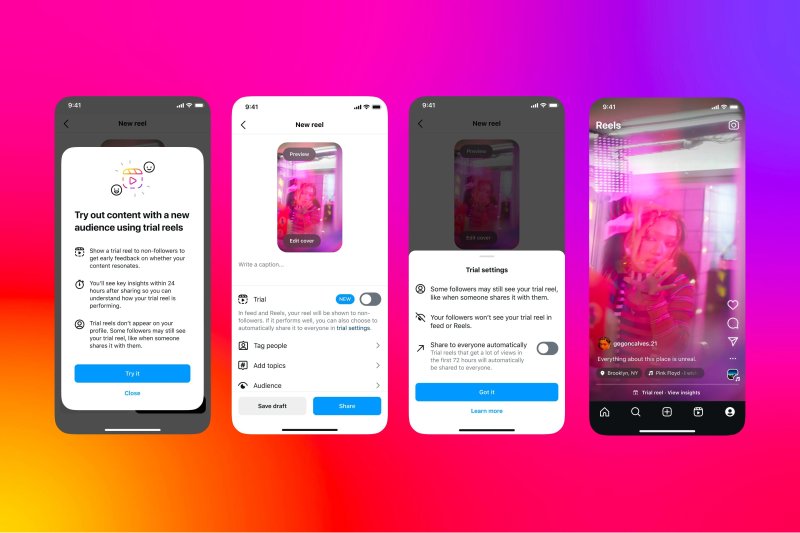
Creators can generally view the initial engagement metrics about 24 hours after publishing a Trial Reel. Open the Reel in the Reels viewer and tap View Insights to review metrics such as views, likes, comments, and shares. Instagram may also provide comparisons with the performance of your previous Trial Reels.
These metrics can help you decide whether an idea is worth developing further, but each one tells you something different:
Trial Reels are initially shown to non-followers, so they may gain views more slowly than regular Reels at first. Give the video time to collect initial insights, then assess the results in the context of its content type.
The value of Trial Reels is not limited to gaining additional exposure. More importantly, they help creators validate new content directions. Before running a test, decide what you want to learn. Change one main variable at a time instead of changing the topic, length, opening, and presentation style all at once. Otherwise, it can be difficult to tell which change affected the result.
Common areas to test include:
Keep a record of each video’s topic, publishing time, main change, and key metrics. When comparing results, try to use videos with similar content types and publishing times.
Trial Reels offer two ways to share a video after the initial test. Choose the option that best fits your testing goals.
Manual sharing
If you want to decide for yourself whether a video is ready for a wider audience, open the Trial Reel after reviewing its insights and select “Share to everyone.” Once shared, the video appears on your profile and may be distributed to your existing followers and other eligible audiences.
Automatic sharing
If you want to reduce the need for manual checks, open Trial settings before publishing and enable “Share to everyone automatically.” Instagram uses the video’s view performance during the first 72 hours to determine whether it should be shared with everyone.
First, check whether your Instagram account is public and whether it meets the follower requirement for its account type. If it meets the follower requirement, open Account Status and check recommendation eligibility. An account with restrictions that affect content recommendations may temporarily be unable to use Trial Reels.
Update Instagram to the latest available version, reopen the Reel creation screen, and check whether the Trial toggle appears. If it is still missing, review your account status and feature eligibility again, then report the issue through Instagram’s Help section.
Do not repeatedly switch account types or frequently change privacy settings just because the Trial toggle is missing. Confirm that the account meets the feature requirements first, then troubleshoot the app and account status.
Trial Reels are initially shown to non-followers, so their audience composition differs from that of regular Reels. The video needs to be distributed by Instagram before it can reach potential viewers. Do not judge the result only by its views shortly after publishing. Wait about 24 hours and review the initial engagement insights.
If views and engagement remain low, adjust the opening, topic, or presentation style and create a new test video. Avoid repeatedly publishing exactly the same video without first analyzing why the earlier version underperformed.
For teams that manage multiple Instagram accounts, Trial Reels testing often involves more than one video. Different brands, audiences, or content themes may have separate accounts. Team members need to switch between these accounts, which can make it harder to keep track of the device and network settings assigned to each one.
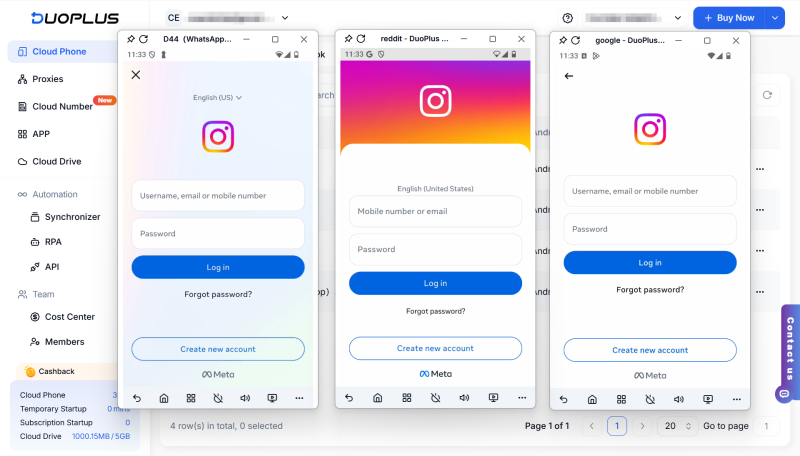
When this becomes difficult to manage, DuoPlus Cloud Phone can provide separate Android environments for different Instagram accounts. You can configure a proxy IP for each cloud phone during setup, helping you keep each account’s device and network settings organized.
With this setup, team members can manage the cloud phones and proxy configurations assigned to different Instagram accounts separately. They can then open Instagram on the corresponding cloud phone and publish Trial Reels through the platform’s normal workflow.
DuoPlus Cloud Phone Free Trial
Instagram Trial Reels give creators a way to test content before sharing it more widely. By showing a video to non-followers first, creators can experiment with new topics and presentation styles, then use views, likes, comments, and shares to evaluate the results.
Before using Trial Reels, check that your account meets Instagram’s public-account, follower, and recommendation-eligibility requirements. Enable Trial during the normal Reel publishing process, then choose manual or automatic sharing to give videos that perform well an opportunity to reach your existing followers.
For teams that need to manage multiple Instagram accounts, DuoPlus Cloud Phone can help keep the device environments and network configurations for different accounts organized, making day-to-day content testing easier to manage.
No. A regular Reel that has already been published cannot be switched to a Trial Reel. You need to create a new Reel and enable Trial in the sharing settings. If Instagram detects that the media is identical to content that has been published before, it may limit the Trial Reel’s reach.
The source article states that Instagram introduced scheduled publishing for Trial Reels in 2026. Creators may be able to select Schedule during the publishing process and set a time, or use a third-party social media management tool that supports Trial Reel scheduling. If the option is not available on your account, update the app and check whether the feature has been rolled out to you.
Instagram’s Help Center guidance says that Trial Reels are evaluated separately in recommendation ranking and do not affect the performance or ranking of regular Reels. Creators can use Trial Reels to test new content without treating the performance of one Trial Reel as a direct reflection of the account’s overall content performance.
No. Instagram provides insights such as views, likes, comments, and shares, but it does not give creators a complete list of viewers. These metrics also cannot identify the specific person behind every view.
Managing social media for one business is relatively straightforward. Managing TikTok, Instagram, and Facebook accounts …

WhatsApp is a widely used messaging app for everyday communication and business conversations. For users who need to …

5 Social Media Management Challenges, and How DuoPlus and Loopway Solve Them Together Running one social media account …
No need to purchase multiple real phones.
With DuoPlus, one person can operate numerous cloud phones and social media accounts from a single computer, driving traffic and boosting sales for you.