





Best Instagram Analytics Tools: 5 Tools to Track and Analyze Instagram Data
Instagram management is about more than likes and follower counts. For individual creators, brand accounts, and …
Learn the key differences between Instagram's link in bio and Story link stickers. Discover how to combine both for maximum traffic, avoid common marketing mistakes, and manage multiple accounts effectively.

Get an AI-Powered Summary of This Article
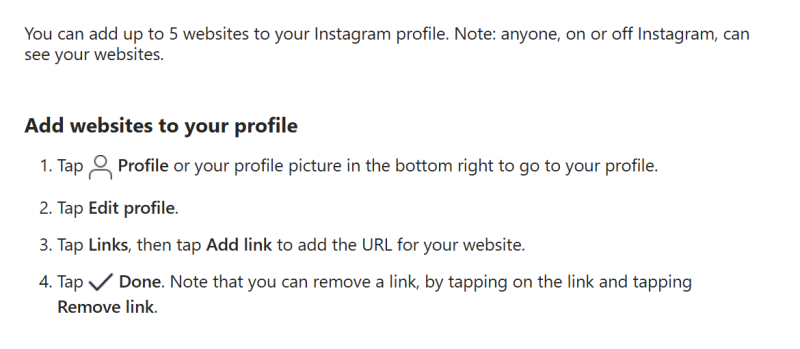
There are two main types of external link entrances on Instagram: the link in bio and the Story link sticker. The link in bio is ideal for long-term display, while the Story link sticker is better suited for time-sensitive promotions, new product launches, and live stream announcements. According to Instagram , users can add external links by editing their profile and navigating to the Links section. They can also embed links using the link sticker feature in Instagram Stories, allowing viewers to tap the sticker and go directly to the target page.
For e-commerce sellers, brand teams, and social media managers, it's easy to confuse the use cases of these two link types when planning Instagram external links. This can lead to missed opportunities for immediate traffic from Stories and underutilization of the profile as a stable traffic hub. As a result, users often don't know where to click after viewing content, and teams struggle to track effective visitor sources from each entrance, failing to fully leverage Instagram's organic reach potential.
It's important to note that for brands running Reels, Stories, and an independent website, these two link entrances should be used together rather than relying on just one. This creates a clear click path for users from Reels and Stories to your website.
The Instagram link in bio is a permanent link entrance displayed on your account profile. When users visit your profile, they can click this link to navigate to your brand website, independent store, product page, campaign page, form page, or multi-link landing page. This entrance is characterized by its stability, longevity, and ability to centralize user traffic.
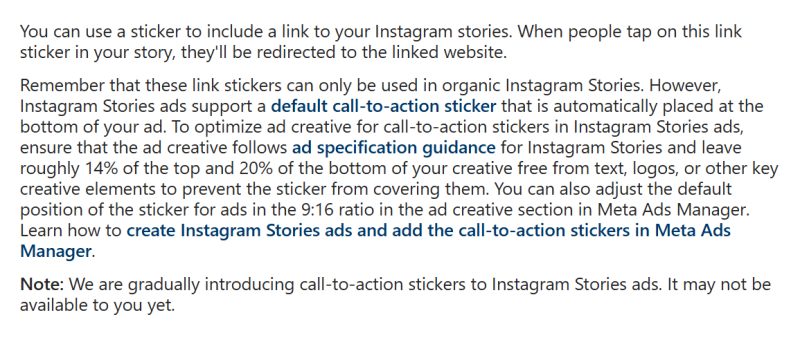
The Instagram Story link sticker is a clickable link element added to Instagram Stories. Users can tap the sticker directly while viewing a Story to access the corresponding page. Unlike the link in bio, the Story link sticker is highly dependent on specific content and timing, making it perfect for new product launches, limited-time offers, live stream previews, or short-term calls to action.
 The core difference is: the link in bio excels at long-term traffic capture, while the Story link sticker is designed for immediate conversions.
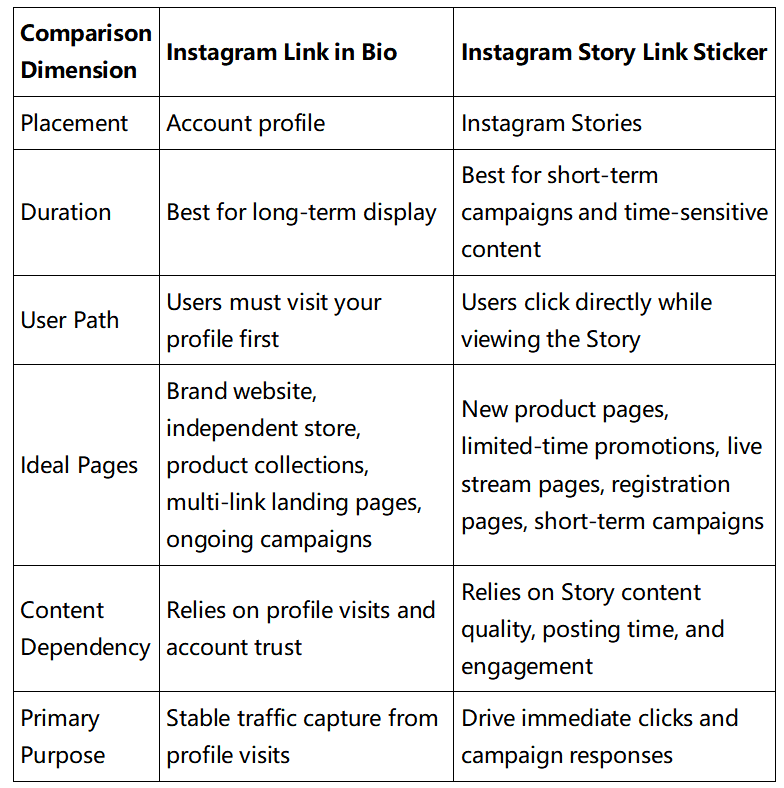
In practice, these two link types are not mutually exclusive. They work together to serve different roles: the link in bio handles long-term traffic retention, while the Story link sticker drives immediate conversions from time-sensitive scenarios.
The link in bio is perfect for accounts focused on long-term traffic capture and building a consistent user base. It can direct users to your independent store, brand website, product collections, membership sign-up pages, or multi-link landing pages.
Its key advantage is permanence. Users can find this fixed link regardless of how they arrive at your profile—whether through Reels, feed posts, platform search, algorithmic recommendations, or direct messages.
You can consistently guide users to your link in bio across all content formats. Common call-to-action (CTA) phrases include:
Pro tip: Since users must actively visit your profile to click the link, ensure your profile photo, bio, pinned posts, and overall visual aesthetic are clear and professional to build trust.
The Story link sticker is specifically designed for time-sensitive scenarios like new product launches, limited-time promotions, live stream previews, and event registrations. It eliminates the need for users to navigate to your profile, creating a shorter conversion path with one-tap access directly from the Story.
Common use cases:
Common CTA phrases for Story link stickers:
Pro tip: The effectiveness of your link sticker depends heavily on your Story content. Always clearly explain the value of clicking the link and ensure the landing page matches the Story topic to maximize click-through and conversion rates.
Build a complete traffic funnel by combining different content formats and link types:
Standard Traffic Funnels:
Running both funnels simultaneously allows you to maintain consistent long-term traffic growth while capturing immediate conversions from time-sensitive campaigns.
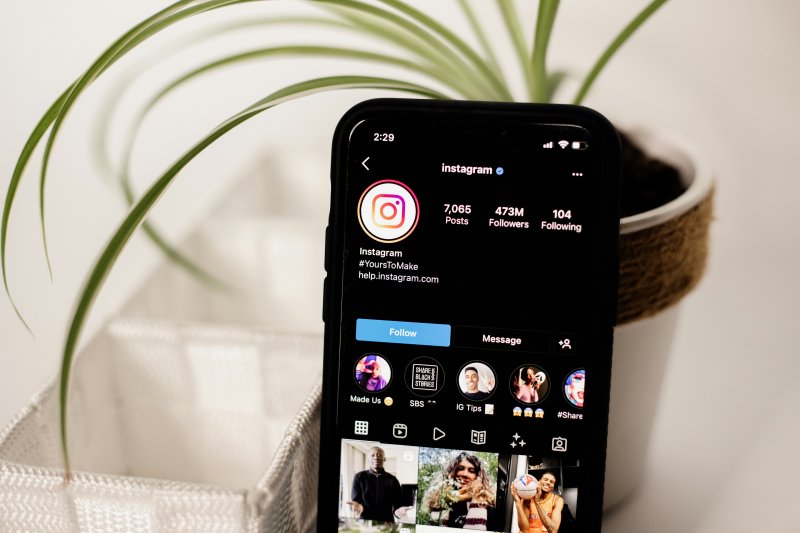
If every piece of content points to the same link in bio and that page lacks clear navigation, users will struggle to find what they're looking for. This is especially problematic for teams with multiple products, campaigns, or accounts.
Solution: Use your link in bio for long-term entrances and Story link stickers for short-term pages, matching different content to appropriate link targets.
A link sticker with no explanation of why users should click or what they'll get will rarely drive meaningful traffic. Always pair your link sticker with clear content that explains the value and includes a strong call to action.
For example, first show product use cases, discount information, or campaign dates in your Story, then add the link sticker—never just post a sticker with no context.
If your Story features a specific new product but links to your homepage, or if your Reel is a tutorial but your link in bio points to a promotion page, you'll break the user journey and lose conversions.
Solution: Always match your link page to your content topic. Product content should link to product pages, campaign content to campaign pages, and tutorial content to resource pages or relevant product collections.
The click-through rate of your Story link sticker depends primarily on your content guidance and visual presentation. Optimize it in these four ways:
Many brands and teams manage multiple Instagram accounts for different product lines, regional markets, or testing purposes. Using the same links across all accounts without differentiation makes it impossible to accurately attribute traffic data and disrupts user journeys, significantly reducing overall conversion efficiency.
Solution: Assign unique links based on account purpose:
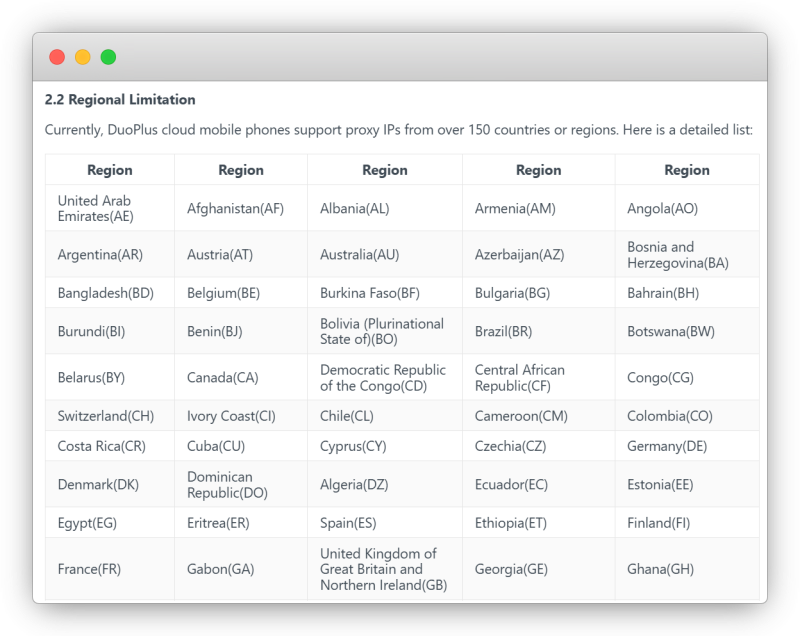
As you manage more accounts, Instagram link marketing becomes more than just choosing the right link type. You'll face challenges including account environment isolation, differentiated link configuration across accounts, content publishing and review, and team collaboration. Manually switching between devices to set different profile links, match Story stickers to the right pages, and configure regional landing pages often leads to misconfigured links, missed updates, and errors.
DuoPlus Cloud Phone addresses these challenges by starting with the fundamental account publishing environment, tailored specifically for teams managing multiple Instagram accounts . DuoPlus Cloud Phone assigns an isolated, independent cloud-based Android environment to each Instagram account, eliminating the chaos of frequent local device switching and shared devices among team members.
In the context of refined Instagram link management, DuoPlus Cloud Phone enables:
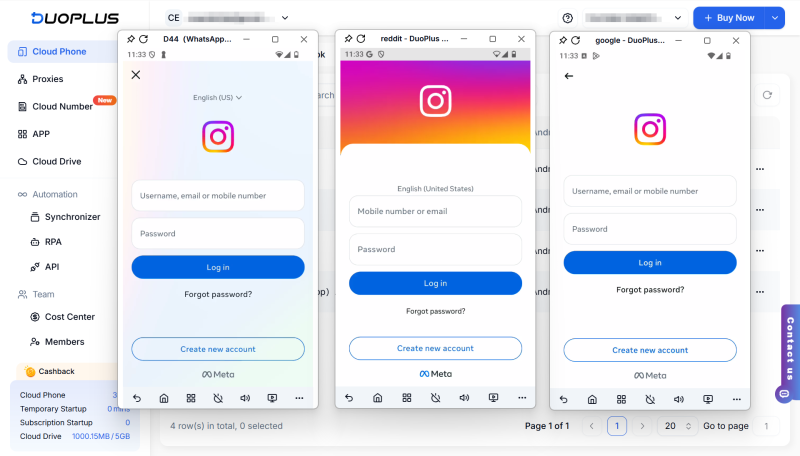
DuoPlus Cloud Phone does not change Instagram's native link rules or marketing strategies, nor does it replace official platform features. Its core value is helping multi-account teams standardize device environments and account management, creating streamlined processes for account isolation, link configuration, and team maintenance to ensure your link strategy runs reliably and effectively over time.
The difference between the Instagram link in bio and Story link sticker lies in the user journey they support. The link in bio is best for long-term traffic capture from profile visits, while the Story link sticker excels at driving immediate conversions from short-term campaigns and time-sensitive content.
For sellers and content teams, the most effective approach is to use Reels and feed posts to generate exposure, your link in bio to capture long-term traffic, and Story link stickers to support new products, campaigns, and live streams. For teams managing multiple Instagram accounts, it's critical to further differentiate link entrances, landing pages, and team responsibilities across accounts to avoid link confusion that can harm your analytics and conversions.
Instagram management is about more than likes and follower counts. For individual creators, brand accounts, and …

When creating YouTube videos, the script determines the video’s structure, pacing, and completeness. For creators who …
An Android app may work perfectly on one phone but behave differently on another. Differences in Android versions, …
No need to purchase multiple real phones.
With DuoPlus, one person can operate numerous cloud phones and social media accounts from a single computer, driving traffic and boosting sales for you.
