Why Cloud Phone Accounts Still Get Banned (and the Proxy Fixes That Stop It)
You moved your accounts to DuoPlus cloud phones to stop them getting linked. Each one runs on its own Android device, …
Learn the differences between Instagram Creator and Business accounts, compare their features, music licensing, and brand partnership options, and find out how to choose or switch account types. You’ll also learn how DuoPlus Cloud Phone can help streamline multiple-account management.

Get an AI-Powered Summary of This Article
Instagram offers two types of Professional Accounts: Creator accounts and Business accounts. For content creators, brands, online retailers, and social media managers, choosing between these account types affects more than just how a profile is presented. It can also influence access to certain content creation, brand partnership, and account management features.
A Creator account is not limited to publishing content, and a Business account does not automatically provide access to every marketing feature. Both are Instagram Professional Accounts and offer many similar tools for managing an online presence. Understanding the differences between Instagram Creator and Business accounts, then making a choice based on your own goals, is more useful than relying on the account names alone.
This article compares Instagram Creator and Business accounts in terms of their intended purposes, feature differences, and use cases. It also explains how to choose and switch between account types, along with practical ways to manage multiple Instagram accounts.
Instagram offers two types of Professional Accounts: Creator accounts and Business accounts. Both are intended for users with content development, audience engagement, or business management needs, but they are designed for different use cases.
Creator accounts are primarily designed for public figures, content creators, artists, influencers, and other individuals or content-led profiles. They are suitable for users whose main goals are to build a personal brand, publish original work, and engage with an audience.
For example, creators who share fashion, beauty, travel, fitness, or lifestyle content can use professional tools to review content performance and audience engagement. Eligible creators may also have access to brand partnership and monetization features.
For creators who earn income through sponsored content, brand partnerships, or their personal influence, a Creator account can provide tools for managing content and audience relationships.
Business accounts are primarily designed for retailers, local businesses, brands, organizations, and service providers. They are suitable for accounts focused on showcasing products, responding to customer inquiries, promoting a business, and driving sales or leads.
For example, a clothing retailer can use Instagram to showcase products, publish Reels, answer customer questions, and promote its business through eligible advertising or business tools. Service providers can use profile details and contact information to help potential customers understand their services and get in touch.
However, Instagram’s business features are not universally available to every account or in every region. Shopping features, advertising, and other business tools may each have their own eligibility and setup requirements.
The main difference between Creator and Business accounts is how well certain tools and features match each account’s intended use.
| Comparison | Creator Account | Business Account |
|---|---|---|
| Typical users | Content creators, public figures, artists, and influencers | Brands, retailers, local businesses, organizations, and service providers |
| Professional insights and tools | Provides professional insights and related tools | Provides professional insights and related tools |
| Content strategy | Designed for content built around an individual’s style, work, and audience | Designed for content built around a brand, products, or services |
| Brand partnerships | Eligible creators may use creator partnership features | Can participate as a brand or advertiser through relevant tools |
| Music access | Available tracks are still subject to regional, licensing, and usage restrictions | Some Business accounts may not have access to the full licensed music library |
| Business profile and management | Profile and contact details can be configured according to available features | Better suited to managing business information, customer contact, and promotion |
This comparison describes the general positioning of each account type. Feature availability is not determined by account type alone. Instagram may adjust features based on region, account eligibility, and product updates. Third-party scheduling, analytics , and messaging tools may also have their own access requirements.
Both Creator and Business accounts can access professional insights and management tools to help users understand account performance and content engagement. The range of available metrics and specific tools may differ between accounts.
For creators, insights are often used to understand how audiences respond to different topics, content formats, and publishing approaches. Features such as Best Practices in the Instagram Professional Dashboard may provide eligible creators with guidance on content creation, engagement, reach, and monetization.
For Business accounts, insights are often evaluated in relation to business goals. For example, businesses may review which posts generate product inquiries, which content attracts potential customers, and how paid advertising performs compared with organic content.
Music availability is an important factor that users sometimes overlook when comparing Creator and Business accounts.
According to Meta’s information about the Instagram music library , licensed music in the library is primarily intended for personal, non-commercial use. To comply with licensing agreements, some Business accounts and certain types of posts may not be able to use particular tracks from the library. Availability can also vary by country or region.
When content is used to promote products, build brand awareness, or run advertisements, the key question is not simply whether a track can be selected. You also need to confirm that the music is licensed for the intended commercial use. Users who need music for commercial content can review Meta Sound Collection, which provides music and sound effects for use in eligible commercial content subject to its licensing terms.
Creator accounts are suitable for individuals who work with brands through their content and influence. Eligible creators may use features such as Instagram Creator Marketplace to present their content focus and connect with brands.
For brands, tools such as Meta Business Suite can support marketing management and creator partnerships. Meta’s information about Instagram Creator Marketplace describes workflows that allow brands to discover creators, communicate with them, and run partnership ads.
Both account types can be used for commercial activities. The choice depends on who the account represents and which tools are needed. An individual creator may prioritize showcasing work, growing an audience, and finding partnership opportunities. A company or brand may focus more on product information, customer communication, advertising, and overall business management.
Once you understand the feature differences, choose an account type based on your primary operating goal. The most important question is whether the account represents an individual’s creative work or a business that needs to attract customers and generate sales or leads.
If your account mainly publishes original videos, personal work, lifestyle content, or professional knowledge, and your goal is to build an audience around your personal identity, a Creator account may be a better fit.
For example, a fitness creator may publish workout tutorials and interact with followers; a photographer may use a portfolio to develop a recognizable style; and a beauty creator may collaborate with brands through product reviews. In each case, personal content and audience relationships are central to the account’s purpose.
If the account represents a brand, store, company, or service business, a Business account is generally more suitable.
For example, an online retailer may need to showcase products, answer purchase-related questions, and run ads. A software company may publish product updates and direct potential customers to its website. A local service provider may need to display service details and contact information. In these cases, the Instagram account serves as part of the business’s marketing and customer communication channels rather than primarily building an individual’s influence.
Some users manage both a personal brand and a business. A creator may sell their own products, while a company founder may use a personal account to share industry-related content.
There is not necessarily one correct choice for these situations. Start by identifying the account’s primary role:
| Account’s main purpose | What to consider |
|---|---|
| Showcasing personal work and building partnerships through individual influence | Evaluate a Creator account first. |
| Representing a brand, store, or company and handling product information or customer communication | Evaluate a Business account first. |
| Publishing content while also selling products | Choose based on the creative, music, business, and management tools you use most often. |
| Managing multiple accounts for different business purposes | Choose an account type for each profile based on its positioning and practical requirements. |
If you already have an Instagram account, you can switch its account type by following the steps below. Menu names may vary slightly depending on the app version.
①Open Instagram and go to your profile.
②Tap the menu icon (More) and open Settings.
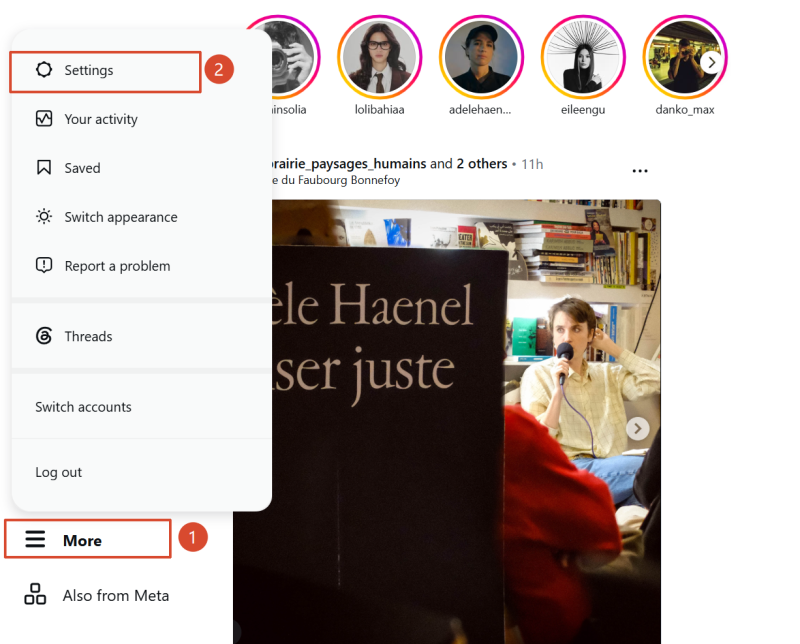
③Find Account type and tools, then select Switch to professional account.
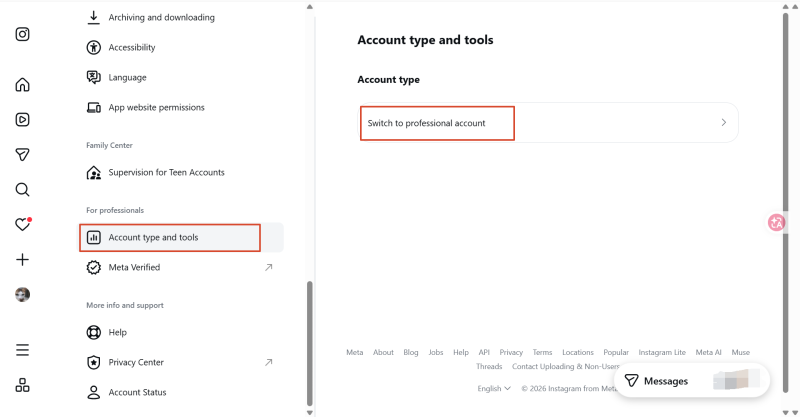
④Follow the on-screen instructions and choose Creator or Business.
Enter your contact details if needed, and decide whether to connect a Facebook Page.
Connecting a Facebook Page is generally not required just to complete professional account setup. However, linking or authorization may be necessary for certain advertising, cross-platform management, or business tools.
If your Instagram account is already a Professional Account, you can also switch between Creator and Business in the account-type settings. The process is similar to the steps above.
First, check whether your account can be public. Instagram Professional Accounts cannot be set to private. If you currently use a private personal account, consider the implications of making it public before switching.
Next, review the features you currently use. Feature visibility may change between account types, and access to certain music, partnership, or management tools may depend on eligibility.
Finally, check external connections. If your account is linked to a Facebook Page or a third-party management platform, review how switching may affect existing permissions and publishing workflows. For an account used in ongoing marketing activities, verify key functions after switching to avoid disrupting normal operations.
For creators, brands, and teams managing multiple Instagram accounts, account type is only one part of the operating setup. Different accounts may be used for content testing, brand presentation, product promotion, or reaching different markets. Teams also need a clear approach to device allocation, account-to-device mapping, and daily workflows.
If your team manages Instagram accounts for different countries or regions, configure network and device settings according to operational requirements. For example, you can assign a suitable proxy IP to a cloud phone and set parameters such as device brand and model, language, and time zone so that the device environment matches the intended use.
DuoPlus Cloud Phone supports the configuration of relevant network and device parameters, helping teams organize devices used for different markets. For teams working collaboratively, member permission settings can also be used to assign feature access and cloud phone access, making device usage and task ownership clearer.
When managing multiple Instagram accounts, establish consistent naming and classification rules for the cloud phones associated with them. You can organize devices by brand, business type, target market, or responsible team so that each device’s purpose is easy to identify.
DuoPlus Cloud Phone supports device organization through device names, tags, and groups. For example, you can group devices by brand or project, then use names and tags to distinguish different markets or business purposes.
As the number of accounts and devices grows, this classification approach can make it easier for team members to locate the right device and reduce searching time and operational mistakes.
As the number of Instagram accounts increases, teams need to manage more devices and switch between accounts more frequently to publish content. Finding devices one by one, opening apps, and repeating similar actions can increase manual work and consume time.
Teams can use the batch operation features in DuoPlus Cloud Phone to manage devices centrally. For content workflows, they can select Instagram-related templates from the DuoPlus RPA Template Store or configure custom workflows according to their requirements. By combining batch device management with RPA workflows, teams can organize eligible repetitive tasks into executable processes and reduce manual repetition.
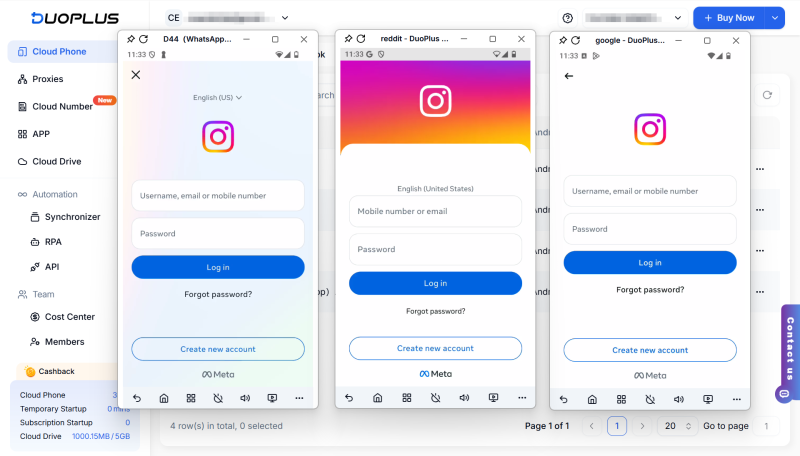
Instagram Creator and Business accounts are both Professional Accounts. A Creator account is generally better suited to profiles centered on individual content creation, audience relationships, and brand partnerships. A Business account is generally better suited to profiles representing brands, stores, companies, or service businesses.
The key factors to compare are account positioning, music licensing, business management requirements, and compatibility with third-party tools. After choosing an account type, review the professional account settings, connected services, and daily workflows to make sure the setup matches your operating goals.
For teams managing multiple Instagram accounts, account planning can be combined with device management. Defining each account’s purpose, configuring devices appropriately, and establishing consistent workflows can reduce repetitive work and allow teams to focus on content quality, audience needs, and business goals.
Switching to a Creator or Business account generally does not require a fee. However, advertising, some third-party services, and certain optional subscription products may involve costs. Check the pricing terms of the relevant service for details.
Switching between a Creator and a Business account does not normally delete followers automatically. However, review your account settings, connected tools, and available features before switching, then check that your profile and daily workflows are functioning normally afterward.
Some Business accounts may not be able to use certain tracks from Instagram’s licensed music library. Availability depends on licensing, region, and the specific use case. For commercial content or ads, confirm that the music is licensed for that purpose. Eligible users can also consider tracks and sound effects in Meta Sound Collection.
You should not assume that one account type receives more reach than the other. The main purpose of choosing an account type is to match your content creation or business management needs. Content performance should still be evaluated based on content quality, audience feedback, engagement, and Instagram’s policies.
You moved your accounts to DuoPlus cloud phones to stop them getting linked. Each one runs on its own Android device, …
When managing X (Twitter) accounts, some daily tasks need to be repeated, such as publishing posts, checking task …
An app may work perfectly on a developer's smartphone but suddenly crash on another device, display the wrong currency, …
No need to purchase multiple real phones.
With DuoPlus, one person can operate numerous cloud phones and social media accounts from a single computer, driving traffic and boosting sales for you.