





How to Log In to Codex: What to Do If You Don't Receive the Phone Verification Code
OpenAI Codex is an AI coding agent designed to help developers write, modify, review, and deliver code. It is available …
Learn how Instagram's comment editing feature improves real-time interaction and how teams managing multiple accounts can optimize comment management to build trust and increase engagement.

Get an AI-Powered Summary of This Article
In April 2026, Instagram rolled out comment editing , allowing users to edit a comment within 15 minutes after posting it. This reduces the need to delete and repost comments just because of typos or unclear wording.
For brands and teams managing multiple accounts, this update may seem small, but it sends a clear signal: Instagram is improving the comment experience and making the comment section a better space for real, continuous, and timely interaction. Compared with likes, comments reveal more directly whether users are genuinely interested in the content, product, or account.
The Instagram comment section is not just a place where users leave messages. It is also an important space for building trust, collecting feedback, and improving content interaction quality.
Instagram’s comment editing feature allows users to edit their own comment within 15 minutes after posting it. Edited comments display an Edited label, so users no longer need to delete the original comment and post it again.
For regular users, this is mainly useful for correcting typos or clarifying what they meant. But for brands, it shows that the comment section is becoming more like a real-time communication space.
In the past, if users made a mistake in a comment, they had to delete it and repost it, which often broke the flow of the conversation. Now they can edit the original comment directly, and brands can follow the conversation more clearly. For example, if a user asks about sizing, shipping regions, usage instructions, or discount details in the comments, the operations team can continue replying within the same thread instead of dealing with repeated, deleted, or reposted comments.
Instagram is making the comment section better suited for real-time interaction, which means teams managing multiple accounts also need to take comment management more seriously.
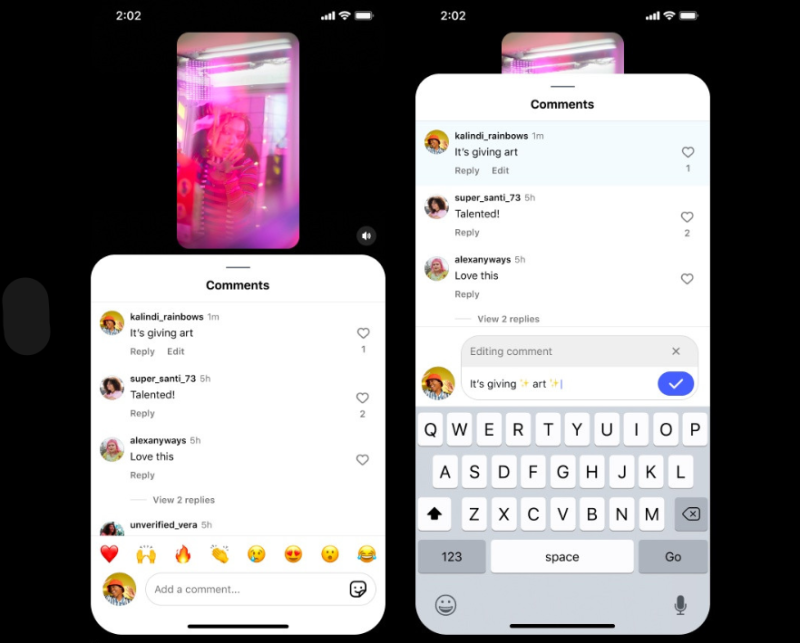
According to a Buffer report cited in the document, Buffer analyzed over 52 million social posts and found within a sample of nearly 2 million posts that posts where accounts actively replied to comments usually performed better than posts without replies. For Instagram specifically, replying to comments was associated with about a 21% lift in engagement compared with the account’s own baseline, and around 63% of Instagram accounts performed better on posts where they replied to comments. The chart on page 3 visually highlights this point alongside the new comment-editing interface.
This does not mean replying to comments automatically guarantees stronger recommendations, but it does show that comment replies are part of overall content interaction. For teams managing multiple accounts, unanswered comments, slow replies, or inconsistent reply styles can all affect the quality of engagement.
A like is a light interaction. Users may tap like casually. A comment usually means the user is willing to ask a question, share an opinion, or talk about their experience.
For example, if a product Reel receives comments like:
These comments are more valuable than likes alone. They directly show what users care about, what they do not fully understand, and which selling points are creating the most interest.
For Instagram teams, the comment section is a free feedback channel. High-frequency comment themes can also become topics for the next piece of content, such as a beginner guide, a sizing recommendation post, a shipping-region explanation, or a comparison between old and new versions.
After seeing a post on Instagram, users often scroll down to read the comments. The overall tone of the comment section can directly affect how trustworthy the account feels.
If the comment section includes real questions, timely brand replies, and user experiences from existing customers, the account feels more credible. On the other hand, if comments go unanswered for a long time, or if the only replies are generic responses like “Thanks,”“❤,” or “👍,” users may feel the account lacks real operations and service support.
Instagram supports product tagging in posts, but when users decide whether to keep exploring a product, they often still check the comments to see whether there is real feedback and whether the brand is actively replying.
The comment section may not close the sale directly, but it can influence whether users visit the profile, click the product, send a DM, or keep following the account.
Many teams review Instagram content mainly by looking at views, likes, and follower growth. But comments often reflect content quality more directly.
A video may get high views, but if the comments are mostly irrelevant, the interaction quality may not actually be strong. Another video may get average views, but if the comments include many real questions, purchase signals, and detailed feedback, that content may be more worth improving and scaling.
The document recommends that Instagram teams review high-value comments once a week and use them to improve account content and increase reach. The table on page 6 can be translated as follows:
| Comment Type | How to Handle It |
|---|---|
| Frequently asked questions | Turn them into FAQs, tutorials, or the next Reel |
| Product questions | Improve the caption, product detail page, or reply template |
| Positive feedback | Save it as user testimony or future content material |
| Negative feedback | Pass it to customer support or the product team |
| Region-specific questions | Adjust the reply style by region or market |
When a team operates only one Instagram account, comment management is relatively simple. But when the team manages multiple brand accounts, regional accounts, test accounts, or creator-collaboration accounts at the same time, comment management quickly becomes more complicated.
When multiple Instagram accounts are active at the same time, comments are spread across different accounts. Operations staff may need to keep switching accounts just to check notifications, which can easily lead to situations where a high-performing post gets no follow-up, user questions are answered a day later, or reply speed varies too much from one account to another.
This matters even more for product-related questions, because slow replies can mean losing the user entirely.
Many Instagram users ask a question in the comments first and then move to DMs. Without a clear rule, teams can end up with public comments left unanswered, the same explanation repeated in DMs, or customer support and operations handling the same issue twice. That adds extra workload.
A common problem for multi-account teams is that the same product question gets different answers from different accounts. Pricing, shipping regions, promotion dates, and after-sales rules can all become inconsistent if each team member replies ad hoc. For brands, that directly weakens trust.

After identifying problems, you need to manage Instagram comments in a timely manner. There’s no need for complicated processes — the key is to set simple, actionable rules.
The document suggests dividing Instagram comments into four categories:
| Comment Type | How to Handle It |
|---|---|
| Product inquiries | Reply quickly, and direct the user to DMs or the product page if needed |
| General engagement | Reply naturally to keep the account active |
| Frequently asked questions | Record them and turn them into content topics |
| Negative or spam comments | Decide whether to hide, filter, or escalate them |
Instagram also provides hidden-comment features. Hidden comments still count toward the total comment count, but the sender does not know the comment has been hidden.
Teams managing multiple accounts should not try to handle all Instagram comments in exactly the same way. A more efficient method is to divide work by account type.
This makes it easier to avoid missed replies and helps each account keep a consistent communication style.
Repeated questions in the Instagram comment section often point the direction for your next piece of content.
If many users ask "how to use it", you can create a tutorial; if many ask "is it suitable for beginners", make a beginner’s guide; if many ask "what’s the difference from the old version", produce comparison content. This approach works better for brand Instagram accounts than simply chasing trends, as it comes from real user feedback. The team can check comments 30 minutes after publishing Instagram content, reply to them in a focused batch on the same day, and sort out frequently asked questions the next day.
While managing content well, it is also necessary to focus on the actual operational efficiency of the team. When a team runs multiple Instagram accounts simultaneously, it is essential to clarify who is responsible for each account, which accounts require priority comment replies, and which accounts belong to the same region or product line.
The grouping feature of DuoPlus cloud phone helps teams manage cloud phones and accounts by business scenario. The grouping function makes it easy for individuals and teams to oversee all cloud phones, and a single cloud phone can also be added to multiple groups.
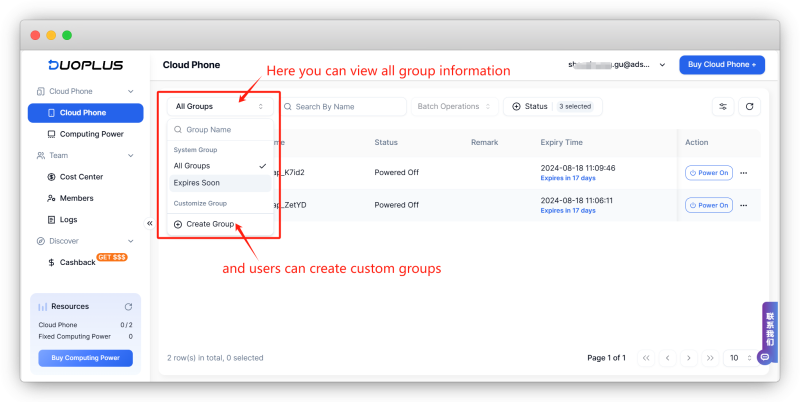
For example, teams can group accounts like this:
| Grouping Method | Best Use Case |
|---|---|
| By platform | Manage Instagram, TikTok, and Facebook accounts separately |
| By region | Manage US, Europe, and Southeast Asia accounts separately |
| By account role | Brand accounts, test accounts, support accounts, creator-collaboration accounts |
| By task | Today’s priority replies, campaign-period accounts, high-engagement accounts |
The value of this is not simply opening more accounts. It is making sure Instagram comment replies and other tasks have a clear owner. When an account needs comment follow-up or review, the team can locate the correct regional or product account more quickly and reduce constant switching and management confusion.
For teams managing multiple Instagram accounts, the more real-time comment management becomes, the more important grouping becomes. The document positions DuoPlus’s grouping feature as a way to connect accounts, cloud phones, and comment tasks so that operators can handle comments according to account role.
It is not accurate to say comments are always more important than likes, but comments usually reflect deeper user engagement. If users are willing to comment, the content has likely triggered a question, opinion, interest, or discussion.
No. Priority should go to product inquiries, high-value interactions, negative issues, and repeated questions. Meaningless emoji comments, spam, or repetitive low-value comments do not need replies, and can be hidden or filtered when necessary.
Yes. Teams managing multiple accounts can group Instagram accounts by platform, region, account role, or task status, which makes comment replies, account management, and team responsibilities clearer.
Not in a simple guaranteed way. It is better understood as a clear correlation rather than a guaranteed ranking effect. The document recommends replying quickly to high-value comments, product questions, and real user feedback after posting.
Yes. Reels are better suited for expanding reach, but that does not necessarily mean comment engagement will also be high. So teams should not judge Instagram performance by Reel views alone. Reels can attract new users, while comments and carousel posts can be used to answer questions, collect feedback, and build trust.
Instagram’s comment editing feature is a reminder that Instagram comments are becoming more suitable for real-time interaction. For sellers and operations teams, the comment section is not just a message area. It is a source of user feedback, trust-building, and future content ideas.
Teams managing multiple accounts do not need to make comment management overly complicated. The document reduces the core work to three things: classify comments, assign work by account type, and turn repeated comments into content topics.
OpenAI Codex is an AI coding agent designed to help developers write, modify, review, and deliver code. It is available …
VK (VKontakte) is one of the major social media platforms in Russia. In addition to account management, content …
ChatGPT is available through both the web version and desktop/mobile apps. The web version requires no installation and …
No need to purchase multiple real phones.
With DuoPlus, one person can operate numerous cloud phones and social media accounts from a single computer, driving traffic and boosting sales for you.
