




How to Assign DuoPlus Cloud Phone and Account Management Permissions to Your Social Media Team
Social media operations often involve content publishing, account maintenance, project collaboration, and staff …
Learn how to register on Avito, post effective listings, increase visibility, and manage multiple Avito accounts efficiently with DuoPlus Cloud Phone.

Get an AI-Powered Summary of This Article
Avito is one of the most popular online marketplaces in Russia. It is widely used by individuals, local businesses, service providers, and professional sellers to reach customers who are already searching for specific products or services.
As more sellers join the platform, competition for visibility and customer attention continues to grow. This article will explore how to create effective Avito listings, manage multiple accounts more efficiently, and solve common account-related issues to help you increase your Avito sales.
Avito is a classified marketplace where users can buy and sell products, advertise services, search for jobs, and publish property or vehicle listings.
Its main advantage is strong local purchase intent. Many users visit Avito with a clear goal, such as finding a second-hand phone, renting an apartment, hiring a local service provider, or purchasing business equipment in a specific city.
Common Avito categories include:
Unlike social media platforms, Avito is designed around direct searches. This means sellers are more likely to reach users who are actively comparing products, prices, and nearby options.
For individual sellers, Avito can be a convenient way to sell unused items. For businesses, it can become a long-term customer acquisition channel, especially when listings are properly organized by product, location, and target audience.
Users can access Avito through its official website or mobile application. Registration normally requires a valid phone number that can receive a verification code .
The standard process includes:
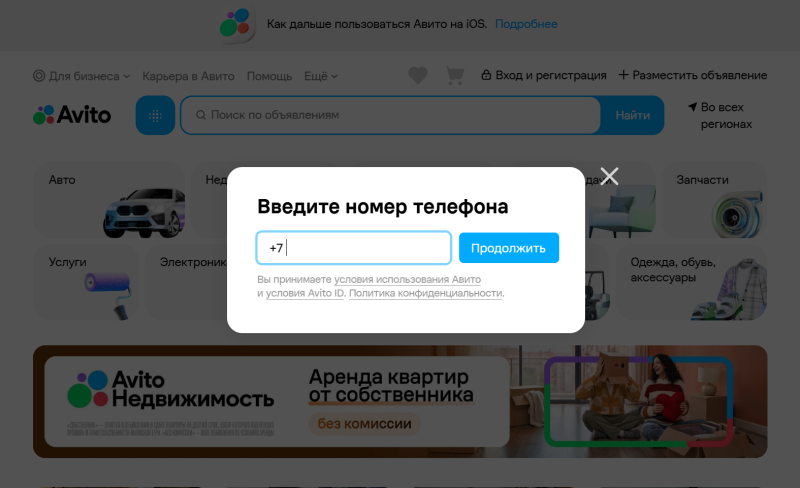
Sellers should use accurate and consistent details, especially when the account represents a business. A complete profile can make future verification easier and may also improve buyer trust.
If login problems occur, check the following first:
Avoid requesting verification codes repeatedly within a short period. If Avito asks for additional verification, complete it only through the official website or application.
A good Avito listing should help buyers quickly understand the product, price, location, and purchase options. Free listing availability may vary by category, region, account type, and the number of active ads, so check the publishing page before submission.
Select the category that best matches the product or service. The right category helps Avito show the listing to relevant buyers and reduces the risk of moderation delays.
Use a simple title structure:
Brand + product type + model + key feature
For example:
Samsung Galaxy S23 256GB in Excellent Condition
Avoid vague wording, repeated keywords, and unnecessary promotional phrases.
Explain the product’s condition, main specifications, included accessories, and any visible defects. Buyers should also know whether the price is negotiable and whether the item is currently available.
A useful description may include:
Use clear photos of the actual item. The main image should show the complete product, while additional photos can highlight accessories, packaging, labels, or defects.
Good lighting and a clean background can make the listing look more credible.
Compare similar listings in the same city before setting the price. Consider the product’s condition, age, accessories, and local demand.
Choose the correct location and clearly state whether the buyer can use delivery, local collection, or both.
Before publishing, confirm that the category, title, description, photos, price, location, and delivery information are correct.
If Avito requests changes, read the moderation message carefully and fix the specific issue before submitting the listing again.
To reach more potential buyers, some sellers use multiple Avito accounts to gain more exposure and organize different parts of their business. When planned properly, multiple accounts can help sellers:
However, logging in to several Avito accounts on the same device can create risks. The accounts may share the same device and network environment, making them easier for the platform to associate. If one account is restricted, other connected accounts may also face additional review.
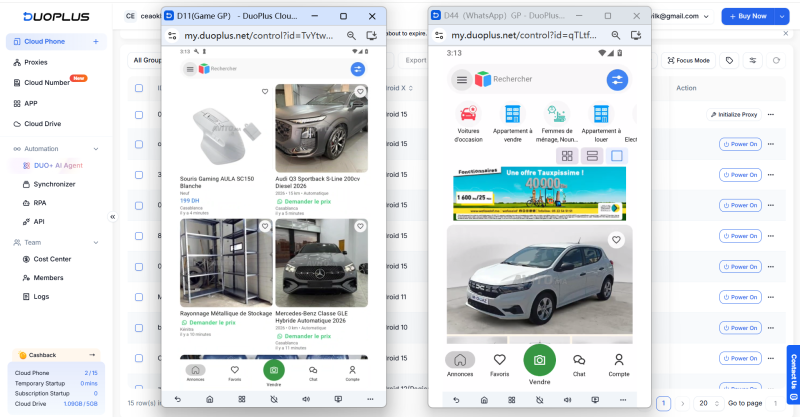
With DuoPlus Cloud Phone , sellers can run each Avito account in a separate cloud Android environment with a unique device fingerprint, all managed from a single dashboard—without purchasing or maintaining multiple physical phones. DuoPlus also provides cloud numbers that can be used for account registration and SMS verification where supported by Avito.
Selling successfully on Avito is not only about posting more listings. It is about presenting the right products clearly, reaching buyers in the right locations, and keeping every account easy to manage.
As your Avito business grows, a more organized multi-account setup can help you spend less time switching between devices and more time improving listings, replying to customers, and closing sales.
Why Is Avito Not Working?
Check your internet connection, update the app, clear the cache, or try the official website. If only one account is affected, review your email and Avito notifications for verification or restriction messages.
How Can I Delete an Avito Account?
Go to the account settings and follow the deletion instructions. Complete active transactions and withdraw any available balance first.
Is It Free to Post an Ad on Avito?
Some listings are free, but fees may vary by category, region, account type, and listing volume. Check the publishing page before submitting.
Can I Use Avito Outside Russia?
Access may be possible from other countries, but some features can depend on location, phone verification, delivery availability, and local platform rules.
Social media operations often involve content publishing, account maintenance, project collaboration, and staff …
As TikTok, Instagram, and Facebook become important channels for brand marketing, content creation, and affiliate …

TikTok Shop gives sellers multiple ways to reach potential customers, from shoppable videos and livestreams to creator …
No need to purchase multiple real phones.
With DuoPlus, one person can operate numerous cloud phones and social media accounts from a single computer, driving traffic and boosting sales for you.

