





How to Sign Up for Meta Muse and Use a Referral Code
Muse has recently become one of the most talked-about AI Agent products in the AI tools space. As a new AI Agent from …
Learn how to find user IDs on Discord, including the steps and methods for enabling developer mode, helping you manage servers and use clients more effectively.

Get an AI-Powered Summary of This Article
In the course of using Discord, there are times when we need to find our own or someone else's user ID. This could be for adding to a whitelist, configuring client permissions, making API calls, or other technical operations. Although Discord does not provide a direct ID lookup interface, by enabling "Developer Mode," we can easily obtain this information.
Every user on Discord has a unique user ID, which is a long number that serves as a unique identifier for the user. The user ID is primarily used for server management, client programming, and high-level user interactions.
Ordinary users generally do not display ID information. If you want to find a user ID on Discord, you first need to enable the "Developer Mode" feature, which requires you to:
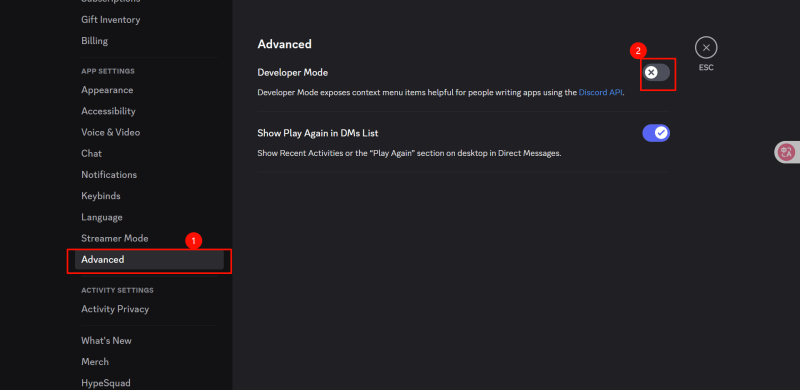
Note: Enabling Developer Mode may reveal more commands or information in chats, but it is a necessary step for finding user IDs. If you do not want to affect your user experience, you can close Developer Mode after finding the Discord ID.
After enabling Developer Mode, finding your own user ID is very simple:
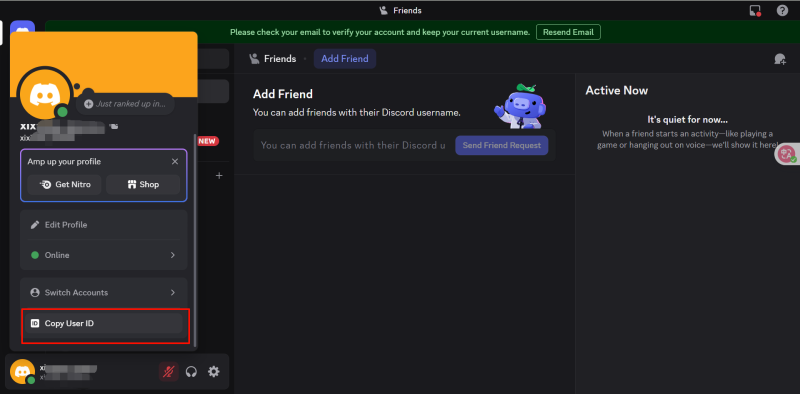
If you want to find the user ID of another user (for example, a server member), follow these steps:
In addition to finding user IDs, enabling Developer Mode also provides other useful features, such as:
By enabling Discord's "Developer Mode," users can easily find their own and others' user IDs, which provides significant benefits for server management, client programming, and various operations requiring user IDs. Just follow the steps mentioned above, and you can use Discord more effectively!
Register for a DuoPlus account to receive a one-month cloud phone that you can use directly! It supports downloading overseas applications like Discord, TikTok, Instagram.If you have any questions,add the Telegram channel: https://telegram.me/duoplusen
Muse has recently become one of the most talked-about AI Agent products in the AI tools space. As a new AI Agent from …

OpenAI Codex is an AI coding agent designed to help developers write, modify, review, and deliver code. It is available …

VK (VKontakte) is one of the major social media platforms in Russia. In addition to account management, content …
No need to purchase multiple real phones.
With DuoPlus, one person can operate numerous cloud phones and social media accounts from a single computer, driving traffic and boosting sales for you.

