
How to Automate TikTok Account Management with AI Agent(Batch Setup & Auto Posting)
TikTok has become one of the most important growth channels for creators, affiliate marketers, and performance-driven …


Table of Contents
In today's world of high mobility and internet ubiquity, mobile devices have become our main gateway to various applications and online services. Along the way, the IP address used by the mobile device also gradually becomes a significant identifier within the network environment and essential for user access characteristics. While the IP address is crucial for network connectivity, from the user's perspective, the mobile IP address may expose your location, what network you connect to, and even what you are doing online.
To safeguard privacy or when using networks in different regions, an increasing number of users are beginning to pay attention: how to hide your IP address on mobile devices?
This article will introduce several common methods for hiding IP addresses.
An IP address is a unique identifier assigned to a device when it connects to the internet. For mobile devices, the IP can come from mobile service providers or the Wi-Fi networks to which they are connected.
Whether browsing web pages, streaming media, or communicating in real-time, every network request must go through an IP to complete precise positioning, allowing servers and applications to send the required information back to the correct location.
The data exposed by an IP address can be more abundant than you think. Hiding your location can be critical for public access, allowing multiple online services to identify the origin of IP addresses to determine whether to grant access or display specific content.
Hiding or disguising a real IP can help achieve this, enabling users to access region-specific content from local servers, allowing them to connect to regional networks for media services, gaming servers, or e-commerce platforms.
For users seeking long-term engagement across multiple accounts, the stability and uniqueness of an IP are critical, especially when managing social media accounts, cross-border e-commerce platforms, and advertising campaigns; if multiple accounts frequently change under the same IP, or if they use an IP on a blacklist, it can lead to erratic account access, resulting in bans or limits.
Currently, users hiding their IP addresses on mobile endpoints commonly utilize the following methods.
Proxy servers can serve as intermediaries between users and the internet. When mobile devices make network requests through a proxy, the real IP is hidden. No matter browsing a website, accessing specific applications, or querying data, you can choose to let the proxy only be used for specific software or a whole system flow. Meanwhile, some proxies support rotating IP addresses or split management across multiple points, providing different aspects of a dynamic network environment.
A VPN establishes an encrypted connection between a mobile device and remote servers, routing all internet traffic through the VPN, thus masking the real IP. Users can choose different servers based on their needs, effectively presenting different geographical locations.
The Tor network transmits requests through multiple nodes to enhance security, allowing users to hide their real location while using the internet. Tor or similar anonymous browsing tools are often used in high-security environments, such as when protecting privacy or accessing restricted websites. However, the speed of such tools might vary based on usage.
A simpler method also involves switching the mobile device's network connection, for example, changing Wi-Fi or enabling mobile data. Each time the network changes, devices usually receive a new IP address. This method needs no additional tools to quickly conceal your IP, but it’s more suited for occasional browsing or short-term anonymous situations.
Some operating systems allow users to manually configure their local IP or activate airplane mode to refresh the IP quickly. This method can be used for simple network management at home or to temporarily refresh the IP, but it cannot reliably hide public IPs; it’s more appropriate as a supplementary step.
Using a proxy IP to conceal a real online footprint will help address many privacy concerns.
However, as account stability is increasingly needed for long-term use, consistent operations, and regulatory times, more users are realizing that the problems are not just about hiding the IP but about how a "device environment" begins to connect.
Common situations may include:
Simply hiding the "hiding IP" has become inadequate to meet users' actual needs—especially when multiple accounts are involved.
With increasing security requirements for offshore platforms concerning account environments, managing multiple accounts or using the same IP across different devices and network environments often lead to frequent bottlenecks, causing account bans or limited access.
DuoPlus is a dedicated cloud management solution specifically designed for managing multiple accounts, supporting unique environments for seamless disconnection and versatile network proxy setups.
Device Environment
Users can create and manage multiple virtual mobile devices within the cloud environment, ensuring independence in their operations while maintaining distinct data, storage, and system information among different accounts, avoiding disruptions or environmental connections leading to risks.
Network Environment
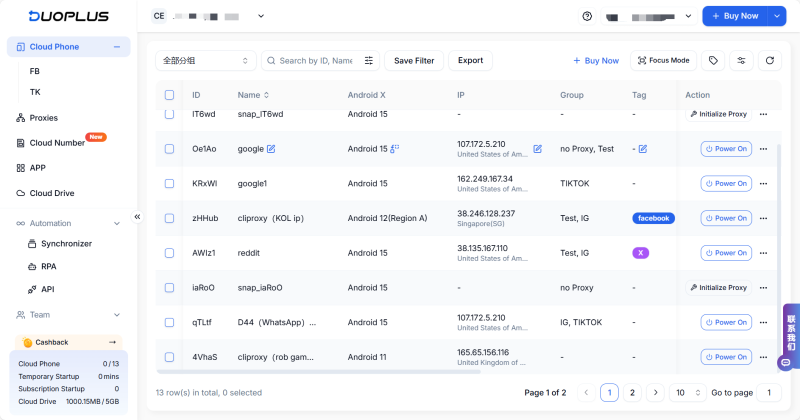
DuoPlus supports custom proxies, allowing each device to maintain unique proxy points to realize standalone network exit and geographic settings.
Simultaneously, cloud devices support and are combinable with high Score proxy integration, ensuring each device maintains a standalone yet stable network exit while accessing hidden real IP addresses, thereby enhancing the overall account security and stability.
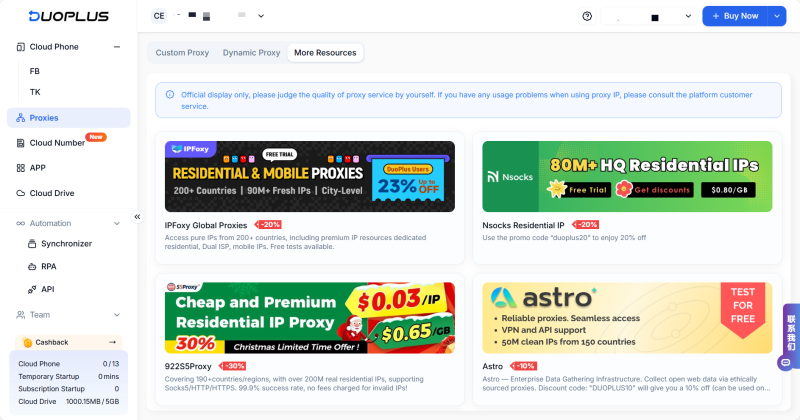
Choose the Appropriate Proxy Type: Based on your needs, select a suitable proxy type, such as residential IP, data center IP, etc.
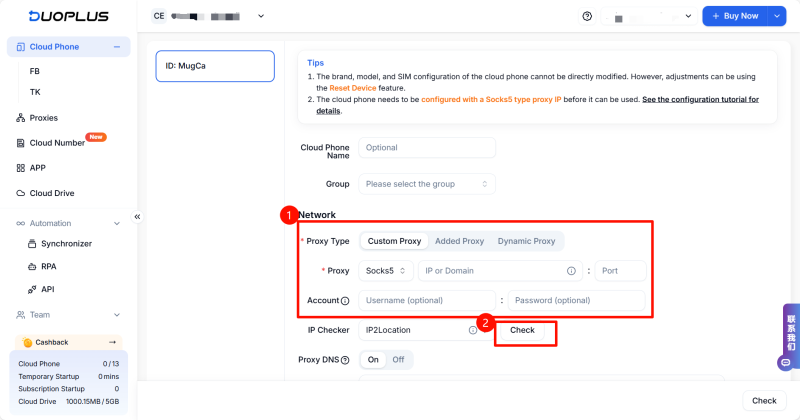
Configure Proxy Settings: In the DuoPlus cloud management settings, ensure all traffic flows through the proxy service for output.
Regularly Updating IPs: To avoid being tracked, regularly update proxy IPs to maintain anonymity.
Monitor Account Security: Continuously observe the state of accounts associated with a single IP to ensure no unusual login activities occur.
There are numerous methods to hide your IP address on mobile devices, each suited for different usage scenarios.
If you are operating multiple offshore accounts and hope to ensure the long-term stability of the environment, DuoPlus mobile + high-quality proxy is the best choice for achieving balance between stability and security.
DuoPlus Cloud Phone
Protect your multiple accounts from being
TikTok has become one of the most important growth channels for creators, affiliate marketers, and performance-driven …

Imagine finding a valuable YouTube tutorial—only to lose it when you need it most. Or trying to watch videos offline …
No need to purchase multiple real phones.
With DuoPlus, one person can operate numerous cloud phones and social media accounts from a single computer, driving traffic and boosting sales for you.
