How to Appeal a Suspended or Disabled Google Account
A Google Account is more than just your Gmail address.It launches Drive, Photos, YouTube, Play and "Sign in with …
Find a Discord user ID on desktop, mobile or web: turn on Developer Mode, copy your own or someone else's ID, and look up a username from an ID.

Get an AI-Powered Summary of This Article
Eventually, you'll need a user ID – either your own, or someone else's – while using Discord. Bots request it, moderators file it in a complaint, and Discord Support utilizes it when a username isn’t enough. Discord doesn't show the ID in plain sight. You activate Developer Mode and copy it. That’s all you need, on desktop or in the browser or on a phone.
To put it simply, enable Developer Mode first (User Settings › App Settings › Advanced on desktop and online; your avatar › the gear icon › Advanced on mobile). Then right-click a person on desktop or open their profile and the ⋯ menu on mobile and pick Copy person ID. The same choices are available for your personal profile, for server, channel and message IDs. Discord doesn't have a public search box that converts a username to an ID, or an ID to a stranger's profile.
Every Discord user has a unique ID: a lengthy number, normally 17-19 digits long, like 123456789012345678. This is the permanent ID for that account. Servers, channels and messages all have IDs of the same type.
It is not the same as a username:
Normal accounts will reveal IDs if this is activated.Copy User ID, Copy Server ID and the other Copy ID items only come later. Turning on Developer Mode will not modify your Discord experience, nor will it offer anyone extra access to your account. It just adds those menu items.
Once you have the ID, if you'd prefer not view the extra menu items, you can switch Developer Mode off again from the same screen.
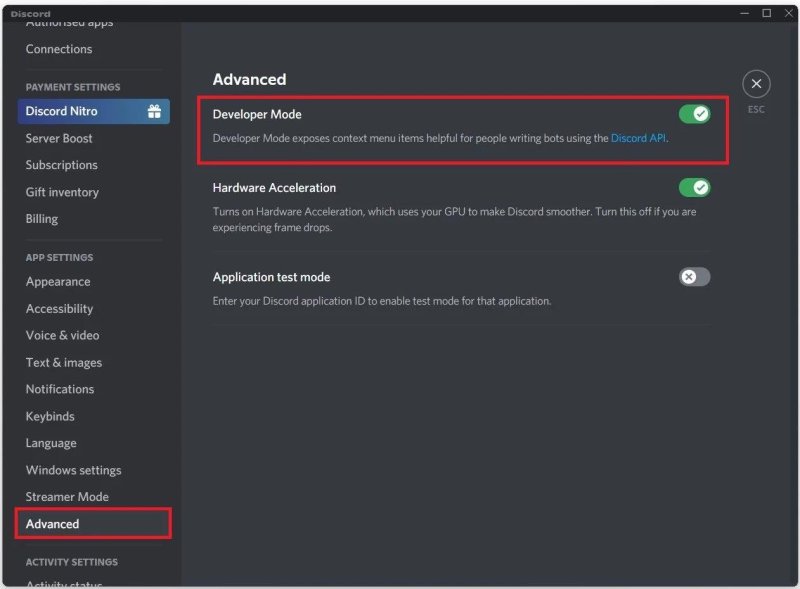
If you don't see the Copy ID options right away, close and open the app again, or refresh the browser tab.
Once you've got Developer Mode turned on, it's easy:
The ID is copied to clipboard. Drop it into a ticket, a bot command or your notes.
You don't have to be their friend. All you need to do is check their profile on a shared server, group chat or DM.
The phone path is what people are missing because long-pressing a message is not enough.
If you long press a message you see respond, copy text or copy message link but not the user ID. First open complete profile.
The same Developer Mode menus apply to anything else Discord numbers.
| What you need | Desktop / web | Mobile |
|---|---|---|
| Server ID | Right-click the server icon ›Copy Server ID | Open the server, tap its name, scroll down ›Copy Server ID |
| Channel ID | Right-click the channel ›Copy Channel ID | Long-press the channel, then look forCopy Channel ID |
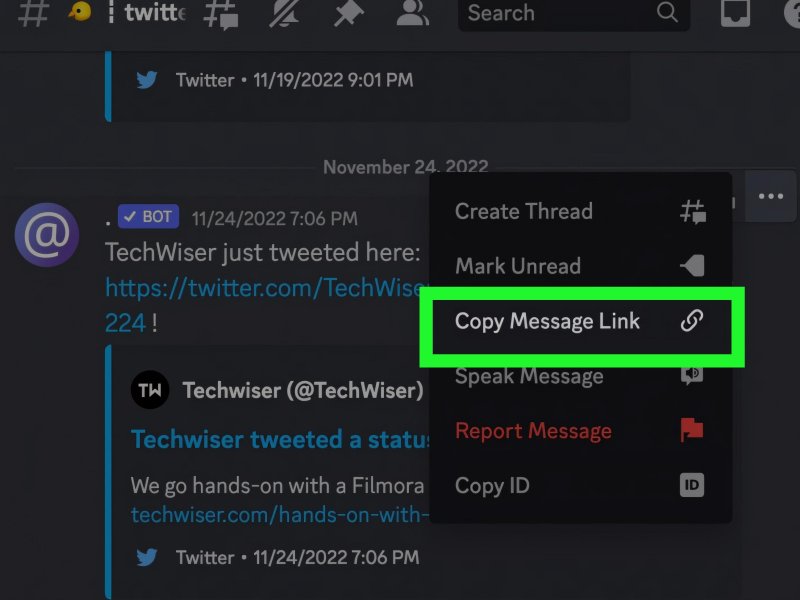
| Message link or ID | Right-click the message ›Copy Message Link (some versions also show Copy Message ID) | Long-press the message ›Copy Message Link |
A message link looks like https://discord.com/channels/SERVER_ID/CHANNEL_ID/MESSAGE_ID. The last number is the message ID. Discord's help center
recommends sending the message link, because anyone who already has access to that channel can jump straight to it.
Discord does not have a built in facility to convert a username to an ID. The way that you may rely on is to find that individual in a spot where you both can see:
If you simply know someone's username and you don't share a server, group chat or DM with them, there's usually no way to retrieve their ID through Discord itself. This is intentional, not a missing button.
Watch out for third party “discord user id lookup by username” sites. Do not log into them using your Discord account and do not ever paste a token or QR login code. Don't use them to stalk people who haven't made themselves available to you.
If you already have any link to the account you can go the opposite route :
Search in the app identifies messages, channels and individuals inside the spaces you are in. It is NOT a public listing of all Discord accounts.
The ID is a snowflake so you can retrieve the account creation time without a third party source. Discord's docs indicate to right shift the ID by 22 bits and add the Discord epoch, 1420070400000 (milliseconds since Unix epoch, 2015-01-01 00:00:00 UTC):
created_at_ms = (user_id >> 22) + 1420070400000
Convert that millisecond timestamp to a date in any programming language or any tool you run. That’s what moderators check to see how new an account is. It doesn't prove who runs the account, and it is not a way to log in.
Yes, generally. A user ID is not a password, but a public identifier. Anyone who can see you in a server can copy it. It can not be used alone to sign in. Nevertheless, it is permanently associated with your account, so share it with bots, moderators and official help, instead than posting it next to personal information.
Never reveal your password, login QR code or account token. That is what attackers really want.
Community managers, support teams and agencies typically have to handle several Discord accounts, such as a personal account, a brand account and a help mailbox. You may switch accounts in the app on switching accounts, forum channels and voice calls and managing multiple Discord accounts . If you are new to the app, start with the Discord beginner's guide .
For those who need numerous mobile Discord sessions at the same time, DuoPlus Cloud Phone for Discord gives each authorized account its own Android cloud phone, managed from one dashboard. Each device is a separate environment, so teammates can be given access to a specific device instead of sharing a single login. A cloud phone does not hide an ID, and it is not a way to evade Discord's rules.
Enable Developer Mode (User Settings > App Settings > Advanced on desktop, or avatar > gear > Advanced on mobile). Then right click or tap your own name in a chat or member list and select Copy User ID. This button is commonly seen in the lower right corner of the desktop profile page.
Turn on Developer Mode, tap the person's name or avatar to access their profile, then hit the ⋯ menu in the top-right and select Copy User ID.
Yes if your on the same server or talk with them. Type <@USER_ID> in a common channel to see the current username or try discord.com/users/USER_ID when logged in. Discord doesn’t have a public directory to look up strangers by ID.
Only a common place. Find the person on a server member list, your DMs or your friends list, and copy the ID from their profile. There is no way to search for a username and find their ID on Discord itself.
No. Your user ID is your user ID throughout the life of the account, regardless of any changes to your username, display name, or server nicknames.
Yes. It just adds Copy ID and related options to Discord’s menus. No it doesn’t alter your privacy settings or provide anyone greater access to your account After copying the ID you can turn it off again.
Running several Discord accounts or communities? Give each authorized account its own isolated cloud phone and manage them from one dashboard. See DuoPlus pricing .
A Google Account is more than just your Gmail address.It launches Drive, Photos, YouTube, Play and "Sign in with …
Many still have this problem even when the phone seems to be in fine condition and the password seems to be right. …

Telegram offers two client apps: Telegram and Telegram X. Because their names are similar but their features and user …
No need to purchase multiple real phones.
With DuoPlus, one person can operate numerous cloud phones and social media accounts from a single computer, driving traffic and boosting sales for you.