
Buvei Launches Virtual Card Platform for Global Business Crypto Payments
Amid the sustained rapid growth of digital advertising, SaaS services, and cross-border operations, global businesses …
Table of Contents
Telegram has become the fastest-growing real-time communication platform globally. As a result, Telegram Bots have gained popularity due to their capability to automate tasks, manage group activities, and deliver content within Telegram groups and channels, effectively acting as small application independent operations.
Telegram Bots are automated programs that operate within the Telegram ecosystem. Due to their openness and vigor, Telegram Bots have become essential tools for group management, project oversight, and even automated marketing. Telegram offers a robust Bot API that enables bots to perform actions such as automated responses, command processing, content delivery, and integration with third-party services.
| Type | Description | Main Functions |
|---|---|---|
| Auto-reply Bot | Automatically replies to user messages based on queries | Customer service Q&A, FAQ auto-responses, keyword triggering |
| Content Delivery Bot | Sends scheduled or event-based messages | News updates, RSS feeds, alert subscriptions, activity notifications |
| Interactive Bot | Provides buttons, menus, and tables for interaction | Polling, voting, inquiries, mini-games, table collection |
| Group Management Bot | Manages groups and permissions | Welcome new members, ban users, automatic reporting, permission management |
| Aggregation / Cross-platform Bot | Integrates with other platforms or services | Data delivery, cross-platform notifications, automation tasks |
Integrating bots into Telegram groups can greatly enhance management efficiency and member experience, serving as a valuable aide for dynamic community engagement.
For Telegram channels offering broadcast and communication services, utilizing bots can enhance release efficiency and interactivity.
Search for @BotFather on Telegram (the official bot creation tool) and send the /start command to access its menu.
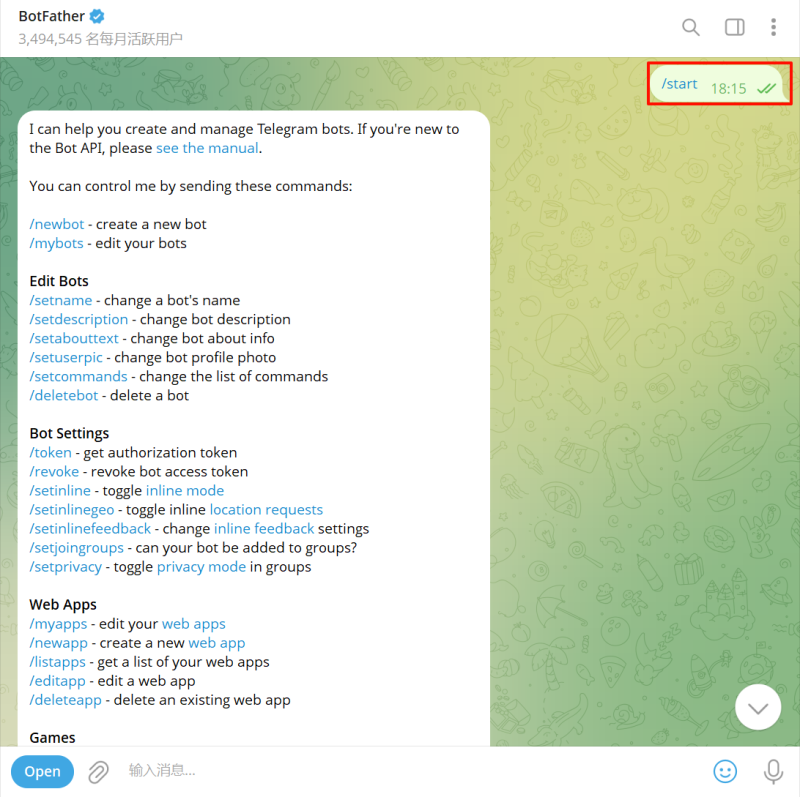
Enter the command /newbot to initiate the creation of a new Telegram bot.
Bot Name: Any name you choose (can include Chinese characters).
bot username: A unique combination of letters that must end in 'bot', e.g., testhelper_bot.
Once set, BotFather will return a link to access the bot (e.g., t.me/testhelper_bot) and an API Token needed for bot functionality.
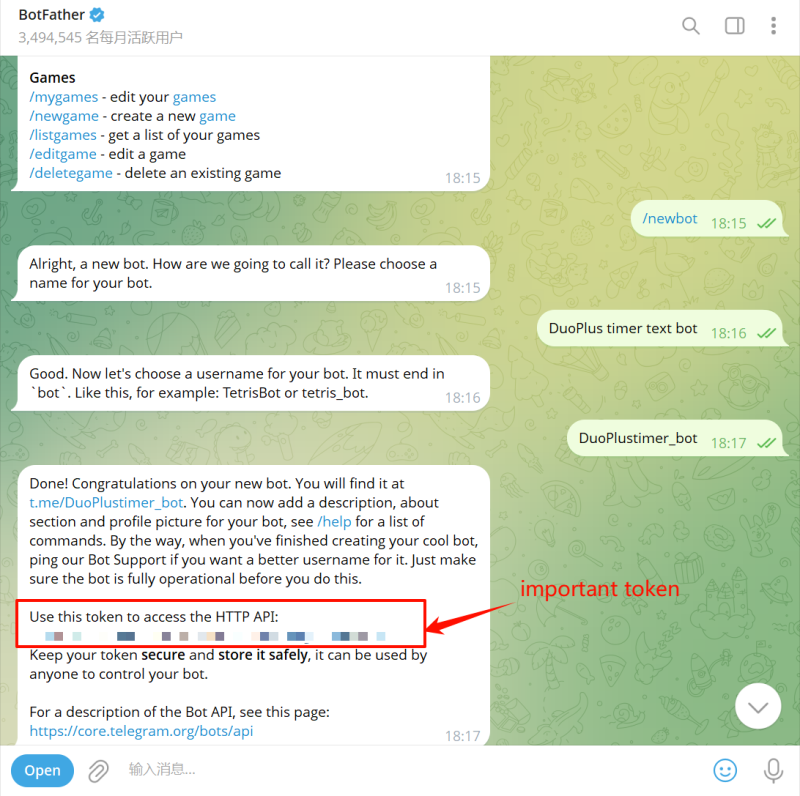
The Bot Token is the password to access and control the bot. You will need this for adding functionality to the bot.
You can also continue to fill in the bot's information on BotFather, making it appear more professional.

This way, you have created your very own Telegram Bot, but the current bot is merely a "registered account" that cannot perform any automated functions since it still lacks any added capabilities.
To enable your Telegram Bot to operate autonomously, you need to program its actions: "What should it do after receiving messages, how to respond, how to process commands, etc." There are three methods to complete the functionality setup:
Method 1: Zero-code Platform (Suitable for Simpler Bots)
If you are not familiar with programming languages, you can use third-party platforms; these platforms usually provide pre-set Telegram bots with customized capabilities, only requiring you to provide the bot token for integration.
Search for "Manybot" on Telegram and follow the on-screen instructions. Telegram has many different bot creation tools that can help you finalize the bot's functionality settings.
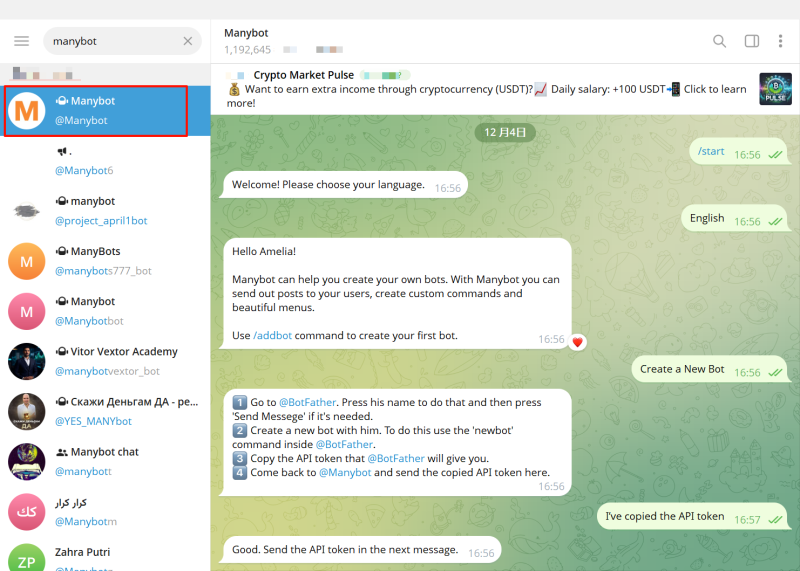
You can set up triggers and add automation to achieve bot functionality, with any templates available for testing the bot.
Method 2: Automation Platforms
Automation platforms can help you create more complex functionality settings by allowing you to visually manage triggers, actions, and modules, enabling you to build a rich and versatile Telegram Bot suitable for various applications or services.
Common automation platforms include Make (Integromat), Zapier, and n8n.
Method 3: Using Telegram Bot API + Programming Language
This is the most professional method provided by Telegram's official website, and it is the most flexible method, suitable for developers to self-code functionalities and realize completely custom interactions and commands.
Common development frameworks include Python, Node.js, and PHP.
https://core.telegram.org/bots/api
Regardless of whether for managing a dynamic Telegram group or batch delivery of rich content within Telegram channels, a well-defined bot can significantly improve your operational efficiency.
DuoPlus Cloud Phone
Protect your multiple accounts from being
Amid the sustained rapid growth of digital advertising, SaaS services, and cross-border operations, global businesses …

Following the official launch of Gemini Pro 3.1, Google is accelerating its dominance in the AI sector. From development …
No need to purchase multiple real phones.
With DuoPlus, one person can operate numerous cloud phones and social media accounts from a single computer, driving traffic and boosting sales for you.
