
How to Find a Discord User ID (Desktop, Mobile and Web)
Eventually, you'll need a user ID – either your own, or someone else's – while using Discord. Bots request it, …
Start a Google account appeal officially: sign in, choose Start Appeal, and write a clear reason. How Workspace, Ads and locked accounts differ.

Get an AI-Powered Summary of This Article
A Google Account is more than just your Gmail address.It launches Drive, Photos, YouTube, Play and "Sign in with Google" on sites unrelated to Google. If the entire account is disabled, those services go down together. That's why people look for “google account appeal” or “google appeal form” when they can't get in.
Quick answer: If your whole Google Account is disabled, go to sign into it in a browser like Chrome, and pick Start Appeal and follow prompts. Your account has been disabled is how Google documents it. Google documents this in Your account is disabled . No separate public form to search for, no paragraph pledging reinstatement. Write a brief, sincere plea in your own words. Don't make a new Gmail account or swap devices to circumvent a deactivate. Work accounts (Google Workspace, still sometimes called G Suite), Google Ads, and Business Profile all have different paths – see the differences below.
| What happened | What Google (or an admin) usually calls it | Where you appeal |
|---|---|---|
| You cannot sign in toany Google service; you land on "Your account is disabled" or myaccount.google.com/blocked | The Google Account is disabled | Sign in, in a browser, and chooseStart Appeal |
| Google asks you to verify it is really you after unusual activity, but the account still exists | A locked or interrupted sign-in, not a full disable | Recover the account through Google's official verification steps, not the disable-appeal flow |
| A work or school account stops working | Often a Workspace admin action (older name: G Suite) | Your organization's administrator, not the consumer Start Appeal page |
| You can still open Google, but Ads or a Business Profile is limited | Aproduct-level suspension | The appeal tools inside Google Ads or Business Profile |
| You are looking for "Google+" | Google+ was shut down years ago | A disabled Google Account is appealed as above; there is no Google+ to restore |
If the screen states the account is disabled and refers you to Google's disabled-account help, use Start Appeal in the next section. If you are still able to sign in and only one product is blocked, do not file a full-account appeal for only that.
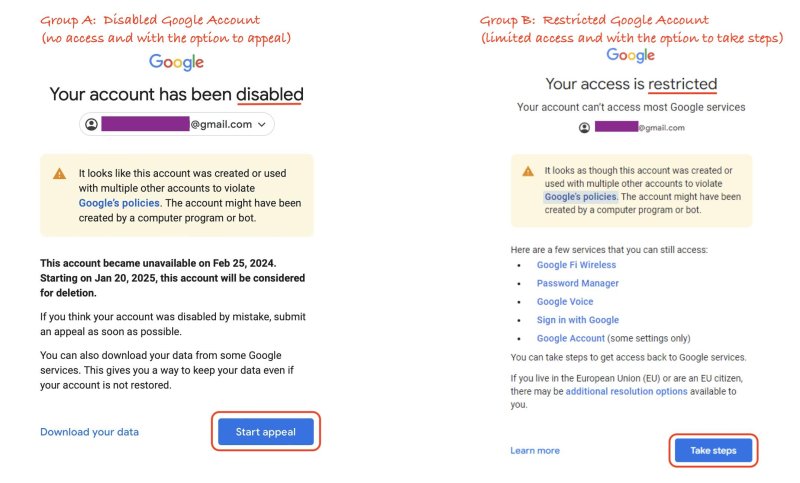
Google’s existing help page is brief and sweet:
Some details people stumble on:
EU citizens and residents may have more recourse; Google's support page points to those separately.
Older “template” articles provided a paragraph that would get every account back. This isn't how it works and a copied letter might make an appeal look generic. A good appeal is brief and to the point. Cover:
The way you say something depends on the situation. Use this as a checklist, not copy-paste text:
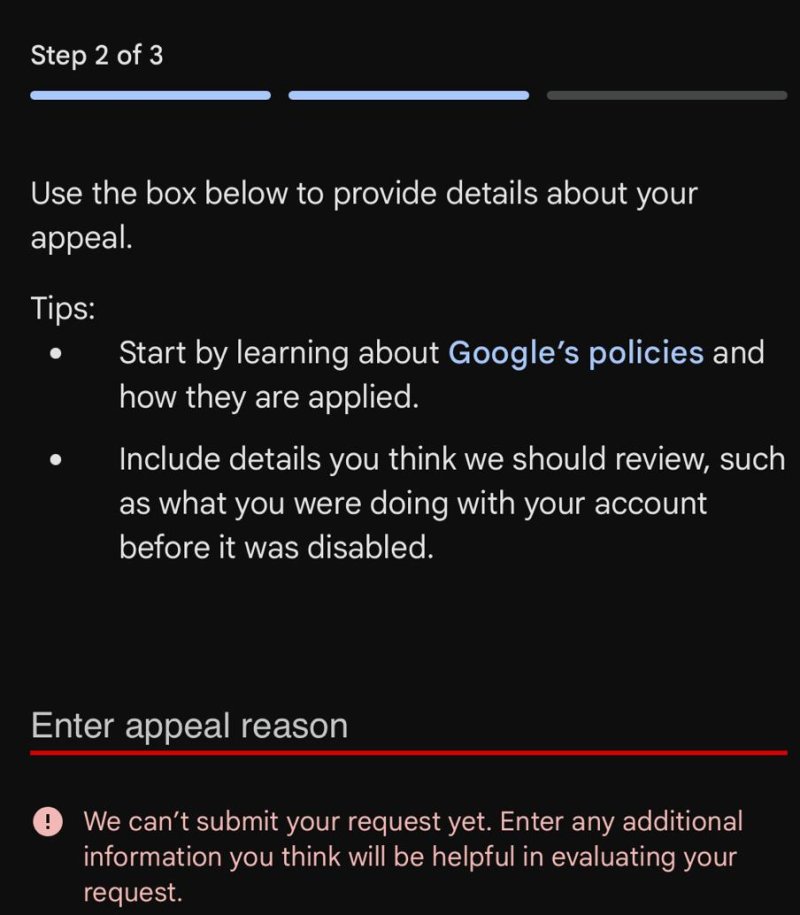
No copy-paste of a legal-sounding template from a forum. Don't say "it won't happen again" if you don't understand the policy Google has highlighted. Don't argue Ads, a YouTube strike or a Business Profile inside a full-account appeal or vice-versa. And don't send the same text every day. Allow second appeal. Add additional info.
Google says the most common reasons accounts get terminated are malware and phishing , spamming , impersonation , violating a product's own rules , and use of several accounts to abuse . A real, "I didn't mean to break this rule, this is the context" is better than a denial that ignores the message on the screen.
Google Workspace (previously known as G Suite). If the address ends in a corporation or school domain, or you were given the account by an employer, disabling or suspension is generally handled by the administrator. First, “Your G Suite account is disabled” is a work issue. Ask your administrator to check the user status in the Admin console. Consumer Start Appeal page does not override an admin action.
Google Ads. An Ads suspension is appealed from within the Ads account (Contact Us / the in-account appeal mechanisms) not via the consumer disabled-account site. You may still be able to log in to Google and access Ads in a limited condition.
Google Business Profile. Profile suspensions include a special appeals tool with evidence such as business registration. Google also recommends against creating a new Business Profile for the same business to avoid suspension.
Use the official tool corresponding to the product. If you file the wrong appeal, you waste the attempts that count.
The disabled-account article does not have a SLA published. Monitor the recovery email on the account and do not create a substitute Gmail address “just in case” while the review is open—especially if the disable included numerous accounts or abuse.
If the appeal isn't allowed, the account will remain disabled. For some types of policy, you may be able to appeal once more. If not, treat the account as permanently lost: notify teammates, change payment methods and sign-in-with-Google logins that depended on it, and download the data if it was available.
The improper approach to an account being disabled is to create a new Google Account to keep up activity.
Developers, QA teams and marketers sometimes need to operate with more than one Google account with access rights: a personal Gmail, a Workspace user, a Play Console test account, a company YouTube channel. That’s a different ball game than spinning up accounts to circumvent a disable.
If you already work like that:
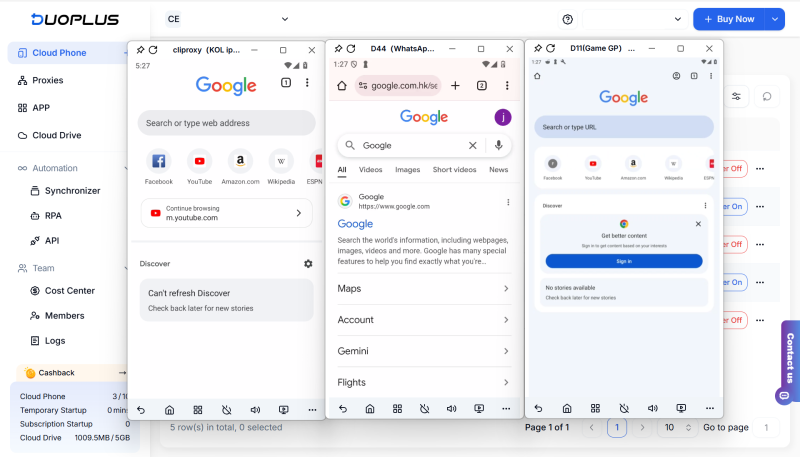
DuoPlus Cloud Phone and the Gmail app page explain how teams dedicate a separate Android environment in the cloud for each Google or Gmail session permitted by an Android user. That’s for organizing work accounts. It is not a replacement of Start Appeal, nor a technique to conceal or replace a disabled account.
Compare plans on the DuoPlus pricing page .
In a browser, sign in to the disabled Google Account and tap Start Appeal, then follow the on-screen procedures. Google documents this as “Your account has been disabled”. There is no need for a separate public form. A lot of folks get to this flow through myaccount.google.com/blocked .
Once you login in, the appeal for a disabled Google Account begins using Start Appeal. Older articles that link to a solo form are outdated: Google eliminated a duplicate appeal form in 2022 and renamed Request Review to Start Appeal.
Write a short factual note: saying you own the account, what you used it for, what you think happened and ask for a review. Do not copy-paste a generic template. Fix the reason that Google gave you during sign in.
Google will examine up to two appeals for certain policy breaches and will inform you if there is a limit. Other appeals may be closed. Do not repeatedly submit the same text.
If your work or school account was disabled or suspended, contact that administrator first. The consumer Start Appeal flow is for your personal Google Accounts, not to override a Workspace administrator decision.
No. Google reinstates a disabled Google Account only when Google has approved the official appeal (or after a Workspace admin has reinstated a work user). A new device does not circumvent that choice.
Need separate, authorized Google or Gmail sessions for a team? Give each one its own isolated cloud phone and manage them from one dashboard. See DuoPlus pricing .
Eventually, you'll need a user ID – either your own, or someone else's – while using Discord. Bots request it, …

Many still have this problem even when the phone seems to be in fine condition and the password seems to be right. …

Telegram offers two client apps: Telegram and Telegram X. Because their names are similar but their features and user …
No need to purchase multiple real phones.
With DuoPlus, one person can operate numerous cloud phones and social media accounts from a single computer, driving traffic and boosting sales for you.