
Buvei Launches Virtual Card Platform for Global Business Crypto Payments
Amid the sustained rapid growth of digital advertising, SaaS services, and cross-border operations, global businesses …
Table of Contents
With the increasing usage of Telegram for cross-border communication, information retrieval, and social networking, more and more users are turning to Google Voice virtual numbers for the convenience of registering or linking to Telegram accounts.
However, in practical operations, many may encounter a common issue: the Google Voice number has already been linked to someone else's Telegram account. This often happens because virtual numbers have cyclical reuse, meaning that previous users may have used that number to register on Telegram, and after recycling, it gets assigned to you, while the previous account information is lost.
This article will clearly outline the steps for linking Google Voice to Telegram, helping you navigate through the process with fewer missteps.
Google Voice is a service released by Google that provides a virtual phone number. Users can request a US or Canada-based virtual mobile number through their Google account and use this number for calls, text messages, and voicemail operations.
Google Voice does not rely on physical SIM cards, meaning you can use it over the internet or via the application for receiving verification codes, registering applications, or cross-border communication.
Due to its unique virtual number and cross-border usage characteristics, Google Voice is widely used in the following scenarios:
Compared to traditional mobile numbers, Google Voice offers many more advantages in practical use:
Although Google Voice presents clear advantages in cross-border communication and privacy protection, there are still some important considerations during practical use:
Before tying your Google Voice number to your Telegram account, ensure that you can easily access Telegram settings. To enhance success rates, you need to accurately assess the number's status, check the operational environment, and select suitable operational methods.
When attempting to use Google Voice to log into Telegram, if the system prompts "The verification code has been sent to other devices," it usually indicates one of the following scenarios:
If you cannot receive verification codes through other devices, it means that the control of this number is not fully grasped, and directly switching accounts might fail or trigger access control.
In addition to the status of the number, environmental factors also frequently lead to transfer failures.
Ensure network and device criteria are met, as these may significantly reduce the chance of transfer failure or triggering security flaws.
Based on the account number and code's practical circumstances, you can select one of the following methods:
If the current GV number has already been registered on Telegram, you can submit a short message verification code request after canceling the account. After completing the number cancellation, it’s advisable to re-register with new numbers on a supportive device that has GMS for higher reliability. Be aware that Telegram typically has a 7-day period for account deletion, during which you cannot use the same number to register a new account.
If you cannot re-register with the application, you can try reaching out to Telegram support. Open Telegram → 'Settings' → 'Help' → 'Contact us', or visit Telegram’s official support page. Clarity on your inability to receive verification codes, the number being previously linked, or the account being restricted can also provide necessary verification information (such as carrier, old device information, or verification code screenshots).
Telegram usually responds within 1-3 business days and may provide a clear solution based on the case.
During the transfer process, device configurations, network stability, and IP environment directly affect the receipt of verification codes and account security. Using multiple physical devices complicates management, resulting in many users opting for a stable and secure virtual operating environment. This can create clear separation between device indicators, prevent active IP shifts, and set configurations from different regions, thereby making operations safer and more stable.
DuoPlus Cloud Phone provides complete Google Mobile Services support, ensuring stable reception of Google Voice verification codes, supporting multiple IP switching and multiple device concurrent operations, allowing you to manage Telegram accounts in a secure environment. Through DuoPlus Mobile, not only can you easily avoid transfer failures and trigger security vulnerabilities, but you can also efficiently manage multiple virtual numbers and accounts, especially suitable for cross-border communication, long-distance collaboration, or extensive operational scenarios.
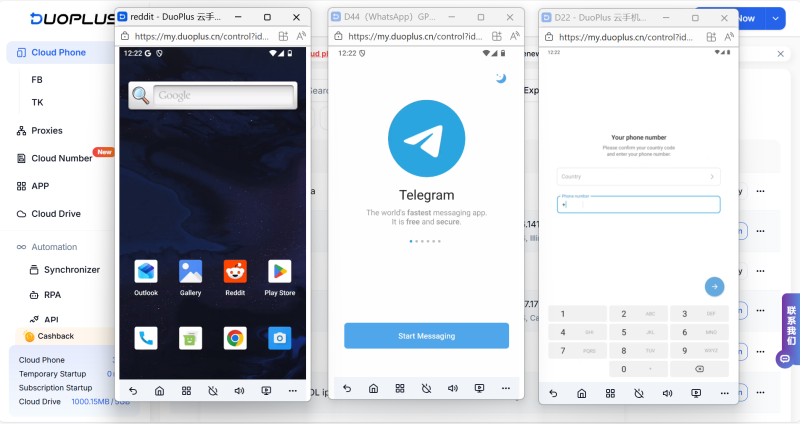
When linking Telegram, ensuring Google Voice number status, device environment, and network stability is key to success. Using DuoPlus Mobile, you can ensure stable reception of verification codes, switch IPs, and manage multiple accounts efficiently, enhancing operational security and fluidity.
DuoPlus Cloud Phone
Protect your multiple accounts from being
Amid the sustained rapid growth of digital advertising, SaaS services, and cross-border operations, global businesses …
Following the official launch of Gemini Pro 3.1, Google is accelerating its dominance in the AI sector. From development …
No need to purchase multiple real phones.
With DuoPlus, one person can operate numerous cloud phones and social media accounts from a single computer, driving traffic and boosting sales for you.
