





How to Sign Up for Meta Muse and Use a Referral Code
Muse has recently become one of the most talked-about AI Agent products in the AI tools space. As a new AI Agent from …
Gmail registration often fails due to device environment issues rather than incorrect steps. This guide covers why Android devices work better for sign-up, how to use Gmail aliases, and how to manage multiple independent Gmail accounts — plus a comparison between Gmail and Outlook to help you choose the right option.

Get an AI-Powered Summary of This Article
Gmail is still one of the most widely used email services worldwide. Besides giving users access to the Google ecosystem — including Google Play, Google Drive, YouTube, and Google Ads — Gmail is also commonly used to sign in to platforms like TikTok, Instagram, and many other online services.
For many users managing social media accounts, apps, or online businesses, a Gmail account is almost essential.
However, creating a Gmail account has become noticeably harder in recent years. Many users run into issues like phone verification failures, “This phone number cannot be used for verification,” or generic registration errors during signup.
In most cases, the problem isn’t the registration steps themselves — it’s the account registration environment.
Many users try to create Google accounts directly from desktop browsers, but browser-based registration tends to have a lower success rate. Even accounts that are successfully created may quickly trigger verification checks or restrictions afterward.
This is mainly related to Google’s risk detection system.
Common issues include:
These problems are usually caused by three factors.
Browsers expose a large amount of device-related information to Google, including:
Google evaluates these signals together. If the browser environment appears unusual or high risk, the registration request may be blocked immediately.
Google closely monitors IP reputation during account creation.
The following situations are more likely to trigger restrictions:
Even if the account is successfully created, it may still face verification requests or temporary restrictions later.
Account behavior immediately after signup also matters.
For example:
can all make Google classify the account as suspicious activity.
Based on real-world user experience, creating a Gmail account through the Gmail app on an Android device usually has a much higher success rate than registering through a desktop browser.
There are two main reasons for this.
First, Android devices provide a more natural device environment, including real IMEI information, device model details, and sensor data.
Second, the Gmail app uses a different registration flow optimized for mobile devices, which tends to trigger fewer risk checks compared to browser-based registration.
Before starting the registration process, it’s recommended to:
Step 1: Open the Gmail App
Launch the Gmail app and tap Create account.
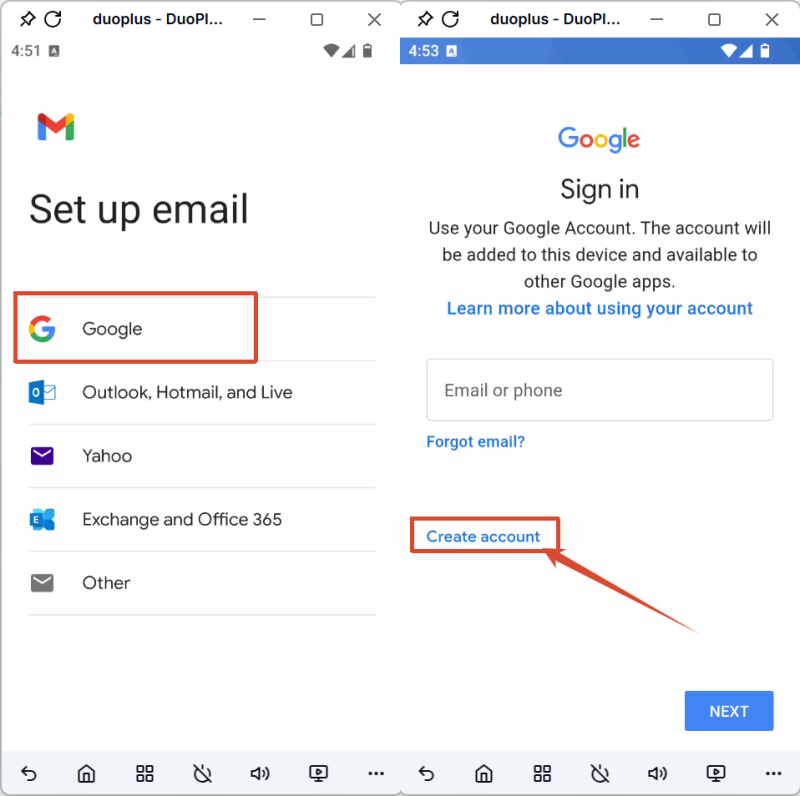
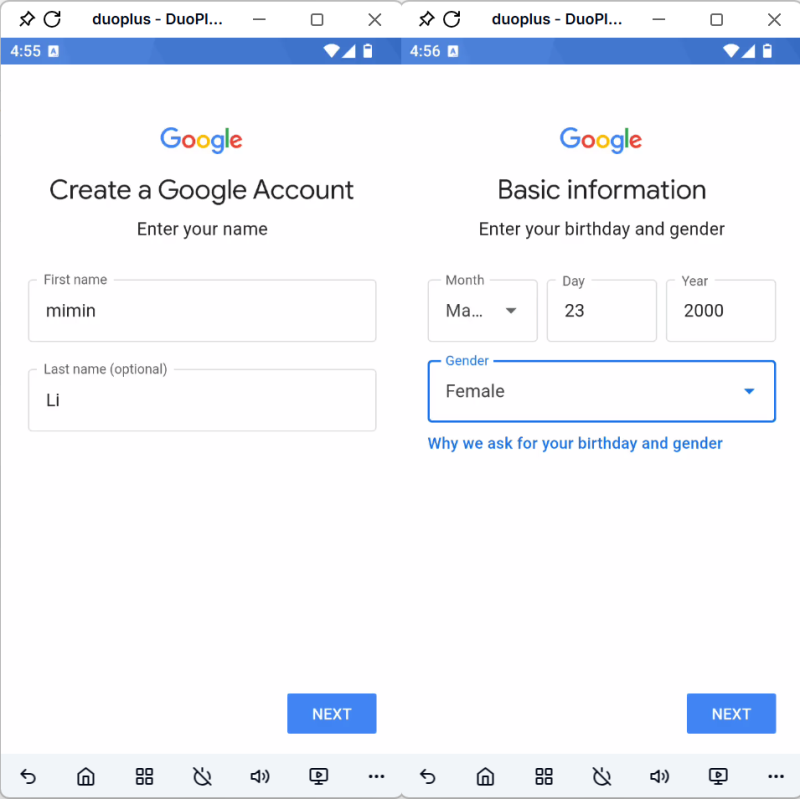
Step 2: Enter Your Personal Information
Fill in your name and other required account details.
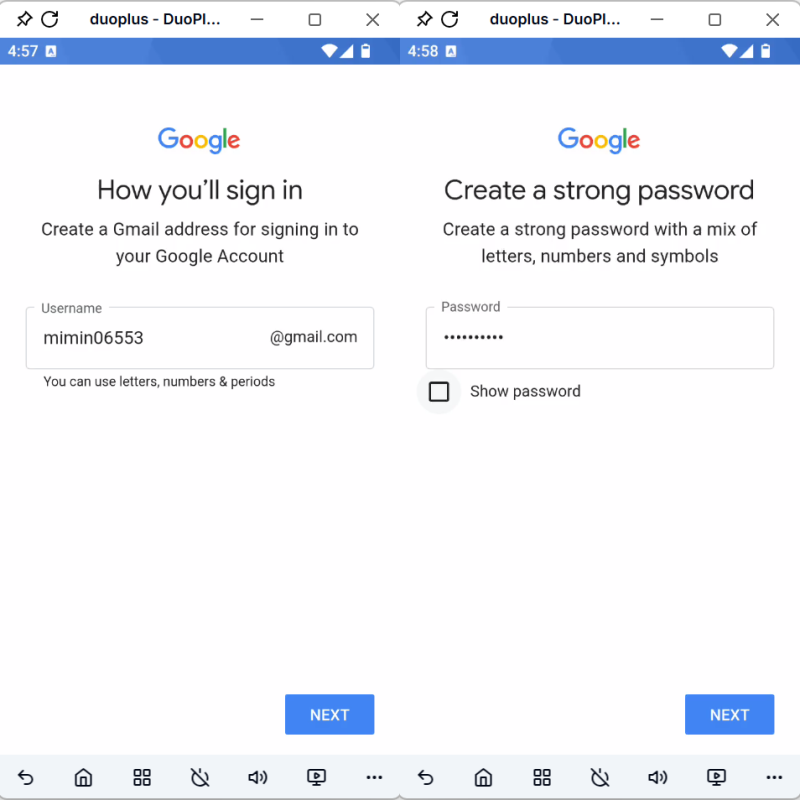
Step 3: Set a Password and Verify Your Phone Number
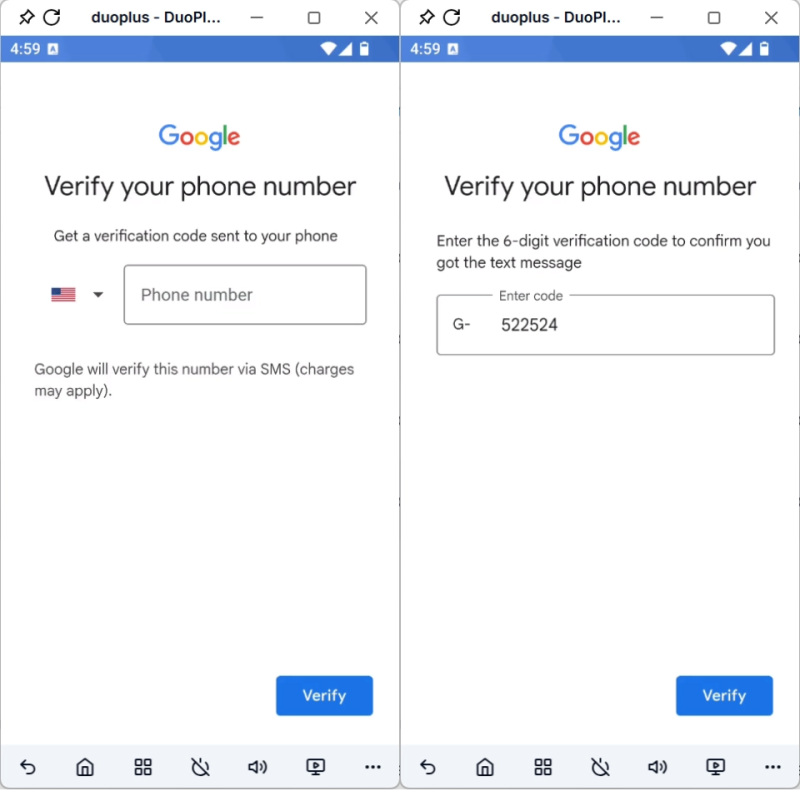
Create a password, enter your phone number, and wait for the verification code.
Step 4: Complete Verification
After successful verification, review and accept Google’s terms to finish the account setup.
After registration, it’s best to use the account normally for a while instead of making aggressive changes immediately. Avoid constantly switching networks or rapidly modifying account details during the first few days.
For users managing multiple platforms, projects, or app accounts, a single Gmail account is often not enough.
There are usually two approaches for handling multiple Gmail addresses.
If you only need multiple email variations for receiving emails or registering on different platforms — without needing completely separate Google accounts — Gmail aliases are the simplest solution.
What Is a Gmail Alias?
A Gmail alias allows you to use multiple email variations under the same Gmail account.
Emails sent to alias addresses will still arrive in the main inbox, without requiring separate logins or account management.
Gmail Alias Rules
For example, if your address is: duopluscloud@gmail.com
then the following variations all point to the same inbox:
If your address is: duoplus@gmail.com
then the following variations all point to the same inbox:
Although aliases are convenient, they do not provide full account separation.
All emails, login history, and account activity still belong to the same Google account.
How to Add a Gmail Alias
If you need completely isolated account data or want to use different accounts for separate Google services, you’ll need to create independent Gmail accounts instead of aliases.
Technically, you can create multiple accounts on the same Android device, but this increases account association risks because Google tracks device-related information.
Registering many accounts on one device can eventually trigger account verification or risk detection. For users creating multiple Gmail accounts, using separate device environments is usually safer.
Compared to buying multiple physical Android phones, cloud phones provide a lower-cost and easier-to-manage solution for creating isolated Gmail accounts.
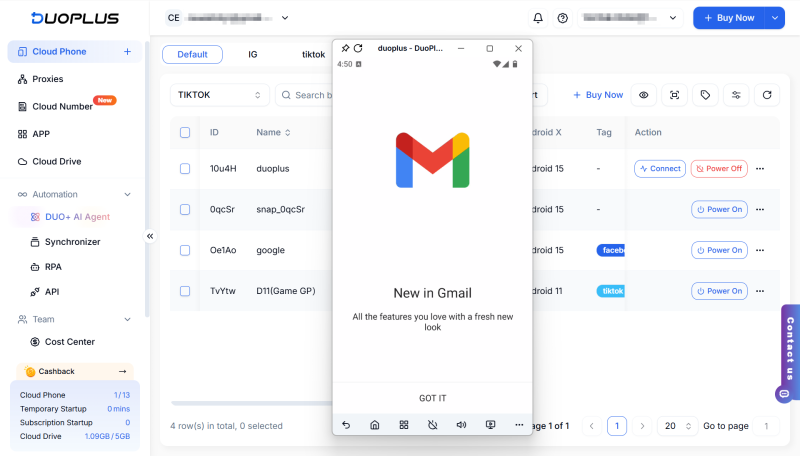
DuoPlus Cloud Phone includes a Reset Device feature that can reset:
This makes the cloud device appear like a completely new Android phone that has never registered a Google account before.
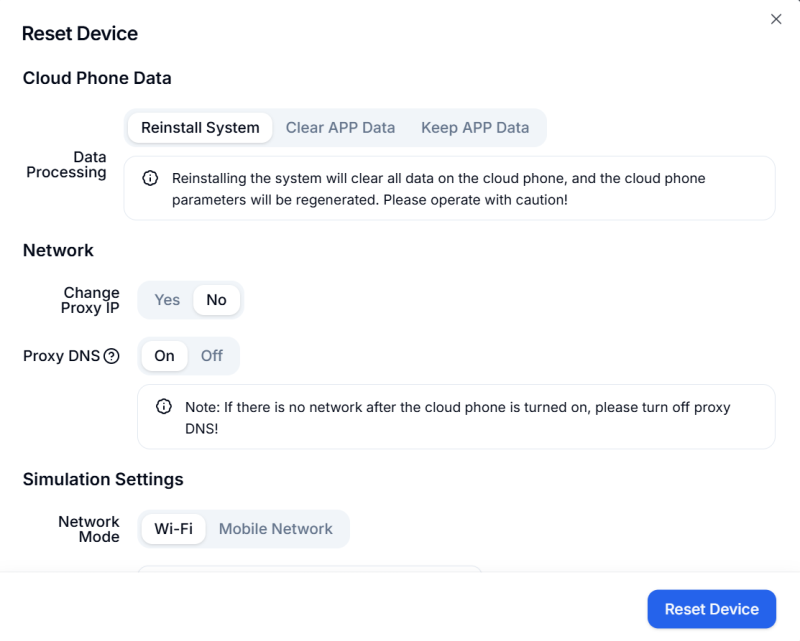
By resetting the device environment before each Gmail registration, users can significantly improve signup success rates while reducing account association risks.
Gmail and Outlook are two of the most widely used email services globally, and many users wonder which platform is better for long-term use.
Here’s a simplified comparison.
| Comparison | Gmail | Outlook |
|---|---|---|
| Registration Difficulty | Higher, stricter risk checks | Easier signup process |
| Verification Method | Phone verification | CAPTCHA verification |
| Ecosystem | Google Play, YouTube, Google Ads | Microsoft 365, Teams |
| Third-Party Login Support | Broader compatibility | Some platforms unsupported |
| Alias Support | Yes | Yes, but with limits |
| Free Storage | 15GB shared with Google Drive | 15GB |
| Multi-Account Management | Stricter device checks | Relatively more flexible |
| Best For | Google ecosystem, app logins, social platforms | Office and Microsoft services |
Compared to Outlook, Gmail has a higher registration barrier, but it also offers broader platform compatibility and stronger integration with major online services.
Choosing the right registration method and maintaining a stable device environment are the most important factors for improving Gmail signup success rates.
After the account is created, you can decide whether Gmail aliases or fully independent accounts better fit your long-term needs.
Muse has recently become one of the most talked-about AI Agent products in the AI tools space. As a new AI Agent from …

OpenAI Codex is an AI coding agent designed to help developers write, modify, review, and deliver code. It is available …

VK (VKontakte) is one of the major social media platforms in Russia. In addition to account management, content …
No need to purchase multiple real phones.
With DuoPlus, one person can operate numerous cloud phones and social media accounts from a single computer, driving traffic and boosting sales for you.

