





How to Sign Up for Meta Muse and Use a Referral Code
Muse has recently become one of the most talked-about AI Agent products in the AI tools space. As a new AI Agent from …
This guide explains how to batch transfer images and videos for Facebook multi-account operations. Compare cloud storage, local transfer, and cloud phone push solutions, and learn how DuoPlus one‑click batch push helps streamline the full workflow from asset preparation to publishing.

Get an AI-Powered Summary of This Article
As Facebook multi-account operations become more common, many teams manage multiple accounts for brand promotion, community management, Marketplace listings, and daily content updates. For these operations, consistently posting images and videos is essential to maintaining account activity. However, as the number of devices grows, repeatedly sending, downloading, and organizing assets becomes time‑consuming and increases the risk of file confusion.
Finding an efficient way to sync images and videos from desktop to multiple devices has become a key concern for many Facebook operations teams. This article covers common asset transfer methods and explains how cloud phone batch push can help streamline multi-account Facebook publishing.
Images and videos are at the core of Facebook content operations. Accounts need a steady stream of product shots, campaign visuals, and daily updates to stay active.
Facebook accounts generally fall into two usage scenarios:
For example, a business might maintain multiple brand Pages, community accounts, or Facebook Marketplace listings, each requiring shared assets while maintaining some content differentiation.
Asset distribution is a foundational task in Facebook account management. The more devices you operate, the greater the pressure. Assets need to be saved to each device's local gallery before posting—doing this manually is not only repetitive and inefficient but also risks version confusion, missed files, or incorrect uploads. For teams running Facebook multi-account operations long‑term, building a standardized asset management system can significantly reduce repetitive work, improve distribution efficiency, and simplify daily maintenance.
In Facebook multi-account operations, images and videos are typically prepared on a computer first, then synced to different operational devices. Cloud storage tools are one of the most common methods. Google Drive, Dropbox, and OneDrive are widely used by teams for this purpose.
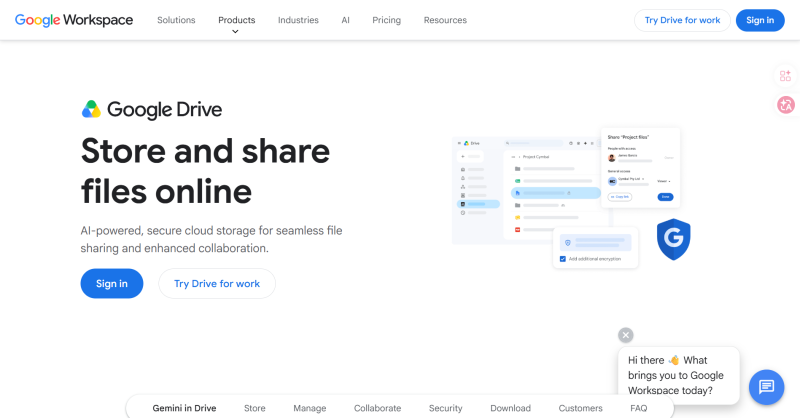
Google Drive is one of the most widely used cloud storage services. It integrates with Google Docs, Google Sheets, and other productivity tools, making it a popular choice for managing images, videos, and design assets.
Its main advantage is real‑time sharing and permission management—team members can always access the latest versions of assets, making it suitable for collaborative content operations.
However, for Facebook multi-account operations, each device still needs to log into Google Drive, download files, and save them locally. When maintaining multiple devices, these repetitive steps still take time.
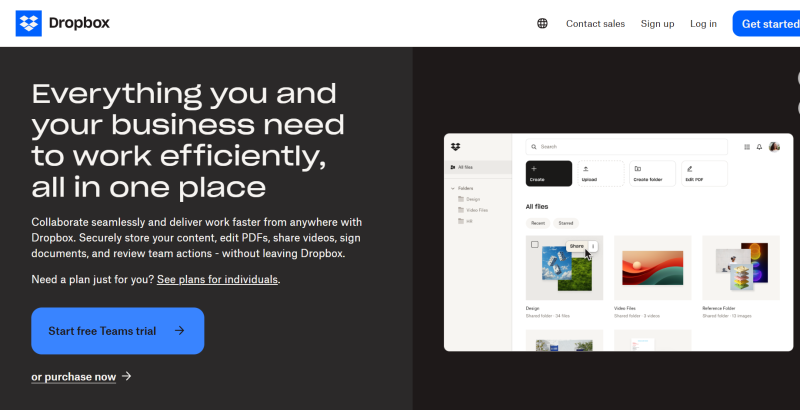
Dropbox is known for its reliable file syncing capabilities, handling large media files like images and videos well. Many content teams use it for asset management.
Compared to traditional file transfers, Dropbox automatically syncs files between computer and cloud, reducing manual upload steps and allowing multiple team members to maintain the asset library together.
But for users managing multiple Facebook devices, each device still needs to download assets separately. If new images or videos need to be posted daily, downloading and organizing files repeatedly remains a time‑consuming task.
For teams already using Microsoft 365, OneDrive is a familiar file management tool. It integrates deeply with Windows and Office applications, making it easy to manage images, videos, and documents in one place.
OneDrive offers strong document collaboration features and is suitable for long‑term project archiving. However, like other cloud drives, it primarily solves storage and sharing—not direct asset distribution across multiple devices. Operators still need to download and import files manually.
In addition to cloud storage, some users also use messaging apps like WhatsApp or Telegram to send images, or USB cables and AirDrop to transfer files to devices. These methods are simple and work well for occasional transfers of small batches. But as the number of devices grows, being able to upload once and sync to multiple devices becomes a clear efficiency advantage.
As cloud phones become more common in multi-account management, some platforms now offer batch file push features. Operators upload images or videos once from their desktop and sync them simultaneously to multiple cloud phones—no need to download or import files one by one.
Compared to chat apps and cloud storage, cloud phones are better suited for Facebook operations that require frequent asset updates and unified device management:
Traditional file transfers require downloading and saving assets on each device individually. Cloud phones allow you to push the same images or videos to multiple target devices at once through a unified management dashboard.
For teams maintaining multiple Facebook accounts, this reduces repetitive work and makes it easier to distribute account‑specific assets in a unified way.
Files pushed through the cloud phone dashboard are uploaded directly to the cloud phone's storage—without compression or re‑encoding from messaging apps. This helps preserve the original resolution and quality.
For Facebook posts involving product images, campaign visuals, or short videos, this approach reduces quality loss from file compression.
As the number of devices grows, physical phones require connecting each device individually to transfer and organize assets. Cloud phones allow you to handle file distribution through a web dashboard.
Operators can upload and push files from a computer, syncing them across multiple cloud phones without switching devices or occupying large amounts of local storage. This approach is better suited for long‑term, multi‑account Facebook operations.
With centralized cloud management and batch push, file distribution becomes simpler and more efficient. Below, we'll walk through how to push images and videos to multiple cloud phones using DuoPlus Cloud Phone.
| Transfer Method | Image/Video Quality | Batch Efficiency | Advantages | Limitations | Best For |
|---|---|---|---|---|---|
| Cloud Storage (Google Drive, etc.) | Original quality, lossless | Low — needs individual login/download per device | Centralized storage, team sharing support | Each device still needs separate downloads | Team asset archiving, collaboration |
| Messaging Apps | Compressed, quality loss | Low — needs individual receive per device | Simple, zero cost | Repetitive operations across devices, scattered assets | Occasional small transfers |
| USB/Local Transfer | Original quality, lossless | Low — needs individual connection per device | Fast, quality preserved | Hard to sync multiple devices at once | Single device, large files |
| Cloud Phone Batch Push | Original quality, lossless | Very high — one upload syncs all devices | One upload to multiple devices, supports batch distribution | Requires cloud phone platform | Multi-account management, team‑scale asset distribution |
With the built‑in "File Push" feature in the DuoPlus dashboard, Facebook operators can easily distribute images and videos from their local computer to specified cloud phones without quality loss. Here are the steps:
After creating images or videos on your computer, use consistent naming conventions (e.g., AccountA_Video01.mp4) based on account strategy or publishing schedule to make asset distribution more accurate.
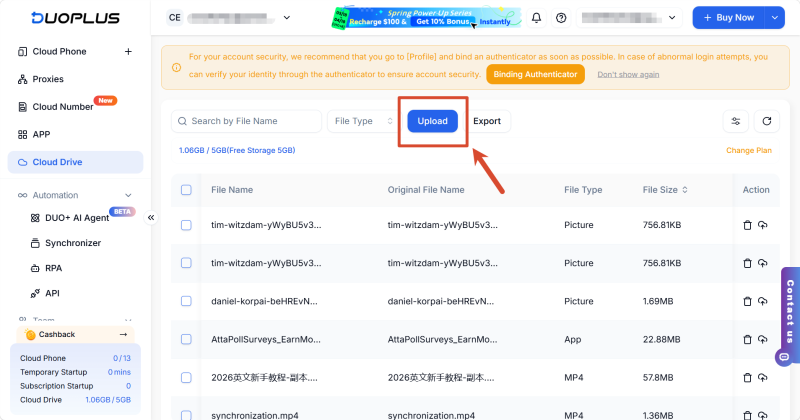
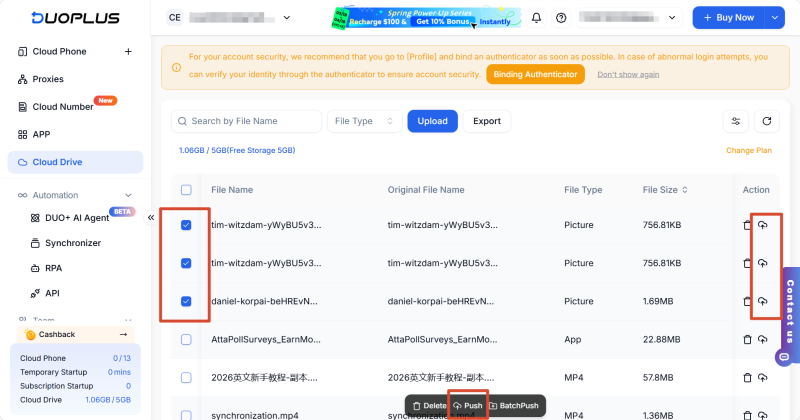
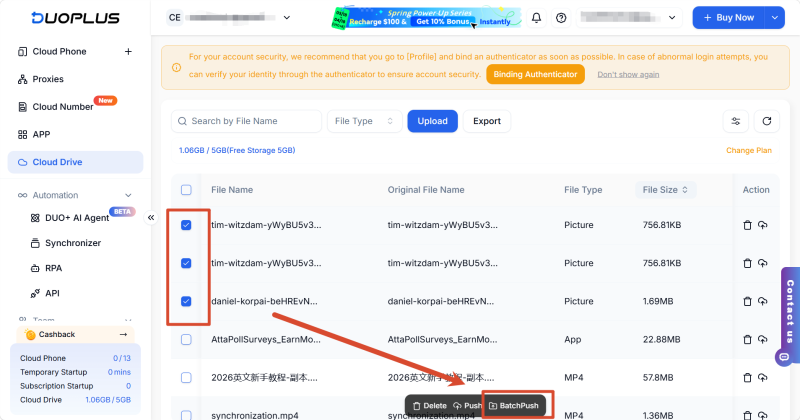
DuoPlus Cloud Phone's file push feature supports common video, image, and document files and can sync them to specified cloud phones. For larger video files, we recommend uploading over a stable network connection for the best experience.
After uploading images or videos, they need to be saved to the DCIM/Camera directory for Facebook, Instagram, and other apps to read them directly. If saved to a different directory like Download, these apps may not display them automatically—you'll need to adjust the save path accordingly.
File push failures are usually related to network connection issues, target cloud phones being offline, insufficient storage, or incorrect target directory settings. Check that the cloud phone is running properly, verify your network connection and target directory, then retry. If failures persist, check the task error messages or contact DuoPlus customer support for further troubleshooting.
Yes. DuoPlus supports batch push, allowing you to assign specific images, videos, or other files to different cloud phones—enabling "one cloud phone, one set of assets" for multi-account operations and differentiated content distribution.
DuoPlus Cloud Phone's file batch push feature simplifies the process of distributing images and videos across multiple accounts. To further automate Facebook operations, teams can combine it with DUO+ AI Agent to automatically handle post editing, asset selection, and content publishing. Together with file push, this creates a complete workflow—from asset preparation and batch distribution to content publishing—reducing repetitive work and improving overall multi-account operational efficiency.
Muse has recently become one of the most talked-about AI Agent products in the AI tools space. As a new AI Agent from …

OpenAI Codex is an AI coding agent designed to help developers write, modify, review, and deliver code. It is available …

VK (VKontakte) is one of the major social media platforms in Russia. In addition to account management, content …
No need to purchase multiple real phones.
With DuoPlus, one person can operate numerous cloud phones and social media accounts from a single computer, driving traffic and boosting sales for you.

