How to Sign Up for Meta Muse and Use a Referral Code
Muse has recently become one of the most talked-about AI Agent products in the AI tools space. As a new AI Agent from …
This guide explains common detection triggers during Facebook multi-account warming, analyzes how device environment, proxy IP, and behavioral patterns affect account stability, and compares automation solutions including scripts, RPA, and AI Agent to help teams manage Facebook accounts more efficiently at scale.

Get an AI-Powered Summary of This Article
In 2026, Facebook remains one of the core channels for reaching target audiences in global marketing and brand promotion. To expand business reach and segment audiences across different markets, many teams and individuals need to manage multiple Facebook accounts simultaneously. In this process, newly registered accounts typically go through a period of daily maintenance and interaction — commonly referred to as "account warming" — to establish stable, authentic activity records.
However, as Facebook's security review mechanisms and behavioral detection algorithms continue to evolve, the difficulty of bulk account warming has increased. This guide outlines common triggers for account restrictions in bulk Facebook operations, explores effective ways to reduce risk, and explains how AI automation can improve account stability and management efficiency.
Facebook's platform is designed to maintain authentic, high-quality social experiences. Its security systems strictly monitor fake accounts, abnormal activity patterns, and unnatural human-machine interactions. When managing accounts in bulk, the following issues are the most common triggers:
Facebook records device hardware parameters and network IP addresses. If multiple Facebook accounts are frequently logged in and out on the same computer or mobile device using the same network connection, the system may flag them as being controlled by a single user, triggering account association bans.
To improve efficiency when managing multiple Facebook accounts, operators often use simple fixed scripts. This results in highly consistent behavioral patterns — for example, liking at identical time intervals, performing the same scrolling routes, or posting at the exact same time across accounts. This lack of randomness, which is characteristic of real users, can be easily detected as bot activity by Facebook's behavioral analysis systems.
Newly registered Facebook accounts typically need a gradual growth period. If a brand-new account immediately starts sending large numbers of friend requests, frequently joining business groups, or sending high volumes of direct messages, this deviates from normal user behavior and may trigger algorithmic restrictions or identity verification requests.
When creating multiple Facebook accounts in bulk, using highly similar profile photos and bios, or limiting interactions to specific business niches without including general social engagement, these accounts are more likely to be flagged as low-quality marketing accounts during regular platform reviews.
To effectively reduce association and ban risks in bulk Facebook operations, the key lies in isolating operational environments and simulating authentic behavioral patterns. In practice, relying solely on manual work makes it difficult to balance efficiency and safety. Teams typically use the following specialized tools to build their Facebook operational infrastructure:
These tools provide independent, clean hardware fingerprints and runtime environments for each Facebook account, preventing the platform from associating multiple accounts through device parameters (such as MAC address, device model, OS version).
Beyond device hardware isolation, unique network environments are equally critical. Logging into large numbers of accounts from the same network IP is one of the most common triggers for Facebook bans. To simulate authentic geographic locations and network conditions, teams typically use the following proxy strategies:
To avoid the inefficiency of manually operating multiple devices one by one, teams typically use automation tools to execute basic warming tasks in bulk — such as scheduled logins, simulated scrolling, and random likes. Common tools fall into the following categories:
While these automation tools perform well for specific standardized tasks, they still require operators to have some technical understanding, especially when dealing with frequently updated social platforms like Facebook. When Facebook updates its app version, adjusts button positions, or displays unexpected pop-ups, workflows may need manual adjustment or code rewriting.
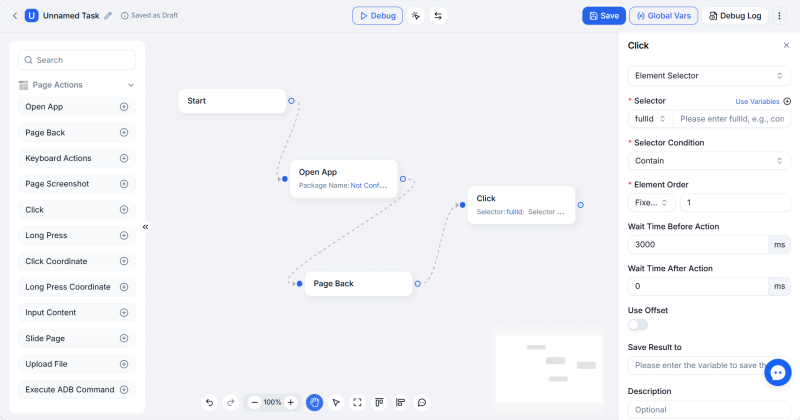
As a result, more teams are beginning to integrate AI Agent into their daily operations. Unlike fixed workflows, AI Agent can identify interface elements based on the current screen and perform actions according to task objectives, making it more suitable for long-term maintenance of multiple Facebook accounts.
Unlike traditional scripts or RPA, AI Agent no longer relies on fixed screen coordinates or predefined rule-based flowcharts. Instead, it understands task objectives through natural language and autonomously plans operation steps to complete complex mobile interaction tasks.
DUO+ AI Agent is DuoPlus Cloud Phone's next-generation AI automation feature. For daily Facebook warming operations, DUO+ AI Agent transforms complex technical logic into simple conversational instructions. Below is the complete setup process for automated Facebook warming:
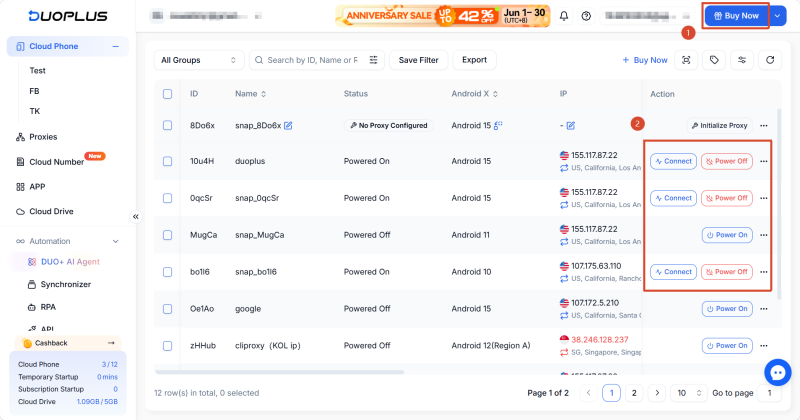
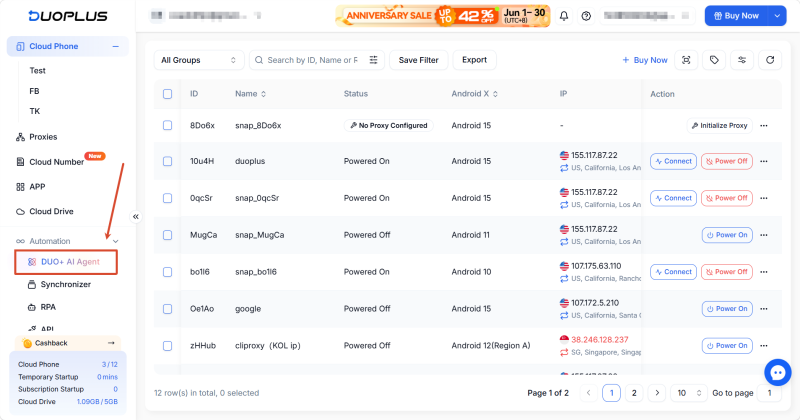
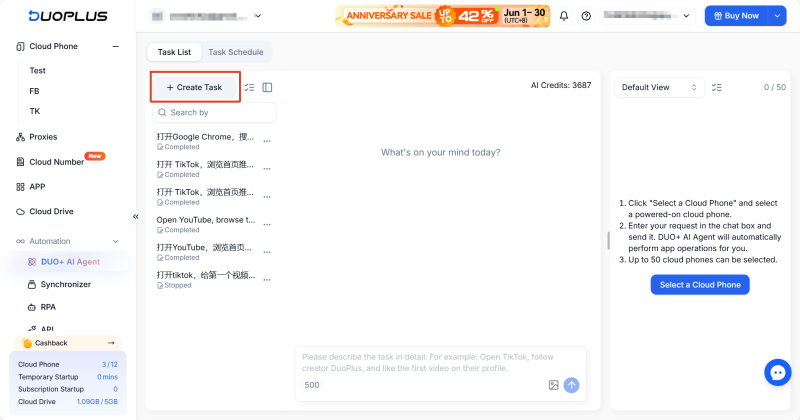
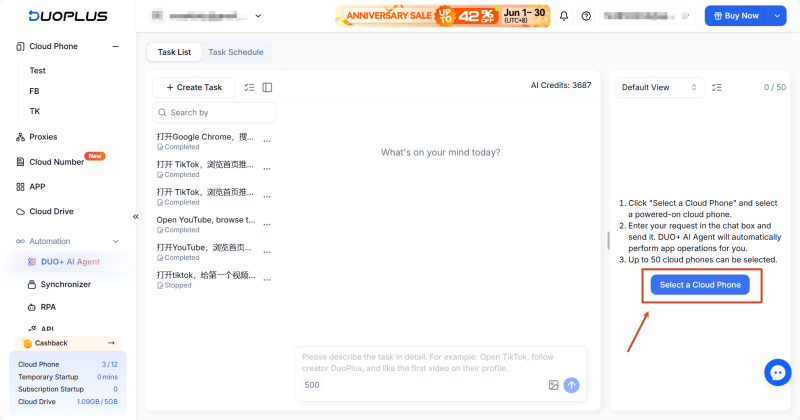
In the task configuration panel, select the DuoPlus Cloud Phones you prepared in Step 1. For batch warming, you can select multiple devices at once (up to 50 devices supported). The AI will distribute and execute the same instruction across all selected accounts simultaneously.
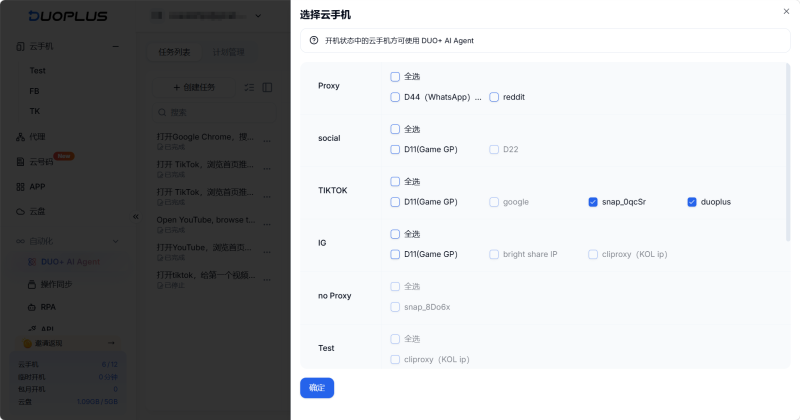
In the task description dialog, directly describe your task in plain language. No flowchart configuration is needed — just clearly outline the steps.
Example Facebook warming command: "Open Facebook. Slowly scroll down the homepage for 2 minutes, randomly liking 2 posts while browsing. Then search for the keyword '[e.g., Digital Marketing]', switch to the 'Groups' tab, and randomly request to join one of the top 3 groups."
Depending on the account's growth stage, you can adjust the focus:
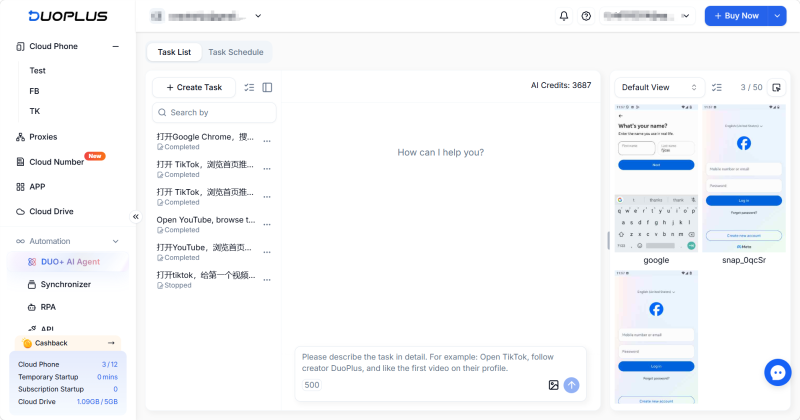
Yes. This is a completely no-code feature. Operators don't need to write any scripts or configure complex RPA flowcharts. Simply describe the task in plain language (e.g., "Open Facebook, scroll through the homepage for 2 minutes, randomly like 2 posts") in the task input box, and the AI system autonomously understands and executes the task.
The risk is very low. AI Agent uses visual models to analyze the screen in real time and naturally introduces human-like random swipe trajectories and irregular wait intervals during interactions, effectively avoiding automated behavior detection.
This is not recommended. Frequently switching between accounts on a single device causes overlapping hardware fingerprints, easily triggering Facebook's security detection. Always follow the principle of one device, one IP, one account — use multiple cloud phones for different Facebook accounts.
It's generally recommended to continue for 7 to 14 days. During this period, gradually increase activity — starting from passive browsing and transitioning to light social interactions. Wait until the Facebook account stabilizes before introducing commercial promotions.
In 2026, to safely and effectively maintain Facebook account activity long-term, teams need to achieve physical and network environment isolation through reliable tools while simulating highly realistic interaction patterns to avoid algorithm detection. By introducing intelligent automation tools like DuoPlus AI Agent, and properly configuring independent runtime environments with smart interaction commands, teams can protect their account assets while significantly improving overall operational efficiency.
Muse has recently become one of the most talked-about AI Agent products in the AI tools space. As a new AI Agent from …

OpenAI Codex is an AI coding agent designed to help developers write, modify, review, and deliver code. It is available …
VK (VKontakte) is one of the major social media platforms in Russia. In addition to account management, content …
No need to purchase multiple real phones.
With DuoPlus, one person can operate numerous cloud phones and social media accounts from a single computer, driving traffic and boosting sales for you.