
How to Sign Up for Meta Muse and Use a Referral Code
Muse has recently become one of the most talked-about AI Agent products in the AI tools space. As a new AI Agent from …
Discover how DuoPlus RPA streamlines large-scale automation for TikTok and Instagram. Learn about new workflow features including Run Task Flow, Pointer Mode, and vertical alignment to improve operational efficiency.

Get an AI-Powered Summary of This Article
As platforms like TikTok and Instagram increasingly rely on multi-account management and large-scale content operations, more users are turning to RPA (Robotic Process Automation) to handle repetitive tasks more efficiently.
Common automation scenarios include:
Compared to manual operations, RPA significantly reduces the time spent on repetitive clicks and allows tasks to run automatically with greater consistency and accuracy.
This latest DuoPlus RPA update focuses on workflow building, task management, and canvas interaction improvements — making complex automation flows smoother, faster, and easier to manage.
When users first start using RPA, most workflows are relatively simple.
For example:
At this stage, workflows usually contain only a few nodes, so building and editing them manually is still manageable.
However, as operations scale up, many users begin creating larger automation workflows with multiple steps and branching logic. A single RPA task may eventually contain dozens of nodes, leading to common issues such as:
To address these problems, DuoPlus RPA introduces several workflow management improvements designed specifically for large-scale automation tasks.
In real automation scenarios, many workflows contain repeated actions, such as:
Previously, users had to rebuild these repetitive steps manually in different workflows, which was both time-consuming and difficult to maintain later.
With this DuoPlus RPA update, users can now directly call existing RPA workflows and insert them into current tasks.
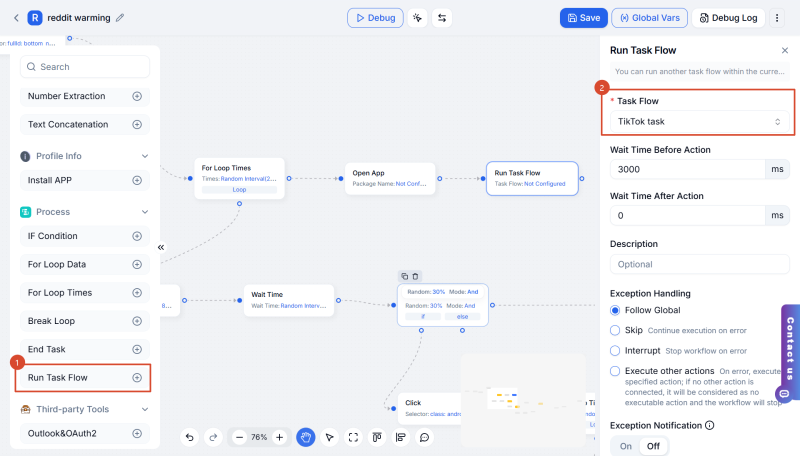
For users managing long-term or large-scale automation operations, reusable workflows make it much easier to build standardized automation processes while reducing repetitive setup work.
Previously, the DuoPlus RPA canvas used drag mode by default. Holding the left mouse button allowed users to freely move around the canvas, which worked well for viewing large workflows.
However, selecting multiple nodes at once was less convenient.
The new Pointer Mode improves this experience:
This makes batch editing and workflow management much more efficient.
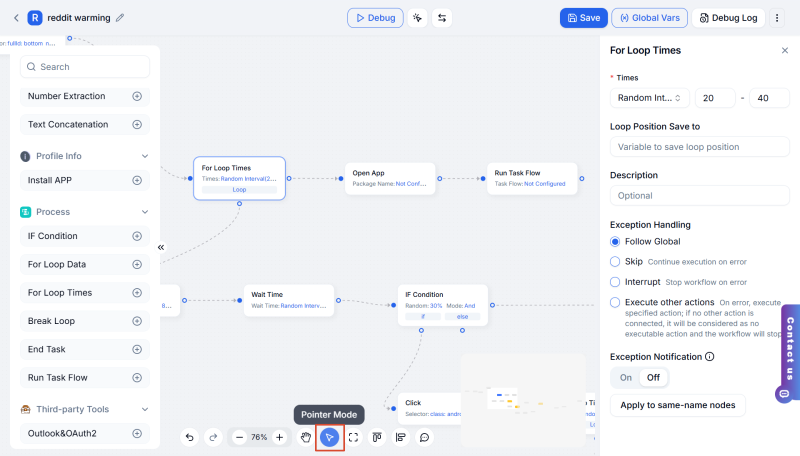
Quick Tip: Even in drag mode, holding the Shift key still enables area selection, so users can choose whichever interaction style fits their workflow best.
When building larger automation workflows, many users run into the same issue:
Different tasks often share nearly identical workflow structures, with only a few steps changing between them.
Previously, users had to repeatedly recreate those same node sequences manually.
DuoPlus RPA now allows users to select two or more consecutive nodes and save them directly as a standalone task for future reuse.
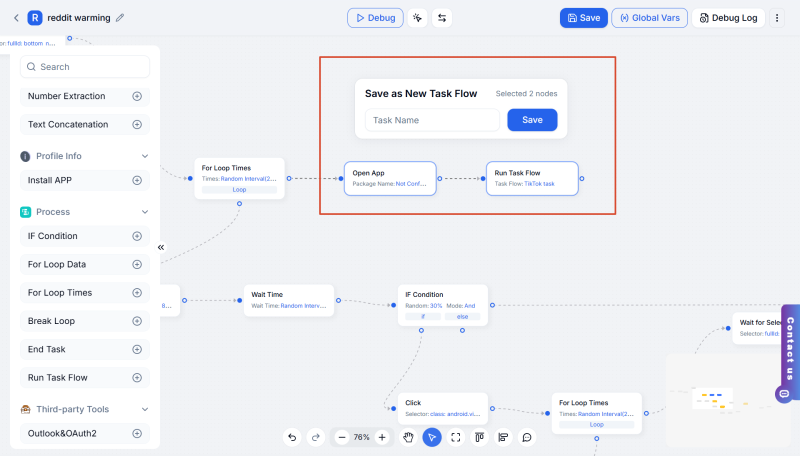
Combined with the new Run Task Flow feature, users can gradually build a reusable automation module library that dramatically improves workflow creation efficiency.
As automation flows become longer and more complex, workflow readability becomes increasingly important — especially in multi-branch processes.
When large numbers of nodes are placed on the canvas, workflows can quickly become visually cluttered.
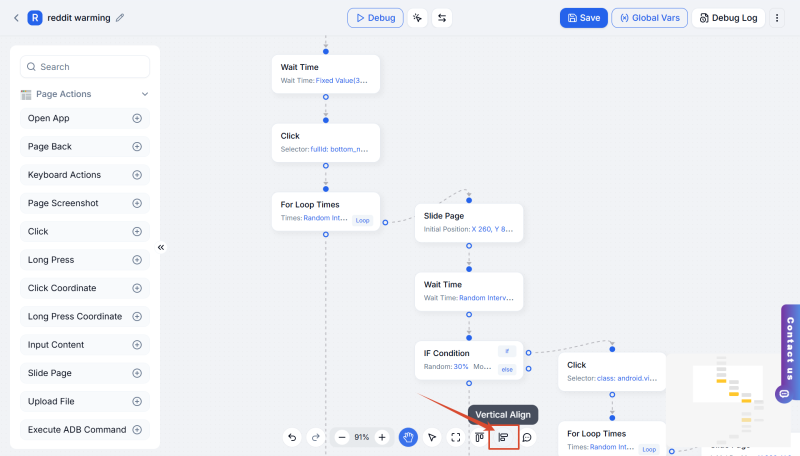
Previously, DuoPlus RPA only supported horizontal alignment, where workflow nodes were arranged from left to right.
This update introduces Vertical Alignment, allowing all workflow nodes to be organized cleanly from top to bottom for a more structured visual layout.
Previously, the mouse wheel controlled canvas zoom by default, which made navigating long workflows less convenient.
The updated canvas interaction system now provides smoother workflow browsing and editing:
This creates a much more intuitive editing experience for large RPA workflows.
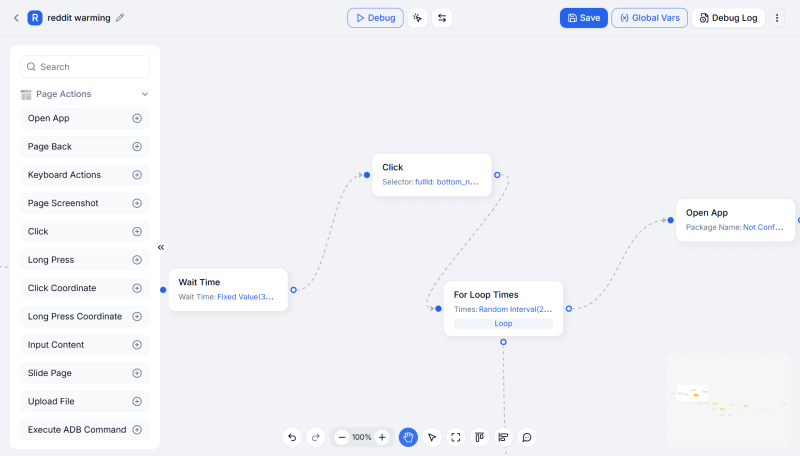
DuoPlus also provides an integrated RPA Marketplace, where users can access commonly used automation workflows in one place.
Instead of building every process from scratch, users can:
For example, DuoPlus RPA can automate TikTok video uploads by publishing specified content at scheduled times.
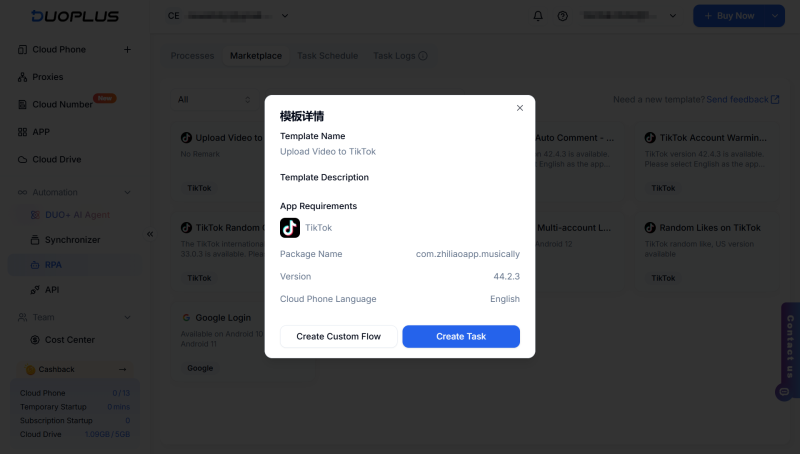
Step 1: Select the “Upload Video to TikTok” Template
Open the DuoPlus RPA Marketplace, choose the "Upload Video to TikTok" template, and click Create Task.
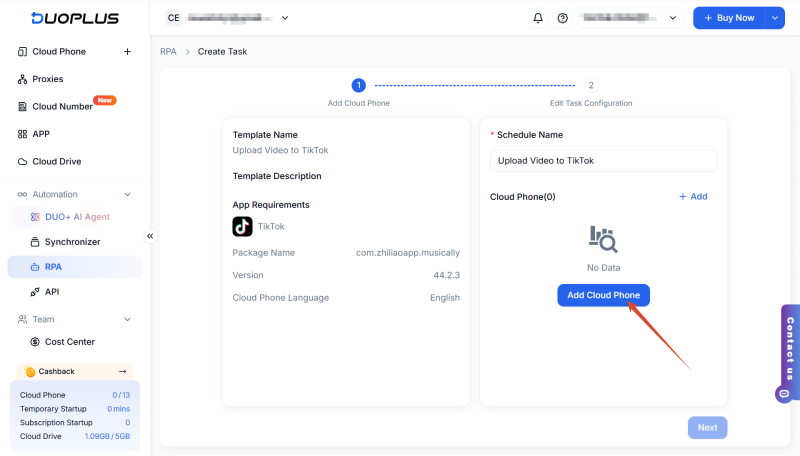
Step 2: Add Cloud Phones
Click Add Cloud Phone and select the cloud devices that will run the RPA task.
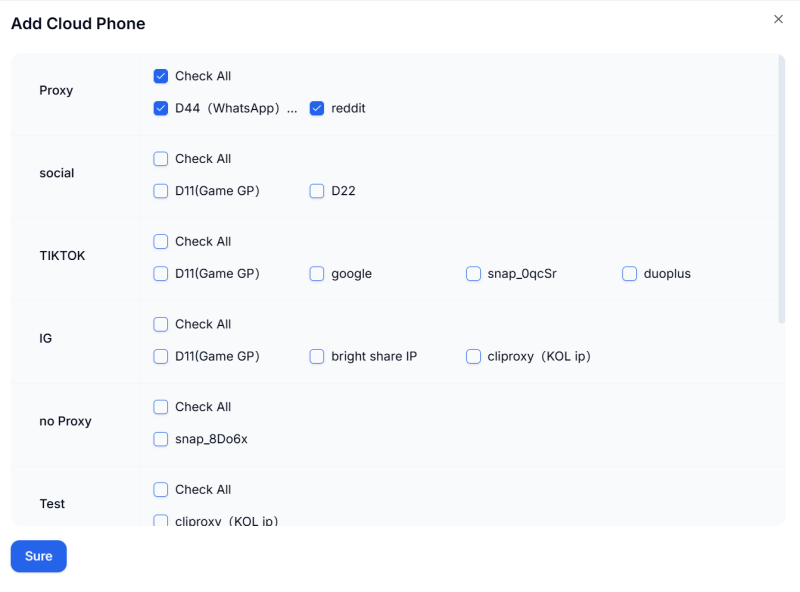
Step 3: Configure the Task
Set the task type and scheduled execution time based on your needs, then click Publish Now.
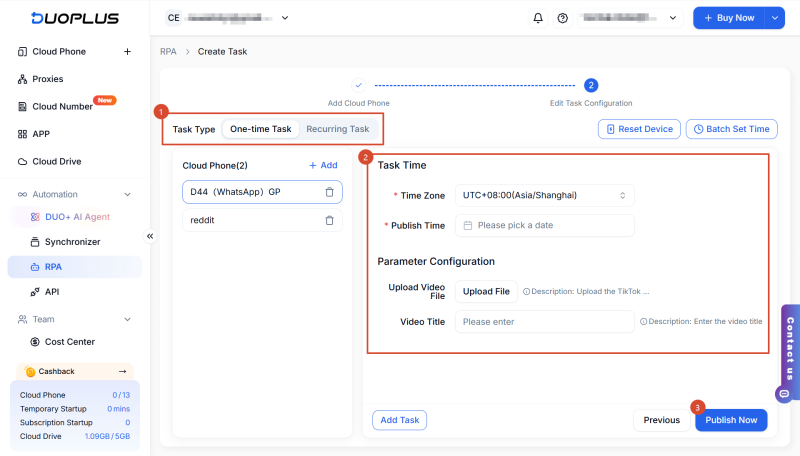
Step 4: Monitor Task Execution
You can check the execution status and logs directly inside Task Logs.
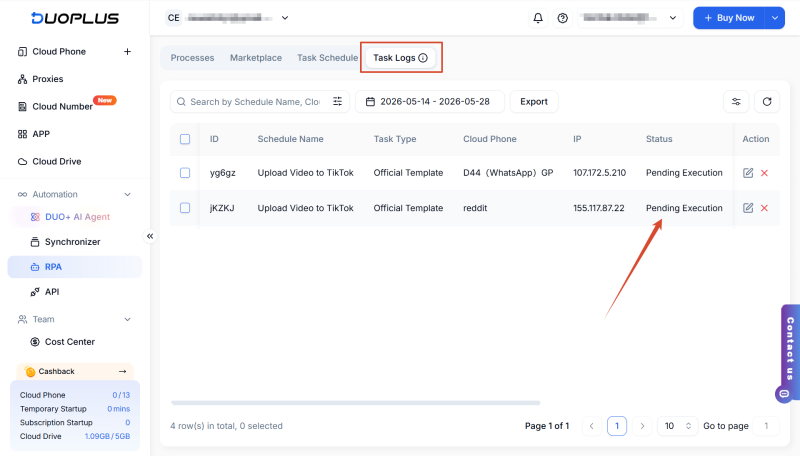
If you're managing repetitive workflows across apps like TikTok, Instagram, or Google services, DuoPlus RPA can help streamline daily operations through automation.
From workflow building and reusable task modules to long-term process management, the latest DuoPlus RPA update is designed to improve operational efficiency while making large-scale automation workflows easier to manage and maintain.
Muse has recently become one of the most talked-about AI Agent products in the AI tools space. As a new AI Agent from …

OpenAI Codex is an AI coding agent designed to help developers write, modify, review, and deliver code. It is available …
VK (VKontakte) is one of the major social media platforms in Russia. In addition to account management, content …
No need to purchase multiple real phones.
With DuoPlus, one person can operate numerous cloud phones and social media accounts from a single computer, driving traffic and boosting sales for you.