





How to Increase TikTok Shop GMV: 5 Practical Strategies for Sustainable Growth
TikTok Shop gives sellers multiple ways to reach potential customers, from shoppable videos and livestreams to creator …
Managing social media accounts often involves repetitive tasks like account warming, engagement, and content publishing. The DuoPlus RPA Template Store offers ready-to-use templates for YouTube, X, Instagram, and more. This guide uses the YouTube Account Warming template to show how to quickly configure and run an RPA task.

Get an AI-Powered Summary of This Article
When managing social media accounts, content creation is not the only task that takes time.
Browsing relevant content on new accounts, liking and commenting on posts, uploading videos, and sending messages are not especially difficult on their own. The challenge is that these tasks need to be repeated consistently over time.
As the number of accounts grows, opening cloud phones one by one, switching between accounts, and repeating the same steps can quickly add to the daily workload.
To help users reduce repetitive work and manage multiple social media accounts more efficiently, DuoPlus Cloud Phone has added a new collection of RPA Templates for YouTube, X, and Instagram to the RPA Marketplace.
These Templates cover common YouTube workflows, from browsing niche-related content and performing basic engagement actions to publishing Shorts and standard videos.
These Templates are designed for common tasks such as publishing content, following relevant creators, communicating with users, and maintaining regular account activity.
Before creating a task, users can organize a list of target creators or accounts based on the positioning of each X account. They can then use the relevant Template to automate clearly defined, repetitive actions and reduce the time spent managing each account manually.
These Templates cover Reels browsing and engagement, early-stage account activity, and direct-message communication.
The Instagram Account Warm-Up Template is designed around a 7- to 14-day schedule, making it useful for establishing a more consistent account activity pattern.
Compared with building a workflow from scratch, DuoPlus RPA Templates reduce configuration work and run directly within the cloud phone environment, making them more practical for recurring social media tasks.
When creating an RPA workflow manually, users usually need to break down each task into individual actions and add nodes for tapping, swiping, typing, and waiting.
Even a common task such as browsing content or publishing a video may require several rounds of testing before the workflow runs reliably.
DuoPlus RPA Templates organize these common steps into ready-to-use task frameworks. Users only need to adjust the relevant parameters before creating a task, which reduces both setup time and testing effort.
All RPA tasks run directly inside the selected DuoPlus Cloud Phone.
Each cloud phone provides a separate account environment. When managing multiple accounts, users do not need to repeatedly open different physical devices or manually log in and out of accounts, reducing a large amount of repetitive device management.
When several accounts need to perform similar actions, users can create multiple tasks from the same Template.
For example:
The execution status of these tasks can be viewed from one place, making it easier to adjust schedules, edit parameters, and manage recurring workflows.
The following example uses the YouTube Account Warm-Up Template to explain the basic process, from selecting a Template to running the task.
Sign in to the DuoPlus Cloud Phone dashboard.
From the left-hand menu, go to: Automation → RPA
You can use the search and filter options in the Marketplace to find the Template you need.
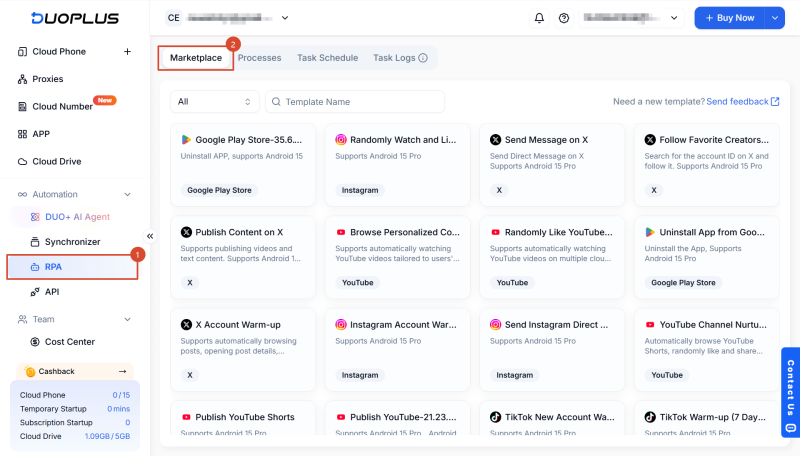
Select the [ YouTube Account Warm-Up ] Template to open its details page.
Review the Template description and app requirements. If the Template matches your needs, click Create Task.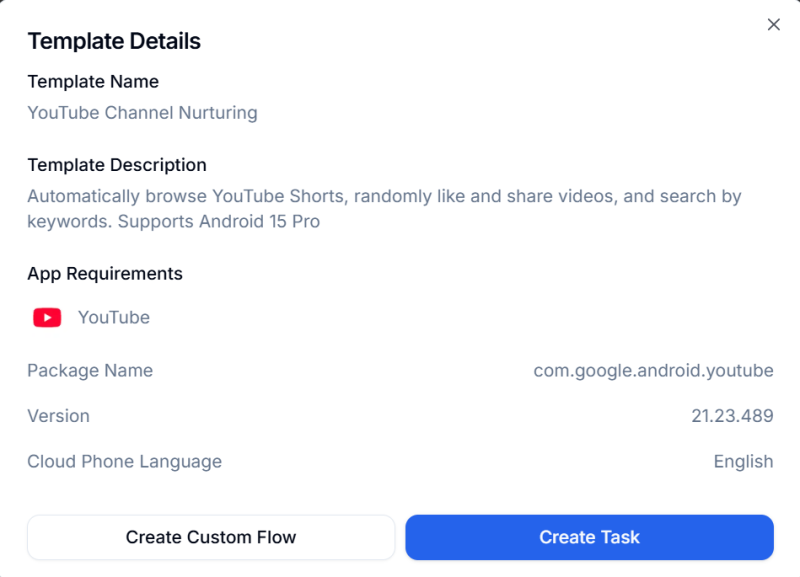
The available settings and interface may vary depending on the Android version of the selected cloud phone. Refer to the options shown in the DuoPlus dashboard.
If you manage multiple YouTube accounts, you can select several cloud phones when creating the task instead of configuring each cloud phone separately.
Depending on your workflow, you can configure settings such as:
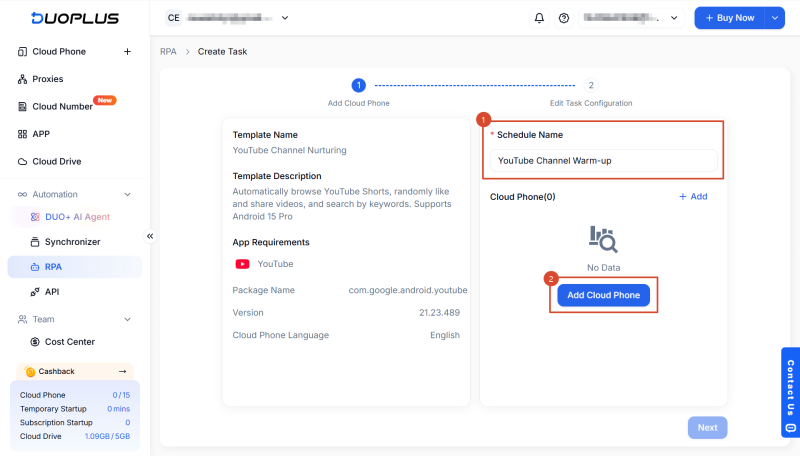
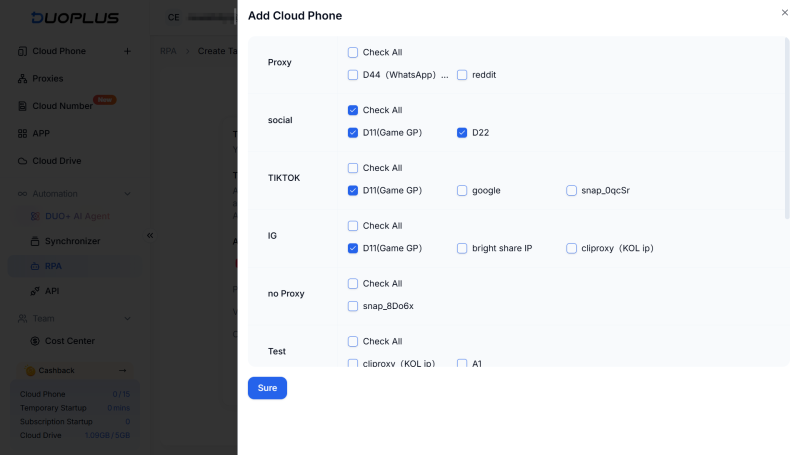
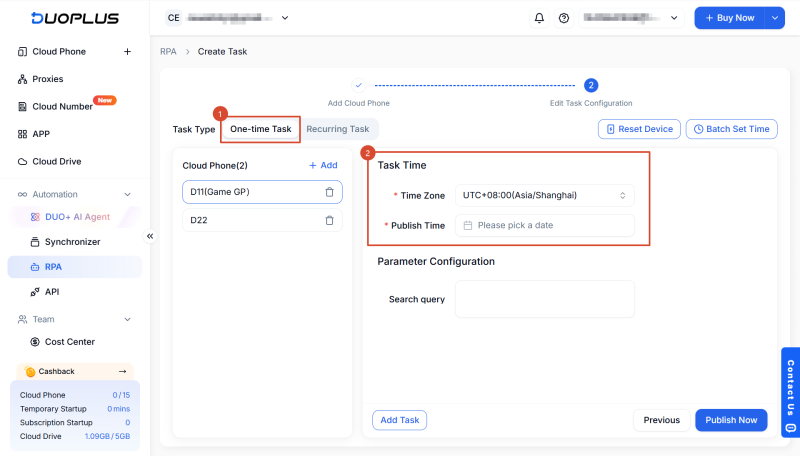
To create a recurring task, set the task schedule and time zone, then choose the execution frequency and interval based on your needs.
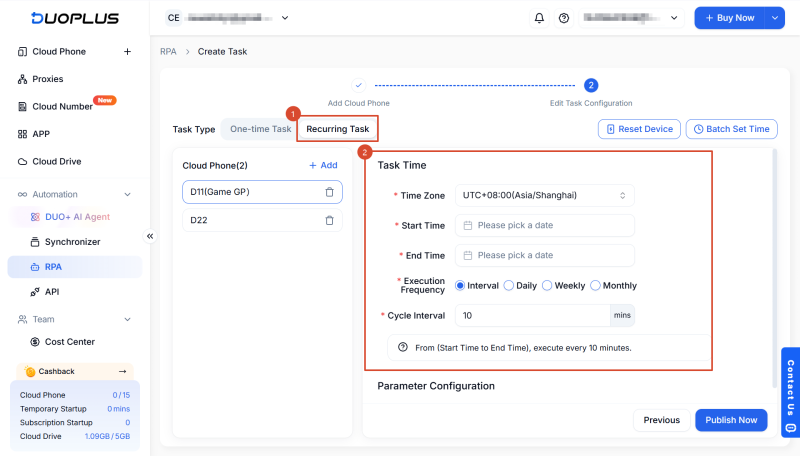
Before publishing the task, check the cloud phone and account status.
Make sure that:
RPA follows the workflow and parameters you configure, but the account strategy, content direction, and task frequency should still be planned in advance.
Click Publish Now.
The YouTube Account Warm-Up task will be added to the task list. At the scheduled time, the system will start the selected cloud phone and automatically run the RPA workflow.
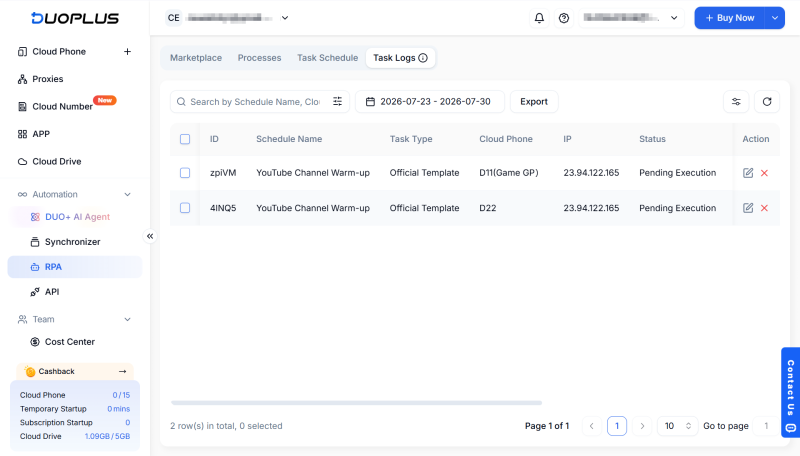
When using a Template for the first time, start with a small number of cloud phones. After confirming that the workflow performs as expected, you can expand it to more devices.
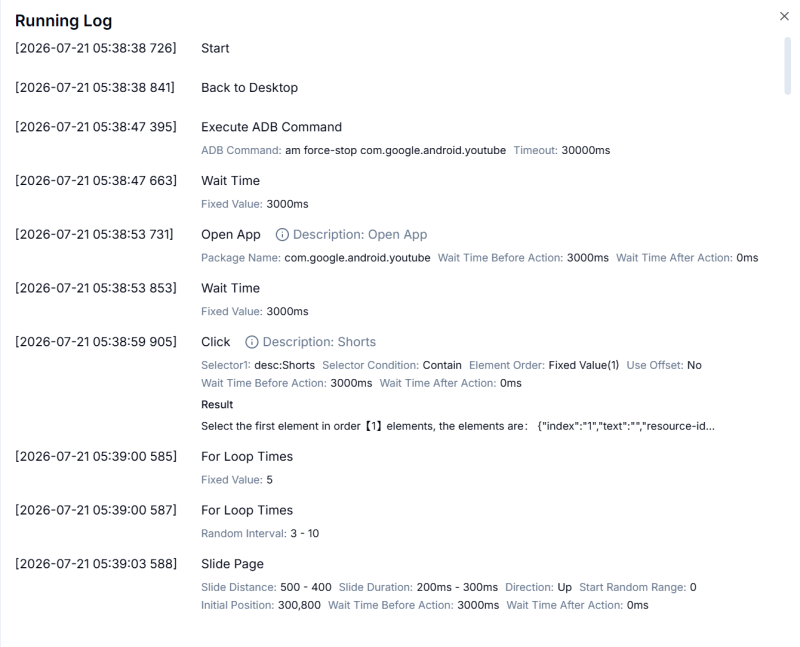
Go to: RPA → Task Logs
Here, you can view:
If a page layout changes, the network becomes unstable, or the account requests additional verification, the execution report can help identify the affected workflow node. You can then adjust the task parameters or workflow configuration as needed.
Yes. DuoPlus RPA Templates can be used to create tasks directly, but they can also be edited to match your own workflow.
You can customize a Template by:
If you are new to RPA, you can use a Template to create a social media automation task quickly.
If you already have an established workflow, you can use the Template as a starting point and customize it instead of building the entire process from scratch.
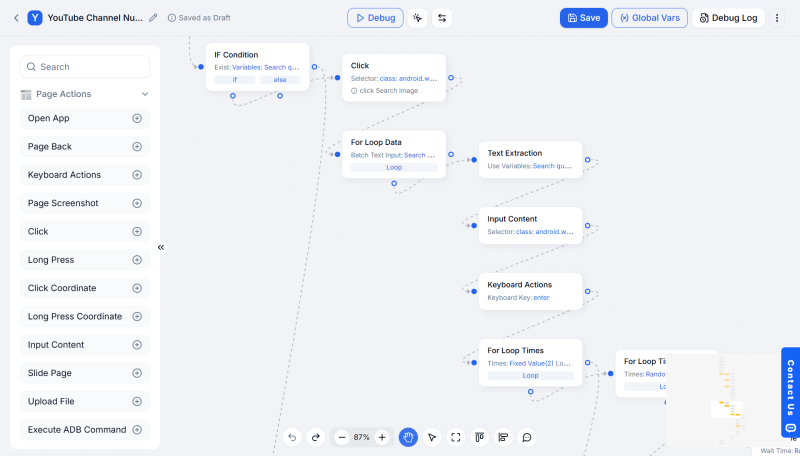
DuoPlus RPA can be used with apps such as TikTok, YouTube, X, and Instagram.
It is suitable for repetitive tasks including account warm-up, content browsing, likes and other engagement actions, video publishing, and direct messaging.
Yes. The DuoPlus RPA feature and the currently available RPA Templates are free to use.
Users can create automation tasks directly from a Template or edit the workflow nodes and execution parameters based on their needs.
However, the cloud phones used to run RPA tasks are charged according to the applicable DuoPlus pricing rules.
Yes. When creating an RPA task, you can configure the start time, end time, execution frequency, recurring interval, and time zone.
At the scheduled time, the system will run the configured workflow on the selected cloud phone.
You can send DuoPlus feedback about the platform, task scenario, and workflow you would like to automate.
We will continue expanding and improving the RPA Marketplace based on real user needs, with more Templates for social media apps added over time.
TikTok Shop gives sellers multiple ways to reach potential customers, from shoppable videos and livestreams to creator …
When managing multiple social media accounts, you often need to handle large amounts of text, including post captions, …
E-commerce operations and social media content management often require saving product specifications, descriptions, …
No need to purchase multiple real phones.
With DuoPlus, one person can operate numerous cloud phones and social media accounts from a single computer, driving traffic and boosting sales for you.

