





How to Increase TikTok Shop GMV: 5 Practical Strategies for Sustainable Growth
TikTok Shop gives sellers multiple ways to reach potential customers, from shoppable videos and livestreams to creator …
Learn how to organize multiple TikTok, Instagram, and Facebook accounts with DuoPlus Cloud Phone. This guide covers device naming, custom tags, group management, bulk grouping, and ways to find devices faster.

Get an AI-Powered Summary of This Article
As TikTok, Instagram, and Facebook become important channels for brand marketing, content creation, and affiliate marketing, more operators need to manage multiple social media accounts at the same time. As the number of accounts grows, the number of cloud phones may grow as well. Without clear classification rules, similar device names, unclear account-to-device mappings, and devices from different projects mixed together can make daily management more difficult.
DuoPlus Cloud Phone provides device names, groups, and custom tags to help users organize device resources and find devices more efficiently through list filters and frequently used groups.
When managing multiple social media accounts, accounts are often distributed across different cloud phones and may relate to different platforms, markets, product lines, or client projects. As the number of devices grows, default names or simple numbers make it difficult to identify each device’s account and purpose quickly.
Without consistent naming and classification rules, operators may need to inspect devices one by one and repeatedly verify their details. This takes time and increases the risk of mistakes. In workflows involving multiple platforms, markets, or clients, platform names alone may not be enough to organize devices effectively.
A better approach is to name devices according to clear business criteria and use groups and tags to distinguish platforms, markets, or projects. This reduces search time and keeps device management organized.
A cloud phone name is primarily used to identify a device quickly, not to store every detail about the account. Use a consistent naming format so every device follows the same rules.
Three principles can help:
Concise: Keep the most important identifying information and avoid overly long names.
Consistent: Use the same field order and abbreviations across the team.
Scalable: Make sure the format can still be used as the number of accounts or markets grows.
DuoPlus
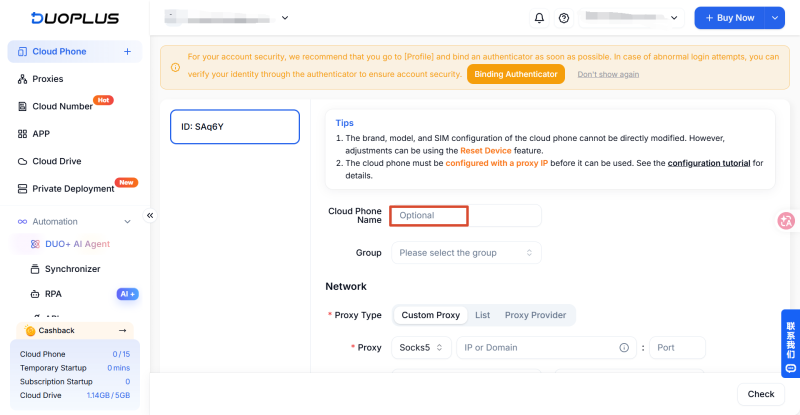
lets users customize and edit cloud phone names. You can set a name when initializing a proxy for a cloud phone.
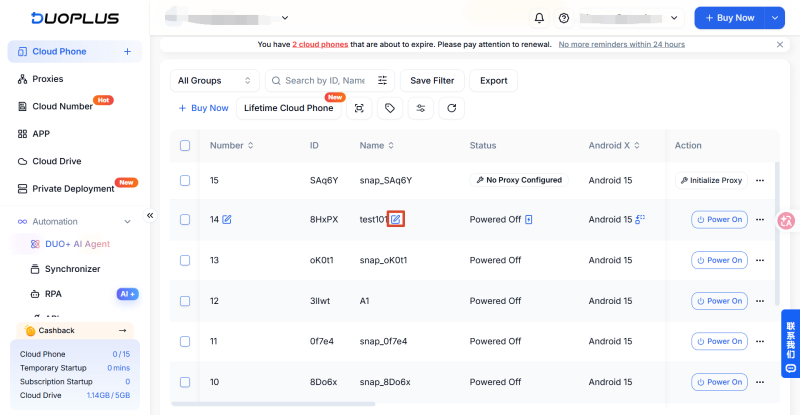
If you did not set a name during proxy initialization, or need to change it later, follow these steps:
①For an individual device, find it in the cloud phone list and click the icon to the right of its name.
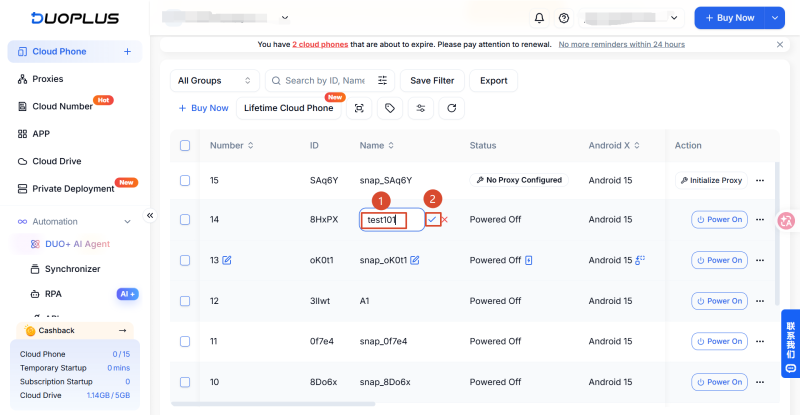
②Edit the name in the text field, then click the blue check mark on the right to save.
A device name is an internal management label. Renaming a cloud phone does not change the name of the social media account logged in on that device, and it does not replace checking which account is actually signed in.
Names are useful for identifying devices quickly, while custom tags provide additional classification details.
DuoPlus supports creating custom cloud phone tags and assigning them to relevant devices to distinguish their purposes or statuses. You can design tags based on your team’s needs instead of putting every detail into the device name.
①Decide which tag names your team needs.
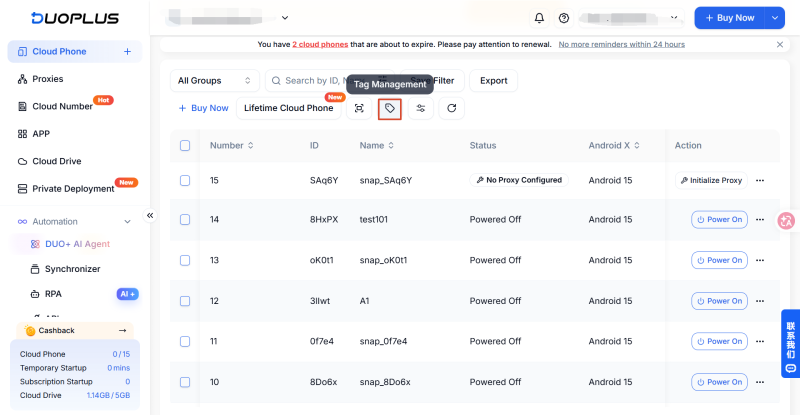
②Open tag management in the DuoPlus dashboard and create the required custom tags. You can customize tag names and colors to distinguish different purposes.
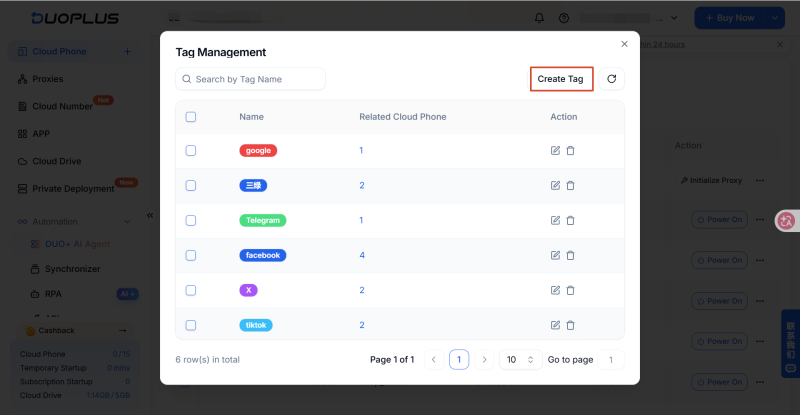
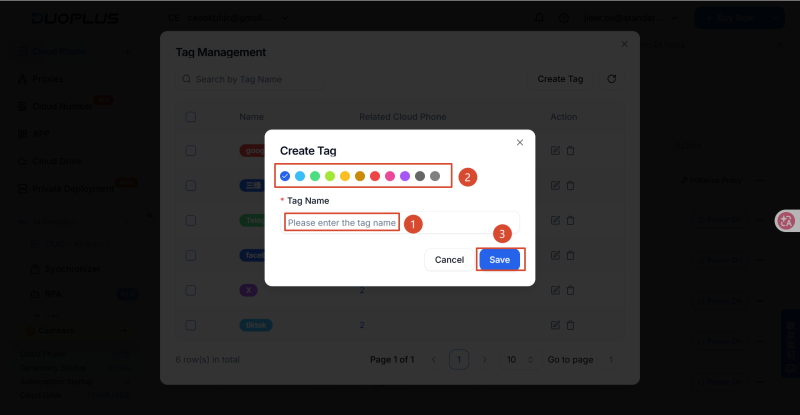
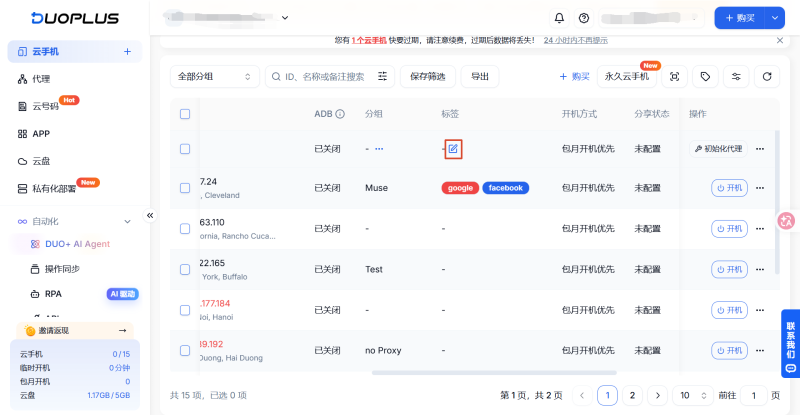
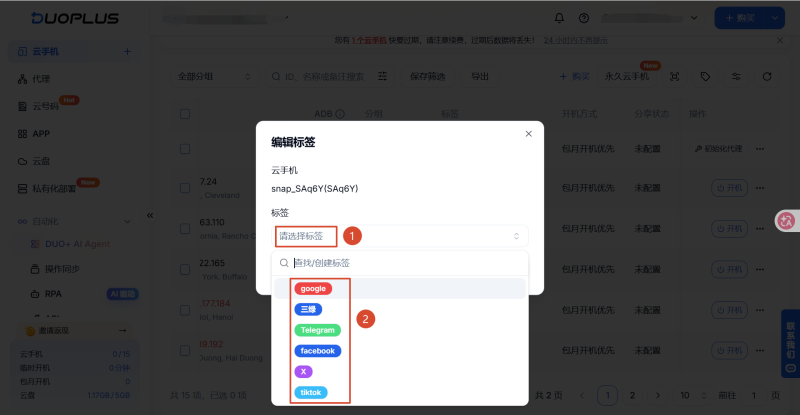
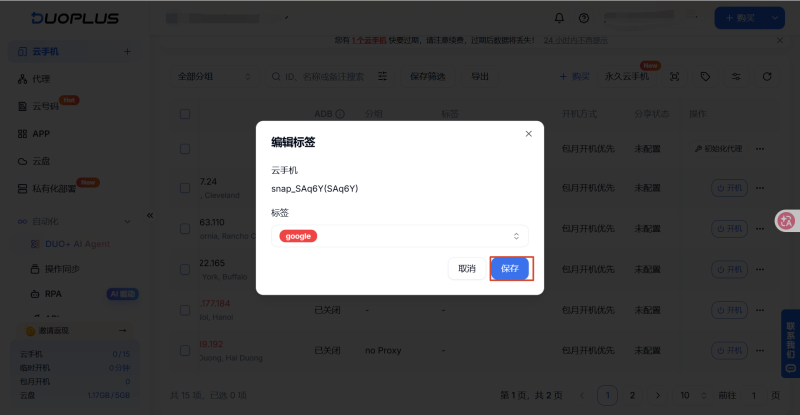
③In the dashboard, scroll horizontally to find the cloud phone’s Tags column, then assign the relevant tags to each device. A cloud phone can have multiple tags. Select the ones you need and click Save.
DuoPlus also supports cloud phone groups. You can create groups based on platform, project, market, or team workflow. A cloud phone can belong to more than one group.
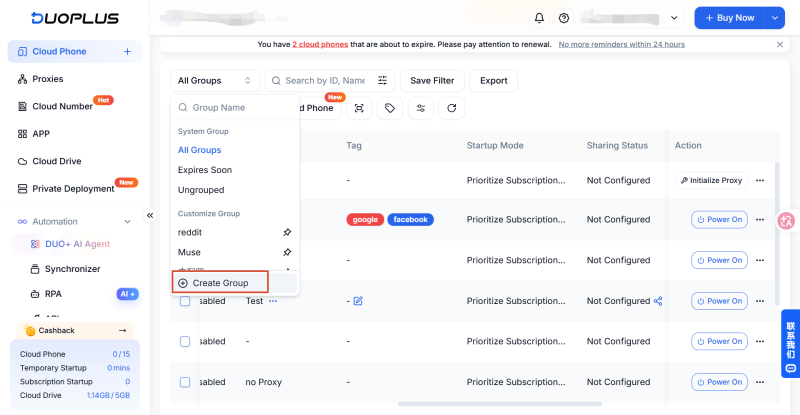
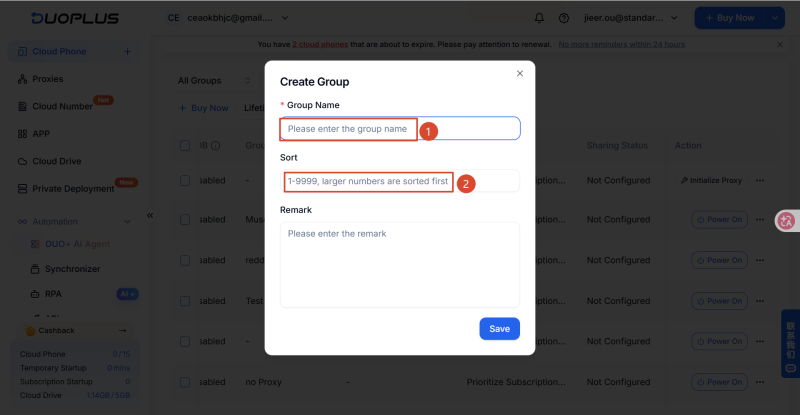
Open the cloud phone group management area in DuoPlus and click Create Group. Enter a group name. You can also enter a number to set the group’s order; larger numbers appear higher in the list. Arrange groups based on how frequently you use them so commonly used categories are easier to find.
When you have many devices, assigning groups one by one creates repetitive work. DuoPlus supports bulk group actions, allowing you to add several devices to a group or move them to another group at once.
①Select the cloud phones you want to organize, click the three-dot menu (...), then choose Add to Group or Move to Group.
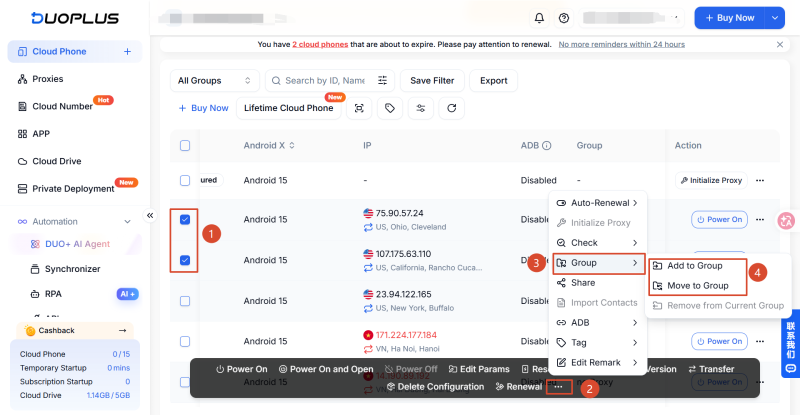
②Select an existing cloud phone group, or create a new group.
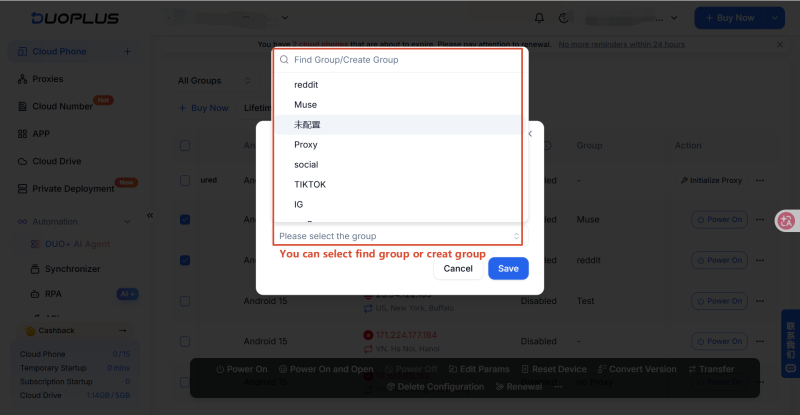
③The selected cloud phones will appear under the relevant group. To remove devices from a group, select the devices, click (...), and choose Remove from Current Group.
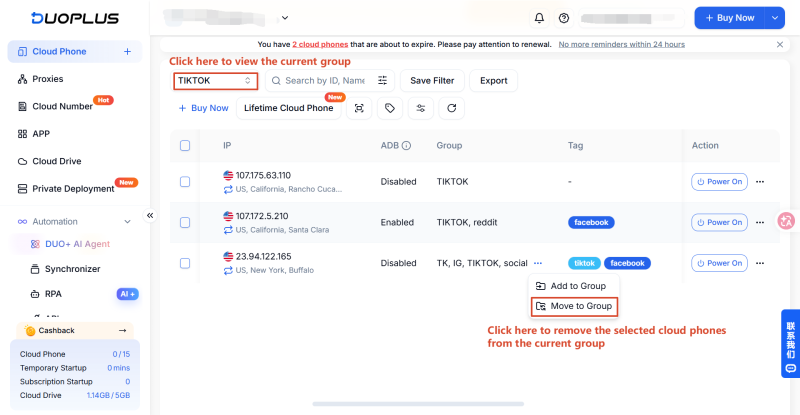
Add to Group and Move to Group are different. Add to Group adds another group association while retaining existing classifications. Move to Group changes a device’s group assignment.
Once your devices are classified, establish a consistent way to find them. DuoPlus provides management features related to device names, tags, and groups.
| Management Feature | Main Purpose | Typical Use |
|---|---|---|
| Cloud phone name | Identify a specific device | Quickly confirm the target cloud phone |
| Custom tag | Label device attributes or purpose | Distinguish platforms, markets, business types, or operating status |
| Group | Organize related cloud phones | Arrange devices by platform, market, or client |
| List filters | Narrow the device list using supported criteria | Locate cloud phones that match selected conditions |
In practice, narrow the search by group first, then use tags and device names to confirm the target cloud phone. If you need to narrow the results further, use the list filters.
If you know a device’s name or number, use it to identify the device. Keep the naming convention consistent with your team’s work tracker. For example, record the device name, social media platform, account purpose, and person responsible in an operations spreadsheet.
When you need to check an account, look up its device name in the tracker and then locate that device in the DuoPlus cloud phone list.
In the cloud phone console, find the search box labeled “Search by ID, Name, or Remarks” and enter the device name to find the corresponding cloud phone.
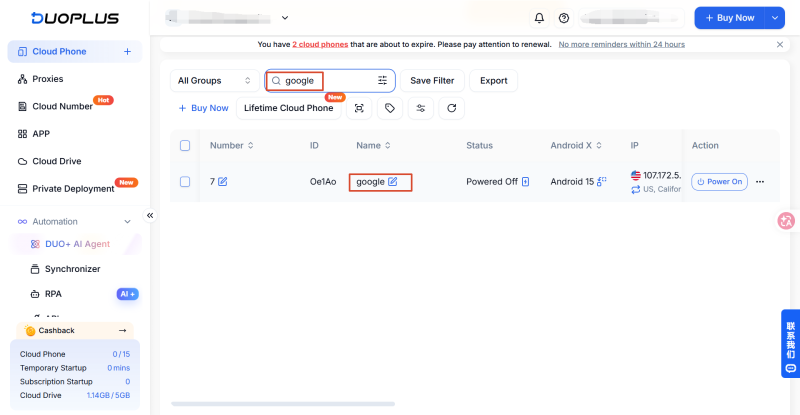
Names are intuitive, but they become less useful if naming rules are inconsistent or a device’s purpose changes without the name being updated. Naming standards should therefore be part of regular maintenance.
When you need to find several cloud phones with a particular attribute, filtering by tag is more convenient than checking each device name individually. For example, to find all devices tagged “TIKTOK,” use the tag filter in the DuoPlus cloud phone list.
①Open the cloud phone list, find All Groups in the upper-left corner, and select the tag you want to find, such as “TIKTOK.”
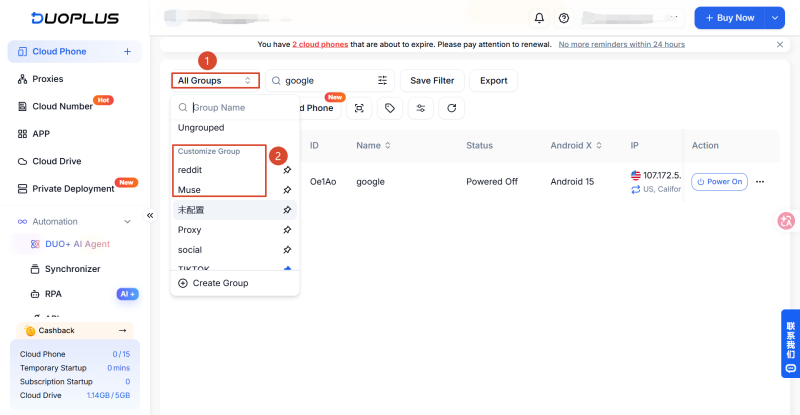
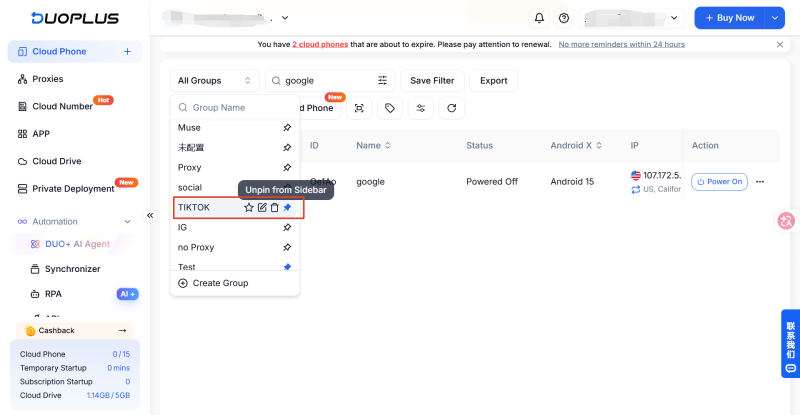
②Review the filtered results and use cloud phone names to confirm the target devices. If a device appears unexpectedly, check whether its tag was assigned correctly and filter again.
③DuoPlus also supports selecting “Untagged” in the tag filter, helping you find cloud phones that have not yet been tagged so you can label or organize them.
If your daily work revolves around a few groups, consider setting the most frequently used group as the default.
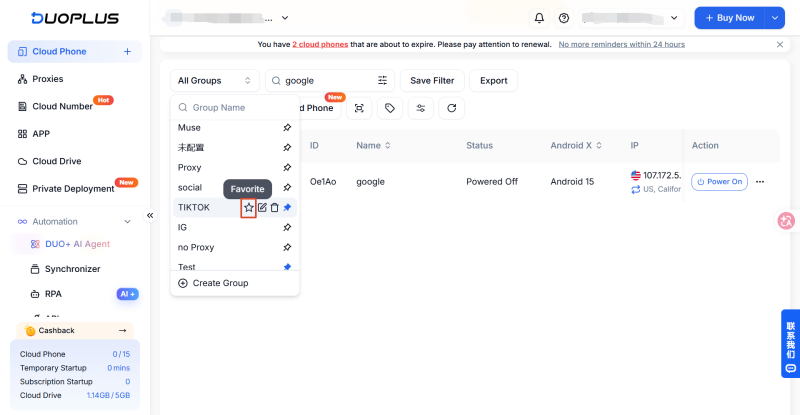
DuoPlus lets you use the star icon beside a group to set it as the default group. The group then appears at the top and in the left sidebar, helping you locate commonly used device collections more quickly.
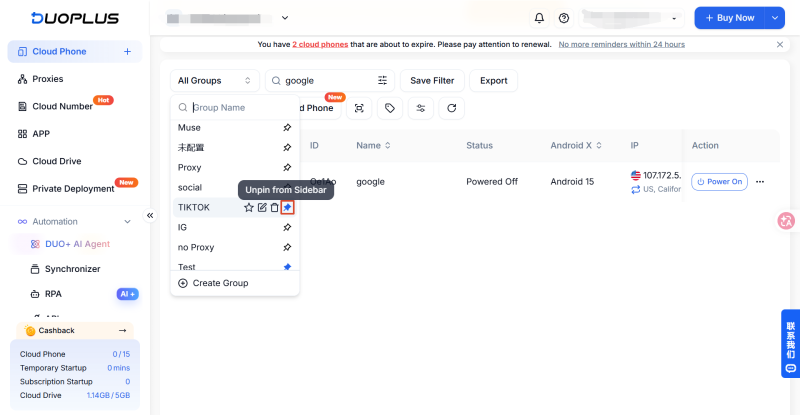
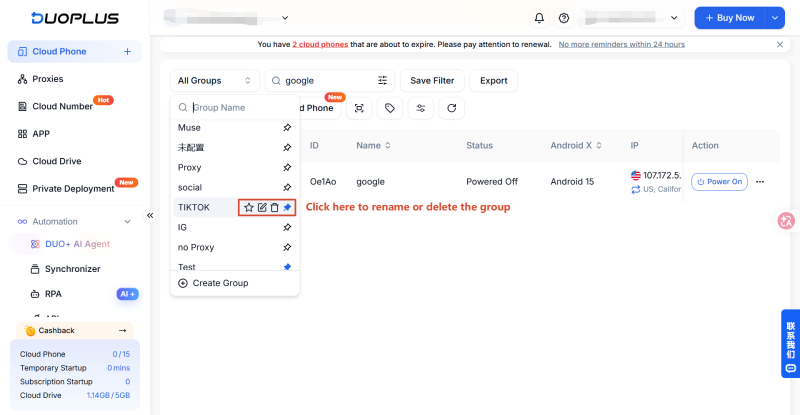
To delete a group or change its name, open the group list and select the relevant group management action.
No single classification method works for every team. When choosing a device management strategy, consider how your team assigns tasks, searches for devices, and how the account count is growing.
Suitable for brands, creators, and affiliate marketing teams that operate across multiple social media platforms.
Suggested structure:
Suitable for e-commerce, brand, and affiliate marketing teams running social media campaigns in multiple countries or regions.
Suggested structure:
Suitable for social media agencies, marketing service providers, and teams responsible for several brands.
Suggested structure:
DuoPlus allows a cloud phone to belong to multiple groups, so you can create overlapping classifications when needed. For example, a device may belong to Client A’s project and also appear in the group of devices used for TikTok. This lets teams organize devices around their workflows without creating duplicate devices solely for classification.
Device classification is not a one-time task. As the number of accounts, markets, and projects changes, naming and grouping rules may also need updating. A simple, sustainable maintenance process helps the classification system remain useful.
Define the order of fields in device names, platform abbreviations, market codes, and tag purposes in advance, and document the rules for the team. Use consistent names for the same concepts so different abbreviations or near-synonymous tags do not interfere with search and filtering.
After creating a cloud phone and confirming its purpose, set its name, add relevant tags, and assign it to the appropriate group. If its purpose is not yet clear, apply a temporary label according to the team’s rules and update the classification once the purpose is confirmed.
After a project ends, a client handover takes place, or the operating strategy changes, check for duplicate groups, obsolete tags, devices that remain unclassified, and names that no longer match their actual purpose. Before cleanup, confirm how each device is currently used and what it belongs to. If necessary, reclassify devices before deleting groups or tags that are no longer needed.
When managing multiple TikTok, Instagram, and Facebook accounts, an increase in the number of cloud phones does not automatically lead to disorganization. The bigger issue is whether devices have consistent identifiers and classification rules.
DuoPlus cloud phone names, groups, and custom tags let you organize devices by platform, market, business function, or client. Combined with tag filters, bulk group actions, and default group settings, these features can reduce the time spent repeatedly searching for devices.
Start with the platforms or clients you use most often. Standardize device names first, then create the groups and tags you need. Classify new devices promptly and update the information when business needs change. Maintaining these rules helps keep the cloud phone list clear and searchable as the number of accounts and projects grows.
1.Does changing a cloud phone’s name also change the social media account name?
No. A cloud phone name is used to identify and manage the device; it is separate from the name of the TikTok, Instagram, or Facebook account logged in on that device. After renaming a device, verify which account is actually signed in.
2.How can multiple team members keep classification rules consistent?
Establish shared naming and classification standards, including platform abbreviations, market codes, tag meanings, and group purposes. Apply the same rules whenever devices are added or updated. If the rules change, update the team documentation and check whether existing devices need adjustment. This helps prevent the same business function from being labeled with different names or tags.
3.What should I do if the purpose of a social media account changes?
First, verify the account currently logged in on the cloud phone and its new business purpose. Then update the device name, group, and tags according to the team’s classification rules.
4.How can I tell whether the current cloud phone classification system needs reorganizing?
Review the list regularly for duplicate or unclear device names, groups that are no longer used, tags with similar meanings, and devices whose actual purpose does not match their classification information.
TikTok Shop gives sellers multiple ways to reach potential customers, from shoppable videos and livestreams to creator …
When managing multiple social media accounts, you often need to handle large amounts of text, including post captions, …
E-commerce operations and social media content management often require saving product specifications, descriptions, …
No need to purchase multiple real phones.
With DuoPlus, one person can operate numerous cloud phones and social media accounts from a single computer, driving traffic and boosting sales for you.

