





How to Sign Up for Meta Muse and Use a Referral Code
Muse has recently become one of the most talked-about AI Agent products in the AI tools space. As a new AI Agent from …
Learn how to use Discord more efficiently with this guide to servers and channels, mobile account switching, Forum Channel creation, multiple voice calls, and managing multiple Discord accounts with DuoPlus Cloud Phone.

Get an AI-Powered Summary of This Article
Discord was originally designed as a voice and text communication tool for gamers and has since evolved into a comprehensive community platform. Users can create Discord servers for gaming, hobbies, learning, developer communities, and other groups, using text channels, voice channels, and Forum Channels to communicate.
As Discord has expanded its features, users may encounter practical questions about managing multiple accounts, creating Forum Channels, and participating in multiple voice calls. This guide covers Discord's background, mobile account switching, Forum Channel creation, and ways to handle multiple voice scenarios.
Discord is an instant messaging and community platform built around servers. Users can join different servers to participate in text chats, voice conversations, and topic-based discussions, as well as communicate through direct messages.
Discord launched in May 2015 and initially focused on gamers. As its user base grew, Discord expanded beyond gaming into music, education, developer communities, creator communities, and other areas. In addition to voice communication, Discord allows users to create servers and organize different topics into separate channels, making it easier for communities to manage and retain discussions over time.
To understand how Discord works, it helps to distinguish between a Server and a Channel. A server can be thought of as an entire community space where users participate in different discussions. Channels are the individual communication spaces organized within that server.
For example, a gaming Discord server might include text channels for “Announcements,” “General Chat,” and “Game Guides,” as well as voice channels for real-time conversations. If the community needs to organize long-term discussions around specific topics, it can also create Forum Channels where each topic is managed as a separate post.
In other words, the server provides the overall community space, while channels organize specific types of content within that community. A single server can contain multiple types of channels, allowing administrators to structure the community according to its needs.
This server-and-channel structure is also one of the key differences between Discord and traditional instant messaging apps.
Discord Forum Channels are designed for servers that need to organize long-term discussions around multiple topics. Unlike regular text channels, where messages appear continuously in chronological order, Forum Channels allow each topic to have its own post, so members can reply directly within that discussion.
For example, a gaming community could use a Forum Channel to create separate discussions for “Beginner Guides,” “Character Recommendations,” and “Equipment Builds,” keeping different topics from getting mixed together.
| Channel Type | How Content Is Organized | Best For |
|---|---|---|
| Text Channel | Messages appear continuously in chronological order | General chat and real-time communication |
| Forum Channel | Different topics are organized into separate posts | Questions, guides, and topic-based discussions |
To create a Forum Channel, open the target server, create a new channel, select Forum as the channel type, and then configure the channel name, description, tags, and other settings.
If the Forum option does not appear, check the following:
The first thing to check is channel management permissions. Being able to join a server and send messages does not necessarily mean you have permission to create new channels.
A single Discord account cannot maintain two independent voice connections at the same time.
For example, if Discord account A is already connected to a voice channel on Server 1 and then joins a voice channel on Server 2, the original voice connection will be switched rather than keeping both connections active simultaneously.
If you need to participate in two different voice sessions at the same time, you can use separate Discord accounts for each voice channel. For example, account A can connect to Server 1 while account B connects to Server 2.
For occasional multi-account use, you can log into different accounts on separate devices. If you need to manage multiple Discord accounts on a long-term basis while handling community messages, voice activities, and server management, you can use DuoPlus Cloud Phone to run the accounts separately.
Running Discord on different cloud phones gives each account its own mobile environment. This reduces the need to repeatedly switch between accounts on the same physical device and makes it easier to manage the devices and network configurations associated with each account.
If you only use one Discord account, simply logging in is enough. However, if you use a personal account, work account, or multiple community accounts, you may need to switch between different accounts regularly.
Discord's desktop app includes an account switcher that allows users to add multiple accounts and switch between them. It currently supports up to five accounts. The mobile experience is different, and switching accounts generally requires logging out of the current account and signing into another one.
For a small number of accounts with occasional switching, this approach may be sufficient. However, when several Discord accounts need to be managed on a regular basis, repeatedly logging out and back in can become inefficient. It can also make it harder to keep messages and community activities associated with the correct account.
For this type of workflow, DuoPlus Cloud Phone can provide a separate Android environment for each Discord account. For example, Discord accounts A, B, and C can each be logged into a different cloud phone, giving each account its own corresponding device environment. You can then open the relevant cloud phone whenever you need to manage messages or a server.
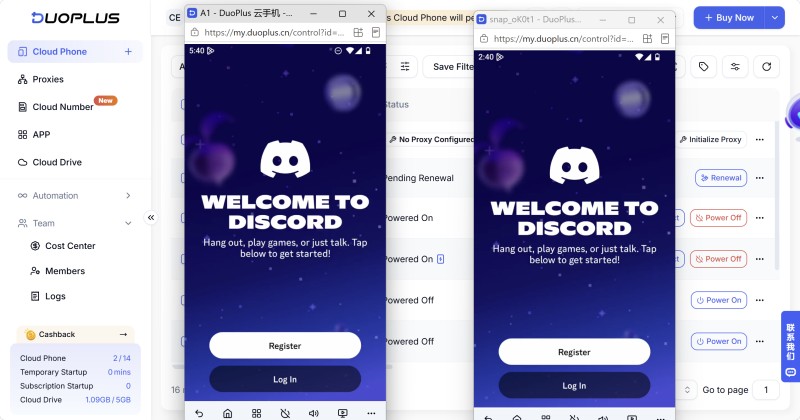
If different accounts also need to use different network connections, you can configure a separate proxy for each cloud phone. This allows the account, device, and network environment to be managed separately.
It is important to note that a cloud phone is primarily used to improve multi-account operation and management efficiency. It should not be used to bypass Discord's Terms of Service or account restrictions.
Since launching in 2015, Discord has evolved from a voice communication tool for gamers into a comprehensive community platform. Servers, text channels, Forum Channels, and voice channels now form the foundation of the Discord community experience.
For individual users, Discord's built-in account, channel, and voice features are generally sufficient for everyday use. When managing multiple Discord accounts on a long-term basis, however, it becomes important to consider how accounts, devices, and network environments are organized.
DuoPlus Cloud Phone provides separate Android environments for different Discord accounts, along with proxy configuration and centralized cloud phone management. This makes it suitable for users who need to operate and manage multiple Discord accounts over time.
Yes. A Discord account can be used on multiple devices, so you can run Discord on both a computer and a phone. If you need to manage multiple accounts, separate cloud phones can also be used to run the corresponding accounts independently.
Discord Orbs are rewards that can be earned through eligible Discord activities or tasks. The available ways to earn them may change depending on Discord's current activities, so check the relevant activity or task pages in the Discord app for the options currently available.
First, enable Developer Mode in Discord's settings. Then open your profile and select Copy User ID from the menu. The copied number is your Discord ID.
Yes. A single Discord account can create and join multiple servers. Different servers can be used for gaming communities, interest groups, team collaboration, and other purposes.
Yes. Different Discord accounts can be logged into separate DuoPlus Cloud Phone environments, allowing them to run independently. You can also configure individual network environments for different cloud phones when needed.
Muse has recently become one of the most talked-about AI Agent products in the AI tools space. As a new AI Agent from …

OpenAI Codex is an AI coding agent designed to help developers write, modify, review, and deliver code. It is available …

VK (VKontakte) is one of the major social media platforms in Russia. In addition to account management, content …
No need to purchase multiple real phones.
With DuoPlus, one person can operate numerous cloud phones and social media accounts from a single computer, driving traffic and boosting sales for you.

