




ChatGPT Login, Verification & Subscription Guide
ChatGPT is available through both the web version and desktop/mobile apps. The web version requires no installation and …
Discover how to manage multiple accounts safely in 2025 with DuoPlus and Ping Proxies. Ensure true device isolation and utilize high-quality residential SOCKS5 proxies for seamless access to platforms like TikTok, Facebook, and Instagram.

Get an AI-Powered Summary of This Article
Managing multiple accounts safely in 2025 requires more than just switching IPs—it requires a trusted device environment paired with a stable, high-quality residential proxy. That’s why many professionals combine DuoPlus, a real-device anti-detect cloud phone, with Ping Proxies, a leading provider of global SOCKS5 residential proxies.
DuoPlus ensures true device isolation on real Android hardware, while Ping Proxies delivers clean, reliable residential IPs. Together, they form a secure and scalable solution for TikTok, Facebook, Instagram, X, and other high-risk platforms.
Ping Proxies (based in the UK) provides ethically sourced residential, ISP, and datacenter proxies. The service features a network of over 35 million residential IPs, with latency under 0.7 seconds and coverage across 195+ countries. It also supports advanced geo-targeting and performance-focused features designed for reliability and scalability.
Proxy Types
Sticky Residential Proxies (HTTP and SOCKS5)
Rotating Residential Proxies (HTTP and SOCKS5)
Static Residential Proxies (ISP Proxies) (HTTP and SOCKS5)
Datacenter Proxies (HTTP and SOCKS5)
Trustpilot Score
Ping Proxies holds a Trustpilot score of 4.8, reflecting strong user satisfaction and consistent service quality.
The service has also been tested by Proxyway, receiving a score of 8.7/10—highlighting its reliability and performance in real-world scenarios.
Size of IP pool
Ping Proxies operates a network of over 35 million residential IPs. These IPs are supported by modern datacenter infrastructure and partnerships with regional ISPs. The network continues to expand, with additional regions and capabilities under development, including support for HIPAA-compliant residential users.
Generating proxies with Ping Proxies is straightforward and does not require command-line operations or complex configurations. The dashboard allows users to quickly create residential, ISP, or datacenter proxies in just a few steps.
For users unsure which proxy type to choose, comparing datacenter and residential proxies can help determine the best fit based on use case and performance requirements.
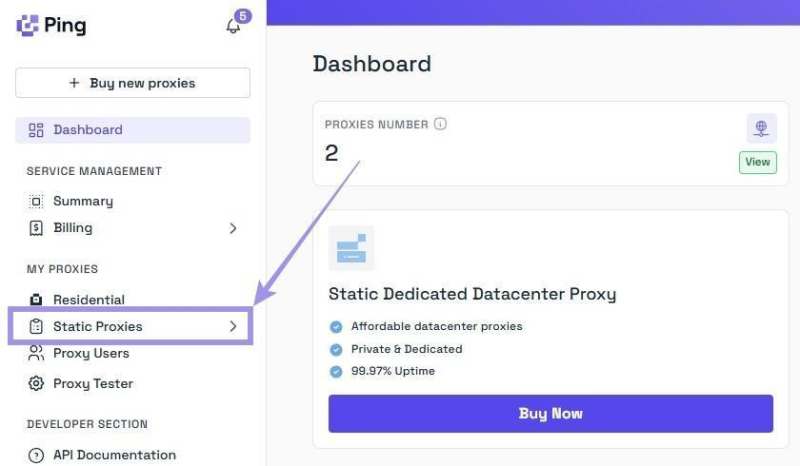
For purchased static proxies, navigate to the “Static Proxies” section under “My Proxies” in the dashboard.
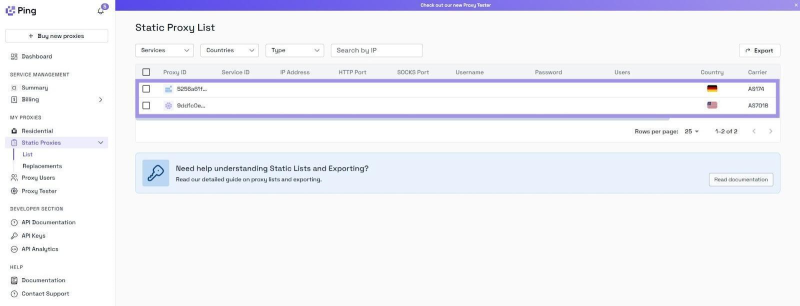
The proxy list will display key details including hostname (IP), port, username, and password. No additional generation steps are required—simply copy the credentials for use.
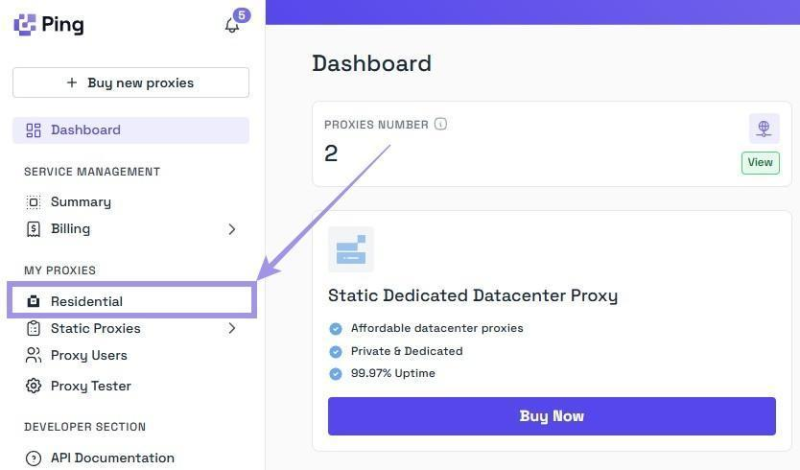
Unlike static proxies, residential proxies involve a few more steps, primarily selecting the options to generate proxies that meet your needs. Here's how residential configurator makes it easier for you.
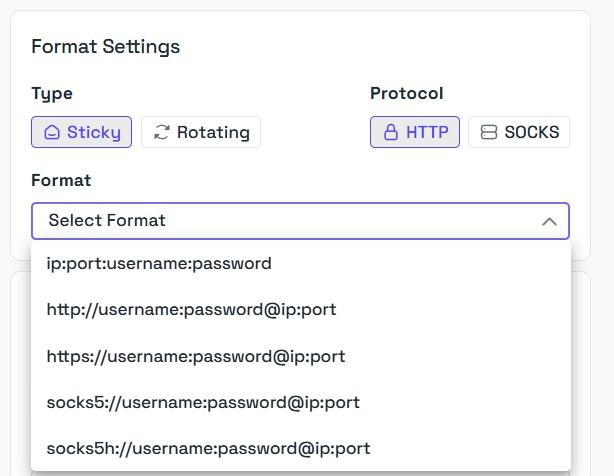
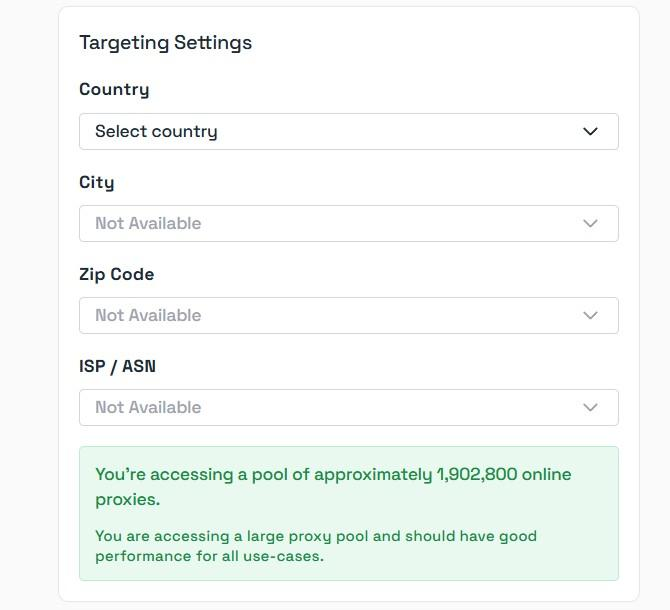
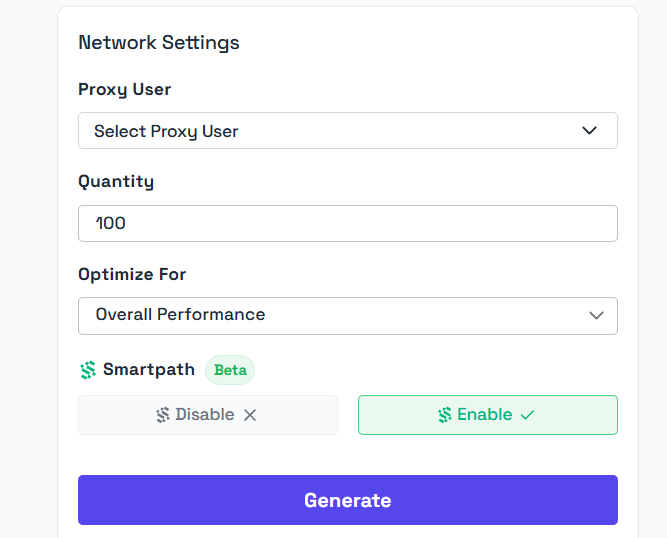
Now that the proxy is generated, understanding it is crucial to enter the details into DuoPlus.
Example: residential.pingproxies.com:8635:PPTest2026_s_R3JBBCW6JUH4A4NY:PP12345678
All proxies generated follow the structure - (hostname:port_number:username_location:password)
Find it confusing? Here's the breakdown of the example relating to the structure.
Note: Always add the location to the username for the sticky proxies. Failing to do so routes you to the incorrect location. Also, remember that broader targeting gives you a larger proxy pool.
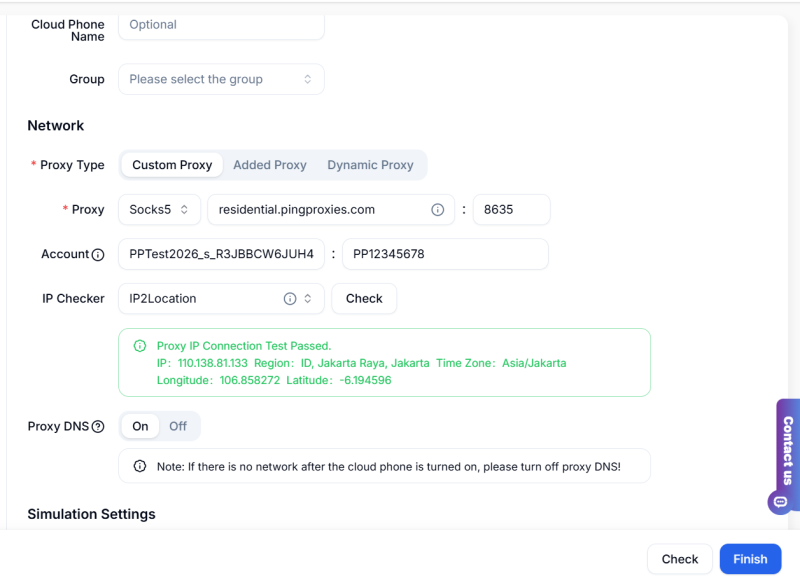
Here just start using DuoPlus cloud phone.
DuoPlus provides a secure and scalable environment for multi-account management through real Android devices, Google-certified systems, and full proxy compatibility.
When integrated with Ping Proxies' global SOCKS5 network, it becomes a powerful solution for managing accounts across platforms—offering strong privacy, stable performance, and efficient global operations.
ChatGPT is available through both the web version and desktop/mobile apps. The web version requires no installation and …

Different ChatGPT models vary in response speed, reasoning ability, performance on complex tasks, and usage cost. The …

Android app testing often involves repeatedly installing apps, testing different versions, performing fixed operations, …
No need to purchase multiple real phones.
With DuoPlus, one person can operate numerous cloud phones and social media accounts from a single computer, driving traffic and boosting sales for you.
