





How to Sign Up for Meta Muse and Use a Referral Code
Muse has recently become one of the most talked-about AI Agent products in the AI tools space. As a new AI Agent from …
Learn how to integrate anyIP residential and mobile proxies with DuoPlus cloud phones to manage global operations, multi-account social media, and localized app testing effectively.

Get an AI-Powered Summary of This Article
Managing cloud phones across different markets involves more than simply creating separate Android devices. The network environment behind each device also matters. This is where a proxy becomes important.
DuoPlus provides an independent cloud-based Android device environment, while the proxy IP determines the device's external IP address and network location. By combining DuoPlus Cloud Phone with anyIP, users can assign proxy networks from different countries or regions to their cloud phones and build more flexible environments for global operations.
anyIP is a proxy service provider offering residential and mobile proxies for users who need flexible network locations and IP rotation options.
Its proxy network includes more than 100 million residential and mobile IPs, and anyIP supports both HTTP/HTTPS and SOCKS5 connections. Users can also customize their connections by location, including country, city, region, and ISP/ASN targeting.
Two proxy types are particularly relevant when using anyIP with cloud phones:
anyIP also lets users control how often their proxy IP changes . By default, rotating mode provides a new IP for each new request. For scenarios that require greater network continuity, users can configure a sticky session to retain the same proxy IP for a longer period.
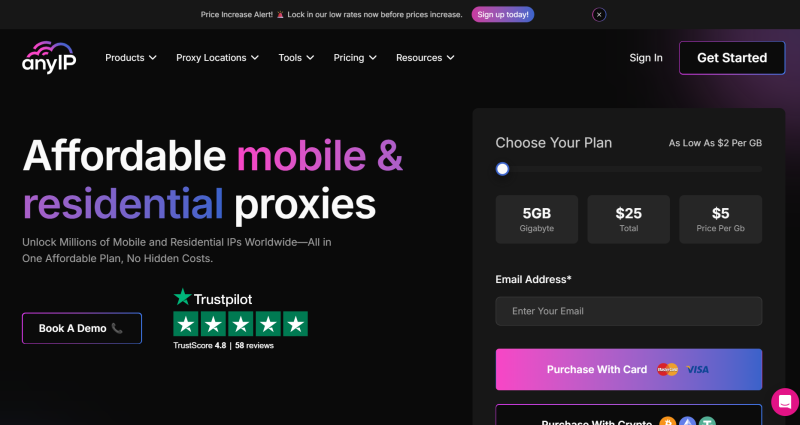
Go to the anyIP website, create an account, and log in to the anyIP dashboard.
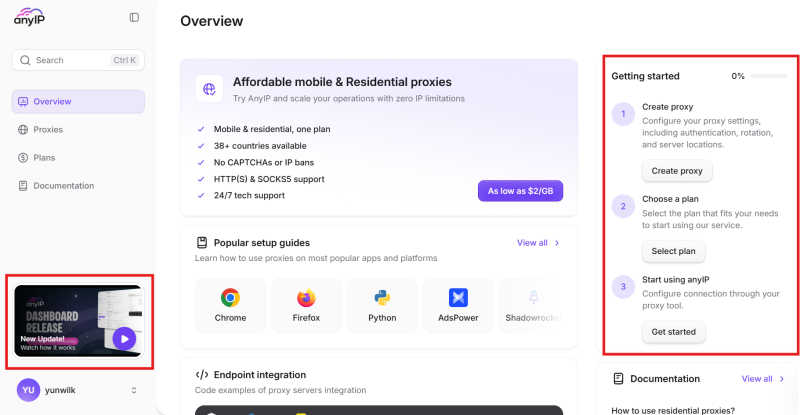
From the anyIP dashboard, you can find video instructions and step-by-step setup guides to get started. You'll only need to do two steps before you can start integrating anyIP proxies: create a proxy profile and select a plan.
During proxy profile creation, determine what type of network environment you need for your DuoPlus cloud phone. You may configure parameters such as:
For standard username/password authentication, anyIP currently uses the following connection information: IP, Port, Username/Password. Keep these details available, because you will enter them into DuoPlus in the next step.
Once you have your anyIP proxy credentials, you can add them to your DuoPlus cloud phone.
The process only requires a few steps.
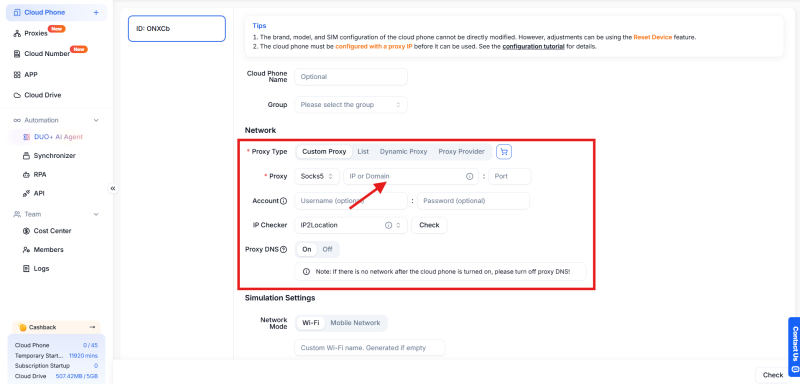
Find the network or proxy configuration for the cloud phone you want to use.
Select the proxy protocol that matches the connection generated in anyIP, such as SOCKS5 or HTTP. And then just paste the information generated by anyIP into the corresponding DuoPlus proxy fields.
Click "Check" here to do the proxy test. Once the proxy test is successful, save the configuration and launch the DuoPlus cloud phone.
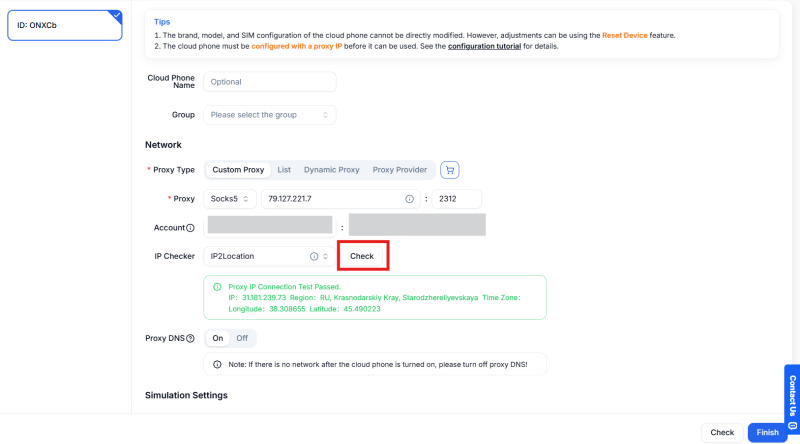
The cloud phone will then access the internet through the configured anyIP proxy.
In simple terms: DuoPlus provides the Android device environment, while anyIP determines the device's external IP and network location.
Combining cloud devices with configurable proxy networks can support a variety of global business workflows. Here are some common examples:
Social media teams often manage accounts associated with different brands, projects, or regional markets. With DuoPlus, teams can separate operations across different cloud phones. anyIP can then provide each device with an appropriate proxy network.
Instead of operating every account from the same device and network environment, teams can organize their workflows into separate cloud phone environments.
International e-commerce businesses frequently operate across several geographic markets. A team might manage activities in the United States, United Kingdom, Southeast Asia, and Japan simultaneously.
With DuoPlus and anyIP, the team can organize devices by market:
Instead of maintaining multiple physical Android phones and local network connections, teams can manage the cloud devices remotely while choosing proxy locations according to each market.
Websites, apps, advertisements, product pages, and online content can vary depending on the user's geographic location. A marketing or QA team may therefore need to check what users in different markets actually see.
This approach can support activities such as:
Affiliate teams may run campaigns for several products, brands, or geographic markets at the same time.
Using DuoPlus, teams can organize different campaigns into separate cloud phone environments. anyIP can then provide network locations aligned with the markets being tested or managed.
This creates a more centralized workflow for managing cloud devices and regional network environments.
The integration of anyIP with DuoPlus brings the device environment and network environment into one practical workflow. With flexible proxy resources paired with cloud-based Android devices, businesses can build localized operating environments more efficiently and adapt them as their markets and projects evolve.
For teams operating across regions, this combination provides a more scalable foundation for managing digital operations globally.
Muse has recently become one of the most talked-about AI Agent products in the AI tools space. As a new AI Agent from …

OpenAI Codex is an AI coding agent designed to help developers write, modify, review, and deliver code. It is available …

VK (VKontakte) is one of the major social media platforms in Russia. In addition to account management, content …
No need to purchase multiple real phones.
With DuoPlus, one person can operate numerous cloud phones and social media accounts from a single computer, driving traffic and boosting sales for you.

