





How to Sign Up for Meta Muse and Use a Referral Code
Muse has recently become one of the most talked-about AI Agent products in the AI tools space. As a new AI Agent from …
Why does a cloud phone need a proxy IP? This article explains what cloud phone proxies are, what proxy IPs do, why cloud phones may need proxy configuration, and how to choose and configure the right proxy in DuoPlus Cloud Phone.

Get an AI-Powered Summary of This Article
Cloud phones deploy mobile device environments in the cloud, allowing users to remotely access multiple independent cloud phones through a browser, run apps, log in to accounts, and perform daily operations. This can reduce the management costs associated with physical devices.
A cloud phone provides the mobile device environment, while a proxy IP provides the network connection. Even when using a cloud phone, businesses that need to access the internet from a specific country or region still need to configure a proxy IP from the target location. For example, application testing for the US market may require a US IP to be configured on the cloud phone. When managing multiple accounts, different cloud phones may also need IP addresses from different regions based on the target market. Therefore, cloud phones are often used together with proxy IPs in real-world scenarios.
This article explains the basics of cloud phones and cloud phone proxies, the practical role of proxy IPs, how to choose them, and how to configure them in DuoPlus Cloud Phone.
A cloud phone provides a cloud-based environment for running mobile apps, while a proxy IP provides the corresponding network connection for that device.
A cloud phone proxy is not a separate proxy type. Different types of proxies, including static proxies , dynamic proxies , residential proxies , and datacenter proxies, can be configured on computers, browsers, physical phones, or cloud phones depending on the service and configuration method. Therefore, “cloud phone proxy” is mainly a term describing the usage scenario, specifically referring to a proxy IP configured on a cloud phone.
After a proxy is configured, network requests from browsers or apps running on the cloud phone are first sent to the proxy server. The proxy server then accesses the target website or app on the cloud phone's behalf. The target website or app sees the IP address provided by the proxy server rather than the original IP used by the cloud phone.
For example, if a US proxy IP is configured on a cloud phone, requests sent from the cloud phone will pass through the proxy server and appear to come from a US IP.
The configuration requirements vary by proxy service, but usually include the proxy protocol, IP address, port, and authentication information such as a username and password. Once these details are correctly configured on the cloud phone, apps running on the cloud phone can access the internet according to the proxy settings.
Although a cloud phone provides an independent mobile device environment, it still needs a proxy IP to access the internet and use apps such as TikTok, Instagram, and Google Play. The proxy IP determines how the cloud phone connects to external services and can also affect the IP address and geographic location used during access.
For businesses operating overseas apps, managing multiple accounts, or accessing content from different regions, configuring an appropriate proxy IP is an important part of building a stable network environment.
Cross-border businesses often need to access websites and mobile apps from different countries or regions. For example, testing Google Play content for the US market, accessing services available in the UK, or checking how a website appears in different regions may require an IP from the corresponding location.
By configuring a proxy from the target region, the cloud phone can access the internet through that location, making it suitable for regional application testing and other cross-border use cases.
When multiple cloud phones are used at the same time, different accounts or business tasks may require different IP addresses. By configuring separate proxies, each cloud phone can use the appropriate network environment, making account and business management easier.
For example, one cloud phone can use a US static proxy for long-term operations, while another can use a UK dynamic proxy for regional testing. Different cloud phones can use different proxy types based on the actual requirements instead of relying on the same network configuration.
Apps running on cloud phones require a stable network connection, and the quality of the proxy connection can directly affect the cloud phone experience. An unstable proxy connection may result in slow app loading or connection failures.
Therefore, configuring a stable and suitable proxy IP is not only about changing the IP address or location, but also an important part of ensuring that mobile apps can operate normally.
When choosing a cloud phone proxy, consider the different requirements of each business in terms of location, stability, IP rotation frequency, and cost. You can evaluate proxies based on the following factors:
If you only need a small number of cloud phones with a few fixed IPs, you can select a proxy based on the number of IPs and the intended usage period.
If you need a large number of cloud phones, multiple regions, or frequent IP rotation, compare factors such as proxy pool size, traffic-based pricing, rotation methods, and concurrency limits to calculate the actual cost.
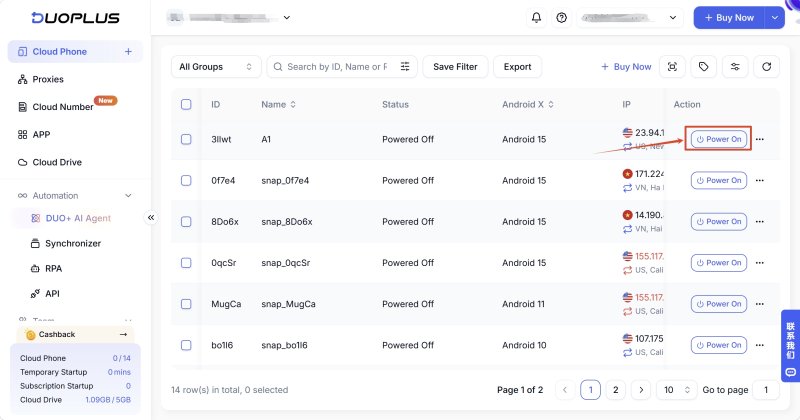
After selecting a proxy, you need to configure it on the cloud phones you actually use. When managing multiple cloud phones, you can add existing proxies directly in DuoPlus and assign the corresponding proxy to the cloud phone that needs it.
Prepare the proxy protocol, IP address, port, username, and password provided by your proxy provider, then add the proxy in the proxy settings of DuoPlus Cloud Phone.
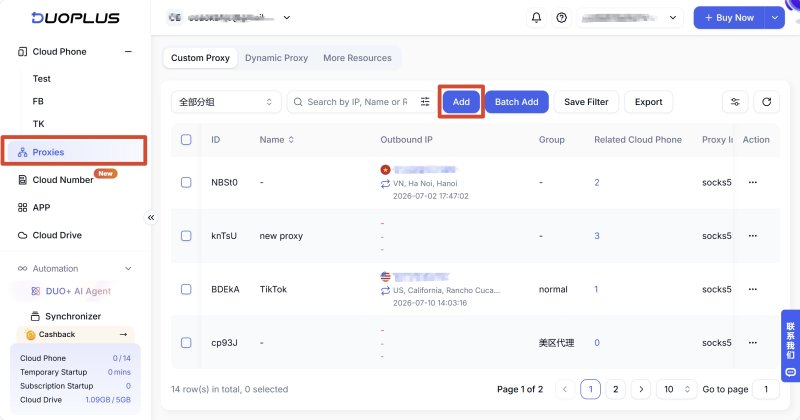
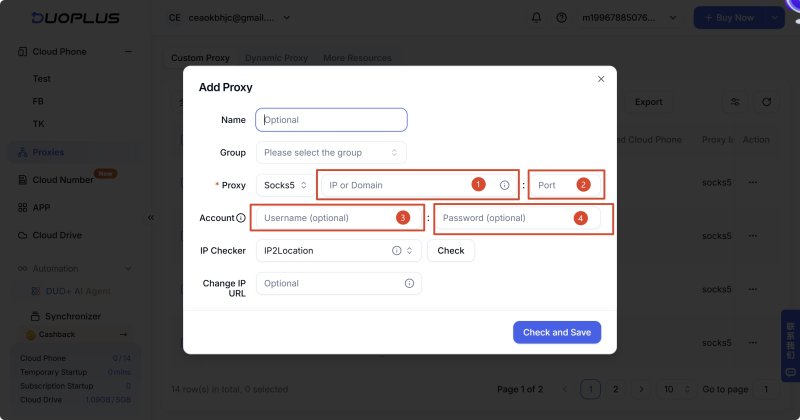
After adding the proxy, assign it to the designated cloud phone.
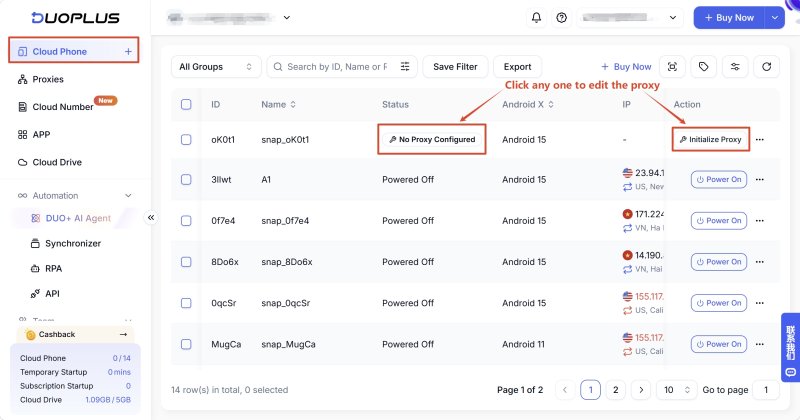
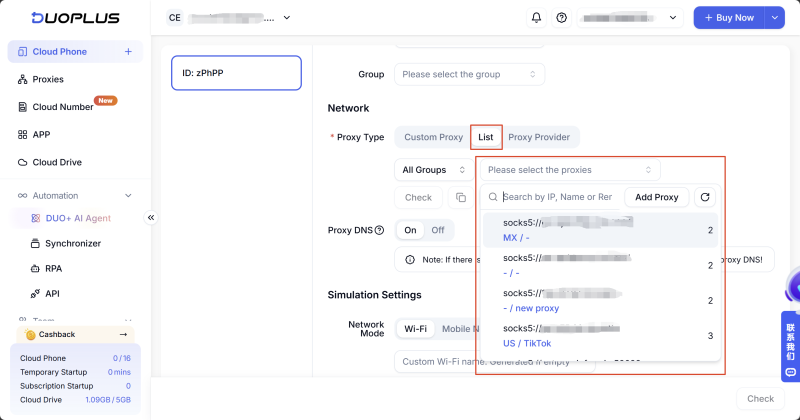
After configuration is complete, start the cloud phone and check whether the current IP address and geographic location meet your expectations.
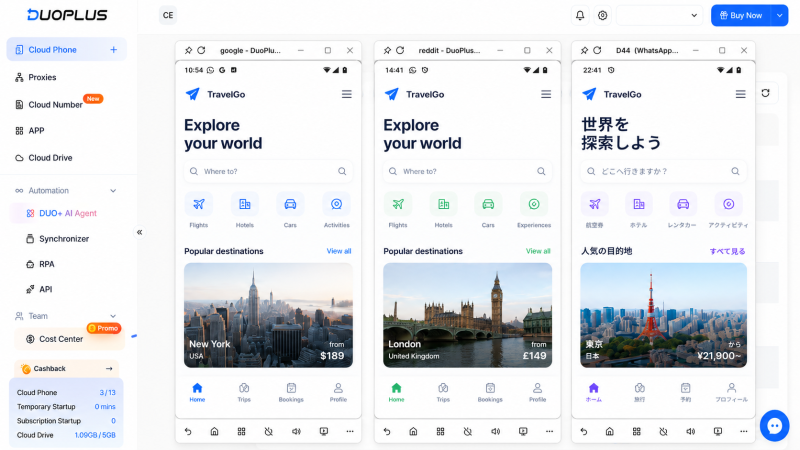
A cloud phone provides an independent mobile device environment, while a proxy IP allows you to adjust the IP address and geographic location used by the cloud phone to access the internet. Combining the two makes it easier to handle overseas app access, multi-account management, and regional network testing.
When choosing a cloud phone proxy, first determine the target location, then decide whether you need a static or dynamic IP based on your business requirements. You should also consider IP stability, proxy quality, usage scale, and cost. For scenarios involving long-term operation of multiple mobile apps, the stability of both the cloud phone environment and proxy configuration should be considered.
DuoPlus Cloud Phone allows you to add existing proxies and assign different proxies to different cloud phones. After configuration, check IP status to confirm the proxy is working correctly before proceeding with further app operations.
It depends on your business requirements. Choose a static proxy when you need to maintain the same IP over a long period, and consider a dynamic proxy when you need regular IP rotation or multiple IPs.
Technically, this is usually possible, but whether it is appropriate depends on the specific use case. When different cloud phones need independent network environments, it is generally better to assign different proxies to each one.
Yes, as long as the proxy service provides a protocol and authentication method compatible with the cloud phone. Once configured, the IP can rotate according to the proxy provider's rules, such as a time interval, request count, or another rotation mechanism.
Yes, provided that the proxy provider offers IPs in the required country or region. After changing the proxy, you can use an IP detection service to verify that the new location is correct.
Muse has recently become one of the most talked-about AI Agent products in the AI tools space. As a new AI Agent from …

OpenAI Codex is an AI coding agent designed to help developers write, modify, review, and deliver code. It is available …

VK (VKontakte) is one of the major social media platforms in Russia. In addition to account management, content …
No need to purchase multiple real phones.
With DuoPlus, one person can operate numerous cloud phones and social media accounts from a single computer, driving traffic and boosting sales for you.

