Instagram Creator Account vs. Business Account: Which Is Right for You?
Instagram offers two types of Professional Accounts: Creator accounts and Business accounts. For content creators, …
Learn how the right proxies help prevent DuoPlus cloud phone account bans through IP consistency, location matching, stable sessions, and Android network fingerprinting.

Get an AI-Powered Summary of This Article
You moved your accounts to DuoPlus cloud phones to stop them getting linked. Each one runs on its own Android device, with its own fingerprint, SIM region and GPS. Then a TikTok account gets limited in its first week, or an Instagram profile is suddenly asked to verify again, or three WhatsApp numbers go down on the same day.
When that happens, the cloud phone is rarely the cause. Usually it's the network behind it. A platform checks the IP as closely as the device, and if the IP doesn't match the rest of the phone, a perfect device can still give the account away.
Here are the five network problems we see most often from teams running accounts on cloud phones, how to recognise each one, and how to fix it.
What it looks like: One account gets flagged, and the next day several more go with it, even though they're on separate cloud phones.
Why it happens: All those phones are sending traffic through the same IP. That might be one shared proxy, a small proxy list used in turns, or the cloud server's own address because no proxy was set at all. To a platform, five accounts on one IP are probably one person. Once one of them is flagged, the IP links the others.
The fix: One proxy per cloud phone, with no exceptions. On rotating products, that means each phone gets its own session ID, so no two devices share an exit IP. If an account matters, it shouldn't share an address with anything else.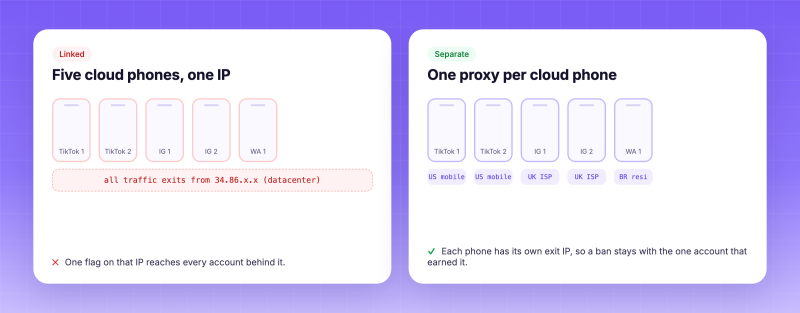
Five cloud phones sharing one IP vs. one proxy per cloud phone
What it looks like: Login challenges, "unusual location" emails, or content that's served to the wrong country.
Why it happens: The cloud phone has a Brazilian SIM, a São Paulo GPS position and a UTC−3 timezone, but the proxy exits in a US data center. Every one of those signals is fine on its own. Together, they disagree, and anti-fraud systems look for exactly that kind of disagreement.
The fix: Choose the proxy's country, and its city where you can, to match the phone. Then set the phone's timezone, language and GPS to the proxy's location before the first login. Keep that location for good. An account that always appears from one slightly imprecise place looks more natural than one that moves between countries.
What it looks like: Posts with no reach, follows that don't count, and verification loops on new TikTok or Instagram accounts.
Why it happens: The IP belongs to a hosting provider. Datacenter ranges are cheap and fast, but social apps know which ranges belong to servers and very few real phone users come from them. A fresh account from a datacenter IP starts with low trust.
The fix: Use mobile proxies for social apps. Carrier IPs are shared by many real phone users at once, so platforms are reluctant to restrict them, and they're the kind of IP a phone would normally have. For seller and ad accounts that should always log in from the same place, use a static ISP IP, which is a consumer address that stays yours for the whole plan. Save datacenter IPs for scraping and testing, where losing an account doesn't matter.
What it looks like: Sessions expire, the app asks for a code again, or an automation fails halfway through a run.
Why it happens: The proxy rotates. A logged-in account that jumps between several IPs in an hour looks like a session takeover. This hits RPA and AI-agent tasks hardest, because nobody is watching when the IP changes in the middle of a run.
The fix: Use a sticky session long enough to cover the task. On Loopway's residential and mobile products, a sticky session holds the same IP for up to 120 minutes. If a 30-minute warm-up routine runs in a 60-minute session, you have enough margin. If an account must never change IP, sticky sessions aren't the right tool: use a static ISP IP.
What it looks like: Hard to see, which is why it's often missed. Accounts get extra checks even when the IP type and location are right.
Why it happens: A connection's TCP/IP packets carry their own operating-system signature, separate from the device. Traffic from a proxy server often looks like it came from Linux. Some platforms compare that with the device, and an "Android phone" whose packets look like a Linux server doesn't add up.
The fix: Set the proxy's network OS to Android. On Loopway's Mobile, Static ISP and Private Residential products, you can pick an OS in the generator or add an OS flag to the proxy username, so the network side matches the cloud phone.
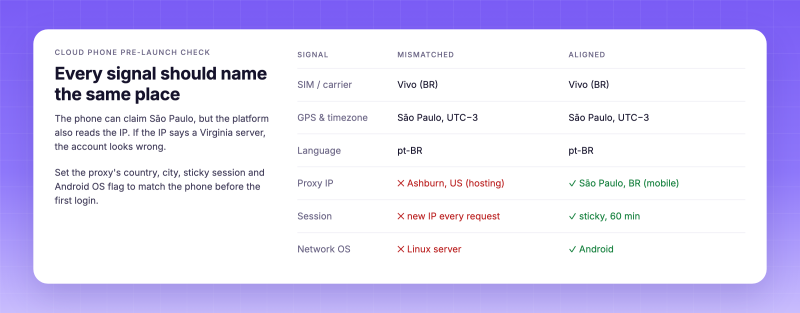
Every signal on a cloud phone should name the same place
· Social accounts (TikTok, Instagram, WhatsApp): Mobile. Use carrier IPs with country and city targeting and, where you need it, a carrier ASN (best effort).
· Stores, seller and ad accounts: Static ISP. One dedicated consumer IP per account, from 1 to 180 days, with a 0-fraud-score option for brand-new accounts.
· Many accounts at scale: Private Residential. Each phone gets its own sticky home IP, and nobody else uses it while you hold it.
· Market research and app QA: Premium Residential. Use rotating or sticky IPs with country, state and city targeting to see an app the way local users do.
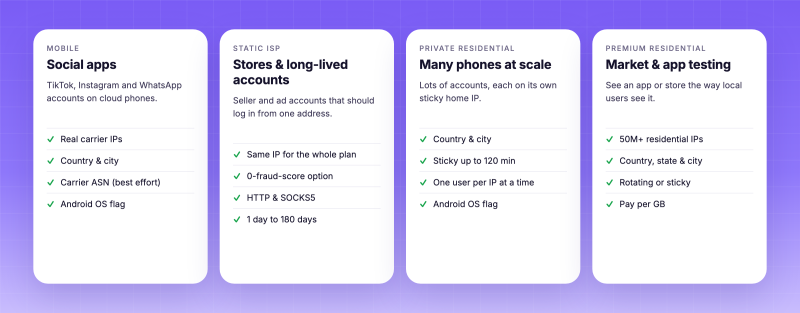
Which Loopway proxy to use for which cloud phone job
If the check fails, the cause is almost always one of three things: the wrong protocol, a typo in the password, or a space at the end of the pasted line.
· One proxy per cloud phone. No sharing, no rotating through a short list.
· The IP type fits the account: mobile for social, static ISP for long-lived accounts.
· The proxy's country and city match the phone's SIM, GPS, timezone and language.
· The session is sticky or static, never a new IP on every request.
· The network OS is set to Android.
· New accounts are warmed up gradually. No clean IP saves an account that posts 50 times on day one.
DuoPlus keeps the device side of every account separate. The proxy decides whether the network tells the same story. Give every cloud phone its own IP, keep that IP in the same place as the phone, keep sessions stable, and match the network OS to Android. Most "random" bans on cloud phones come from breaking one of those rules.
If you'd like to set this up, you can create an account at Loopway (https://app.loopway.io/go/duoplus-app ) and have your first cloud phone connected in a few minutes.
Instagram offers two types of Professional Accounts: Creator accounts and Business accounts. For content creators, …
When managing X (Twitter) accounts, some daily tasks need to be repeated, such as publishing posts, checking task …
An app may work perfectly on a developer's smartphone but suddenly crash on another device, display the wrong currency, …
No need to purchase multiple real phones.
With DuoPlus, one person can operate numerous cloud phones and social media accounts from a single computer, driving traffic and boosting sales for you.