Does Telegram Support Video Calls? A Guide to Video Calls and Screen Sharing
Telegram supports more than text messaging and file transfers. It also offers voice and video calls. Users can …
了解云手机仿真的核心能力,涵盖GPS位置配置、触控轨迹与压力、陀螺仪传感器及Google Play Integrity检测,并通过DuoPlus云手机实测,了解如何搭建更接近真实Android设备的运行环境。

Get an AI-Powered Summary of This Article
As social media operations scale, managing TikTok, Facebook, Instagram and other mobile accounts across physical phones becomes increasingly expensive and difficult.
A cloud phone is a more scalable option. A cloud phone is a more scalable option.Without having to maintain a sizable physical phone farm, teams can remotely access Android devices, set up regional environments, upload content, collaborate, and run automated workflows.
But the Android environment isn’t the same on every cloud phone.
It’s easy to compare device model, Android version, screen resolution and pricing, but that’s only part of the picture. Users also should check to know if a cloud phone is closer to a real Android device:
This article tests these layers of DuoPlus Cloud Phone and describes what each result means for social media, app testing, multi-account management, RPA and AI Agent workflows.
Cloud phone simulation is usually tied to observable device attributes, such as:
These static properties are important but a mobile device also generates dynamic data when applications are running.
For instance:
The Android environment (ARM) is the foundation of DuoPlus Cloud Phone. This provides a mobile-oriented basis, but a complete cloud phone environment also requires consistent location settings, responsive touch input, available motion sensors, system integrity and isolation between cloud phone.
The following tests check completeness and verifiability of each isolated environment.underlying Android input environment.
One way to check that the current Android environment meets specific device integrity requirements is via Google Play Integrity.
The API can return information about app integrity, account licensing, device integrity and other environmental signals. For cloud phone users, the 3 most relevant device labels are:
| Device integrity identifier | What it means |
|---|---|
<span data-type="text">MEETS_BASIC_INTEGRITY</span> | The device passes basic system integrity tests |
<span data-type="text">MEETS_DEVICE_INTEGRITY</span> | The device meets the criteria of a genuine, certified Android environment |
<span data-type="text">MEETS_STRONG_INTEGRITY</span> | The device is of a higher integrity level with stronger system and security requirements |
A successful result is not that a cloud phone is like every physical phone. This means that the Android environment fulfills the respective Google Play Integrity requirements under the current test conditions.
Google Play Integrity doesn't make a decision based on device model or screen resolution alone.
Several factors could influence the verdict.
What you see in the device is only part of the properties. Google may also verify the status of the Android system, boot state, certification information, and hardware-backed security evidence.
Renaming a model to match a physical phone does not automatically create the corresponding integrity environment.
Device modifications that may affect device integrity include root access, bootloader changes, modified system partitions, and changes to critical Android components.
A cloud phone might show a normal brand, model and Android version, but its underlying system state might not satisfy the conditions for <span data-type="text">MEETS_DEVICE_INTEGRITY</span> or <span data-type="text">MEETS_STRONG_INTEGRITY</span>.
Requirements Vary with Android version.
On Android 13 and later, <span data-type="text">MEETS_STRONG_INTEGRITY</span> requires <span data-type="text">MEETS_DEVICE_INTEGRITY</span> and recent security updates for affected system and vendor partitions.
Valid attestation data is also important. The result can vary if the proof information expires, is revoked, or does not match the environment any more.
On Android 13 and higher, if the requesting test app was not installed or updated using Google Play, then some optional labels may be omitted.
Nope. An ARM-based Android environment is a key mobile runtime foundation but does not, in itself, guaranty any Google Play Integrity verdict.
The result is also affected by the Android image, system state, security updates, test conditions, and valid attestation information.
DuoPlus helps you configure and verify the integrity of your devices. Availability and default behavior may differ between Android versions so always check the actual result as displayed by the current cloud phone.
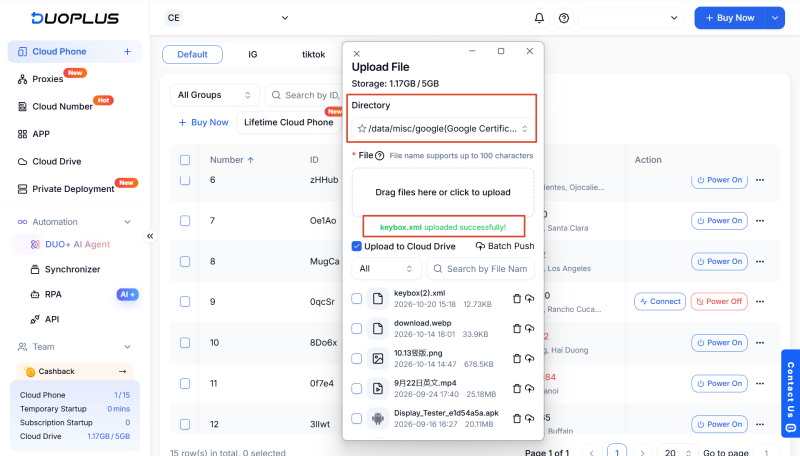
If a workflow needs higher device integrity levels, users can follow the official DuoPlus configuration process and check the result with a checker that is installed via Google Play. The usual procedure is:
<span data-type="text">keybox.xml</span> document to the system directory.
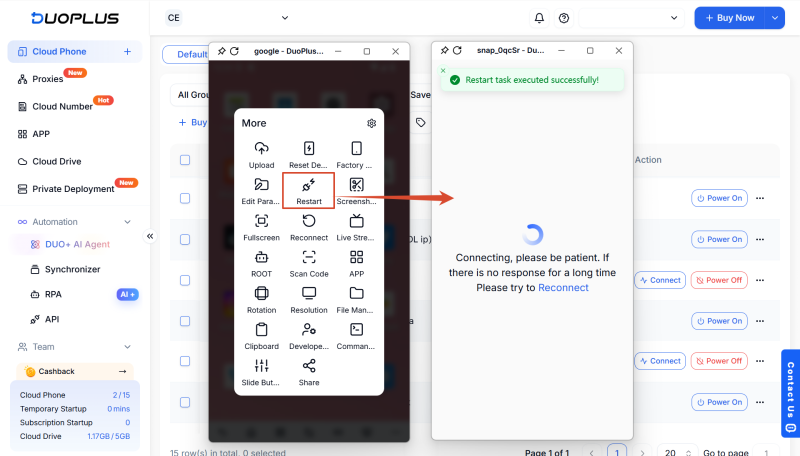
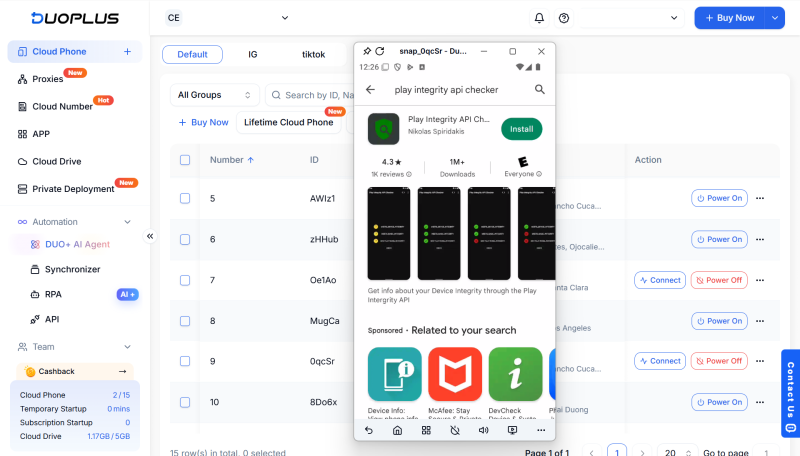
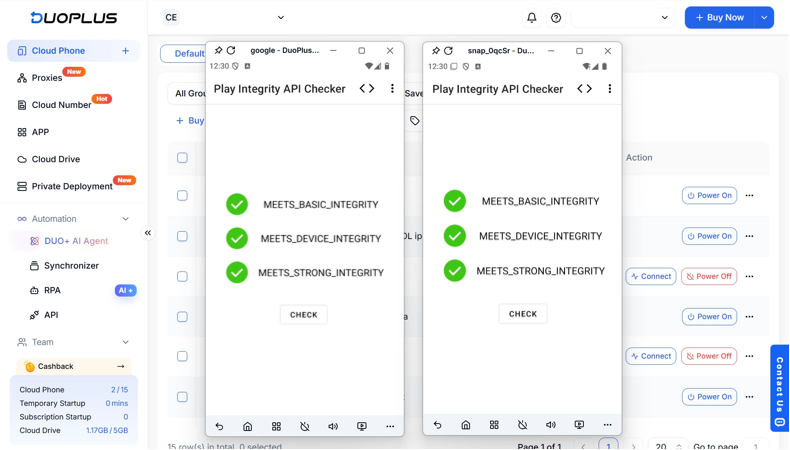
This figure is indicative of the current environment and should not be taken as permanent. It may change when switching Android versions, system updates, Google Play services updates or attestation changes.
Publicly shared attestation files may also have a short lifespan, as public or unusual use can lead to revocation.
And when using apps in different markets, users often need to consider the right proxy first.
If an IP checker shows United States, United Kingdom, or any other target country, it is easy to assume that the whole Android device is now located in that market.
But an IP address only identifies the network location. It does not automatically update all location related values, on Android.
Depending on implementation and permissions, the app may have several sources of regional information.
Application connections show the server the request's public IP address. A country, region, or city can be estimated using an IP geolocation database.
A proxy changes where you leave the network. It doesn’t automatically change the Android GPS location.
If an app requests location permission and the user grants it, Android can provide the app with the device’s location.
Apps can also use regional signals like:
Theoretically, this means a cloud phone can have:
Each setting can be viewed in isolation, but together they do not constitute a consistent regional environment.
No. IP geolocation is only an estimate, and you might see different databases report different cities for the same address. GPS readings also depends on the source and accuracy of the positioning.
Even with physical phones, the IP and GPS results don’t always end up on the same street.
The practical aim is to achieve reasonable and stable regional consistency:
The network location should not have obvious country level conflicts or regular unexplained changes with Android device location and target market.
DuoPlus has two ways to configure GPS.
For common app workflows, users can first set up a proxy for the target country, then allow DuoPlus to generate a GPS location based on the proxy location.
This method is useful in situations when:
Users can also enter custom latitude and longitude values if the workflow is associated with a specific location.
When is Custom GPS better?
DuoPlus also supports related regional settings such as SIM info, language, time zone, device model and screen resolution.
The second test uses a cloud phone configured for a target country.
Choose the cloud phone, open the proxy settings and fill in the IP address, port, user name and password.
The proxy country should be the country for which the market is intended. A US focused environment should use a working US proxy for example.
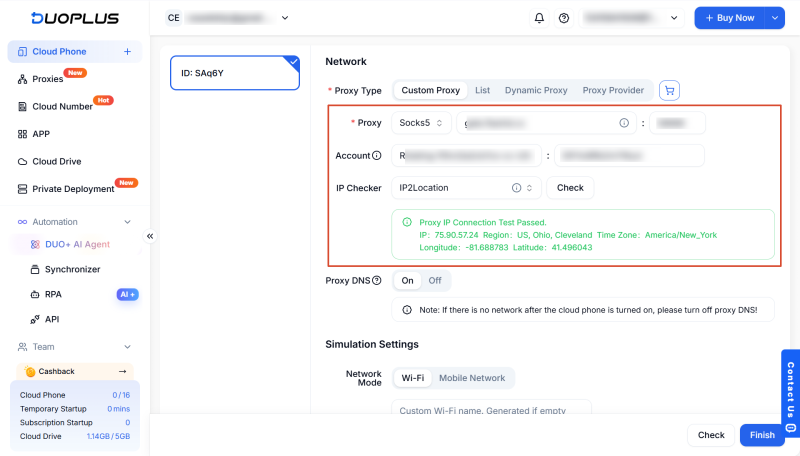
Once the proxy connection passes the availability check, select the option to set GPS using the proxy IP.
Custom GPS coordinates, if the workflow requires a specific location.
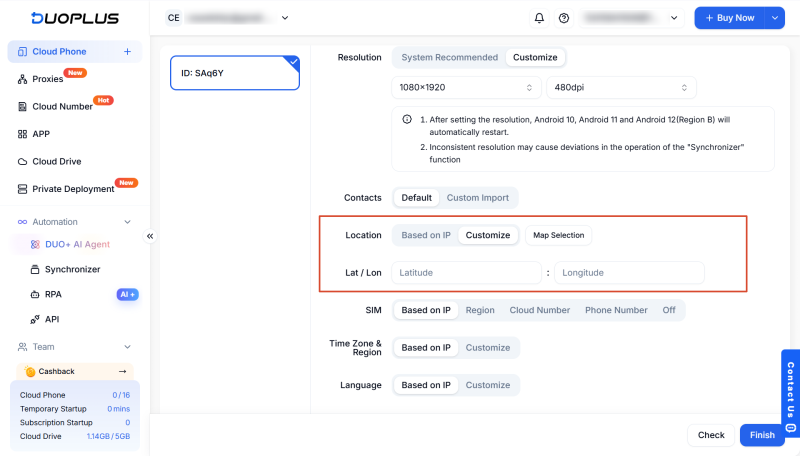
Open the browser inside the cloud phone and go to an IP checking service.
Confirm Please:
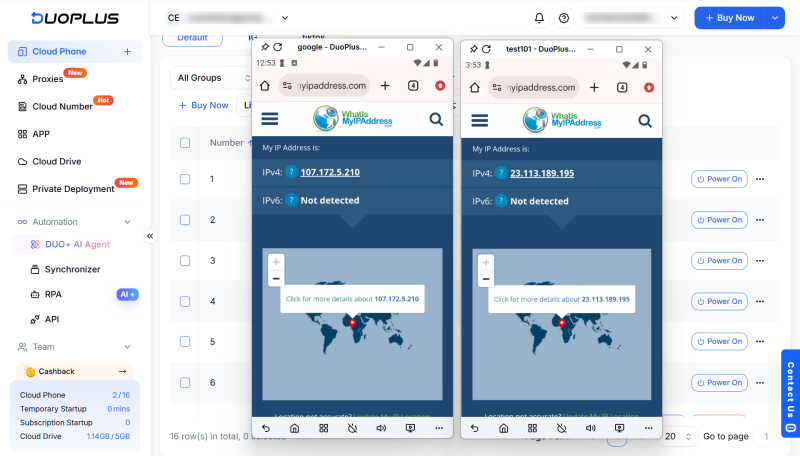
Open the map app or GPS testing tool and enable location permissions.
Compare the reported device location to the proxy country and target market.
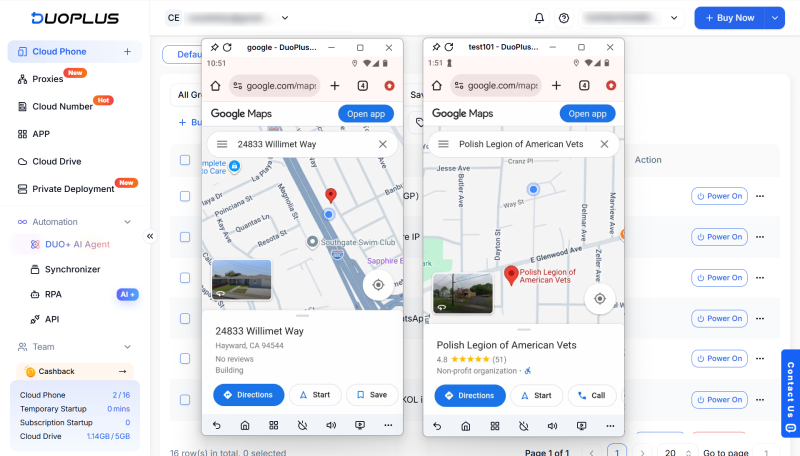
The location at the country level should be reasonably consistent. Exact city or street match not required.
Location consistency won’t improve a low-quality proxy, override platform rules, or guaranty an account outcome..
A swipe on a physical Android phone is more than just a page moving from one position to another.
From the moment a finger touches the screen until the moment it lifts, Android receives a stream of input events:
The system may also receive timestamps, contact state, pressure values and other touch related data.
A simple implementation might reproduce the visual result of a swipe without implementing most of the underlying touch process.
In some environments a swipe is represented primarily by:
If intermediate points are missing, Android receives an incomplete sequence of movement.
But even if there are intermediate points, it can still look too uniform if every point is evenly spaced, with fixed timing and the same straight line.
This is even more true if a cloud phone is mouse-controlled. Moving the finger directly is usually not as straight or regular as dragging with a mouse.
Touch pressure is the state of the contact between the touch point and the screen. It shouldn’t be read as an exact measure of physical finger force on most capacitive Android displays.
In some emulator environments , a fixed pressure value is used for the length of a touch. This means that a tap, a long press, and a swipe might all register 100% pressure in a testing tool.
DuoPlus optimizes Android touch input on two related layers: the path of a touch point’s movement and the pressure data of that contact.
For swipe paths, DuoPlus considers each gesture a full Android touch sequence. Rather than providing a start coordinate and an end coordinate to represent a swipe, the environment generates and provides intermediate movement points from touch down to touch up.
DuoPlus also processes the path drawn by the mouse to create a smooth trajectory with sensible curvature and offset when the user operates the cloud phone using a computer.
DuoPlus also changes the pressure values in Android touch events. During the interaction, taps, long presses and swipes are not all represented by the same fixed 100% pressure value.
This means apps and testing tools that can read touch pressure can get more complete contact-state data.
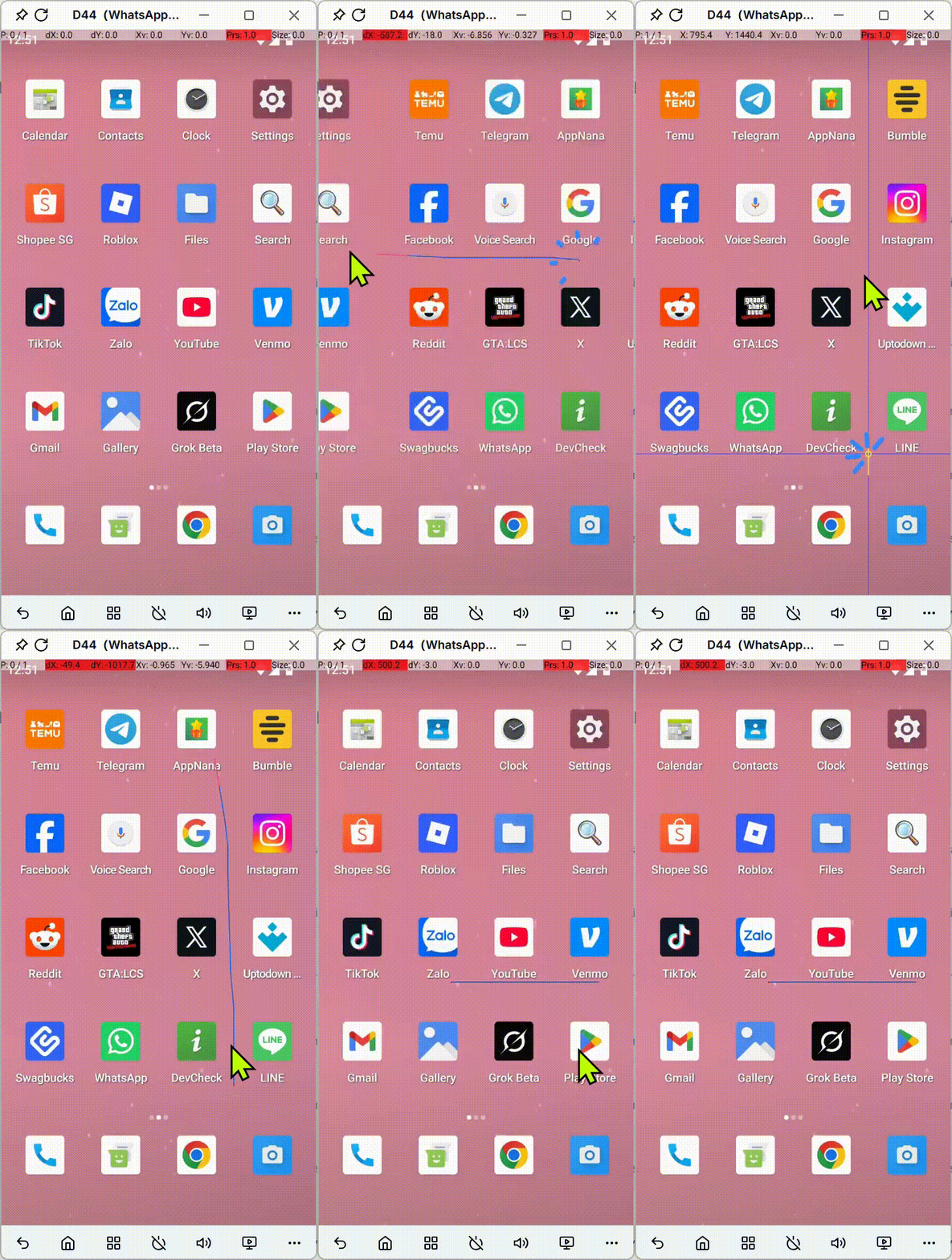
Go to developer options in android and enable pointer location and swipe on the cloud phone a few times.
The test shows a number of intermediate points in the course of the movement. Even with the input from a mouse the path is not a perfectly straight line of uniformity.
Download Display Tester from Google Play. Open Tests → Touch pressure test. Touch, long press and swipe on the touch panel.
The pressure shown is not set to 100% for every interaction.
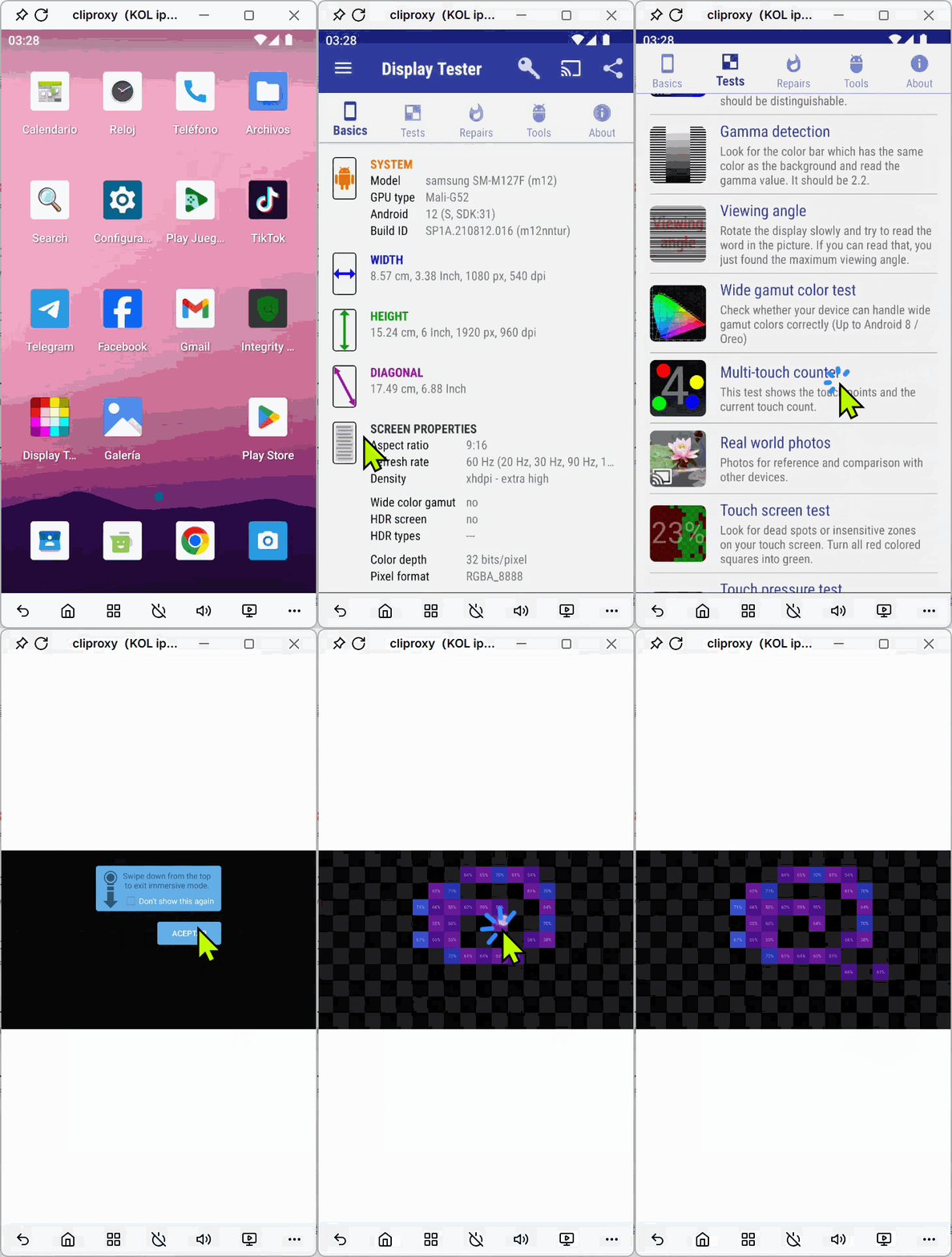
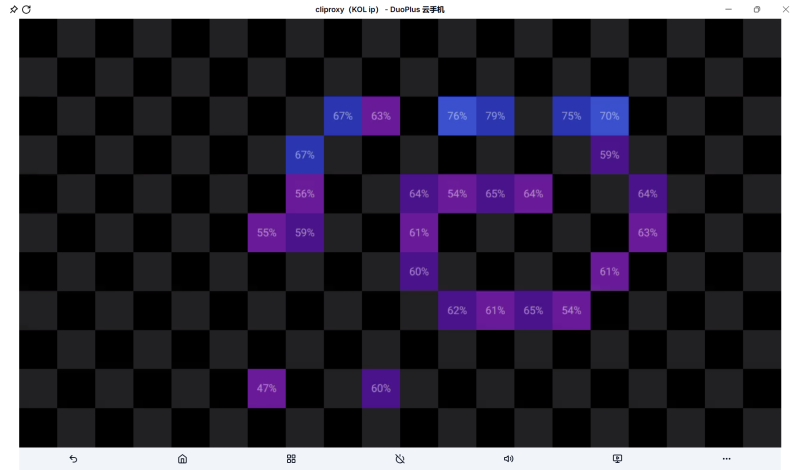
The touch inputs are more than just a manual control. They also favor:
DuoPlus RPA and AI Agent tasks are run in the android input environment of the cloud phone. They are not separate desktop scripts divorced from the device layer.
Location and touch input are not the only dynamic signals in the Android environment. Sensors are also used in physical mobile devices, to measure movement and orientation.
According to the Android motion sensor documentation , the gyroscope is responsible for reporting the device's rate of rotation around the X, Y, and Z axes.
It does not inform us of the device’s location. It describes how the device rotates or changes its orientation, instead.
Gyroscope and related motion sensor data can be used to support:
Not all apps use gyroscope data and the availability of a gyroscope should not be a platform risk-control requirement for all.
But in terms of device simulation, the availability of sensors helps to make a more complete mobile environment.
You can see in the incomplete Android environment:
Not all apps will suffer from these limitations, but it can interfere with apps that use rotation, orientation or movement information.
The DuoPlus also adds gyroscope support as part of its cloud phone environment.
To check the result in the browser:
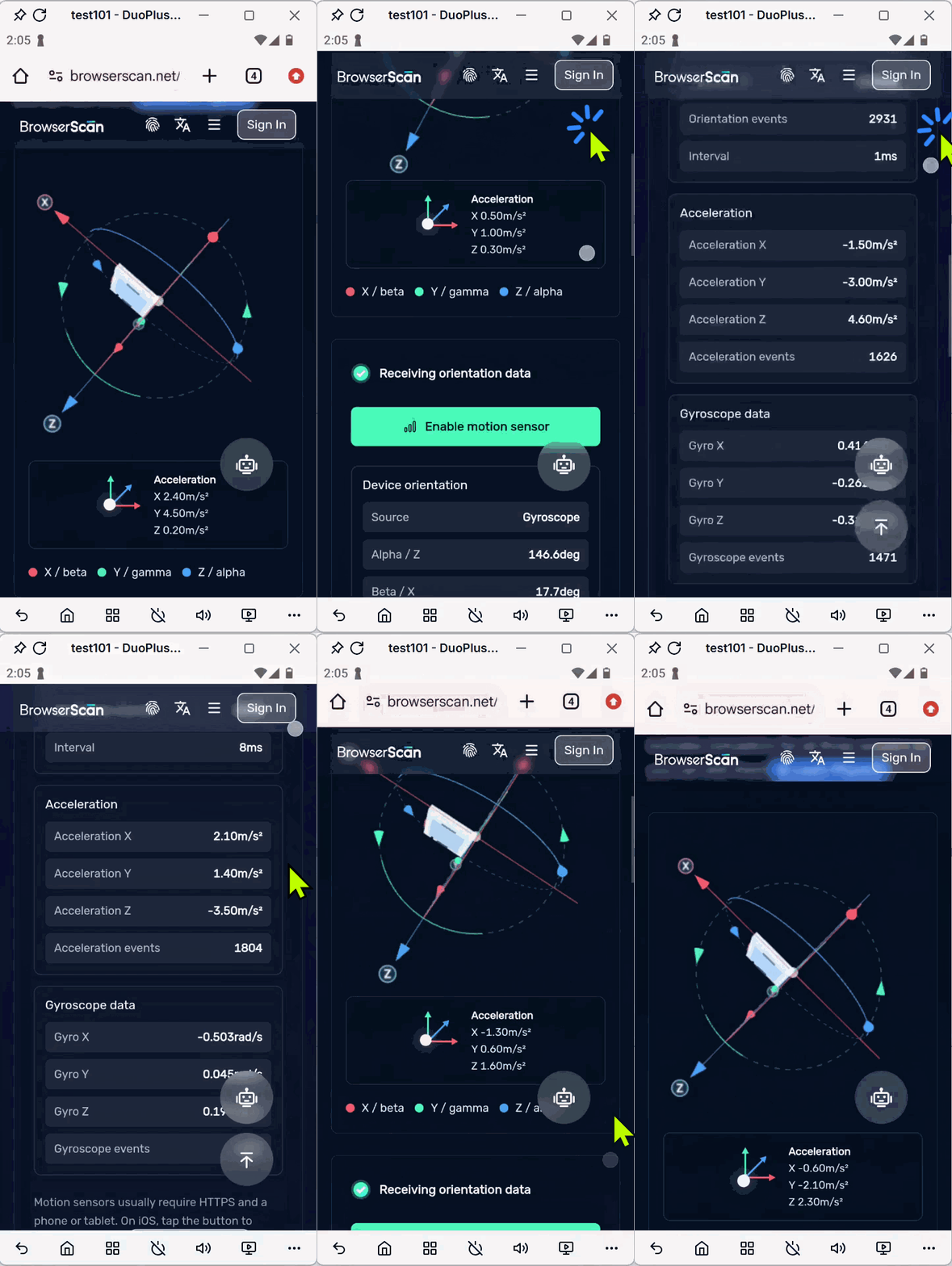
Touch and gyroscope data describe different aspects of the environment. Touch input refers to the way the screen is manipulated and motion sensors provide data regarding the rotation and movement of the device.
Layers of Android. Device integrity, location data , touch input and motion sensors. They’re not just product features in isolation.
Depending on the workflow, an app or task might need to use one or several of these layers at the same time.
| Real-world use case | Signals from the respective environment | What they impact |
|---|---|---|
| Configure a cloud phone for a specific market | Proxy IP, GPS, SIM information, language, and time zone | Keeps reasonable consistency between network, location of device and target area |
| Scrolling through TikTok, Facebook or Instagram. | Swipe paths and touch pressure | Provides continuous and more complete Android touch events |
| Running RPA browsing & interaction jobs | Touch input and a self-contained Android environment | runs automation through the input layer of the cloud phone |
| AI Agent for swiping, dragging, or navigation | Swipe gestures and continuous touch events | Gives an input basis for more complex screen interactions |
| Using maps, video, rotation, or motion-based features | GPS, gyro and accelerometer data | Provides cues related to location, orientation, and movement |
| Running applications with more integrity requirements | Google Play Integrity, system status and attestation information | Indicates if the current environment satisfies the applicable device integrity requirements |
| Handling several social media accounts | Region Configuration Isolated App Data Device Fingerprint Isolation | Region Configuration Isolated App Data Device Fingerprint Isolation |
Typically, it is an Android emulator running on your local PC, using local CPU, memory and storage resources. Its principal purpose is to simulate the behavior of the Android software and interface.
A cloud phone is accessed remotely via a browser or client. DuoPlus provides ARM-based Android cloud phones with isolated device environments, remote access, regional configuration, batch management, RPA, AI Agent and team collaboration.
For a detailed comparison, see DuoPlus vs. Android Emulator .
DuoPlus needs proxy IP for app workflows. The android device is the cloud phone, the proxy is the network connection. With GPS and regional settings, they create a more complete target-market environment.
Nope. IP geolocation is an estimate, and different databases may report different cities. GPS locations and IP locations on a physical phone can also vary a little bit.
The key is to avoid obvious conflicts, like a US proxy with a GPS location in another country, or frequent unexplained location changes.
Yes. Multiple TikTok accounts can be run on separate DuoPlus cloud phones, with each device configured with its own Android environment, proxy IP, app data and regional settings.
Proxy quality, registration information, content, user behavior and platform enforcement, however, can still have an impact on the status of the TikTok account.
A cloud phone doesn't get any more real because it displays a familiar brand, model or Android version.
IP and GPS settings describe where the device connects, and where Android says it is located. The touch input is given by the swipe paths and the pressure values. Gyroscope data adds motion and orientation information. Google Play Integrity offers a way to check the current Android integrity level.
DuoPlus overlays these layers with an ARM-based Android infrastructure and isolated cloud phone environments. More importantly, capabilities can be verified through configuration pages, Android settings and third party testing tools.
If you are a team looking for a cloud phone to test with TikTok, Facebook, Instagram, app testing or mobile automation these testable results give you a clearer way to assess the Android environment before scaling.
Telegram supports more than text messaging and file transfers. It also offers voice and video calls. Users can …
Joining groups, opening invite links, and accessing chat pages are common tasks when using Telegram. However, users may …
Many cloud phone tasks used in account operations, multi-account management, and mobile app testing are simple but …
No need to purchase multiple real phones.
With DuoPlus, one person can operate numerous cloud phones and social media accounts from a single computer, driving traffic and boosting sales for you.